
The complete transaction lifecycle
Follow a transaction from creation and signing through submission, validation, consensus, canonical application and final validation.
What you'll learn
- Trace the stages from submission to full validation.
- Distinguish preflight, preclaim and doApply.
- Explain open-ledger tentative application vs canonical application.
- Read transaction metadata and result codes.
Introduction
≈75 min · Advanced · builds on Navigating the rippled codebase
What really happens between hitting 'send' and a transaction becoming permanent? In this module you'll follow one from creation and signing, through submission and validation, into consensus, and finally to canonical application in a validated ledger. You'll learn to tell tentative (open-ledger) application from the real thing, and to read the result codes and metadata a transaction leaves behind. It's the end-to-end story that every later module zooms into.
Transaction Lifecycle Overview
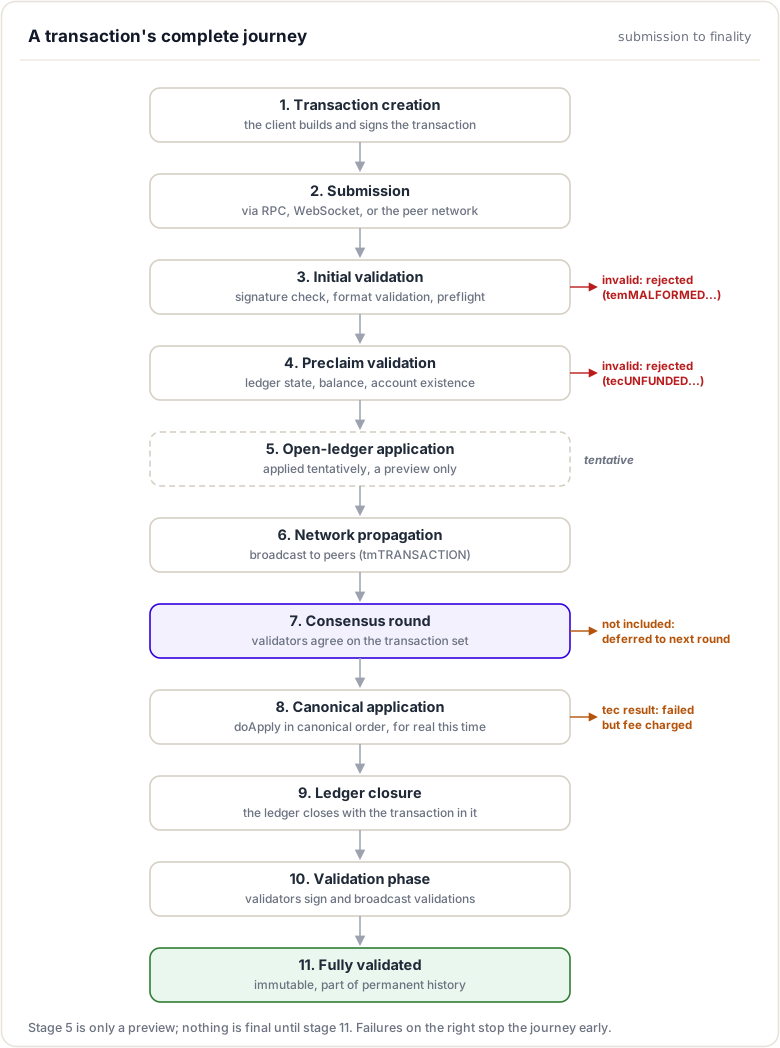
In brief: the eleven-stage journey from a signed transaction to a permanent one, at a glance.
Complete Journey Diagram
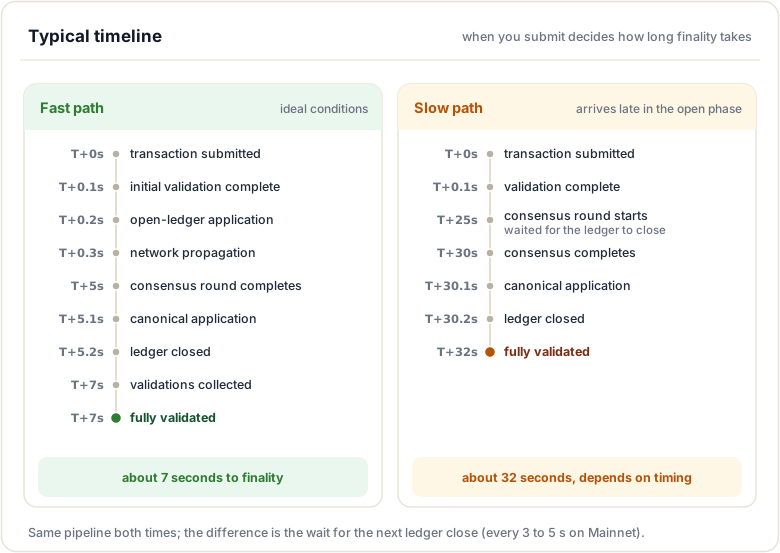
Typical Timeline
Phase 1: Transaction Creation
In brief: build and sign the transaction; its hash becomes its identity.
Transaction Structure
Before submission, a transaction must be properly constructed:
{
  "TransactionType": "Payment",
  "Account": "rN7n7otQDd6FczFgLdlqtyMVrn3HMtthca",
  "Destination": "rLNaPoKeeBjZe2qs6x52yVPZpZ8td4dc6w",
  "Amount": "1000000",
  "Fee": "12",
  "Sequence": 42,
  "LastLedgerSequence": 75234567,
  "SigningPubKey": "03AB40A0490F9B7ED8DF29D246BF2D6269820A0EE7742ACDD457BEA7C7D0931EDB",
  "TxnSignature": "30450221008..."
}
Required Fields
Universal Fields (all transaction types):
TransactionType- Type of transaction (Payment, OfferCreate, etc.)Account- Source account (sender)Fee- Transaction fee in drops (1 XRP = 1,000,000 drops)Sequence- Account sequence number (nonce)SigningPubKey- Public key used for signingTxnSignature- Cryptographic signature (or multi-signatures)
Optional but Recommended:
LastLedgerSequence- Expiration ledger (transaction invalid after this)SourceTag/DestinationTag- Integer tags for routing/identificationMemos- Arbitrary data attached to transaction
Transaction Signing
Single Signature:
// Using xrpl.js
const xrpl = require('xrpl');

// Create transaction
const tx = {
  TransactionType: 'Payment',
  Account: wallet.address,
  Destination: 'rLNaPoKeeBjZe2qs6x52yVPZpZ8td4dc6w',
  Amount: '1000000',
  Fee: '12'
};

// Auto-fill (adds Sequence, LastLedgerSequence, etc.)
const prepared = await client.autofill(tx);

// Sign transaction
const signed = wallet.sign(prepared);

console.log(signed.tx_blob);  // Signed transaction blob
console.log(signed.hash);     // Transaction hash
Multi-Signature:
// For accounts with SignerList
const tx = {
  TransactionType: 'Payment',
  Account: multiSigAccount,
  Destination: 'rLNaPoKeeBjZe2qs6x52yVPZpZ8td4dc6w',
  Amount: '1000000',
  Fee: '12',
  SigningPubKey: '',  // Empty for multi-sig
  Sequence: 42
};

// Each signer signs independently
const signer1Sig = wallet1.sign(tx, true);
const signer2Sig = wallet2.sign(tx, true);

// Combine signatures
const multisigned = xrpl.multisign([signer1Sig, signer2Sig]);
Transaction Hash
The transaction hash (ID) is calculated from the signed transaction:
// Simplified hash calculation
uint256 calculateTransactionID(STTx const& tx)
{
    // Serialize the entire signed transaction
    Serializer s;
    tx.add(s);

    // Hash with SHA-512 and take first 256 bits
    return s.getSHA512Half();
}
Important: The hash is deterministic, the same signed transaction always produces the same hash.
Phase 2: Transaction Submission
Submission Methods
Method 1: RPC Submit
Submit via JSON-RPC:
curl -X POST https://s1.ripple.com:51234/ \
  -H "Content-Type: application/json" \
  -d '{
    "method": "submit",
    "params": [{
      "tx_blob": "120000228000000024..."
    }]
  }'
Response:
{
  "result": {
    "engine_result": "tesSUCCESS",
    "engine_result_code": 0,
    "engine_result_message": "The transaction was applied.",
    "tx_blob": "120000228000000024...",
    "tx_json": {
      "Account": "rN7n7otQDd6FczFgLdlqtyMVrn3HMtthca",
      "Amount": "1000000",
      "Destination": "rLNaPoKeeBjZe2qs6x52yVPZpZ8td4dc6w",
      "Fee": "12",
      "TransactionType": "Payment",
      "hash": "E08D6E9754025BA2534A78707605E0601F03ACE063687A0CA1BDDACFCD1698C7"
    }
  }
}
Method 2: WebSocket Submit
Real-time submission with streaming updates:
const ws = new WebSocket('wss://s1.ripple.com');

ws.on('open', () => {
  ws.send(JSON.stringify({
    command: 'submit',
    tx_blob: '120000228000000024...'
  }));
});

ws.on('message', (data) => {
  const response = JSON.parse(data);
  console.log(response.result.engine_result);
});
Method 3: Peer Network Submission
Transactions submitted to one node propagate to all nodes:
Client → Node A → Overlay Network → All Nodes
Even if submitted to a non-validator, the transaction reaches validators through peer-to-peer propagation.
Submission Response
Immediate response indicates initial validation result:
Success Codes:
tesSUCCESS- Transaction applied to open ledgerterQUEUED- Transaction queued (network busy)
Temporary Failure (can retry):
terPRE_SEQ- Sequence too high, earlier tx neededtefPAST_SEQ- Sequence too low (already used)
Permanent Failure (don't retry):
temMALFORMED- Malformed transactiontemBAD_FEE- Invalid feetemBAD_SIGNATURE- Invalid signature
Phase 3: Initial Validation
Preflight Checks
Before accessing ledger state, static validation occurs:
NotTEC Transactor::preflight(PreflightContext const& ctx)
{
    // 1. Verify signature
    if (!checkSignature(ctx.tx))
        return temBAD_SIGNATURE;

    // 2. Check transaction format
    if (!ctx.tx.isFieldPresent(sfAccount))
        return temMALFORMED;

    // 3. Validate fee
    auto const fee = ctx.tx.getFieldAmount(sfFee);
    if (fee < ctx.baseFee)
        return telINSUF_FEE_P;

    // 4. Check sequence
    if (ctx.tx.getSequence() == 0)
        return temBAD_SEQUENCE;

    // 5. Verify amounts are valid
    auto const amount = ctx.tx.getFieldAmount(sfAmount);
    if (amount <= zero)
        return temBAD_AMOUNT;

    return tesSUCCESS;
}
Checks Performed:
- Cryptographic signature valid
- Transaction format correct
- Required fields present
- Fee sufficient
- Amounts positive and properly formatted
- No contradictory fields
Why Preflight Matters: Catches obvious errors before expensive ledger state access.
Phase 4: Preclaim Validation
Ledger State Checks
Read-only validation against current ledger state:
TER Transactor::preclaim(PreclaimContext const& ctx)
{
    // 1. Source account must exist
    auto const sleAccount = ctx.view.read(
        keylet::account(ctx.tx[sfAccount]));

    if (!sleAccount)
        return terNO_ACCOUNT;

    // 2. Check sequence number
    auto const txSeq = ctx.tx.getSequence();
    auto const acctSeq = (*sleAccount)[sfSequence];

    if (txSeq != acctSeq)
        return tefPAST_SEQ;  // Already used or too high

    // 3. Verify sufficient balance
    auto const balance = (*sleAccount)[sfBalance];
    auto const fee = ctx.tx[sfFee];
    auto const amount = ctx.tx[sfAmount];

    if (balance < fee + amount)
        return tecUNFUNDED_PAYMENT;

    // 4. Check destination exists (for Payment)
    if (ctx.tx.getTransactionType() == ttPAYMENT)
    {
        auto const dest = ctx.tx[sfDestination];
        auto const sleDest = ctx.view.read(keylet::account(dest));

        if (!sleDest)
        {
            // Can create account if amount >= reserve
            if (amount < ctx.view.fees().accountReserve(0))
                return tecNO_DST_INSUF_XRP;
        }
    }

    return tesSUCCESS;
}
Checks Performed:
- Source account exists
- Sequence number correct
- Sufficient balance (including fee)
- Destination account requirements met
- Trust lines exist (for issued currencies)
- Account flags permit operation
Phase 5: Open Ledger Application
In brief: the transaction is applied tentatively to the open ledger; nothing is final yet.
Tentative Application
Transaction is tentatively applied to provide immediate feedback:
std::pair<TER, bool>
NetworkOPs::processTransaction(
    std::shared_ptr<Transaction> const& transaction)
{
    // Apply to open ledger
    auto result = app_.openLedger().modify(
        [&](OpenView& view, beast::Journal j)
        {
            return transaction->apply(app_, view, ApplyFlags::tapNONE);
        });

    if (result.second)  // Transaction applied successfully
    {
        JLOG(j_.trace())
            << "Transaction " << transaction->getID()
            << " applied to open ledger with result: "
            << transToken(result.first);

        // Relay to network
        app_.overlay().relay(transaction);

        return {result.first, true};
    }

    return {result.first, false};
}
Open Ledger Characteristics:
- Not Final: Open ledger is tentative, changes frequently
- No Consensus: Local view only, other nodes may differ
- Immediate Feedback: Clients get instant response
- Can Change: Transaction may be removed or re-ordered
Why It Matters:
- Users get immediate confirmation
- Wallets can show pending transactions
- Applications can provide real-time updates
Watch out. A result you see in the open ledger is tentative. It can still change until the transaction lands in a validated ledger. Never treat an open-ledger success as final.
Phase 6: Network Propagation
Transaction Broadcasting
Once applied to open ledger, transaction broadcasts to peers:
void Overlay::relay(std::shared_ptr<Transaction> const& tx)
{
    // Create protocol message
    protocol::TMTransaction msg;
    msg.set_rawtransaction(tx->getSerialized());
    msg.set_status(protocol::tsNEW);
    msg.set_receivetimestamp(
        std::chrono::system_clock::now().time_since_epoch().count());

    // Wrap in Message object
    auto m = std::make_shared<Message>(msg, protocol::mtTRANSACTION);

    // Broadcast to all peers (except source)
    for (auto& peer : getActivePeers())
    {
        if (peer.get() != source)
            peer->send(m);
    }

    JLOG(j_.trace())
        << "Relayed transaction " << tx->getID()
        << " to " << getActivePeers().size() << " peers";
}
Propagation Speed:
- Local network: < 100ms
- Global network: 200-500ms
- All nodes receive transaction within 1 second
Deduplication:
- Nodes track recently seen transactions
- Duplicate transactions not re-processed
- Prevents network flooding
Phase 7: Consensus Round
Transaction Set Building
As ledger close approaches, validators build transaction sets:
std::set<TxID> buildInitialPosition(OpenView const& openLedger)
{
    std::set<TxID> position;

    // Include transactions from open ledger
    for (auto const& tx : openLedger.transactions())
    {
        // Only include transactions that:
        // 1. Are still valid
        // 2. Have sufficient fee
        // 3. Haven't expired (LastLedgerSequence)

        if (isValidForConsensus(tx))
            position.insert(tx.getTransactionID());
    }

    return position;
}
Consensus Process
Validators exchange proposals and converge:
Round 1: Initial proposals
Validator A proposes: {TX1, TX2, TX3, TX4}
Validator B proposes: {TX1, TX2, TX3, TX5}
Validator C proposes: {TX1, TX2, TX4, TX5}

Agreement:
TX1: 100% ✓
TX2: 100% ✓
TX3: 67%
TX4: 67%
TX5: 67%
Round 2: Converge on high-agreement transactions
All validators propose: {TX1, TX2}

Agreement:
TX1: 100% ✓ (included)
TX2: 100% ✓ (included)

TX3, TX4, TX5 deferred to next ledger
Transaction Inclusion Criteria:
-
80% of UNL must agree to include
- Transaction must still be valid
- Must not have expired (LastLedgerSequence)
Phase 8: Canonical Application
In brief: after consensus agrees on the set, every node applies it in the same canonical order.
Deterministic Execution
After consensus, transactions are applied in canonical order:
void applyTransactionsCanonically(
    Ledger& ledger,
    std::set<TxID> const& txSet)
{
    // 1. Retrieve transactions from set
    std::vector<std::shared_ptr<STTx>> transactions;
    for (auto const& id : txSet)
    {
        auto tx = fetchTransaction(id);
        transactions.push_back(tx);
    }

    // 2. Sort in canonical order
    std::sort(transactions.begin(), transactions.end(),
        [](auto const& a, auto const& b)
        {
            // Sort by account, then sequence
            if (a->getAccountID(sfAccount) != b->getAccountID(sfAccount))
                return a->getAccountID(sfAccount) < b->getAccountID(sfAccount);

            return a->getSequence() < b->getSequence();
        });

    // 3. Apply each transaction
    for (auto const& tx : transactions)
    {
        auto const result = applyTransaction(ledger, tx);

        // Record in metadata
        ledger.recordTransaction(tx, result);

        JLOG(j_.debug())
            << "Applied " << tx->getTransactionID()
            << " with result " << transToken(result);
    }
}
Simplified. The real canonical order is salted:
CanonicalTXSetXORs each account key with a salt derived from the previous ledger's hash, so the order is deterministic for everyone but unpredictable in advance (nobody can buy a better position). The sort shown here keeps the idea readable; see the Transaction ordering module for the real mechanics.
DoApply Execution:
TER Payment::doApply()
{
    // 1. Debit source account
    auto const result = accountSend(
        view(),
        accountID_,
        ctx_.tx[sfDestination],
        ctx_.tx[sfAmount],
        j_);

    if (result != tesSUCCESS)
        return result;

    // 2. Update sequence number
    auto const sleAccount = view().peek(keylet::account(accountID_));
    (*sleAccount)[sfSequence] = ctx_.tx.getSequence() + 1;
    view().update(sleAccount);

    // 3. Record metadata
    ctx_.deliver(ctx_.tx[sfAmount]);

    return tesSUCCESS;
}
Result Codes:
tesSUCCESS- Transaction succeededtecUNFUNDED- Failed but fee chargedtecNO_TARGET- Failed but fee charged
Important: Even failed transactions (tec codes) consume the fee and advance the sequence number.
Phase 9: Ledger Closure
Closing the Ledger
After all transactions are applied:
void closeLedger(
    std::shared_ptr<Ledger>& ledger,
    NetClock::time_point closeTime)
{
    // 1. Set close time
    ledger->setCloseTime(closeTime);

    // 2. Calculate state hash
    auto const stateHash = ledger->stateMap().getHash();
    ledger->setAccountHash(stateHash);

    // 3. Calculate transaction tree hash
    auto const txHash = ledger->txMap().getHash();
    ledger->setTxHash(txHash);

    // 4. Calculate ledger hash
    auto const ledgerHash = ledger->getHash();

    JLOG(j_.info())
        << "Closed ledger " << ledger->seq()
        << " hash: " << ledgerHash
        << " txns: " << ledger->txCount();

    // 5. Mark as closed
    ledger->setClosed();
}
Ledger Hash Calculation:
uint256 Ledger::getHash() const
{
    Serializer s;
    s.add32(seq_);                    // Ledger sequence
    s.add64(closeTime_.count());      // Close time
    s.addBitString(parentHash_);      // Parent ledger hash
    s.addBitString(txHash_);          // Transaction tree hash
    s.addBitString(accountHash_);     // Account state hash
    s.add64(totalCoins_);             // Total XRP
    s.add64(closeTimeResolution_);    // Close time resolution
    s.add8(closeFlags_);              // Flags

    return s.getSHA512Half();
}
Phase 10: Validation Phase
Creating Validations
Validators sign the closed ledger:
std::shared_ptr<STValidation> createValidation(
    Ledger const& ledger,
    SecretKey const& secretKey)
{
    auto validation = std::make_shared<STValidation>(
        ledger.getHash(),
        ledger.seq(),
        NetClock::now(),
        publicKeyFromSecretKey(secretKey),
        calculateNodeID(publicKeyFromSecretKey(secretKey)),
        [&](STValidation& v)
        {
            v.setFlag(vfFullValidation);
            v.sign(secretKey);
        });

    JLOG(j_.info())
        << "Created validation for ledger " << ledger.seq()
        << " hash: " << ledger.getHash();

    return validation;
}
Broadcasting Validations
void broadcastValidation(std::shared_ptr<STValidation> const& val)
{
    // Create protocol message
    protocol::TMValidation msg;
    Serializer s;
    val->add(s);
    msg.set_validation(s.data(), s.size());

    // Broadcast to all peers
    auto m = std::make_shared<Message>(msg, protocol::mtVALIDATION);
    overlay().broadcast(m);

    JLOG(j_.trace())
        << "Broadcast validation for ledger " << val->getLedgerSeq();
}
Collecting Validations
bool hasValidationQuorum(
    LedgerHash const& hash,
    std::set<NodeID> const& validators)
{
    auto const& unl = getUNL();
    size_t validationCount = 0;

    for (auto const& validator : validators)
    {
        if (unl.contains(validator))
            validationCount++;
    }

    // Need >80% of UNL
    return validationCount >= (unl.size() * 4 / 5);
}
Phase 11: Fully Validated
In brief: enough validators sign the ledger; now the result is irreversible.
Finalization
When quorum is reached, ledger becomes fully validated:
void markLedgerValidated(std::shared_ptr<Ledger> const& ledger)
{
    // 1. Mark as validated
    ledger->setValidated();

    // 2. Add to validated chain
    ledgerMaster_.addValidatedLedger(ledger);

    // 3. Update current validated ledger
    ledgerMaster_.setValidatedLedger(ledger);

    // 4. Publish to subscribers
    publishValidatedLedger(ledger);

    // 5. Start next open ledger
    openLedger_.accept(
        ledger,
        orderTx,
        consensusParms,
        {});  // Empty initial transaction set

    JLOG(j_.info())
        << "Ledger " << ledger->seq()
        << " validated with " << validationCount(ledger)
        << " validations";
}
Characteristics of Validated Ledger:
- Immutable: Cannot be changed
- Permanent: Part of ledger history forever
- Canonical: All nodes have identical copy
- Final: Transactions cannot be reversed
Transaction Status Querying
Methods to Check Transaction Status
Method 1: tx RPC
Query by transaction hash:
xrpld tx E08D6E9754025BA2534A78707605E0601F03ACE063687A0CA1BDDACFCD1698C7
Response:
{
  "result": {
    "Account": "rN7n7otQDd6FczFgLdlqtyMVrn3HMtthca",
    "Amount": "1000000",
    "Destination": "rLNaPoKeeBjZe2qs6x52yVPZpZ8td4dc6w",
    "Fee": "12",
    "Sequence": 42,
    "TransactionType": "Payment",
    "hash": "E08D6E9754025BA2534A78707605E0601F03ACE063687A0CA1BDDACFCD1698C7",
    "ledger_index": 75234567,
    "validated": true,
    "meta": {
      "TransactionIndex": 5,
      "TransactionResult": "tesSUCCESS",
      "AffectedNodes": [
        // Nodes modified by transaction
      ]
    }
  }
}
Key Fields:
validated: true = in validated ledger, false = pendingmeta.TransactionResult: Final result codeledger_index: Which ledger contains transaction
Method 2: account_tx RPC
Query all transactions for an account:
xrpld account_tx rN7n7otQDd6FczFgLdlqtyMVrn3HMtthca
Lists transactions in reverse chronological order.
Method 3: WebSocket Subscriptions
Real-time transaction monitoring:
ws.send(JSON.stringify({
  command: 'subscribe',
  accounts: ['rN7n7otQDd6FczFgLdlqtyMVrn3HMtthca']
}));

ws.on('message', (data) => {
  const msg = JSON.parse(data);
  if (msg.type === 'transaction') {
    console.log('Transaction:', msg.transaction);
    console.log('Status:', msg.validated ? 'Validated' : 'Pending');
  }
});
Subscription Types:
accounts- Transactions affecting specific accountstransactions- All transactions network-wideledger- Ledger close events
Transaction Metadata
In brief: the record of exactly what a transaction changed in the ledger.
Metadata Structure
Metadata records the effects of a transaction:
{
  "meta": {
    "TransactionIndex": 5,
    "TransactionResult": "tesSUCCESS",
    "AffectedNodes": [
      {
        "ModifiedNode": {
          "LedgerEntryType": "AccountRoot",
          "LedgerIndex": "13F1A95D7AAB7108D5CE7EEAF504B2894B8C674E6D68499076441C4837282BF8",
          "PreviousFields": {
            "Balance": "10000000",
            "Sequence": 42
          },
          "FinalFields": {
            "Balance": "8999988",
            "Sequence": 43,
            "Account": "rN7n7otQDd6FczFgLdlqtyMVrn3HMtthca"
          }
        }
      },
      {
        "ModifiedNode": {
          "LedgerEntryType": "AccountRoot",
          "LedgerIndex": "4F83A2CF7E70F77F79A307E6A472BFC2585B806A70833CCD1C26105BAE0D6E05",
          "PreviousFields": {
            "Balance": "5000000"
          },
          "FinalFields": {
            "Balance": "6000000",
            "Account": "rLNaPoKeeBjZe2qs6x52yVPZpZ8td4dc6w"
          }
        }
      }
    ],
    "delivered_amount": "1000000"
  }
}
AffectedNodes Types:
CreatedNode- New ledger object createdModifiedNode- Existing object modifiedDeletedNode- Object deleted
Key Metadata Fields:
TransactionIndex- Position in ledgerTransactionResult- Final result codedelivered_amount- Actual amount delivered (for partial payments)
Transaction Expiration
LastLedgerSequence
Transactions can specify an expiration:
{
  "TransactionType": "Payment",
  "Account": "rN7n7otQDd6FczFgLdlqtyMVrn3HMtthca",
  "Destination": "rLNaPoKeeBjZe2qs6x52yVPZpZ8td4dc6w",
  "Amount": "1000000",
  "LastLedgerSequence": 75234567
}
Behavior:
- If not included by ledger 75234567, transaction becomes invalid
- Prevents transactions from being stuck indefinitely
- Recommended: Set to current ledger + 4
Checking Expiration:
bool isExpired(STTx const& tx, LedgerIndex currentLedger)
{
    if (!tx.isFieldPresent(sfLastLedgerSequence))
        return false;  // No expiration set

    return tx[sfLastLedgerSequence] < currentLedger;
}
Using testnet
xrpld account_info <your_address>
**Step 2**: Prepare transaction with monitoring

```javascript
const xrpl = require('xrpl');
const client = new xrpl.Client('wss://s.altnet.rippletest.net:51233');

await client.connect();

const wallet = xrpl.Wallet.fromSeed('sXXXXXXXXXXXXXXXX');

// Create transaction
const tx = {
  TransactionType: 'Payment',
  Account: wallet.address,
  Destination: 'rLNaPoKeeBjZe2qs6x52yVPZpZ8td4dc6w',
  Amount: '1000000',
  Fee: '12'
};

// Prepare with LastLedgerSequence
const prepared = await client.autofill(tx);
console.log('Prepared TX:', prepared);
console.log('LastLedgerSequence:', prepared.LastLedgerSequence);

// Sign
const signed = wallet.sign(prepared);
console.log('Transaction Hash:', signed.hash);
Step 3: Submit and record time
const startTime = Date.now();

const result = await client.submit(signed.tx_blob);

console.log('Submission Time:', Date.now() - startTime, 'ms');
console.log('Initial Result:', result.result.engine_result);
console.log('Applied to Open Ledger:', result.result.engine_result === 'tesSUCCESS');
Part 2: Monitor Progress
Step 4: Subscribe to transaction
await client.request({
  command: 'subscribe',
  accounts: [wallet.address]
});

client.on('transaction', (tx) => {
  console.log('Transaction Event:');
  console.log('  Hash:', tx.transaction.hash);
  console.log('  Validated:', tx.validated);
  console.log('  Ledger Index:', tx.ledger_index);
  console.log('  Time:', Date.now() - startTime, 'ms');

  if (tx.validated) {
    console.log('✓ Transaction fully validated!');
    console.log('  Result:', tx.meta.TransactionResult);
  }
});
Step 5: Poll for status
async function checkStatus(hash) {
  try {
    const tx = await client.request({
      command: 'tx',
      transaction: hash
    });

    console.log('Status Check:');
    console.log('  Found:', true);
    console.log('  Validated:', tx.result.validated);
    console.log('  Ledger:', tx.result.ledger_index);
    console.log('  Result:', tx.result.meta.TransactionResult);

    return tx.result.validated;
  } catch (e) {
    console.log('Status Check: Not yet in validated ledger');
    return false;
  }
}

// Poll every second
const pollInterval = setInterval(async () => {
  const validated = await checkStatus(signed.hash);
  if (validated) {
    clearInterval(pollInterval);
    console.log('Total time to validation:', Date.now() - startTime, 'ms');
  }
}, 1000);
Part 3: Analyze Results
Step 6: Examine metadata
const finalTx = await client.request({
  command: 'tx',
  transaction: signed.hash
});

console.log('\n=== Final Transaction Analysis ===');
console.log('Transaction Hash:', finalTx.result.hash);
console.log('Ledger Index:', finalTx.result.ledger_index);
console.log('Result Code:', finalTx.result.meta.TransactionResult);
console.log('Transaction Index:', finalTx.result.meta.TransactionIndex);

// Analyze affected nodes
console.log('\nAffected Nodes:');
for (const node of finalTx.result.meta.AffectedNodes) {
  if (node.ModifiedNode) {
    console.log('  Modified:', node.ModifiedNode.LedgerEntryType);
    console.log('    Account:', node.ModifiedNode.FinalFields.Account);
    if (node.ModifiedNode.PreviousFields.Balance) {
      console.log('    Balance Change:',
        node.ModifiedNode.FinalFields.Balance -
        node.ModifiedNode.PreviousFields.Balance);
    }
  }
}

// Calculate total time
console.log('\nTiming:');
console.log('  Total time:', Date.now() - startTime, 'ms');
Analysis Questions
Answer these based on your observations:
- How long did each phase take?
- Submission to initial result: ___ ms
- Initial result to validated: ___ ms
- Total time: ___ ms
- What was the initial result?
- Did it apply to open ledger?
- Which ledger included the transaction?
- Ledger index?
- How many ledgers closed between submission and inclusion?
- What was the metadata?
- Which nodes were affected?
- What balances changed?
- Did the transaction expire?
- Was LastLedgerSequence set?
- How close to expiration was it?
Common Issues and Solutions
Issue 1: Transaction Stuck Pending
Symptoms: Transaction not validating after 30+ seconds
Possible Causes:
- Insufficient fee (transaction queued)
- Network congestion
- Sequence gap (earlier transaction missing)
Solutions:
# Check transaction status
xrpld tx <hash>

# Check for sequence gaps
xrpld account_info <account>

# Increase fee and resubmit if needed
Issue 2: tefPAST_SEQ Error
Symptoms: Sequence number already used
Cause: Sequence out of sync or transaction already processed
Solution:
// Always fetch current sequence
const accountInfo = await client.request({
  command: 'account_info',
  account: wallet.address
});

const currentSeq = accountInfo.result.account_data.Sequence;
Issue 3: Transaction Not Found
Symptoms: tx command returns "txnNotFound"
Possible Causes:
- Transaction not yet in validated ledger
- Transaction expired (LastLedgerSequence)
- Transaction rejected during validation
Solution:
// Wait for validation or check expiration
const ledger = await client.request({command: 'ledger_current'});

if (ledger.result.ledger_current_index > tx.LastLedgerSequence) {
  console.log('Transaction expired');
}
Issue 4: tecUNFUNDED_PAYMENT
Symptoms: Transaction failed with fee charged
Cause: Insufficient balance between submission and execution
Prevention:
// Always check balance including reserves
const reserve = (2 + ownerCount) * baseReserve;
const available = balance - reserve;

if (amount + fee > available) {
  throw new Error('Insufficient funds');
}
Additional Resources
Official Documentation
- XRP Ledger Dev Portal: xrpl.org/docs
- Transaction Types: xrpl.org/transaction-types
- Transaction Results: xrpl.org/transaction-results
Codebase References
src/libxrpl/tx/Transactor.cpp- Transaction processingsrc/xrpld/app/misc/NetworkOPs.cpp- Network operations and transaction handlingsrc/xrpld/app/ledger/detail/OpenLedger.cpp- Open ledger management
Related Topics
- Transactors - How transactions are validated and executed
- Consensus Engine - How transactions are included in consensus
- Protocols - How transactions are propagated across the network
Summary
This module followed a transaction across its entire journey: creation and signing, submission, the validation phases (preflight, preclaim, doApply), consensus, and finally canonical application in a validated ledger. You learned to tell a tentative open-ledger result from a final one, and to read the result codes and metadata a transaction leaves behind. It is the end-to-end picture that the deeper modules each zoom into.
To remember:
- Full path: create/sign, submit, preflight, preclaim, open-ledger (tentative), relay, consensus, canonical apply, close, validations, fully validated
- A transaction is identified by its hash; finality = inclusion in a validated ledger
- Open-ledger results are provisional; the canonical (salted) order at consensus can even change the outcome
- Metadata (
meta/AffectedNodes) records exactly what the transaction changed - Query with
tx <hash>oraccount_tx; the field that matters is"validated": true - Dispatch code:
src/libxrpl/tx/applySteps.cpp; ledger flow:src/xrpld/app/ledger - Typical Mainnet close cadence: a ledger every 3 to 5 seconds
- Watch out: treating
tesSUCCESSfromsubmitas final is the classic integration bug; it only means "applied to the open ledger"
Next up. You watched the happy path. When something goes wrong in that pipeline, how do you see inside the running node? Next: the debugging techniques you will use for the rest of the bootcamp.
Resources
Assignments
0 of 2 complete