
Navigating the rippled codebase
Find your way around the modern rippled source tree (`include/xrpl`, `src/libxrpl`, `src/xrpld`) and the naming conventions used throughout.
What you'll learn
- Navigate the three source roots: public headers, libxrpl and the xrpld daemon.
- Locate transactors, RPC handlers, consensus and overlay code quickly.
- Decode common prefixes (ST*, SLE, tt*, sf*, keylet, TER…).
- Use grep patterns to trace functionality across the tree.
Introduction
≈60 min · Intermediate · builds on The Application layer
A million lines of C++ can feel intimidating, until you know the map. In this module you'll learn to find your way around the modern rippled tree (include/xrpl, src/libxrpl, src/xrpld), decode the naming conventions that are everywhere in the code (ST*, SLE, sf*, keylet, TER…), and use a few grep strategies to trace any feature end to end. Get comfortable here and the rest of the bootcamp becomes reading, not searching.
Directory Structure Overview
In brief: the three source roots and what lives in each (include/xrpl, src/libxrpl, src/xrpld).
Top-Level Organization
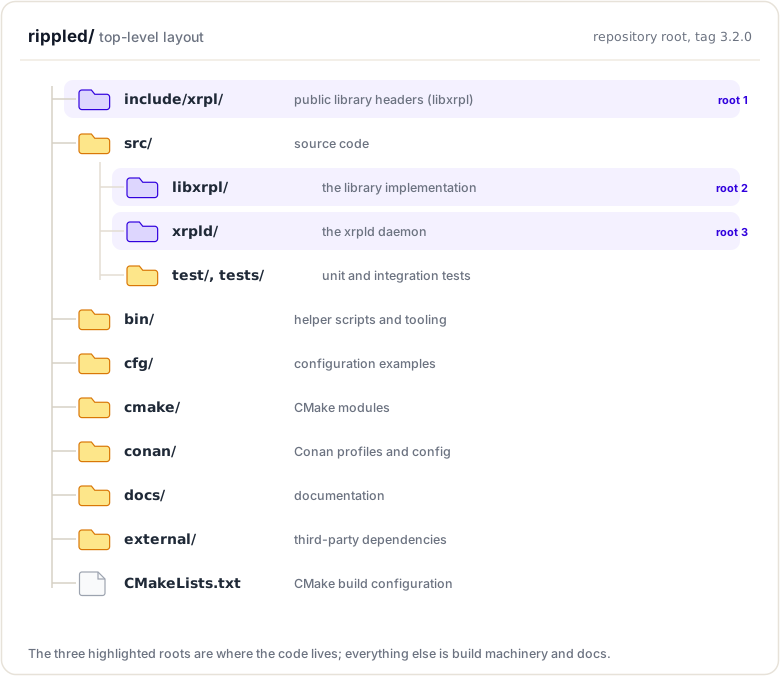
The source tree: three roots
Modern rippled no longer keeps everything under a single src/ tree. The code is now split across three roots:
include/xrpl, public headers of the reusable libxrpl library (protocol, ledger data structures, crypto, basics, JobQueue interface, etc.).src/libxrpl, the implementation (.cpp) of that library, plus the transaction processing engine (src/libxrpl/tx).src/xrpld, the daemon: everything specific to running a node (application layer, overlay/P2P, consensus glue, RPC handlers, node storage daemon side).
Private implementation files that used to sit in an impl/ subfolder now live in a detail/ subfolder.
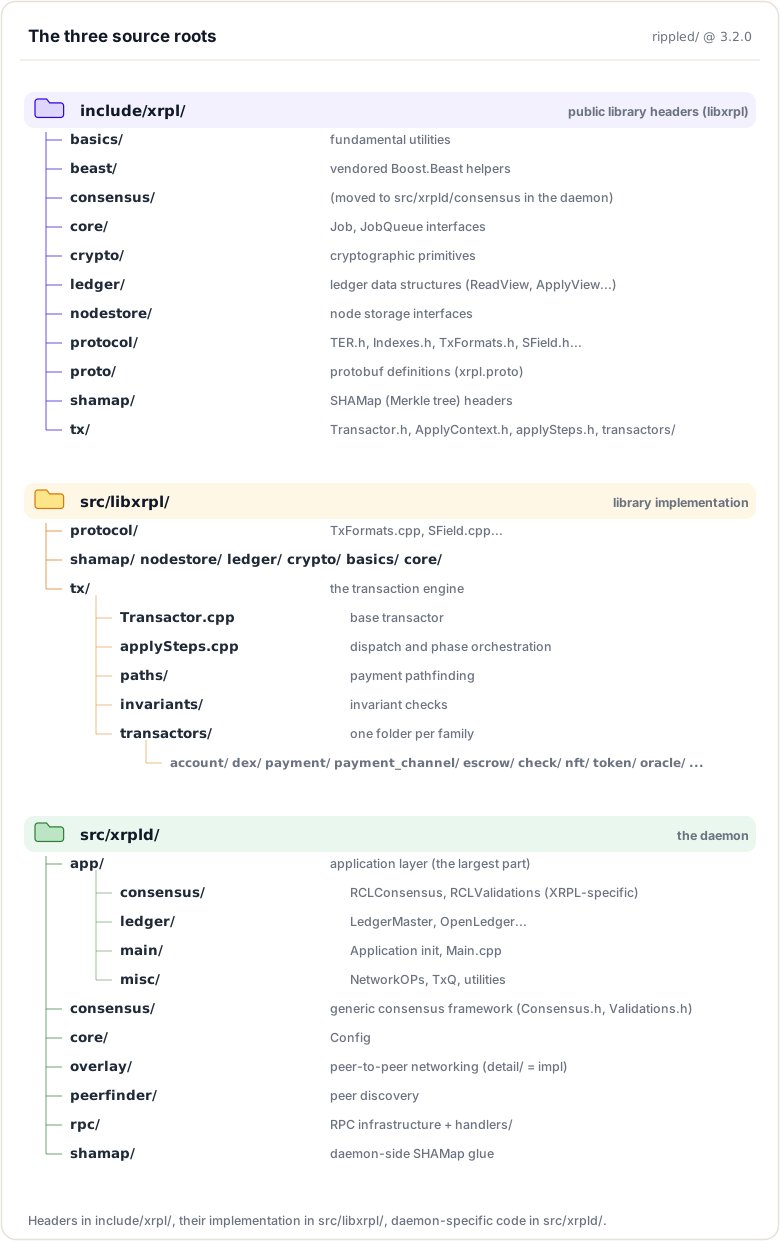
Key Directories by Function
Transaction Processing:
src/libxrpl/tx/transactors- All transactor implementations (grouped by family)include/xrpl/tx/Transactor.h+src/libxrpl/tx/Transactor.cpp- Base transactorsrc/libxrpl/protocol/TxFormats.cpp- Transaction type definitions
Consensus:
src/xrpld/consensus- Generic consensus frameworksrc/xrpld/app/consensus- XRPL-specific consensus (RCLConsensus, RCLValidations)
Networking:
src/xrpld/overlay- P2P overlay network (detail/holds the implementation)include/xrpl/beast+src/libxrpl/beast- Low-level networking (HTTP, WebSocket)
Ledger Management:
src/xrpld/app/ledger- Ledger operationsinclude/xrpl/ledger- Ledger data structures (ReadView, ApplyView…)include/xrpl/shamap+src/libxrpl/shamap- Merkle tree implementation
Storage:
include/xrpl/nodestore+src/libxrpl/nodestore- Key-value storage backend
RPC:
src/xrpld/rpc/handlers- RPC command implementationssrc/xrpld/rpc- RPC infrastructure
Application Core:
src/xrpld/app/main- Application initializationsrc/xrpld/core/Config.h- Configuration;include/xrpl/core/JobQueue.h- JobQueue
Naming Conventions
In brief: decode the prefixes you will see everywhere (ST, SLE, sf, tt, keylet, TER).
Common Prefixes and Abbreviations
Understanding naming conventions is essential for quickly identifying what a class or type represents:
ST* Classes (Serialized Types)
Classes representing serializable protocol objects:
STTx - Serialized Transaction
// Represents a transaction
class STTx : public STObject
{
    TransactionType getTransactionType() const;
    AccountID getAccountID(SField const& field) const;
    STAmount getFieldAmount(SField const& field) const;
};
STObject - Serialized Object (base class)
// Base for all serialized objects
class STObject
{
    void add(Serializer& s) const;
    Json::Value getJson(JsonOptions options) const;
};
STAmount - Serialized Amount
// Represents XRP or issued currency amount
class STAmount
{
    bool isXRP() const;
    Issue const& issue() const;
    std::int64_t mantissa() const;
};
STValidation - Serialized Validation
// Validator signature on a ledger
class STValidation
{
    uint256 getLedgerHash() const;
    std::uint32_t getLedgerSeq() const;
};
STArray - Serialized Array
// Array of STObjects
class STArray : public STBase
{
    std::size_t size() const;
    STObject const& operator[](std::size_t i) const;
};
SLE - Serialized Ledger Entry
Represents an object stored in the ledger:
// An entry in the ledger state
class SLE
{
    LedgerEntryType getType() const;
    Keylet const& key() const;

    // Field accessors
    STAmount const& getFieldAmount(SField const& field) const;
    AccountID getAccountID(SField const& field) const;
};
Common SLE Types:
- Account (AccountRoot)
- Offer
- RippleState (Trust Line)
- SignerList
- PayChannel
- Escrow
- NFToken
TER - Transaction Engine Result
Result codes from transaction processing:
// Result code enumeration
enum TER : int
{
    // Success
    tesSUCCESS = 0,

    // Malformed (tem)
    temMALFORMED = -299,
    temBAD_FEE = -298,
    temBAD_SIGNATURE = -297,

    // Failure (tef)
    tefFAILURE = -199,
    tefPAST_SEQ = -198,

    // Retry (ter)
    terRETRY = -99,
    terQUEUED = -89,

    // Claimed fee (tec) — note: tec codes are positive (>= 100)
    tecCLAIM = 100,
    tecUNFUNDED_PAYMENT = 104,
    tecNO_TARGET = 138,
};
Categories:
tes*- Successtem*- Malformed (permanent failure)tef*- Failure (local, temporary)ter*- Retry (waiting for condition)tec*- Claimed fee (failed but fee charged)
SF* - Serialized Field
Field identifiers for serialized data:
// Field definitions
extern SField const sfAccount;
extern SField const sfDestination;
extern SField const sfAmount;
extern SField const sfFee;
extern SField const sfSequence;
extern SField const sfSigningPubKey;
extern SField const sfTxnSignature;
Naming Pattern: sf + CamelCase field name
Other Common Prefixes
LedgerEntryType - Types of ledger objects
enum LedgerEntryType
{
    ltACCOUNT_ROOT = 'a',
    ltOFFER = 'o',
    ltRIPPLE_STATE = 'r',
    ltESCROW = 'u',
    ltPAYCHAN = 'x',
};
Keylet - Keys for accessing ledger objects
// Factory functions for creating keylets
Keylet account(AccountID const& id);
Keylet offer(AccountID const& id, std::uint32_t seq);
Keylet escrow(AccountID const& src, std::uint32_t seq);
RPC* - RPC-related classes
class RPCHandler;
class RPCContext;
Key idea. The prefixes are your map. Once
sf(serialized field),SLE(serialized ledger entry) andkeylet(an entry's key) are second nature, most of the code reads itself.
Code Patterns and Idioms
In brief: the recurring C++ patterns (keylets, views, optional fields, RAII) that show up in every file.
Pattern 1: Keylet Access
Keylets are the standard way to access ledger objects:
// Create keylet for account
AccountID const accountID = ...;
Keylet const k = keylet::account(accountID);

// Read from ledger (immutable)
auto const sle = view.read(k);
if (!sle)
    return terNO_ACCOUNT;

// Access fields
auto const balance = (*sle)[sfBalance];
auto const sequence = (*sle)[sfSequence];
Common Keylet Functions:
// In include/xrpl/protocol/Indexes.h
namespace keylet {
    Keylet account(AccountID const& id);
    Keylet offer(AccountID const& id, std::uint32_t seq);
    Keylet line(AccountID const& id1, AccountID const& id2, Currency const& currency);
    Keylet escrow(AccountID const& src, std::uint32_t seq);
    Keylet payChan(AccountID const& src, AccountID const& dst, std::uint32_t seq);
}
Pattern 2: View Abstraction
Views provide read/write access to ledger state:
Read-Only View:
void analyzeAccount(ReadView const& view, AccountID const& id)
{
    // Can only read, cannot modify
    auto const sle = view.read(keylet::account(id));

    // Safe for concurrent access
    auto balance = (*sle)[sfBalance];
}
Modifiable View:
TER modifyAccount(ApplyView& view, AccountID const& id)
{
    // Can read and modify
    auto sle = view.peek(keylet::account(id));
    if (!sle)
        return terNO_ACCOUNT;

    // Modify
    (*sle)[sfBalance] = newBalance;
    (*sle)[sfSequence] = (*sle)[sfSequence] + 1;

    // Commit changes
    view.update(sle);

    return tesSUCCESS;
}
View Types:
ReadView- Read-only accessApplyView- Read/write for transaction applicationOpenView- Open ledger viewPaymentSandbox- Sandboxed view for payments
Pattern 3: Field Access with Optional
Many fields are optional, use ~ operator:
// Required field (asserts if missing)
auto const account = tx[sfAccount];

// Optional field (returns std::optional)
auto const destTag = tx[~sfDestinationTag];

if (destTag)
    useDestinationTag(*destTag);

// Optional with default
auto const flags = tx[~sfFlags].value_or(0);
Pattern 4: RAII and Smart Pointers
Extensive use of RAII and smart pointers:
// Unique ownership
std::unique_ptr<LedgerMaster> ledgerMaster_;

// Shared ownership
std::shared_ptr<Ledger const> ledger = getLedger();

// Weak references
std::weak_ptr<Peer> weakPeer_;
Pattern 5: Application Reference Pattern
Most components hold an Application reference:
class SomeComponent
{
public:
    SomeComponent(Application& app)
        : app_(app)
        , j_(app.journal("SomeComponent"))
    {
    }

    void doWork()
    {
        // Access other components via app_
        auto& ledgerMaster = app_.getLedgerMaster();
        auto& overlay = app_.overlay();
    }

private:
    Application& app_;
    beast::Journal j_;
};
Finding Functionality
In brief: practical strategies to trace any feature: grep, follow the types, start from entry points.
Strategy 1: Grep and Search
Command-line searching is often the fastest way:
Find where a function is defined:
# Find definition of a function
grep -r "void processTransaction" src/

# Find class definition
grep -r "class NetworkOPs" src/
Find where a variable is used:
# Find all uses of a variable
grep -r "ledgerMaster_" src/xrpld/app/

# Case-insensitive search
grep -ri "transaction" src/libxrpl/tx/
Find specific transaction type:
# Find Payment transactor
grep -r "class Payment" src/libxrpl/tx/transactors/

# Find all transactor implementations
ls src/libxrpl/tx/transactors/*.cpp
Find RPC command handler:
# Find account_info handler
grep -r "doAccountInfo" src/xrpld/rpc/handlers/
Strategy 2: Follow the Types
Use type information to navigate:
Example: Finding where STTx is used
# Find STTx usage
grep -r "STTx" src/ | grep -v ".h:" | head -20

# Find function taking STTx parameter
grep -r "STTx const&" src/
Example: Finding transaction submission
# Find where transactions are submitted
grep -r "submitTransaction" src/

# Follow to NetworkOPs
cat include/xrpl/server/NetworkOPs.h | grep submitTransaction
Strategy 3: Start from Entry Points
Entry Points:
- main() -
src/xrpld/app/main/Main.cpp - RPC handlers -
src/xrpld/rpc/handlers/*.cpp - Transaction types -
src/libxrpl/tx/transactors/*.cpp - Protocol messages -
src/xrpld/overlay/detail/ProtocolMessage.h
Example: Tracing RPC Call
1. Client calls "account_info" RPC
2. Find handler: src/xrpld/rpc/handlers/account/AccountInfo.cpp
3. Handler function: doAccountInfo()
4. Calls: view.read(keylet::account(accountID))
5. View implementation: include/xrpl/ledger/ReadView.h
Strategy 4: Use IDE Features
Modern IDEs provide powerful navigation:
Visual Studio Code:
Ctrl/Cmd + Click- Go to definitionF12- Go to definitionShift + F12- Find all referencesCtrl/Cmd + T- Go to symbolCtrl/Cmd + P- Quick file open
CLion:
Ctrl + B- Go to declarationCtrl + Alt + B- Go to implementationAlt + F7- Find usagesCtrl + N- Go to classCtrl + Shift + N- Go to file
XCode:
Cmd + Click- Go to definitionCtrl + 1- Show related itemsCmd + Shift + O- Open quicklyCmd + Shift + F- Find in project
Understanding File Organization
Transaction Files
Format: src/libxrpl/tx/transactors/<family>/<TransactionType>.cpp. Since 3.x the file names match the TransactionType exactly and are grouped by family:
payment/Payment.cpp        - Payment transactions
dex/OfferCreate.cpp        - Offer creation
dex/OfferCancel.cpp        - Offer cancellation
token/TrustSet.cpp         - Trust line creation/modification
account/AccountSet.cpp     - Account settings
escrow/EscrowCreate.cpp    - Escrow operations (Finish/Cancel alongside)
payment_channel/           - Payment channels
account/SignerListSet.cpp  - Multi-signature configuration
Finding Transaction Implementation:
# If you know the transaction type
ls src/libxrpl/tx/transactors/ | grep -i payment

# List all transaction implementations
ls src/libxrpl/tx/transactors/*.cpp
RPC Handler Files
Format: src/xrpld/rpc/handlers/<CommandName>.cpp
AccountInfo.cpp      - account_info command
AccountLines.cpp     - account_lines command
AccountTx.cpp        - account_tx command
Tx.cpp               - tx command
Submit.cpp           - submit command
LedgerCurrent.cpp    - ledger_current command
ServerInfo.cpp       - server_info command
Finding RPC Handler:
# Find specific handler
ls src/xrpld/rpc/handlers/ | grep -i account

# Find handler function
grep -r "doAccountInfo" src/xrpld/rpc/handlers/
Header vs Implementation
Header Files (.h):
- Class declarations
- Function prototypes
- Template definitions
- Inline functions
Implementation Files (.cpp):
- Function implementations
- Static variables
- Template specializations
Finding Pattern:
# Find header
find src/ -name "NetworkOPs.h"

# Find implementation
find src/ -name "NetworkOPs.cpp"
Reading and Understanding Code
Step 1: Start with the Interface
Always read the header file first:
// In LedgerMaster.h
class LedgerMaster
{
public:
    // Public interface - what can be called
    std::shared_ptr<Ledger const> getValidatedLedger();
    std::shared_ptr<Ledger const> getClosedLedger();

    void addValidatedLedger(std::shared_ptr<Ledger const> const& ledger);

    // ...

private:
    // Implementation details - how it works
    std::shared_ptr<Ledger> mCurrentLedger;
    std::shared_ptr<Ledger> mClosedLedger;

    // ...
};
What to Look For:
- Public methods (API)
- Constructor parameters (dependencies)
- Member variables (state)
- Comments and documentation
Step 2: Trace Data Flow
Follow how data flows through functions:
// Example: Following a payment
void NetworkOPs::submitTransaction(STTx const& tx)
{
    // 1. Initial validation
    auto const result = checkTransaction(tx);
    if (!isTesSuccess(result))
        return;

    // 2. Apply to open ledger
    app_.openLedger().modify([&](OpenView& view)
    {
        return Transactor::apply(app_, view, tx);  // → Go here
    });

    // 3. Broadcast
    app_.overlay().relay(tx);  // → And here
}
Step 3: Understand Control Flow
Identify key decision points:
TER Payment::doApply()
{
    // Key decision: XRP or issued currency?
    if (isXRP(amount_))
    {
        // XRP path
        return payXRP();
    }
    else
    {
        // Issued currency path
        return payIssued();
    }
}
Step 4: Read Tests
Tests show how code is meant to be used:
// In Payment_test.cpp
void testPayment()
{
    // Setup
    Env env(*this);
    Account alice{"alice"};
    Account bob{"bob"};

    env.fund(XRP(10000), alice, bob);

    // Execute
    env(pay(alice, bob, XRP(100)));

    // Verify
    BEAST_EXPECT(env.balance(alice) == XRP(9900));
    BEAST_EXPECT(env.balance(bob) == XRP(10100));
}
IDE Setup and Configuration
Visual Studio Code Setup
Extensions:
- C/C++ (Microsoft)
- C/C++ Extension Pack
- CMake Tools
- GitLens
Configuration (.vscode/settings.json):
{
  "C_Cpp.default.configurationProvider": "ms-vscode.cmake-tools",
  "C_Cpp.default.compileCommands": "${workspaceFolder}/build/compile_commands.json",
  "files.associations": {
    "*.h": "cpp",
    "*.cpp": "cpp"
  },
  "search.exclude": {
    "**/build": true,
    "**/external": true
  }
}
CLion Setup
CMake Configuration:
- Open rippled directory
- CLion auto-detects CMakeLists.txt
- Configure build profiles (Debug, Release)
- Let CLion index the project
Tips:
- Use "Find in Path" (Ctrl+Shift+F) for project-wide search
- Use "Go to Symbol" (Ctrl+Alt+Shift+N) to find classes/functions
- Enable "Compact Middle Packages" in Project view
Compile Commands Database
Generate for better IDE support:
cd rippled
mkdir build && cd build
cmake -DCMAKE_EXPORT_COMPILE_COMMANDS=ON ..
This creates compile_commands.json that IDEs use for accurate code intelligence.
Documentation and Comments
Code Documentation
Rippled uses various documentation styles:
Doxygen-Style Comments:
/**
 * @brief Apply a transaction to a view
 *
 * @param app Application instance
 * @param view Ledger view to apply to
 * @param tx Transaction to apply
 * @return Pair of result code and success flag
 */
std::pair<TER, bool>
applyTransaction(
    Application& app,
    OpenView& view,
    STTx const& tx);
Inline Comments:
// Check if destination requires a tag
if (sleDest->getFlags() & lsfRequireDestTag)
{
    if (!ctx.tx.isFieldPresent(sfDestinationTag))
        return tecDST_TAG_NEEDED;
}
In-Source Documentation
README Files:
src/xrpld/README.md
src/xrpld/consensus/README.md
Design Documents:
docs/consensus.md
docs/build-unix.md
External Documentation
Dev Null Productions Source Code Guide:
- Comprehensive walkthrough of rippled codebase
- Available online
- Covers architecture and key components
XRP Ledger Dev Portal:
- https://xrpl.org/docs
- Protocol documentation
- API reference
Find class definition
grep -r "class ClassName" src/
Find function implementation
grep -r "ReturnType functionName(" src/
Find where something is used
grep -r "variableName" src/
Case-insensitive search
grep -ri "searchterm" src/
Search in specific file types
grep -r --include="*.cpp" "searchterm" src/
Exclude directories
grep -r --exclude-dir="test" "searchterm" src/
### IDE Shortcuts

**VS Code**:
Go to Definition: F12 or Ctrl+Click Find References: Shift+F12 Go to Symbol: Ctrl+T Search in Files: Ctrl+Shift+F
**CLion**:
Go to Declaration: Ctrl+B Go to Implementation: Ctrl+Alt+B Find Usages: Alt+F7 Search Everywhere: Double Shift
***

## Additional Resources

### Official Documentation

* **XRP Ledger Dev Portal**: [xrpl.org/docs](https://xrpl.org/docs)
* **Rippled Repository**: [github.com/XRPLF/rippled](https://github.com/XRPLF/rippled)
* **Build Instructions**: [github.com/XRPLF/rippled/BUILD.md](https://github.com/XRPLF/rippled/blob/develop/BUILD.md)

### Codebase Guides

* **Dev Null Productions Source Code Guide**: Comprehensive rippled walkthrough
* **In-Source Documentation**: [`src/xrpld/README.md`](https://github.com/XRPLF/rippled/blob/3.2.0/src/xrpld/README.md) and `docs/` directory
* **Code Comments**: Doxygen-style documentation throughout

### Tools

* **Visual Studio Code**: Free, excellent C++ support
* **CLion**: Powerful C++ IDE (commercial)
* **grep/ag/ripgrep**: Command-line search tools
* **ctags/cscope**: Code indexing tools

### Related Topics

* Application Layer - Understanding the overall architecture
* Transactors - How to read transaction implementations
* Debugging Tools - Tools for exploring code at runtime

---

## Summary

This module gave you a map of the rippled source. You learned the three roots ([`include/xrpl`](https://github.com/XRPLF/rippled/tree/3.2.0/include/xrpl) for public headers, [`src/libxrpl`](https://github.com/XRPLF/rippled/tree/3.2.0/src/libxrpl) for the library implementation, [`src/xrpld`](https://github.com/XRPLF/rippled/tree/3.2.0/src/xrpld) for the daemon), the naming conventions that appear everywhere (`ST`, `SLE`, `sf`, `tt`, `keylet`, `TER`), and the recurring C++ patterns (keylets, views, the Application reference). With those in hand you can trace any feature by grepping, following the types, or starting from an entry point.

**To remember:**

- Three roots: [`include/xrpl`](https://github.com/XRPLF/rippled/tree/3.2.0/include/xrpl) (public headers), [`src/libxrpl`](https://github.com/XRPLF/rippled/tree/3.2.0/src/libxrpl) (library impl), [`src/xrpld`](https://github.com/XRPLF/rippled/tree/3.2.0/src/xrpld) (the daemon)
- Prefixes: `ST*` serialized types, `SLE` ledger entry, `sf*` fields, `tt*` tx types, `lsf*` state flags, `tes/tec/ter/tef/tem/tel` results
- `keylet::account(...)`, `keylet::check(...)` compute the key that locates a ledger entry
- Transactors: `src/libxrpl/tx/transactors/<family>/`; RPC handlers: [`src/xrpld/rpc/handlers`](https://github.com/XRPLF/rippled/tree/3.2.0/src/xrpld/rpc/handlers)
- Consensus: [`src/xrpld/consensus`](https://github.com/XRPLF/rippled/tree/3.2.0/src/xrpld/consensus) (generic engine) + [`src/xrpld/app/consensus`](https://github.com/XRPLF/rippled/tree/3.2.0/src/xrpld/app/consensus) (RCL glue); overlay: [`src/xrpld/overlay`](https://github.com/XRPLF/rippled/tree/3.2.0/src/xrpld/overlay)
- Private implementation files sit in `detail/` subfolders
- To trace a feature: grep the symbol, follow the types, or start from an entry point (`main()`, a handler, a transactor)
- Watch out: older docs cite `src/ripple/...` paths; the tree was reorganized, translate to the three-root layout

> **Next up.** You can find any file; can you follow a transaction through all of them? Next you trace **the complete transaction lifecycle**, from submission to finality.Resources
Assignments
0 of 2 complete