
Secure memory handling
Why secrets must be wiped from memory and how rippled does it (`secure_erase` / `OPENSSL_cleanse`).
What you'll learn
- Explain the memory attack surface for secret keys.
- Understand why `memset` isn't enough and how `secure_erase` works.
- Recognise RAII patterns that protect key material.
Introduction
≈30 min · Intermediate · builds on Key generation & derivation
A private key is only as safe as the memory it sits in. In this short but important module you'll learn the attack surface for secrets in a running node, why a plain memset isn't enough to erase them, and how rippled uses secure_erase and RAII to make sure key material doesn't linger. It's a small habit that prevents a catastrophic mistake.
The Memory Problem
In brief: secrets live in RAM, on the stack, and in CPU registers, all of which can leak.
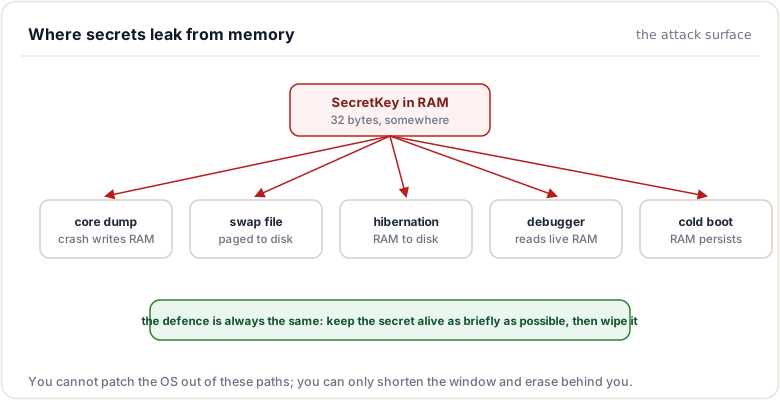
Where Secrets Live
void processTransaction() {
    SecretKey sk = loadKeyFromFile();
    // Secret key is now in memory:
    // - Stack frame
    // - CPU registers
    // - Potentially CPU cache
    // - Maybe swapped to disk

    auto sig = sign(pk, sk, tx);

    // Function returns
    // Stack frame deallocated
    // But what happens to the secret key bytes?
}
The problem: Memory isn't automatically erased when you're done with it.
Attack Vectors
1. Memory Dumps
// Process crashes
// Core dump written to disk
// Contains all process memory
// Including secret keys!
2. Swap Files
// System runs out of RAM
// Pages swapped to disk
// Secret keys written to swap file
// May persist even after process exits
3. Hibernation
// System hibernates
// All RAM written to hibernation file
// Includes secret keys
// File remains on disk until next boot
4. Cold Boot Attacks
// System powered off
// RAM still contains data for seconds/minutes
// Attacker boots different OS
// Reads RAM contents
// Recovers secret keys
5. Debugging/Inspection
// Debugger attached to process
// Can read all memory
// Can dump memory to file
// Secret keys exposed
The Solution: Secure Erasure
In brief: wipe secrets with a routine the compiler is not allowed to optimize away.
Why memset() Isn't Enough
// ❌ WRONG - Compiler may optimize this away
void clearKey(uint8_t* key, size_t size) {
    memset(key, 0, size);
    // Compiler sees: "Memory about to be freed/unused"
    // Optimizes: "No need to write zeros, skip this"
    // Result: Key NOT actually erased!
}
Compiler optimization example:
void function() {
    uint8_t secretKey[32];
    // ... use secretKey ...

    memset(secretKey, 0, 32);  // Compiler: "This write is never read"
    // Optimized to: /* nothing */
}  // Function returns with secretKey still in memory
The OPENSSL_cleanse Solution
// From src/libxrpl/crypto/secure_erase.cpp

void secure_erase(void* dest, std::size_t bytes)
{
    OPENSSL_cleanse(dest, bytes);
}
Why OPENSSL_cleanse works:
// OpenSSL's implementation (simplified concept):
void OPENSSL_cleanse(void* ptr, size_t len)
{
    // Mark as volatile to prevent optimization
    unsigned char volatile* vptr = (unsigned char volatile*)ptr;

    while (len--) {
        *vptr++ = 0;  // Compiler cannot optimize away volatile writes
    }

    // Additional measures:
    // - Memory barriers
    // - Inline assembly on some platforms
    // - Function marked with attributes preventing optimization
}
Key properties:
- Cannot be optimized away: Compiler forced to execute it
- Overwrites memory: Zeros written to actual memory
- Works cross-platform: Handles different compiler optimizations
- Validated: Extensively tested across compilers and architectures
Watch out. A plain
memsetcan be optimized away as a "dead store", leaving the secret in memory. Always usesecure_erase/OPENSSL_cleansefor key material.
RAII: Resource Acquisition Is Initialization
In brief: tie a secret's lifetime to a scope so it is wiped automatically when you leave it.
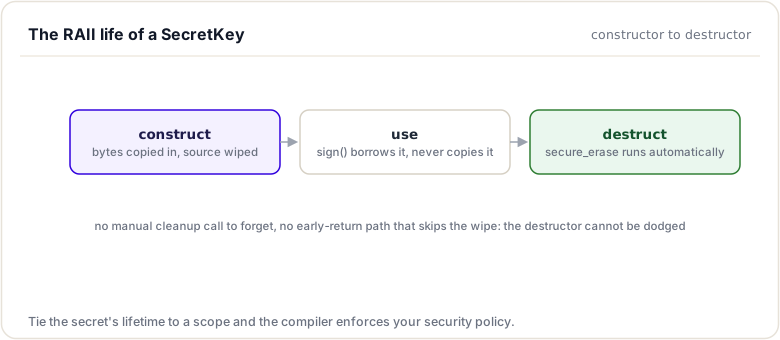
The Pattern
class SecretKey
{
private:
    std::uint8_t buf_[32];

public:
    // Constructor: Acquire resource
    SecretKey(Slice const& slice)
    {
        std::memcpy(buf_, slice.data(), sizeof(buf_));
    }

    // Destructor: Release resource (automatically called)
    ~SecretKey()
    {
        secure_erase(buf_, sizeof(buf_));
    }

    // Prevent copying (would lead to double-erase issues)
    SecretKey(SecretKey const&) = delete;
    SecretKey& operator=(SecretKey const&) = delete;

    // Allow moving (transfer ownership)
    SecretKey(SecretKey&&) noexcept = default;
    SecretKey& operator=(SecretKey&&) noexcept = default;
};
Why RAII Matters
Automatic cleanup:
void processTransaction() {
    SecretKey sk = randomSecretKey();

    // Use key...
    auto sig = sign(pk, sk, tx);

    // sk destructor automatically called here
    // Key erased even if exception thrown
    // No manual cleanup needed
}
Exception safety:
void riskyOperation() {
    SecretKey sk = loadKey();

    doSomething();       // Might throw
    doSomethingElse();   // Might throw
    finalStep();         // Might throw

    // Even if any step throws, sk destructor runs
    // Key is securely erased
}
No forgetting:
// ❌ Manual cleanup - easy to forget
void manual() {
    uint8_t key[32];
    fillRandom(key, 32);

    // ... use key ...

    secure_erase(key, 32);  // Must remember!
    // What if we add early return?
    // What if exception thrown?
}

// ✅ RAII cleanup - automatic
void automatic() {
    SecretKey key = randomSecretKey();

    // ... use key ...

    // Cleanup happens automatically
    // Works with early returns
    // Works with exceptions
}
Secure String Handling
The Problem with std::string
// ❌ std::string doesn't securely erase
void badExample() {
    std::string secretHex = "1a2b3c4d...";

    // Convert to binary
    auto secret = parseHex(secretHex);

    // Use secret...

    // secretHex still in memory!
    // std::string's destructor doesn't erase
    // Data may be in multiple string instances (SSO, copies, etc.)
}
Solutions
1. Explicit erasure:
void explicitErase() {
    std::string secretHex = "1a2b3c4d...";

    // Convert to binary
    auto secret = parseHex(secretHex);

    // Use secret...

    // Explicitly erase string contents
    secure_erase(
        const_cast<char*>(secretHex.data()),
        secretHex.size());

    // Also erase the converted secret
    secure_erase(
        const_cast<uint8_t*>(secret.data()),
        secret.size());
}
2. Use SecretKey wrapper:
void useWrapper() {
    std::string secretHex = "1a2b3c4d...";

    // Convert to SecretKey (RAII protection)
    SecretKey sk = parseSecretKey(secretHex);

    // Erase original string
    secure_erase(
        const_cast<char*>(secretHex.data()),
        secretHex.size());

    // sk automatically erased when out of scope
}
3. Avoid std::string for secrets:
// Better: Use fixed-size buffers
void fixedBuffer() {
    uint8_t secretBytes[32];
    getRandomBytes(secretBytes, 32);

    SecretKey sk{Slice{secretBytes, 32}};

    secure_erase(secretBytes, 32);

    // sk automatically erased
}
Secure Allocators (Advanced)
For highly sensitive applications:
// Custom allocator that:
// 1. Locks memory (prevents swapping to disk)
// 2. Securely erases on deallocation

template<typename T>
class secure_allocator
{
public:
    T* allocate(std::size_t n)
    {
        T* ptr = static_cast<T*>(std::malloc(n * sizeof(T)));

        // Lock memory to prevent swapping
        #ifdef _WIN32
        VirtualLock(ptr, n * sizeof(T));
        #else
        mlock(ptr, n * sizeof(T));
        #endif

        return ptr;
    }

    void deallocate(T* ptr, std::size_t n)
    {
        // Securely erase
        OPENSSL_cleanse(ptr, n * sizeof(T));

        // Unlock
        #ifdef _WIN32
        VirtualUnlock(ptr, n * sizeof(T));
        #else
        munlock(ptr, n * sizeof(T));
        #endif

        std::free(ptr);
    }
};

// Usage
std::vector<uint8_t, secure_allocator<uint8_t>> secretData;
Benefits:
- Memory cannot be swapped to disk
- Automatically erased on deallocation
- Protected against paging attacks
Drawbacks:
- Limited by OS limits on locked memory
- Performance overhead
- Complexity
When to use:
- Extremely sensitive operations
- Long-lived secrets
- High-security requirements
Stack Scrubbing
The Problem
void function() {
    uint8_t secretKey[32];
    fillRandom(secretKey, 32);

    // Use key...

    secure_erase(secretKey, 32);

    // Stack frame still contains key!
    // Variables below secretKey might contain fragments
}
Solution: Overwrite Stack
void secureFunction() {
    // Allocate large array to overwrite stack
    uint8_t stackScrubber[4096];
    secure_erase(stackScrubber, sizeof(stackScrubber));

    // Now continue with sensitive operations
    processSecrets();

    // Scrub again before returning
    secure_erase(stackScrubber, sizeof(stackScrubber));
}
Note: This is paranoid and rarely needed. RAII is usually sufficient.
CPU Registers and Cache
The Challenge
// Secret key passes through:
// 1. CPU registers (during computation)
// 2. L1/L2/L3 cache (for performance)
// 3. TLB (address translation)

// Cannot easily erase these!
Mitigations
1. Minimize lifetime:
{
    SecretKey sk = loadKey();
    auto sig = sign(pk, sk, tx);
    // sk destroyed immediately
}  // Scope ends, memory reused quickly
2. Overwrite with new data:
// Perform other operations that use same memory
// This overwrites cache and registers
doOtherWork();
3. Trust hardware:
// Modern CPUs have mechanisms to prevent
// cache-based attacks between processes
// Rely on OS and hardware security features
Best Practices
DO:
// 1. Use RAII wrappers for secrets
SecretKey sk = randomSecretKey();
// Automatic cleanup

// 2. Minimize secret lifetime
{
    SecretKey sk = loadKey();
    auto sig = sign(pk, sk, tx);
}  // Erased immediately

// 3. Explicitly erase temporary buffers
uint8_t temp[32];
crypto_prng()(temp, 32);
SecretKey sk{Slice{temp, 32}};
secure_erase(temp, 32);  // Clean up temp

// 4. Use secure_erase, not memset
secure_erase(buffer, size);

// 5. Mark sensitive functions with comments
// SECURITY: This function handles secret keys
void processSecretKey(SecretKey const& sk) {
    // ...
}
DON'T:
// ❌ Don't use memset for secrets
memset(secretKey, 0, 32);  // May be optimized away

// ❌ Don't use std::string for long-lived secrets
std::string secretKey = /* ... */;  // Not erased!

// ❌ Don't copy secrets unnecessarily
SecretKey copy1 = original;  // Now two copies!
SecretKey copy2 = original;  // Three copies!

// ❌ Don't log secrets
std::cout << "Key: " << hexKey << "\n";  // Logs persist!

// ❌ Don't pass secrets by value
void bad(SecretKey sk);      // Copies made
void good(SecretKey const& sk);  // No copy
Defensive Programming
Assume the Worst
// Assume: Attacker can read all of your process memory
//
// Defense: Minimize time secrets exist in memory
//          Erase immediately when done
//          Use RAII to make erasure automatic
Multiple Layers
// 1. RAII (automatic cleanup)
SecretKey sk = randomSecretKey();

// 2. Explicit temporary erasure
uint8_t temp[32];
/* use temp */
secure_erase(temp, 32);

// 3. Scope minimization
{
    // Use secret
}  // Destroyed here

// 4. Quick reuse of memory
// New allocations overwrite old data
Testing Secure Erasure
Verification (Debug Build)
void testSecureErase() {
    uint8_t buffer[32];

    // Fill with known pattern
    memset(buffer, 0xAA, 32);

    // Erase
    secure_erase(buffer, 32);

    // Verify all zeros
    for (int i = 0; i < 32; ++i) {
        assert(buffer[i] == 0);
    }
}
Memory Inspection (Advanced)
// Use debugger or memory inspection tools
// Verify secrets are actually erased

// Example with gdb:
// (gdb) x/32xb &secretKey  // Before erasure
// (gdb) next               // Execute secure_erase
// (gdb) x/32xb &secretKey  // After erasure - should be zeros
Summary
This short module covered why secrets must be wiped from memory and how rippled does it. You saw the attack surface (RAM, stack, registers), why a plain memset is not enough (the compiler can optimise the dead store away), and how secure_erase / OPENSSL_cleanse and RAII patterns make sure key material is cleared automatically. A small habit that prevents a catastrophic mistake.
To remember:
- Secrets linger in heap, stack, registers, swap, and core dumps
- A plain
memsetbefore free is a dead store: the compiler may remove it entirely - Use
secure_erase(OPENSSL_cleanse underneath): the compiler cannot optimize it away - RAII ties wiping to scope:
SecretKey's destructor erases the key material - Avoid
std::stringfor secrets: copies and reallocations scatter traces - Grep
secure_erasein the tree to see every wipe site - Watch out: logs are the other leak channel; never JLOG a seed or secret key, even at trace level
Next up. Your keys are safe in memory; now they need to face users. Next: Base58Check encoding, the armor that turns bytes into typo-proof addresses.
Resources
Assignments
0 of 2 complete