
Peer discovery & connection lifecycle
How nodes find peers (config, DNS, gossip, crawler) and the lifecycle of a peer connection.
What you'll learn
- Explain the peer-discovery mechanisms.
- Trace a connection from TCP/TLS to active peer.
- Understand inbound vs outbound vs fixed connections.
Introduction
≈60 min · Intermediate · builds on The overlay network
Watch this short video by XRPL Commons first, then dive into the details below.
How does a fresh node find anyone to talk to? In this module you'll learn the peer-discovery mechanisms (configured lists, DNS seeds, gossip and the crawler) and follow a connection's lifecycle from a raw TCP/TLS socket to an active peer, managed by PeerFinder and its slots. It's how the network heals and grows on its own.
PeerFinder Overview
In brief: the component that decides who to connect to and manages the connection slots.
The PeerFinder subsystem serves as the overlay network's "address book" and connection coordinator. It tracks known endpoints, manages connection slots, and makes intelligent decisions about which peers to connect to based on various criteria.
Key Responsibilities:
- Endpoint Discovery: Learning about new potential peers from various sources
- Slot Management: Allocating limited connection resources efficiently
- Bootstrapping: Helping new nodes establish their initial connections
- Address Quality Assessment: Evaluating the reliability and usefulness of known addresses
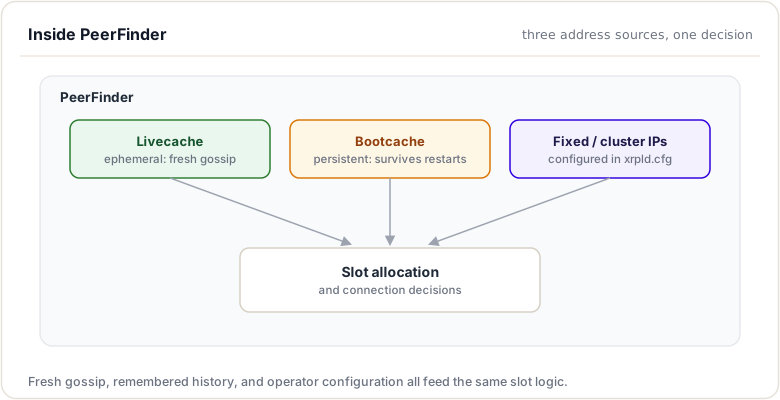
Bootstrapping: Joining the Network
In brief: how a brand-new node finds its very first peers.
When a node starts, it needs to establish connections to become part of the overlay network. The bootstrapping process follows a specific priority order to ensure reliable connectivity.
Bootstrapping Stages
The connection preference order is:
- Fixed Peers (Highest Priority)
- Configured in
xrpld.cfgunder[ips_fixed] - Always-connect peers that the node prioritizes
- Connections are maintained persistently
- Livecache (Medium Priority)
- Ephemeral cache of recently seen, active peers
- Populated from peer exchange messages
- Addresses are validated through successful connections
- Bootcache (Lower Priority)
- Persistent cache stored between node restarts
- Contains addresses ranked by historical usefulness
- Used when Livecache is insufficient
- Hardcoded Bootstrap Nodes (Fallback)
- Built-in addresses used as last resort
- Ensures new nodes can always find the network
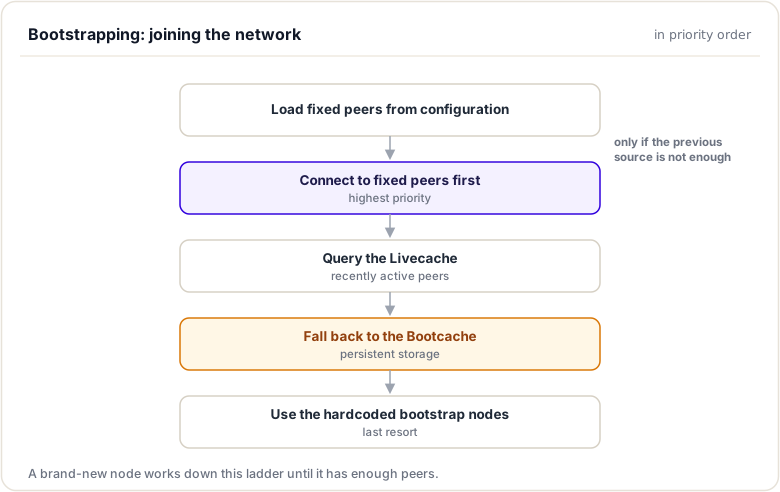
Key idea. A new node finds peers several ways at once: configured lists, DNS seeds, gossip, and the crawler. No single source is a point of failure.
Cache Management
In brief: the live and boot caches of known peer addresses.
PeerFinder maintains two distinct caches for endpoint information, each serving a different purpose.
Livecache (Ephemeral Cache)
The Livecache stores information about peers that have been recently active and validated:
- Contents: Endpoints learned from peer exchange and successful connections
- Lifetime: Exists only in memory; cleared on restart
- Quality: High confidence addresses (recently verified)
- Updates: Continuously refreshed as peers connect and exchange information
Bootcache (Persistent Cache)
The Bootcache provides persistent storage of known endpoints:
- Contents: Historically useful addresses ranked by reliability
- Lifetime: Persisted to disk; survives restarts
- Quality: Variable; addresses may become stale
- Updates: Updated based on connection success/failure history
The separation allows nodes to quickly reconnect to known-good peers (Livecache) while maintaining a fallback of historically useful addresses (Bootcache).
Slot Management
In brief: how inbound, outbound, and fixed connection slots are allocated.
PeerFinder manages a finite number of connection "slots" to ensure resources are allocated efficiently. Different slot types serve different purposes.
Slot Types
| Slot Type | Description | Counts Toward Limit |
|---|---|---|
| Outbound | Connections initiated by this node | Yes |
| Inbound | Connections received from other nodes | Yes |
| Fixed | Connections to configured fixed peers | No* |
| Cluster | Connections to cluster members | No |
*Fixed peers have reserved slots that don't count against normal limits.
Slot Allocation Process
When OverlayImpl wants to establish a connection, it requests a slot from PeerFinder:
void
OverlayImpl::connect(beast::IP::Endpoint const& remote_endpoint)
{
    XRPL_ASSERT(work_, "xrpl::OverlayImpl::connect : work is set");

    auto usage = resourceManager().newOutboundEndpoint(remote_endpoint);
    if (usage.disconnect(journal_))
    {
        JLOG(journal_.info()) << "Over resource limit: " << remote_endpoint;
        return;
    }

    auto const [slot, result] = peerFinder().new_outbound_slot(remote_endpoint);
    if (slot == nullptr)
    {
        JLOG(journal_.debug()) << "Connect: No slot for " << remote_endpoint
                               << ": " << to_string(result);
        return;
    }

    auto const p = std::make_shared<ConnectAttempt>(
        app_,
        io_context_,
        beast::IPAddressConversion::to_asio_endpoint(remote_endpoint),
        usage,
        setup_.context,
        next_id_++,
        slot,
        app_.journal("Peer"),
        *this);

    std::lock_guard lock(mutex_);
    list_.emplace(p.get(), p);
    p->run();
}
PeerFinder evaluates:
- Current slot utilization
- Endpoint reputation
- Connection diversity goals
- Configuration limits
Configuration Options
PeerFinder behavior is controlled through several configuration parameters:
| Parameter | Description | Default |
|---|---|---|
autoConnect |
Automatically connect to discovered peers | true |
wantIncoming |
Accept incoming connections | true |
maxPeers |
Maximum total peer connections | 21 |
outPeers |
Target number of outbound connections | varies |
listeningPort |
Port for incoming connections | 51235 |
ipLimit |
Max connections per IP address | 2 |
Configuration in xrpld.cfg:
[peers_max]
21

[peer_private]
0

[ips_fixed]
validator1.example.com 51235
validator2.example.com 51235

[ips]
r.ripple.com 51235
Endpoint Message Handling
Peers exchange endpoint information through protocol messages, helping the network maintain connectivity.
Receiving Endpoint Information
When a peer sends endpoint messages (e.g., in response to HTTP 503 with alternatives), PeerFinder processes them:
// From ConnectAttempt::processResponse
if (response_.result() == boost::beast::http::status::service_unavailable)
{
    // Parse "peer-ips" header for alternative addresses
    auto const ips = parse_peer_ips(response_["peer-ips"]);

    if (!ips.empty())
    {
        // Inform PeerFinder about alternative endpoints
        peerFinder().onRedirects(slot, ips);
    }
}
Address Quality Assessment
Not all received addresses are equally trustworthy. PeerFinder assesses quality by:
- Source Reliability: Addresses from established peers rank higher
- Connection Success: Successfully connected addresses are promoted
- Recency: Recently validated addresses are preferred
- Diversity: Addresses providing network diversity are valued
When an inbound connection succeeds, it validates that the connecting peer's advertised address is reachable, improving address quality assessment.
Peer Reservation System
The PeerReservationTable allows operators to reserve connection slots for specific trusted nodes:
- Purpose: Ensure critical peers (validators, monitoring nodes) can always connect
- Configuration: Specified by public key in configuration
- Behavior: Reserved slots bypass normal connection limits
This is particularly useful for:
- Ensuring validator connectivity
- Maintaining cluster coherence
- Supporting monitoring infrastructure
Integration with Overlay
PeerFinder integrates tightly with the Overlay subsystem:
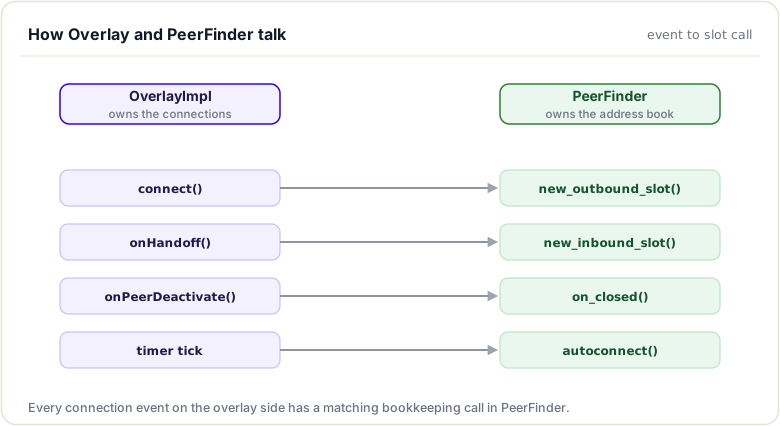
Key Integration Points:
- Connection Initiation: Overlay requests slots before connecting
- Slot Release: Overlay notifies PeerFinder when connections close
- Auto-connect: PeerFinder periodically suggests new connections
- Endpoint Updates: Overlay forwards received endpoint information
Practical Considerations
Debugging Connectivity Issues
When troubleshooting peer discovery:
- Check Configuration: Verify
[ips_fixed]and[ips]sections - Monitor Slot Usage: Use
peerscommand to see current connections - Review Logs: PeerFinder logs connection attempts and failures
- Verify Network: Ensure firewall allows port 51235 (or configured port)
Optimizing Network Position
For better network connectivity:
- Configure diverse fixed peers across different geographic regions
- Ensure your node accepts incoming connections if possible
- Monitor and maintain good peer relationships
- Consider running a public node to contribute to network health
Conclusion
PeerFinder is the intelligence behind XRP Ledger's peer-to-peer connectivity. By managing endpoint discovery, slot allocation, and bootstrapping, it ensures nodes can reliably join and maintain connections to the network. Understanding PeerFinder helps you configure nodes optimally, debug connectivity issues, and contribute to overall network health.
Connection Lifecycle
Introduction
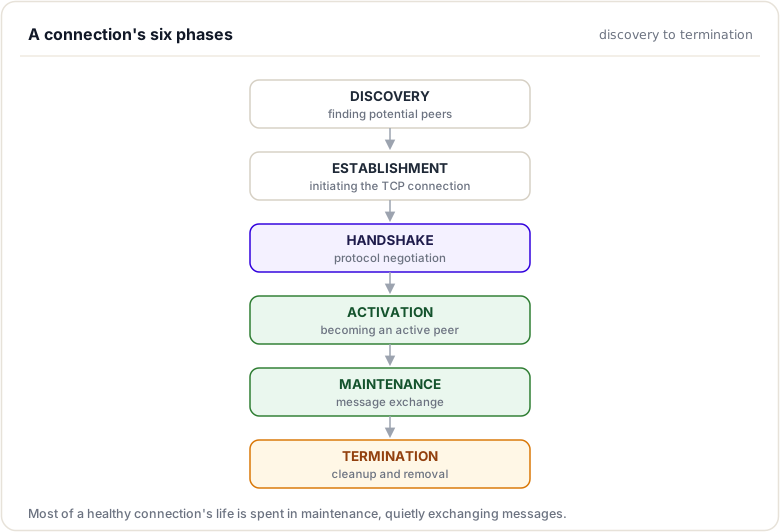
A peer connection in the XRP Ledger overlay network goes through a well-defined lifecycle: discovery, establishment, activation, maintenance, and termination. Understanding this lifecycle is crucial for debugging connectivity issues, optimizing network performance, and implementing new networking features.
Each phase involves careful coordination between multiple subsystems, resource management decisions, and thread-safe state transitions. This lesson traces the complete journey of a peer connection through the codebase.
Lifecycle Phases
The connection lifecycle consists of five distinct phases:
Discovery Phase
Before a connection can be established, nodes must discover potential peers. The PeerFinder subsystem manages peer discovery and slot allocation.
Discovery sources include:
Fixed Peers: Configured in xrpld.cfg under [ips_fixed], these are always-connect peers that the node prioritizes.
Bootstrap Peers: Initial peers used when joining the network for the first time, typically well-known, reliable nodes.
Peer Exchange: Active peers share their known endpoints, enabling organic discovery of new nodes.
Establishment Phase
When OverlayImpl decides to connect to a peer, it creates a ConnectAttempt object that manages the asynchronous connection process:
void
OverlayImpl::connect(beast::IP::Endpoint const& remote_endpoint)
{
    XRPL_ASSERT(work_, "xrpl::OverlayImpl::connect : work is set");

    auto usage = resourceManager().newOutboundEndpoint(remote_endpoint);
    if (usage.disconnect(journal_))
    {
        JLOG(journal_.info()) << "Over resource limit: " << remote_endpoint;
        return;
    }

    auto const [slot, result] = peerFinder().new_outbound_slot(remote_endpoint);
    if (slot == nullptr)
    {
        JLOG(journal_.debug()) << "Connect: No slot for " << remote_endpoint
                               << ": " << to_string(result);
        return;
    }

    auto const p = std::make_shared<ConnectAttempt>(
        app_,
        io_context_,
        beast::IPAddressConversion::to_asio_endpoint(remote_endpoint),
        usage,
        setup_.context,
        next_id_++,
        slot,
        app_.journal("Peer"),
        *this);

    std::lock_guard lock(mutex_);
    list_.emplace(p.get(), p);
    p->run();
}
The ConnectAttempt::run() method initiates an asynchronous TCP connection:
void
ConnectAttempt::run()
{
    if (!strand_.running_in_this_thread())
        return boost::asio::post(
            strand_, std::bind(&ConnectAttempt::run, shared_from_this()));

    JLOG(journal_.debug()) << "run: connecting to " << remote_endpoint_;

    ioPending_ = true;

    // Allow up to connectTimeout_ seconds to establish remote peer connection
    setTimer(ConnectionStep::TcpConnect);

    stream_.next_layer().async_connect(
        remote_endpoint_,
        boost::asio::bind_executor(
            strand_,
            std::bind(
                &ConnectAttempt::onConnect,
                shared_from_this(),
                std::placeholders::_1)));
}
Using shared_from_this() ensures the ConnectAttempt object remains alive until the asynchronous operation completes, even if other references are released.
Handshake Phase
Once the TCP connection succeeds, the handshake phase begins. This involves TLS negotiation followed by protocol-level handshaking.
For outbound connections, ConnectAttempt::processResponse handles the handshake:
void
ConnectAttempt::processResponse()
{
    if (!OverlayImpl::isPeerUpgrade(response_))
    {
        // A peer may respond with service_unavailable and a list of alternative
        // peers to connect to, a differing status code is unexpected
        if (response_.result() !=
            boost::beast::http::status::service_unavailable)
        {
            JLOG(journal_.warn())
                << "Unable to upgrade to peer protocol: " << response_.result()
                << " (" << response_.reason() << ")";
            return shutdown();
        }

        // Parse response body to determine if this is a redirect or other
        // service unavailable
        std::string responseBody;
        responseBody.reserve(boost::asio::buffer_size(response_.body().data()));
        for (auto const buffer : response_.body().data())
            responseBody.append(
                static_cast<char const*>(buffer.data()),
                boost::asio::buffer_size(buffer));

        Json::Value json;
        Json::Reader reader;
        auto const isValidJson = reader.parse(responseBody, json);

        // Check if this is a redirect response (contains peer-ips field)
        auto const isRedirect =
            isValidJson && json.isObject() && json.isMember("peer-ips");

        if (!isRedirect)
        {
            JLOG(journal_.warn())
                << "processResponse: " << remote_endpoint_
                << " failed to upgrade to peer protocol: " << response_.result()
                << " (" << response_.reason() << ")";

            return shutdown();
        }

        Json::Value const& peerIps = json["peer-ips"];
        if (!peerIps.isArray())
            return fail("processResponse: invalid peer-ips format");

        // Extract and validate peer endpoints
        std::vector<boost::asio::ip::tcp::endpoint> redirectEndpoints;
        redirectEndpoints.reserve(peerIps.size());

        for (auto const& ipValue : peerIps)
        {
            if (!ipValue.isString())
                continue;

            error_code ec;
            auto const endpoint = parse_endpoint(ipValue.asString(), ec);
            if (!ec)
                redirectEndpoints.push_back(endpoint);
        }

        // Notify PeerFinder about the redirect redirectEndpoints may be empty
        overlay_.peerFinder().onRedirects(remote_endpoint_, redirectEndpoints);

        return fail("processResponse: failed to connect to peer: redirected");
    }

    // Just because our peer selected a particular protocol version doesn't
    // mean that it's acceptable to us. Check that it is:
    std::optional<ProtocolVersion> negotiatedProtocol;

    {
        auto const pvs = parseProtocolVersions(response_["Upgrade"]);

        if (pvs.size() == 1 && isProtocolSupported(pvs[0]))
            negotiatedProtocol = pvs[0];

        if (!negotiatedProtocol)
            return fail(
                "processResponse: Unable to negotiate protocol version");
    }

    auto const sharedValue = makeSharedValue(*stream_ptr_, journal_);
    if (!sharedValue)
        return shutdown();  // makeSharedValue logs

    try
    {
        auto const publicKey = verifyHandshake(
            response_,
            *sharedValue,
            overlay_.setup().networkID,
            overlay_.setup().public_ip,
            remote_endpoint_.address(),
            app_);

        usage_.setPublicKey(publicKey);

        JLOG(journal_.debug())
            << "Protocol: " << to_string(*negotiatedProtocol);
        JLOG(journal_.info())
            << "Public Key: " << toBase58(TokenType::NodePublic, publicKey);

        auto const member = app_.cluster().member(publicKey);
        if (member)
        {
            JLOG(journal_.info()) << "Cluster name: " << *member;
        }

        auto const result = overlay_.peerFinder().activate(
            slot_, publicKey, member.has_value());
        if (result != PeerFinder::Result::success)
        {
            std::stringstream ss;
            ss << "Outbound Connect Attempt " << remote_endpoint_ << " "
               << to_string(result);
            return fail(ss.str());
        }

        if (!socket_.is_open())
            return;

        if (shutdown_)
            return tryAsyncShutdown();

        auto const peer = std::make_shared<PeerImp>(
            app_,
            std::move(stream_ptr_),
            read_buf_.data(),
            std::move(slot_),
            std::move(response_),
            usage_,
            publicKey,
            *negotiatedProtocol,
            id_,
            overlay_);

        overlay_.add_active(peer);
    }
    catch (std::exception const& e)
    {
        return fail(std::string("Handshake failure (") + e.what() + ")");
    }
}
For inbound connections, PeerImp::doAccept handles the server side of the handshake:
void
PeerImp::doAccept()
{
    XRPL_ASSERT(
        read_buffer_.size() == 0,
        "xrpl::PeerImp::doAccept : empty read buffer");

    JLOG(journal_.debug()) << "doAccept";

    // a shutdown was initiated before the handshake, there is nothing to do
    if (shutdown_)
        return tryAsyncShutdown();

    auto const sharedValue = makeSharedValue(*stream_ptr_, journal_);

    // This shouldn't fail since we already computed
    // the shared value successfully in OverlayImpl
    if (!sharedValue)
        return fail("makeSharedValue: Unexpected failure");

    JLOG(journal_.debug()) << "Protocol: " << to_string(protocol_);

    if (auto member = app_.cluster().member(publicKey_))
    {
        {
            std::unique_lock lock{nameMutex_};
            name_ = *member;
        }
        JLOG(journal_.info()) << "Cluster name: " << *member;
    }

    overlay_.activate(shared_from_this());

    // XXX Set timer: connection is in grace period to be useful.
    // XXX Set timer: connection idle (idle may vary depending on connection
    // type.)

    auto write_buffer = std::make_shared<boost::beast::multi_buffer>();

    boost::beast::ostream(*write_buffer) << makeResponse(
        !overlay_.peerFinder().config().peerPrivate,
        request_,
        overlay_.setup().public_ip,
        remote_address_.address(),
        *sharedValue,
        overlay_.setup().networkID,
        protocol_,
        app_);

    // Write the whole buffer and only start protocol when that's done.
    boost::asio::async_write(
        stream_,
        write_buffer->data(),
        boost::asio::transfer_all(),
        bind_executor(
            strand_,
            [this, write_buffer, self = shared_from_this()](
                error_code ec, std::size_t bytes_transferred) {
                if (!socket_.is_open())
                    return;
                if (ec == boost::asio::error::operation_aborted)
                    return tryAsyncShutdown();
                if (ec)
                    return fail("onWriteResponse", ec);
                if (write_buffer->size() == bytes_transferred)
                    return doProtocolStart();
                return fail("Failed to write header");
            }));
}
Activation Phase
Once the handshake completes successfully, the peer becomes active. The OverlayImpl::activate method registers the peer in the overlay's tracking structures:
void
OverlayImpl::activate(std::shared_ptr<PeerImp> const& peer)
{
    beast::WrappedSink sink{journal_.sink(), peer->prefix()};
    beast::Journal journal{sink};

    // Now track this peer
    {
        std::lock_guard lock(mutex_);
        auto const result(ids_.emplace(
            std::piecewise_construct,
            std::make_tuple(peer->id()),
            std::make_tuple(peer)));
        XRPL_ASSERT(
            result.second,
            "xrpl::OverlayImpl::activate : peer ID is inserted");
        (void)result.second;
    }

    JLOG(journal.debug()) << "activated";

    // We just accepted this peer so we have non-zero active peers
    XRPL_ASSERT(size(), "xrpl::OverlayImpl::activate : nonzero peers");
}
The add_active method handles the full registration process:
void
OverlayImpl::add_active(std::shared_ptr<PeerImp> const& peer)
{
    beast::WrappedSink sink{journal_.sink(), peer->prefix()};
    beast::Journal journal{sink};

    std::lock_guard lock(mutex_);

    {
        auto const result = m_peers.emplace(peer->slot(), peer);
        XRPL_ASSERT(
            result.second,
            "xrpl::OverlayImpl::add_active : peer is inserted");
        (void)result.second;
    }

    {
        auto const result = ids_.emplace(
            std::piecewise_construct,
            std::make_tuple(peer->id()),
            std::make_tuple(peer));
        XRPL_ASSERT(
            result.second,
            "xrpl::OverlayImpl::add_active : peer ID is inserted");
        (void)result.second;
    }

    list_.emplace(peer.get(), peer);

    JLOG(journal.debug()) << "activated";

    // As we are not on the strand, run() must be called
    // while holding the lock, otherwise new I/O can be
    // queued after a call to stop().
    peer->run();
}
After activation, PeerImp::doProtocolStart begins the message exchange:
void
PeerImp::doProtocolStart()
{
    // a shutdown was initiated before the handshare, there is nothing to do
    if (shutdown_)
        return tryAsyncShutdown();

    onReadMessage(error_code(), 0);

    // Send all the validator lists that have been loaded
    if (inbound_ && supportsFeature(ProtocolFeature::ValidatorListPropagation))
    {
        app_.validators().for_each_available(
            [&](std::string const& manifest,
                std::uint32_t version,
                std::map<std::size_t, ValidatorBlobInfo> const& blobInfos,
                PublicKey const& pubKey,
                std::size_t maxSequence,
                uint256 const& hash) {
                ValidatorList::sendValidatorList(
                    *this,
                    0,
                    pubKey,
                    maxSequence,
                    version,
                    manifest,
                    blobInfos,
                    app_.getHashRouter(),
                    p_journal_);

                // Don't send it next time.
                app_.getHashRouter().addSuppressionPeer(hash, id_);
            });
    }

    if (auto m = overlay_.getManifestsMessage())
        send(m);

    setTimer(peerTimerInterval);
}
Maintenance Phase
During normal operation, peers exchange messages continuously. The maintenance phase involves:
Message Processing: Reading incoming messages and dispatching to appropriate handlers.
Health Monitoring: Tracking response times, message rates, and connection quality.
Resource Management: Ensuring fair bandwidth allocation and detecting abuse.
Termination Phase
Connections may terminate for various reasons: network errors, protocol violations, resource limits, or graceful shutdown. Proper cleanup is essential to prevent resource leaks.
void
PeerImp::close()
{
    XRPL_ASSERT(
        strand_.running_in_this_thread(),
        "xrpl::PeerImp::close : strand in this thread");

    if (!socket_.is_open())
        return;

    cancelTimer();

    error_code ec;
    socket_.close(ec);

    overlay_.incPeerDisconnect();

    // The rationale for using different severity levels is that
    // outbound connections are under our control and may be logged
    // at a higher level, but inbound connections are more numerous and
    // uncontrolled so to prevent log flooding the severity is reduced.
    JLOG((inbound_ ? journal_.debug() : journal_.info())) << "close: Closed";
}
The PeerImp destructor handles final cleanup:
PeerImp::~PeerImp()
{
    bool const inCluster{cluster()};

    overlay_.deletePeer(id_);
    overlay_.onPeerDeactivate(id_);
    overlay_.peerFinder().on_closed(slot_);
    overlay_.remove(slot_);

    if (inCluster)
    {
        JLOG(journal_.warn()) << name() << " left cluster";
    }
}
The overlay updates its state when a peer disconnects:
void
OverlayImpl::onPeerDeactivate(Peer::id_t id)
{
    std::lock_guard lock(mutex_);
    ids_.erase(id);
}
Resource Management Throughout the Lifecycle
Every phase involves resource management decisions:
Discovery: PeerFinder limits the number of endpoints tracked to prevent memory exhaustion.
Establishment: Resource Manager checks if the endpoint has a good reputation before allowing connection.
Activation: Slots are finite resources allocated by PeerFinder based on configuration.
Maintenance: Bandwidth and message rates are monitored, with misbehaving peers penalized.
Termination: All allocated resources must be released to prevent leaks.
Thread Safety Considerations
The connection lifecycle involves multiple threads:
IO Threads: Handle asynchronous network operations.
Job Queue Threads: Process completed operations and state transitions.
Application Threads: May query peer state or initiate connections.
Conclusion
The connection lifecycle is a carefully orchestrated sequence of phases, each with specific responsibilities and resource management requirements. Understanding this lifecycle enables you to debug connectivity issues, optimize network performance, and safely implement new networking features.
Summary
This module covered how a node finds peers and manages its connections. You saw the discovery mechanisms, configured lists, DNS seeds, gossip, and the crawler, and followed a connection's lifecycle from a raw TCP/TLS socket to an active peer, managed by PeerFinder and its slots and caches. Because a node uses several discovery paths at once, no single source is a point of failure.
To remember:
- Discovery sources: config (
[ips],[ips_fixed]), DNS seeds, gossip (endpoint messages), the crawler - PeerFinder manages connection slots (in / out / fixed)
- Two caches: Livecache (fresh gossip) and Bootcache (persistent, survives restarts)
- Connection lifecycle: TCP, TLS, HTTP Upgrade, cryptographic handshake, active peer
/crawlon the peer port exposesoverlay.activepublicly: trycurl -sk https://s1.ripple.com:51235/crawl- Fixed peers are always retried; they anchor your topology
- Code:
src/xrpld/peerfinder - Watch out: an unreachable peer port (NAT/firewall) leaves you outbound-only; you still work, but you give nothing back to the mesh
Next up. Connections exist; now watch them carry the real traffic. Next: the handshake and message relaying, squelching included.
Resources
Assignments
0 of 2 complete