
Ledger acquisition & the tx lifecycle
How a node acquires and validates ledgers, and the end-to-end path of a transaction across RPC, peers and consensus.
What you'll learn
- Explain ledger acquisition and validation.
- Trace a transaction from RPC through peers to a validated ledger.
- Connect acquisition to catch-up / sync.
Introduction
≈75 min · Advanced · builds on Consensus lifecycle & phases
A node doesn't just build ledgers, it also has to catch up on the ones it missed. In this module you'll learn how LedgerMaster and InboundLedgers acquire and validate ledgers and fill gaps, then trace a transaction end to end, from RPC or peer relay all the way to a validated ledger. Two threads of the story, tied together.
LedgerMaster Overview
In brief: the component that tracks known ledgers and spots gaps.
The LedgerMaster is the central coordinator for ledger state management:
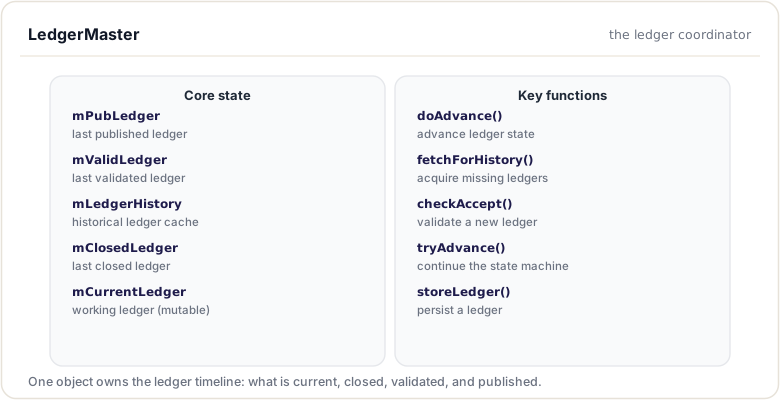
Ledger Types in LedgerMaster
One ledger is four different things depending on how sure the network is about it. The same ledger starts current (still accepting transactions), becomes closed when consensus fixes its content, validated once enough validators sign it, and published when the node has streamed it to subscribers. LedgerMaster tracks where each ledger sits on that scale:
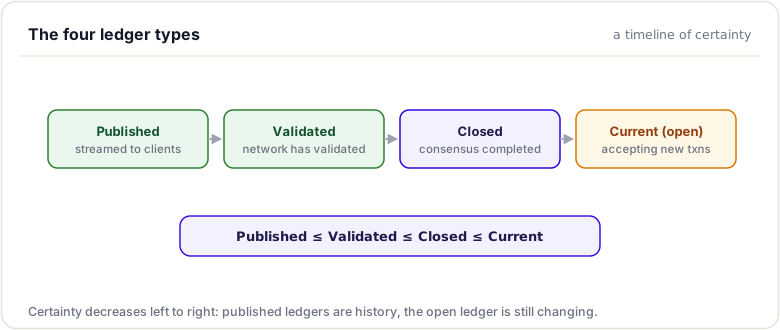
| Ledger Type | Description | Mutability |
|---|---|---|
| Current | Open ledger accepting transactions | Mutable |
| Closed | Just closed, awaiting validation | Immutable |
| Validated | Network consensus achieved | Immutable |
| Published | Streamed to subscribers | Immutable |
Gap Detection and Filling
When the node detects missing ledgers, it initiates acquisition:
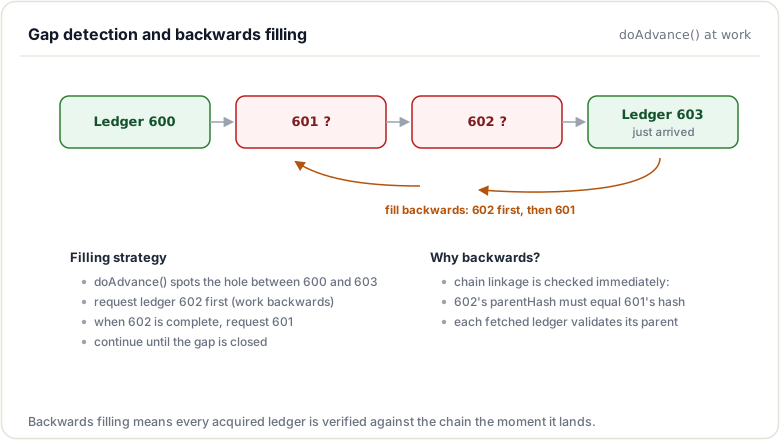
InboundLedgers System
Knowing a ledger is missing is one thing; fetching it is another. That work belongs to the InboundLedgers subsystem, which runs one acquisition state machine per missing ledger and knows exactly which tree nodes each one still lacks.
In brief: fetches missing ledgers from peers.
The InboundLedgers class manages ledger acquisition from peers:
// InboundLedgers.h
class InboundLedgers {
public:
    // Start or continue acquisition
    std::shared_ptr<Ledger const> acquire(
        uint256 const& hash,
        std::uint32_t seq,
        InboundLedger::Reason reason);

    // Record acquisition failure
    void logFailure(uint256 const& hash, std::uint32_t seq);

    // Process incoming data from peer
    void gotData(
        std::weak_ptr<Peer> peer,
        uint256 const& hash,
        Blob const& data);
};
Acquisition Architecture:
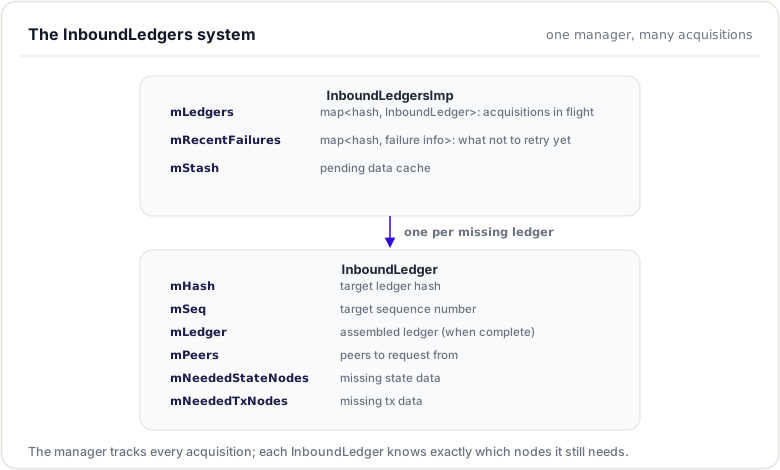
Key idea. A node that falls behind does not give up:
LedgerMasterdetects the gap andInboundLedgersfetches the missing history from peers until it catches up.
Acquisition Process
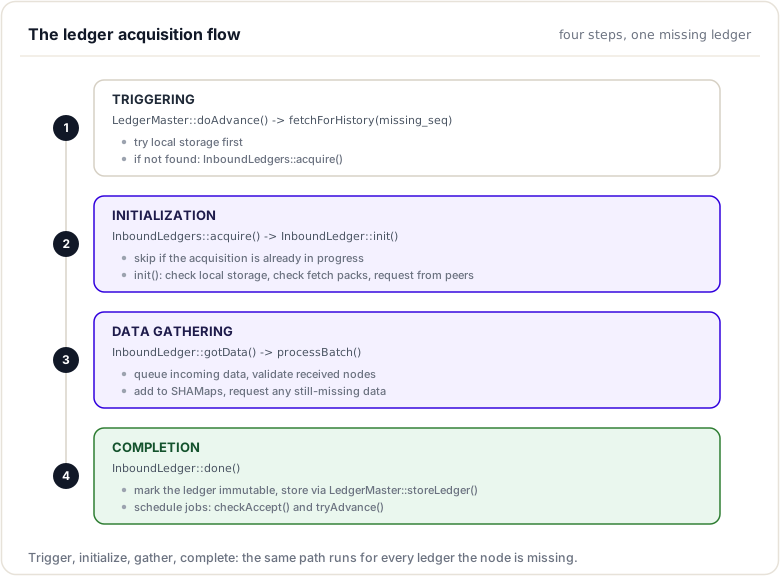
An acquisition always follows the same four steps, whether it was triggered by gap filling, by consensus needing a ledger, or by an operator request:
In brief: how a missing ledger is requested, received, and verified.
Step-by-Step Flow:
Validation Process
Validation Quorum:
Illustrative structure (conceptual, not a real rippled type) showing what quorum tracking involves:
// Validation requirements (illustrative)
struct ValidationQuorum {
    std::size_t minVal;           // Minimum validations needed
    std::set<NodeID> trustedValidators;  // UNL validators
    std::set<NodeID> negativeUNL;        // Excluded validators
};
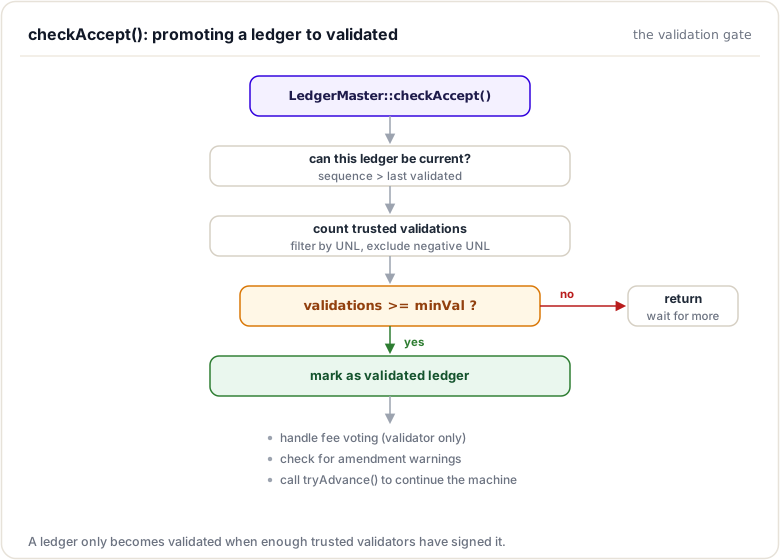
checkAccept Flow:
Validation Checks:
| Check | Purpose |
|---|---|
| Sequence check | Ensure forward progress |
| Trusted count | Verify UNL agreement |
| Minimum threshold | Require sufficient validations |
| Negative UNL | Exclude untrusted validators |
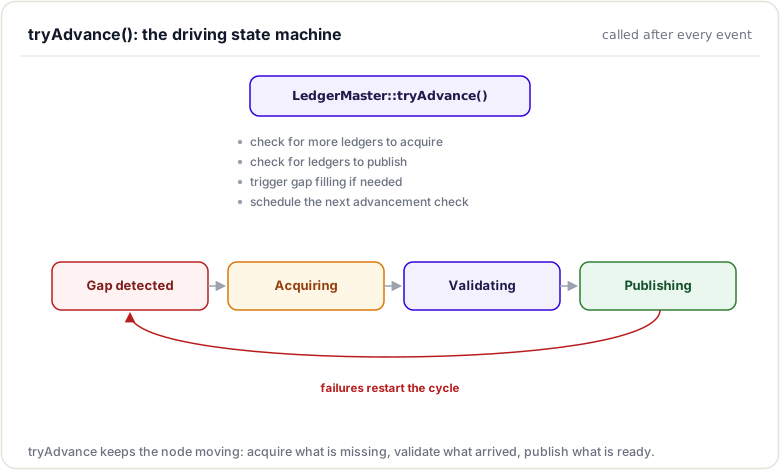
tryAdvance State Machine
In brief: how the node advances to the newest validated ledger.
Ledger Storage
When a ledger is complete and validated:
// LedgerMaster::storeLedger
void storeLedger(std::shared_ptr<Ledger const> ledger) {
    // 1. Verify integrity
    assert(ledger->info().accountHash == ledger->stateMap().getHash());
    assert(ledger->info().txHash == ledger->txMap().getHash());

    // 2. Store in history cache
    mLedgerHistory.insert(ledger, /*validated=*/true);

    // 3. Persist to database
    // Header → SQL
    // SHAMap nodes → NodeStore
}
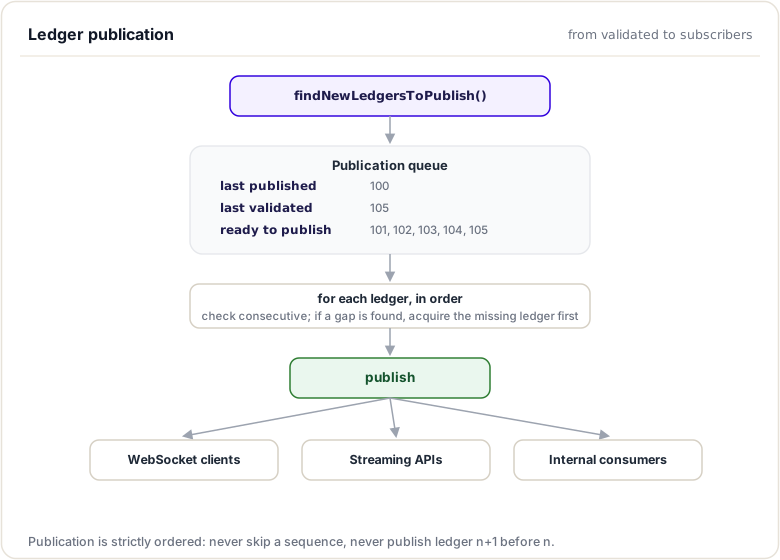
Publication Stream
Validation makes a ledger true; publication makes it visible. The publication stream walks every validated ledger, in order and without gaps, out to WebSocket subscribers and internal consumers:
Validated ledgers are published to clients:
Error Handling and Recovery
Acquisition Failures:
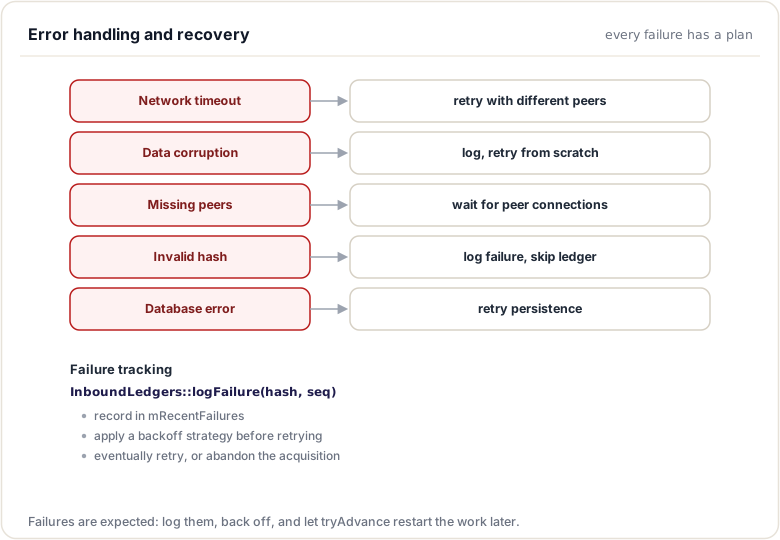
Validation Mismatches:
// When built ledger doesn't match validated
if (builtHash != validatedHash) {
    JLOG(journal_.warn())
        << "Built ledger " << builtHash
        << " doesn't match validated " << validatedHash;

    // Trigger reacquisition
    acquireLedger(validatedHash, validatedSeq);
}
Ledger Cleaning
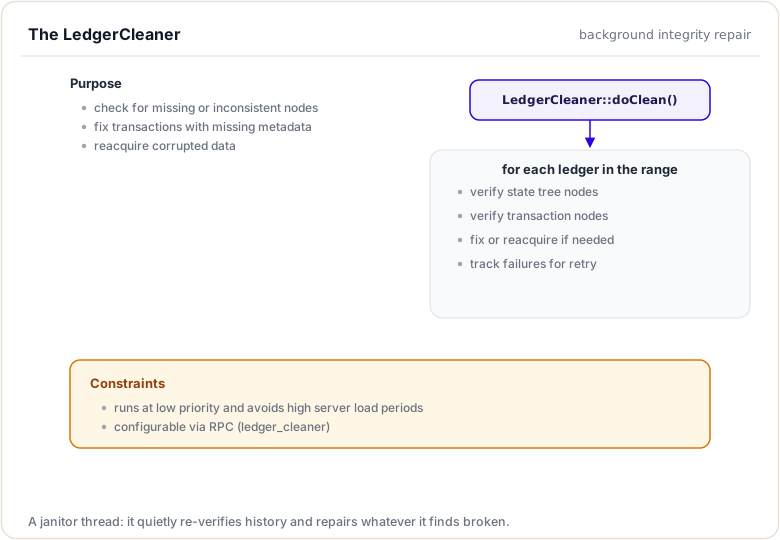
Disks corrupt, downloads abort, bugs happen. The LedgerCleaner is the low-priority background repairman that re-verifies stored history and re-acquires whatever fails the check:
The LedgerCleaner component maintains ledger integrity:
RPC and Peer Transaction Lifecycle
Introduction
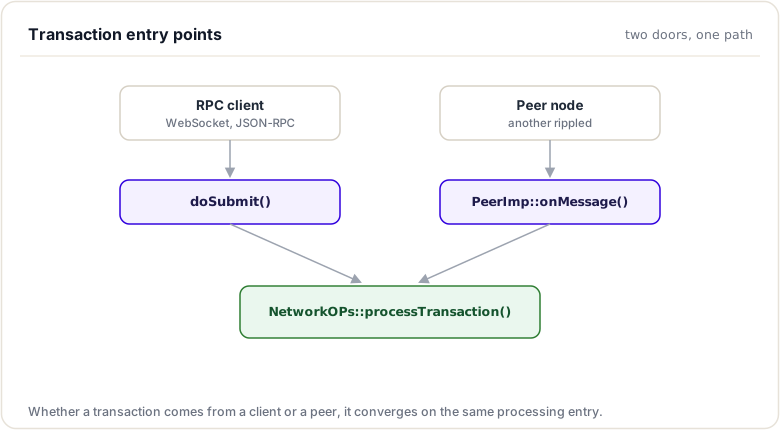
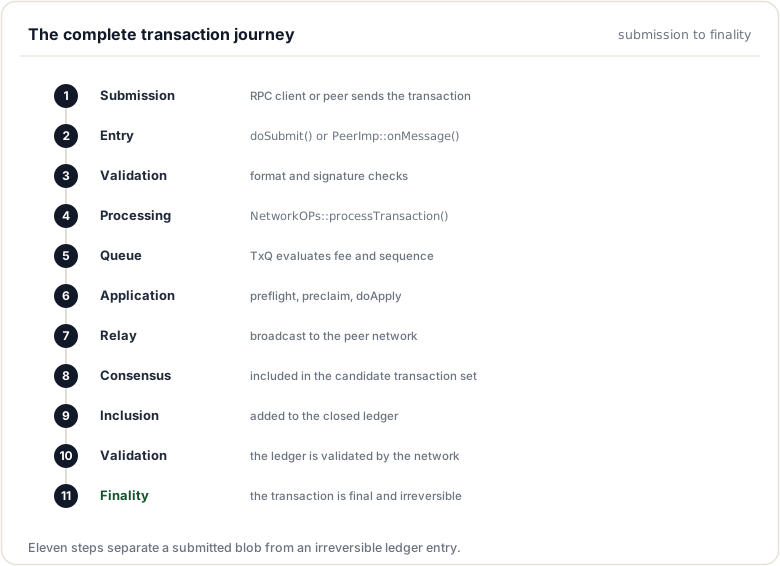
Transactions enter the XRP Ledger network through two primary channels: direct RPC submission from clients and relay from peer nodes. Understanding how transactions flow through these paths is essential for debugging submission issues, optimizing transaction throughput, and implementing client applications.
This chapter traces the complete journey of a transaction from submission to inclusion in a validated ledger.
Transaction Entry Points
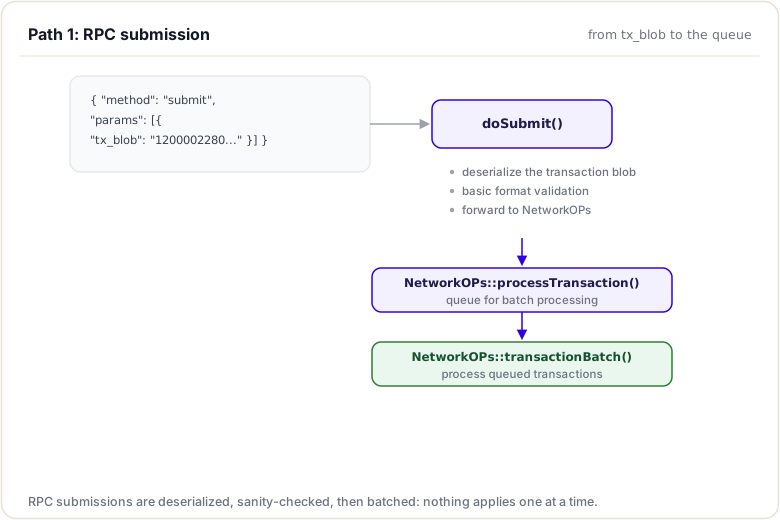
Path 1: RPC Submission
Client submits via submit RPC:
Path 2: Peer Relay
Transaction received from peer:
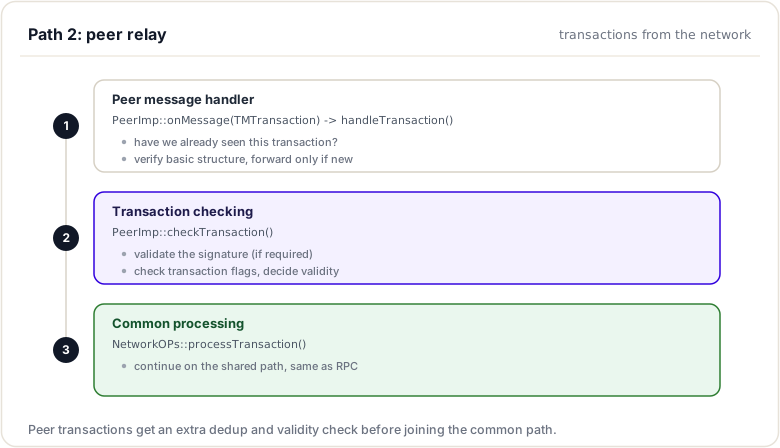
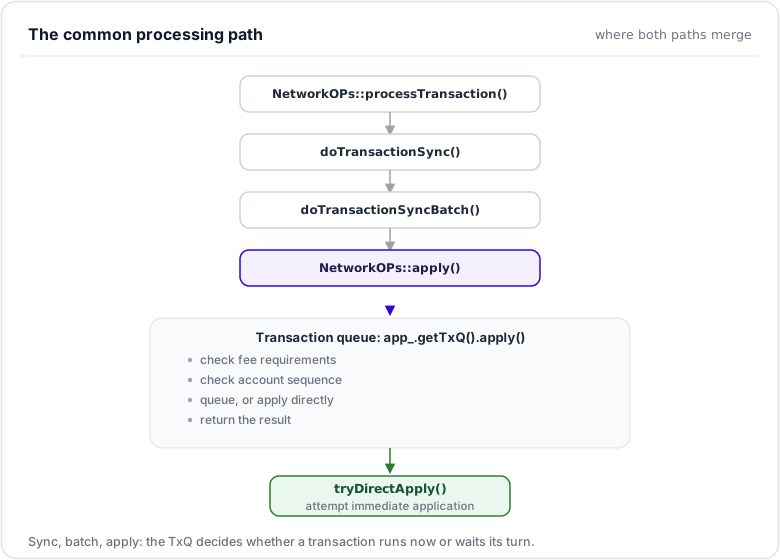
Common Processing Path
After entry (RPC or Peer):
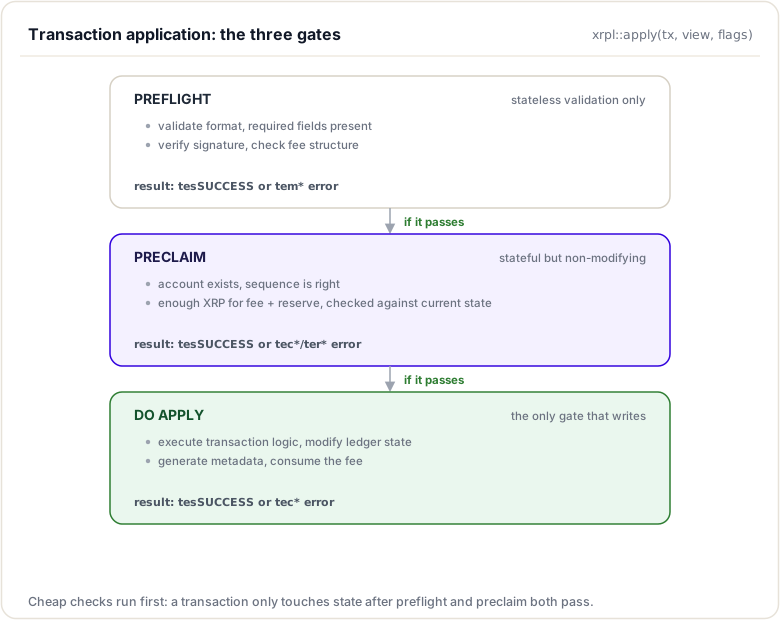
Transaction Application
The apply process (preflight → preclaim → doApply):
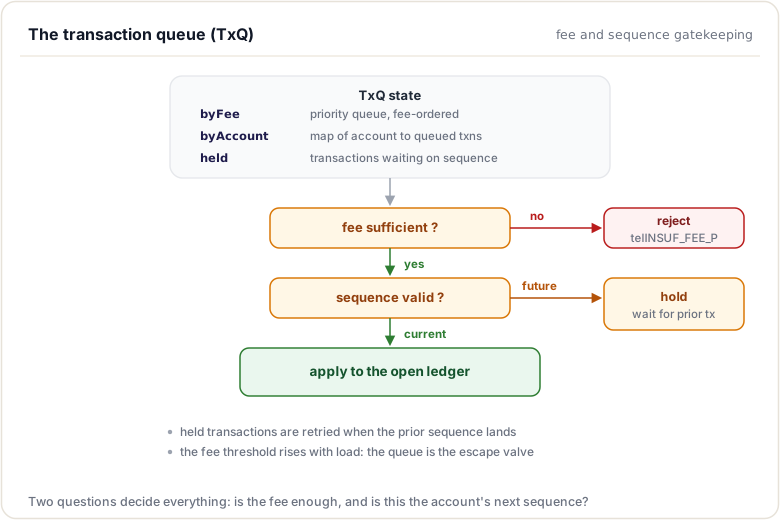
Transaction Queue (TxQ)
Queue management:
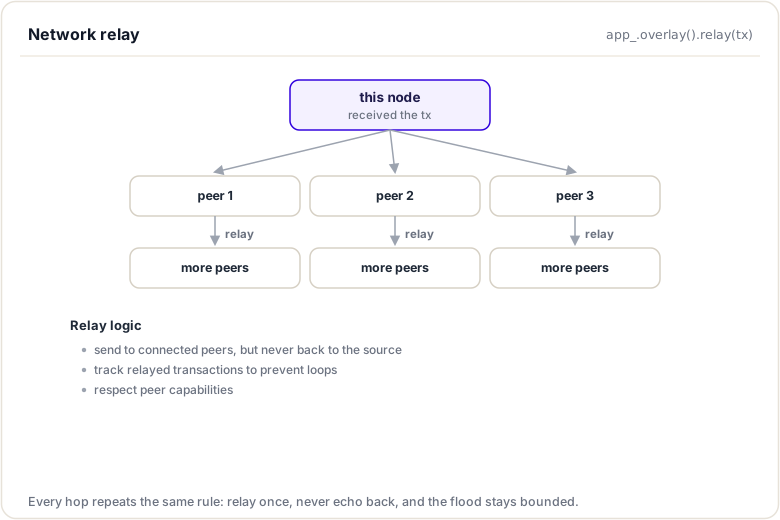
Network Relay
After successful application:
Complete Transaction Journey
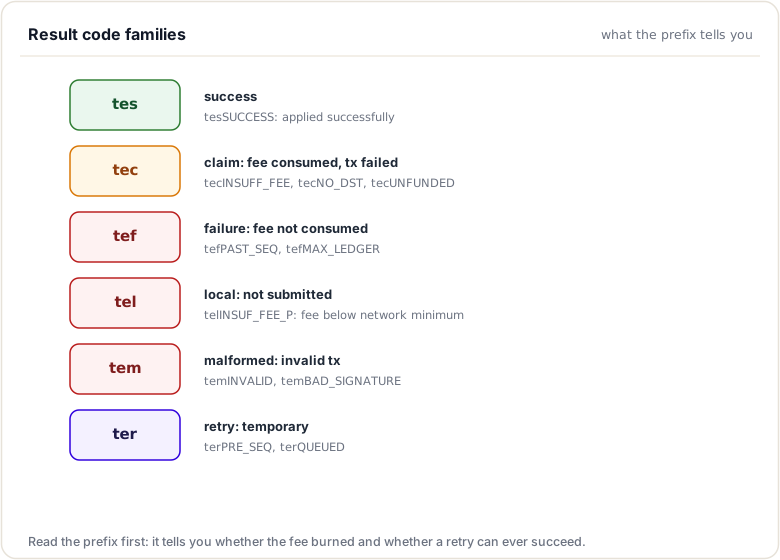
Result Codes
Transaction result categories:
| Prefix | Category | Description |
|---|---|---|
| tes | Success | Transaction succeeded |
| tec | Claim | Fee claimed but transaction failed |
| tef | Failure | Transaction failed, fee not claimed |
| tel | Local | Local error, not submitted |
| tem | Malformed | Transaction malformed |
| ter | Retry | Temporary failure, retry possible |
Common Results:
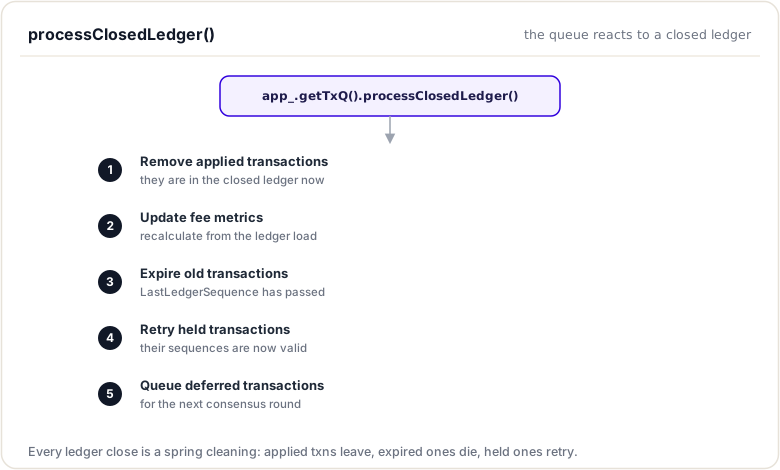
processClosedLedger
When a ledger closes:
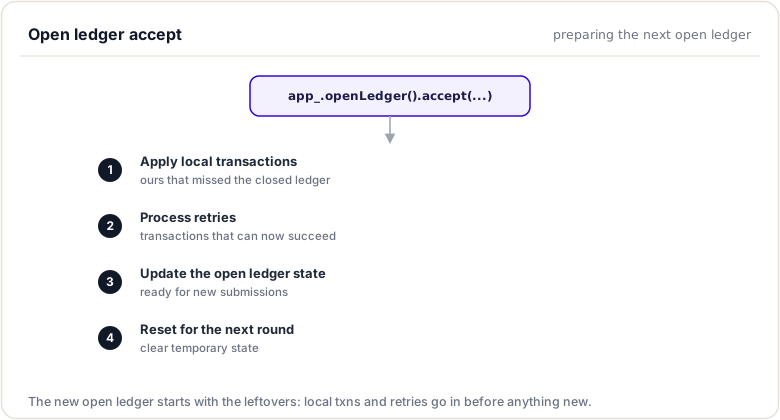
Open Ledger Accept
Preparing for next round:
Summary
This module tied two threads together. You saw how LedgerMaster tracks ledgers and detects gaps and how InboundLedgers fetches the missing ones from peers so a node can catch up, and you traced a transaction end to end, from RPC or peer relay, through consensus, to a validated ledger. A node that falls behind does not give up; it acquires the history it needs and advances.
To remember:
- LedgerMaster tracks the validated chain and detects gaps (
tryAdvance) - InboundLedgers fetches missing ledgers by hash from peers
- Transactions enter via RPC submit or peer relay, then the open ledger, then consensus
- The TxQ holds the overflow, ordered by fee level (fee escalation)
- Validated ledgers are announced on the publication stream (what
subscribe ledgertaps) server_infocomplete_ledgerstells you which ledgers you actually hold- Code:
src/xrpld/app/ledger(LedgerMaster; InboundLedgers underdetail/) - Watch out:
complete_ledgers: emptyright after startup is normal acquisition, not a fault; do not panic-restart
Next up. A ledger everyone built still is not final. Next: consensus validations, the signed votes that turn agreement into finality.
Resources
Assignments
0 of 3 complete