
State modification, fees & sequences
How a transactor modifies ledger state through views, and how fees, reserves and sequence numbers are handled.
What you'll learn
- Modify ledger entries (SLE) through ApplyView and keylets.
- Explain fee deduction, reserves and `preFeeBalance_`.
- Understand sequence numbers, tickets and SeqProxy.
Introduction
≈60 min · Advanced · builds on The transaction processing pipeline
Once a transaction is cleared to run, how does it actually change the ledger? In this module you'll learn to modify ledger entries through views and keylets, and to handle the three things every transactor must get right: fees, reserves (via preFeeBalance_), and sequence numbers, including tickets and SeqProxy. This is the toolkit doApply is built from.
Ledger Views
In brief: ReadView, ApplyView and OpenView, the read-only and read/write windows onto ledger state.
The view system provides three levels of access:
ReadView
Read-only access to ledger state. Used in preclaim:
class ReadView
{
public:
    // Read a ledger entry (returns nullptr if not found)
    virtual std::shared_ptr<SLE const> read(Keylet const& k) const = 0;

    // Check if an entry exists
    virtual bool exists(Keylet const& k) const = 0;

    // Get current fees
    virtual Fees const& fees() const = 0;

    // Get current rules (amendments)
    virtual Rules const& rules() const = 0;

    // Get ledger sequence
    virtual LedgerIndex seq() const = 0;
};
Example usage in preclaim:
TER CheckCreate::preclaim(PreclaimContext const& ctx)
{
    // Read destination account (read-only)
    auto const sleDst = ctx.view.read(keylet::account(dstId));
    if (!sleDst)
        return tecNO_DST;

    // Read flags
    auto const flags = sleDst->getFlags();
    // ...
}
ApplyView
Read/write access to ledger state. Used in doApply:
class ApplyView : public ReadView
{
public:
    // Get modifiable reference to an entry
    virtual std::shared_ptr<SLE> peek(Keylet const& k) = 0;

    // Insert a new entry
    virtual void insert(std::shared_ptr<SLE> const& sle) = 0;

    // Mark an entry as updated
    virtual void update(std::shared_ptr<SLE> const& sle) = 0;

    // Delete an entry
    virtual void erase(std::shared_ptr<SLE const> const& sle) = 0;

    // Directory operations
    virtual std::optional<std::uint64_t> dirInsert(
        Keylet const& directory,
        Keylet const& key,
        std::function<void(SLE::ref)> const& describe) = 0;

    virtual bool dirRemove(
        Keylet const& directory,
        std::uint64_t page,
        uint256 const& key,
        bool keepRoot) = 0;
};
OpenView
Used internally by the ledger for staging changes during consensus.
Serialized Ledger Entries (SLEs)
In brief: the objects you create, read, modify and delete in the ledger.
Ledger entries are represented as SLE objects (Serialized Ledger Entries). Each SLE has:
- A type (AccountRoot, Check, Offer, TrustLine, etc.)
- A key (256-bit unique identifier)
- Fields specific to that type
Creating an SLE
// Create a new Check entry
Keylet const checkKeylet = keylet::check(accountID_, seq);
auto sleCheck = std::make_shared<SLE>(checkKeylet);

// Set required fields
sleCheck->setAccountID(sfAccount, accountID_);
sleCheck->setAccountID(sfDestination, dstAccountId);
sleCheck->setFieldU32(sfSequence, seq);
sleCheck->setFieldAmount(sfSendMax, ctx_.tx[sfSendMax]);

// Set optional fields
if (auto const srcTag = ctx_.tx[~sfSourceTag])
    sleCheck->setFieldU32(sfSourceTag, *srcTag);
Reading an SLE
// Read-only (in preclaim)
auto const sle = ctx.view.read(keylet::account(accountId));
if (!sle)
    return tecNO_ENTRY;

// Get field values
auto const flags = sle->getFlags();
auto const balance = sle->getFieldAmount(sfBalance);
auto const sequence = sle->getFieldU32(sfSequence);
Modifying an SLE
// Get modifiable reference (in doApply)
auto sle = view().peek(keylet::account(accountID_));
if (!sle)
    return tefINTERNAL;

// Modify fields
sle->setFieldU32(sfSequence, newSequence);
sle->setFieldAmount(sfBalance, newBalance);

// Mark as updated (implicit in most cases, but good practice)
view().update(sle);
Deleting an SLE
// Get the entry
auto sle = view().peek(keylet::check(owner, seq));
if (!sle)
    return tecNO_ENTRY;

// Remove from directories first
view().dirRemove(
    keylet::ownerDir(owner),
    sle->getFieldU64(sfOwnerNode),
    sle->key(),
    false);

// Decrement owner count
adjustOwnerCount(view(), sleAccount, -1, j);

// Delete the entry
view().erase(sle);
Keylets
In brief: the helper that computes the exact key locating any ledger entry.
Keylets are typed wrappers around ledger entry keys. They combine a type and a key, ensuring type safety when accessing ledger entries.
// Common keylet functions
keylet::account(AccountID const& id);           // Account root
keylet::check(AccountID const& id, std::uint32_t seq);  // Check
keylet::offer(AccountID const& id, std::uint32_t seq);  // Offer
keylet::trustLine(AccountID const& a, AccountID const& b, Currency const& c);  // Trust line
keylet::ownerDir(AccountID const& id);          // Owner directory
keylet::escrow(AccountID const& src, std::uint32_t seq);  // Escrow
keylet::payChannel(AccountID const& src, AccountID const& dst, std::uint32_t seq);  // Payment channel
Example:
// Create a keylet for a check
Keylet const checkKeylet = keylet::check(accountID_, seq);

// Use it to create or access the entry
auto sleCheck = std::make_shared<SLE>(checkKeylet);
// or
auto sleCheck = view().peek(checkKeylet);
Directory Management
Directories are linked lists of ledger entry keys, used to track which objects an account owns. Every account has an owner directory that lists all objects owned by that account.
Adding to a Directory
When creating a new ledger object, add it to the appropriate directories:
// Add to owner's directory
auto const page = view().dirInsert(
    keylet::ownerDir(accountID_),      // Directory to add to
    sleCheck->key(),                  // Key of the new entry
    describeOwnerDir(accountID_));      // Description callback

if (!page)
    return tecDIR_FULL;  // Directory has too many entries

// Store the page number in the entry for later removal
sleCheck->setFieldU64(sfOwnerNode, *page);
For objects that relate to two accounts (like Checks), add to both directories:
// Add to destination's directory
if (dstAccountId != accountID_)
{
    auto const dstPage = view().dirInsert(
        keylet::ownerDir(dstAccountId),
        sleCheck->key(),
        describeOwnerDir(dstAccountId));

    if (!dstPage)
        return tecDIR_FULL;

    sleCheck->setFieldU64(sfDestinationNode, *dstPage);
}

// Add to source's directory
auto const srcPage = view().dirInsert(
    keylet::ownerDir(accountID_),
    sleCheck->key(),
    describeOwnerDir(accountID_));

if (!srcPage)
    return tecDIR_FULL;

sleCheck->setFieldU64(sfOwnerNode, *srcPage);
Removing from a Directory
When deleting a ledger object, remove it from all directories:
// Remove from owner's directory
view().dirRemove(
    keylet::ownerDir(owner),
    sle->getFieldU64(sfOwnerNode),  // Page where it was stored
    sle->key(),                      // Key of the entry
    false);                          // Don't keep empty root

// Remove from destination's directory if applicable
if (sle->isFieldPresent(sfDestinationNode))
{
    view().dirRemove(
        keylet::ownerDir(destination),
        sle->getFieldU64(sfDestinationNode),
        sle->key(),
        false);
}
Owner Count Management
In brief: keep the owner count accurate so reserves are charged correctly.
Each account tracks how many ledger objects it owns via the sfOwnerCount field. This count affects the account's reserve requirement.
Incrementing Owner Count
When creating a new owned object:
// Get the account entry
auto const sle = view().peek(keylet::account(accountID_));

// Increment owner count
adjustOwnerCount(view(), sle, 1, j_);
Decrementing Owner Count
When deleting an owned object:
// Get the account entry
auto const sle = view().peek(keylet::account(owner));

// Decrement owner count
adjustOwnerCount(view(), sle, -1, j_);
The adjustOwnerCount Function
void adjustOwnerCount(
    ApplyView& view,
    std::shared_ptr<SLE> const& sle,
    std::int32_t amount,  // +1 or -1
    beast::Journal j);
This function:
- Gets the current owner count
- Adds the adjustment
- Updates the account SLE
Reserve Checking
In brief: verify the account can afford a new object using preFeeBalance_ before creating it.
Before creating a new object, verify the account can afford the increased reserve:
TER CheckCreate::doApply()
{
    auto const sle = view().peek(keylet::account(accountID_));
    if (!sle)
        return tefINTERNAL;

    // Calculate reserve with one additional object
    STAmount const reserve{
        view().fees().accountReserve(
            sle->getFieldU32(sfOwnerCount) + 1)};

    // Check against balance BEFORE fee deduction
    if (preFeeBalance_ < reserve)
        return tecINSUFFICIENT_RESERVE;

    // Proceed with creating the object...
}
Why use preFeeBalance_?
The reserve is checked against the balance before the transaction fee is deducted. This allows accounts to dip into their reserve to pay fees, which is important for cleaning up objects when an account is low on funds.
Watch out. Always check the reserve against
preFeeBalance_before creating an owned object, and always keep the owner count in step. Getting either wrong corrupts an account's reserve accounting.
Atomic Operations
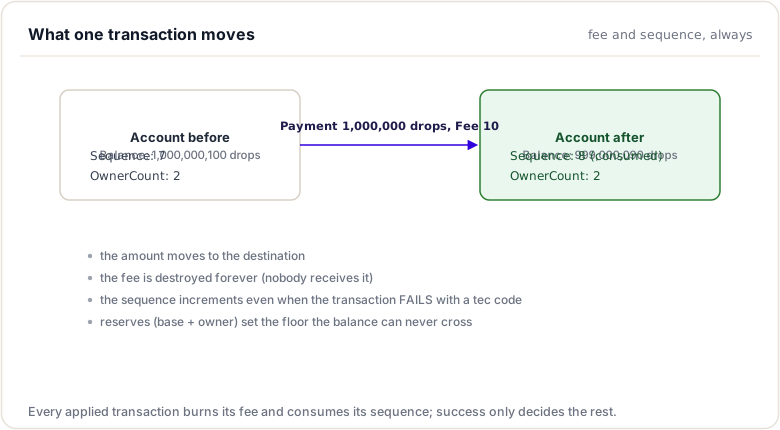
All changes made through views are staged and only committed if the transaction succeeds. If the transaction fails with a tec code:
- All state changes are reverted
- The fee is still charged
- The sequence number is still consumed
This ensures that failed transactions never leave the ledger in an inconsistent state.
How Atomicity Works
- Staging: Changes are made to a view layer, not the actual ledger
- Validation: All invariants are checked
- Commit or Rollback:
- On
tesSUCCESS: Changes are committed - On
tec*: Changes are reverted, but fee/sequence applied - On other failures: Nothing is applied
Common Utility Functions
Reading Account Balances
// Get XRP balance
STAmount accountHolds(
    ReadView const& view,
    AccountID const& account,
    Currency const& currency,
    AccountID const& issuer,
    FreezeHandling zeroIfFrozen,
    beast::Journal j);

// Get liquid XRP (available after reserves)
XRPAmount xrpLiquid(
    ReadView const& view,
    AccountID const& id,
    std::int32_t ownerCountAdj,  // Adjust for pending changes
    beast::Journal j);
Checking Freeze Status
// Check if an issuer has globally frozen
bool isGlobalFrozen(ReadView const& view, AccountID const& issuer);

// Check if a specific trust line is frozen
bool isFrozen(
    ReadView const& view,
    AccountID const& account,
    Currency const& currency,
    AccountID const& issuer);
Checking Expiration
// Check if a time has passed (uses parent close time)
bool hasExpired(
    ReadView const& view,
    std::optional<std::uint32_t> const& exp);
Best Practices
- Always check entry existence: Use
peek()orread()before accessing fields - Use keylets for type safety: Don't construct keys manually
- Update directories on create/delete: Maintain bidirectional links
- Update owner count on create/delete: Keep reserve calculations correct
- Check reserves before creating: Prevent
tecINSUFFICIENT_RESERVEfailures - Remove from directories before erasing: Clean up all references
- Use
preFeeBalance_for reserve checks: Allow fee payment from reserves
Codebase References
| File | Description |
|---|---|
include/xrpl/ledger/ReadView.h |
ReadView interface |
include/xrpl/ledger/ApplyView.h |
ApplyView interface |
include/xrpl/ledger/View.h |
View utility functions |
src/libxrpl/ledger/View.cpp |
View implementation |
include/xrpl/protocol/Indexes.h |
Keylet definitions |
Fee and Sequence Handling
Introduction
Transaction fees and sequence numbers are fundamental mechanisms that ensure the XRP Ledger operates securely and efficiently. Fees prevent spam and compensate the network for processing transactions, while sequence numbers prevent replay attacks and ensure transaction ordering.
Understanding how these mechanisms work is essential for implementing transactors correctly and for building applications that submit transactions reliably.
Transaction Fees
Every transaction on the XRP Ledger requires a fee, paid in XRP. This fee is destroyed (burned), permanently removing it from circulation.
Base Fee
The base fee is the minimum fee for a standard transaction:
static XRPAmount
Transactor::calculateBaseFee(ReadView const& view, STTx const& tx)
{
    // Get the reference fee from the ledger
    return view.fees().base;
}
The current reference base fee is 10 drops (0.00001 XRP).
Fee Calculation
Different transaction types may have different fee multipliers:
// Some transactions cost more than the base fee
// For example, multi-signed transactions cost more per signature
XRPAmount baseFee = calculateBaseFee(view, tx);

// Account for additional signatures
if (tx.isFieldPresent(sfSigners))
{
    auto const& signers = tx.getFieldArray(sfSigners);
    baseFee = baseFee * (1 + signers.size());
}
Fee Escalation (Transaction Queue)
When the network is busy, the required fee increases:
static XRPAmount
Transactor::minimumFee(
    Application& app,
    XRPAmount baseFee,
    Fees const& fees,
    ApplyFlags flags)
{
    // During high load, fees escalate
    if (flags & tapNO_ESCALATION)
        return baseFee;

    return app.getTxQ().minimumFee(baseFee);
}
Fee Checking in Preclaim
The base Transactor class checks fees during preclaim:
static TER
Transactor::checkFee(PreclaimContext const& ctx, XRPAmount baseFee)
{
    auto const feePaid = ctx.tx[sfFee].xrp();

    // Fee must be non-negative
    if (feePaid < beast::kZero)
        return temBAD_FEE;

    // Fee must be sufficient
    if (feePaid < baseFee)
        return telINSUF_FEE_P;

    // Account must have enough to pay fee
    auto const sle = ctx.view.read(keylet::account(ctx.tx[sfAccount]));
    auto const balance = (*sle)[sfBalance].xrp();

    if (balance < feePaid)
        return terINSUF_FEE_B;

    return tesSUCCESS;
}
Fee Payment
Fees are paid at the start of doApply:
TER
Transactor::payFee()
{
    auto const feePaid = ctx_.tx[sfFee].xrp();

    // Get the account SLE
    auto const sle = view().peek(keylet::account(accountID_));

    // Deduct the fee
    auto const balance = sle->getFieldAmount(sfBalance);
    sle->setFieldAmount(sfBalance, balance - feePaid);

    // The fee is destroyed (no destination)
    return tesSUCCESS;
}
Account Reserves
Accounts must maintain a minimum XRP balance called the reserve. The reserve has two components:
- Base Reserve: Fixed amount every account must hold (currently 1 XRP)
- Owner Reserve: Additional amount per owned object (currently 0.2 XRP per object)
Reserve Calculation
STAmount accountReserve = view().fees().accountReserve(ownerCount);

// This is equivalent to:
// baseReserve + (ownerCount * ownerReserve)
// e.g., 1 XRP + (5 objects * 0.2 XRP) = 2 XRP
Checking Reserves Before Creating Objects
Before creating a new object that will increase the owner count, verify the account can afford it:
TER CheckCreate::doApply()
{
    auto const sle = view().peek(keylet::account(accountID_));

    // Calculate reserve with one additional object
    STAmount const reserve{
        view().fees().accountReserve(
            sle->getFieldU32(sfOwnerCount) + 1)};

    // Use preFeeBalance_ (before fee deduction)
    if (preFeeBalance_ < reserve)
        return tecINSUFFICIENT_RESERVE;

    // Continue with object creation...
}
Why preFeeBalance_?
Using the balance before fee deduction allows accounts to use reserve XRP to pay transaction fees. This is important for:
- Deleting objects when an account is low on funds
- Sending the last XRP out of an account
Sequence Numbers
Each account has a sequence number that starts at 1 and increments with each transaction. This prevents:
- Replay attacks: A transaction can only be applied once
- Transaction ordering issues: Transactions are applied in sequence order
Sequence Number Checking
static NotTEC
Transactor::checkSeqProxy(ReadView const& view, STTx const& tx, beast::Journal j)
{
    auto const account = tx[sfAccount];
    auto const sle = view.read(keylet::account(account));

    if (!sle)
        return terNO_ACCOUNT;

    auto const txSeq = tx.getSequence();
    auto const acctSeq = (*sle)[sfSequence];

    if (txSeq != acctSeq)
    {
        if (txSeq < acctSeq)
            return tefPAST_SEQ;  // Already used
        else
            return terPRE_SEQ;   // Too high, need earlier tx first
    }

    return tesSUCCESS;
}
Sequence Number Consumption
After a successful transaction (or tec failure), the sequence number is incremented:
TER
Transactor::consumeSeqProxy(SLE::pointer const& sleAccount)
{
    auto const txSeq = ctx_.tx.getSequence();
    auto const acctSeq = (*sleAccount)[sfSequence];

    // Increment the account sequence
    (*sleAccount)[sfSequence] = acctSeq + 1;

    return tesSUCCESS;
}
Tickets
Tickets provide an alternative to strict sequence ordering. A ticket is a pre-reserved sequence number that can be used later.
Creating Tickets
The TicketCreate transaction reserves a range of sequence numbers:
// Reserve 10 tickets
{
    "TransactionType": "TicketCreate",
    "Account": "rAccount...",
    "TicketCount": 10
}
Using Tickets
Instead of Sequence, use TicketSequence:
// Use ticket #5 instead of the account sequence
{
    "TransactionType": "Payment",
    "Account": "rAccount...",
    "TicketSequence": 5,
    // No "Sequence" field
}
Ticket Handling in Transactors
// Get the sequence value (works for both regular sequence and tickets)
std::uint32_t const seq = ctx_.tx.getSeqValue();

// For creating objects, use this value as the identifier
Keylet const checkKeylet = keylet::check(accountID_, seq);
LastLedgerSequence
Transactions can specify a maximum ledger sequence for inclusion:
{
    "TransactionType": "Payment",
    "Account": "rAccount...",
    "Sequence": 42,
    "LastLedgerSequence": 75000000  // Expire after this ledger
}
If the transaction is not included by this ledger, it becomes invalid:
static NotTEC
Transactor::checkPriorTxAndLastLedger(PreclaimContext const& ctx)
{
    // Check LastLedgerSequence if present
    if (auto const lastLedger = ctx.tx[~sfLastLedgerSequence])
    {
        if (ctx.view.seq() > *lastLedger)
            return tefMAX_LEDGER;  // Transaction expired
    }

    return tesSUCCESS;
}
Best Practice: Always set LastLedgerSequence to prevent transactions from being stuck indefinitely. A common value is current_ledger + 4.
preFeeBalance_
The Transactor base class records the account's XRP balance before the fee is
deducted, so transaction logic can reason about reserves correctly:
XRPAmount preFeeBalance_{}; // Balance before fees are deducted
preFeeBalance_ is captured by the base class before doApply() runs. Charging the fee is
also the base class's responsibility: Transactor::reset() (called from apply()) peeks the
fee payer's account, deducts the fee, and writes the new balance back to the ledger, derived
transactors never do this themselves. (Modern reset() also handles fee-payer/sponsor cases,
but the core idea is unchanged: fee handling lives in the base class.)
Usage:
- Use
preFeeBalance_for reserve checks, comparing the pre-fee balance (rather than the post-fee balance) against the reserve is what lets an account dip into its reserve to pay the transaction fee.
Fee-Related Result Codes
| Code | Meaning | When Returned |
|---|---|---|
temBAD_FEE |
Fee is malformed | Negative fee |
telINSUF_FEE_P |
Fee too low | Below minimum for network load |
terINSUF_FEE_B |
Can't afford fee | Balance < fee |
tecINSUFFICIENT_RESERVE |
Reserve not met | Creating object without enough XRP |
Sequence-Related Result Codes
| Code | Meaning | When Returned |
|---|---|---|
tefPAST_SEQ |
Sequence already used | Transaction replayed or sequence too low |
terPRE_SEQ |
Sequence too high | Earlier transaction not yet applied |
tefMAX_LEDGER |
Transaction expired | LastLedgerSequence exceeded |
tefNO_TICKET |
Ticket not found | TicketSequence doesn't exist |
Best Practices
- Always set LastLedgerSequence: Prevent stuck transactions
- Check reserves before creating objects: Use
preFeeBalance_ - Handle sequence gaps: Use tickets for out-of-order transactions
- Account for fee escalation: During high load, fees increase
- Don't hardcode fees: Query the current fee level
- Consider ticket usage: For systems that need flexible ordering
Codebase References
| File | Description |
|---|---|
src/libxrpl/tx/Transactor.cpp |
Fee and sequence handling implementation |
src/xrpld/app/misc/detail/TxQ.cpp |
Transaction queue and fee escalation |
include/xrpl/protocol/Fees.h |
Fee structure definitions |
Summary
This module covered how a transactor actually changes the ledger. You worked with the ledger views (ReadView, ApplyView, OpenView), created, read, modified, and deleted serialized ledger entries (SLEs) through keylets, and handled the three things every transactor must get right: fees, reserves (checked against preFeeBalance_), and sequence numbers (including tickets and SeqProxy). This is the toolkit doApply is built from.
To remember:
- Views:
ReadView(read-only),ApplyView(read/write),OpenView(the open ledger) - SLE lifecycle:
view().peek()/read(), theninsert()/update()/erase() keylet::account/check/line/...computes an entry's key (include/xrpl/protocol/Indexes.h)- Reserve check BEFORE creating an object:
accountReserve(ownerCount + 1)vspreFeeBalance_ - Owned objects must be wired:
dirInsertinto the owner directory +adjustOwnerCount - Sequences: plain sequence or Tickets, unified behind
SeqProxy - Fees are charged by the engine; your transactor checks but never deducts
- Watch out: creating an owned object without dirInsert + adjustOwnerCount silently corrupts the account's reserve accounting
Next up. Every transaction ends with a verdict. Next you learn to read them all: the TER result codes, and what each family promises about fees and retries.
Resources
Assignments
0 of 2 complete