
RPC architecture & request flow
How rippled's RPC layer dispatches JSON-RPC / WebSocket / gRPC requests to handlers.
What you'll learn
- Describe the handler table and the dispatch flow.
- Understand `JsonContext` and the handler signature.
- Trace a request from transport to response.
Understanding the Foundation of Rippled's RPC System
Introduction
≈45 min · Advanced · builds on Handshake & message relaying
This phase is about how the outside world talks to a node. In this module you'll learn how rippled's RPC layer dispatches JSON-RPC, WebSocket and gRPC requests to the right handler: the central handler table, the JsonContext a handler receives, and the path a request takes from transport to response. It's the groundwork for building your own command a couple of modules from now.
Core Architecture Components
In brief: the pieces that make RPC work: the handler table, the handler signature, and the JsonContext.
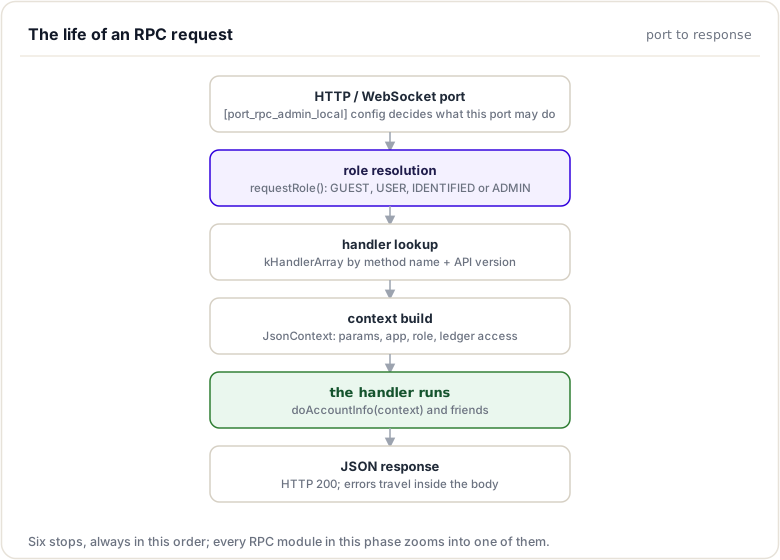
The RPC system consists of several key components that work together to process requests:
1. Central Handler Table
The handler table is a centralized registry that maps RPC command names to their corresponding handler functions.
Location: src/xrpld/rpc/detail/Handler.cpp
// Handler table structure (simplified)
// Simplified model. The real table is a constexpr array, kHandlerArray,
// in src/xrpld/rpc/detail/Handler.cpp, indexed with API version ranges.
std::map<std::string, HandlerInfo> handlerTable = {
    {"account_info", {&doAccountInfo, Role::USER, Condition::NeedsCurrentLedger}},
    {"ledger", {&doLedger, Role::USER, Condition::NeedsNetworkConnection}},
    {"submit", {&doSubmit, Role::USER, Condition::NeedsCurrentLedger}},
    // ... hundreds of other handlers
};
Key characteristics:
- Command Name: Case-sensitive string identifier (e.g.,
"account_info") - Handler Function: Pointer to the actual implementation function
- Required Role: Minimum permission level needed to execute the command
- Capability Flags: Additional requirements (ledger access, network connectivity, etc.)
2. Handler Information Structure
Each handler is described by a HandlerInfo structure containing metadata:
struct HandlerInfo {
    handler_type handler;           // Function pointer
    Role role;                      // Minimum role required
    RPC::Condition condition;       // Execution conditions
    unsigned int version_min = 1;   // Minimum API version
    unsigned int version_max = UINT_MAX; // Maximum API version
};
Purpose:
- Enables versioning for backward compatibility
- Specifies permission requirements before execution
- Defines runtime conditions (e.g., must have synced ledger)
3. Handler Function Signature
All RPC handlers follow a standardized function signature:
Json::Value handlerName(RPC::JsonContext& context);
Components:
- Return Type:
Json::Value, The JSON response object - Parameter:
RPC::JsonContext&, Contains request data, ledger access, and configuration
This consistency allows the dispatcher to invoke any handler uniformly.
4. JsonContext Object
The JsonContext provides handlers with everything needed to process a request:
struct JsonContext {
    Json::Value params;              // Request parameters
    Application& app;                // Access to application services
    Resource::Consumer& consumer;    // Resource tracking
    Role role;                       // Caller's permission level
    std::shared_ptr<ReadView const> ledger; // Ledger view
    NetworkOPs& netOps;              // Network operations
    LedgerMaster& ledgerMaster;      // Ledger management
    // ... additional context
};
Key capabilities:
- Ledger Access: Query account states, transactions, and metadata
- Network Information: Node status, peer connections, consensus state
- Resource Management: Track API usage and enforce limits
- Authentication: Know the caller's permission level
Handler Registration Process
In brief: how a command is added to the central handler table.
Handlers are registered at compile time through static initialization:
Step 1: Define the Handler Function
// src/xrpld/rpc/handlers/MyCustomHandler.cpp
namespace xrpl {

Json::Value doMyCustomCommand(RPC::JsonContext& context)
{
    Json::Value result;
    // Implementation here
    return result;
}

} // namespace xrpl
Step 2: Add to Handler Table
// src/xrpld/rpc/detail/Handler.cpp — add an entry to kHandlerArray[]
{.name = "my_custom_command",
 .valueMethod = byRef(&doMyCustomCommand),  // wrap the handler function
 .role = Role::USER,                        // Minimum role
 .condition = Condition::NeedsCurrentLedger}
Step 3: Declare in Header (Optional)
// src/xrpld/rpc/handlers/Handlers.h
Json::Value doMyCustomCommand(RPC::JsonContext&);
Handler Discovery and Dispatch
In brief: how an incoming request is matched to its handler and run.
When a client sends an RPC request, the system follows this flow:
1. Request Reception
The server receives a JSON-RPC request via HTTP, WebSocket, or gRPC:
{
    "method": "account_info",
    "params": [{
        "account": "rN7n7otQDd6FczFgLdlqtyMVrn3NnrcVXs"
    }]
}
2. Command Lookup
The dispatcher searches the handler table:
auto it = handlerTable.find(request["method"].asString());
if (it == handlerTable.end()) {
    return rpcError(RpcUnknownCommand);
}
3. Permission Check
Before invoking the handler, the system verifies the caller's role:
if (context.role < handlerInfo.role) {
    return rpcError(RpcNoPermission);
}
4. Condition Validation
The system ensures required conditions are met:
if (handlerInfo.condition & Condition::NeedsCurrentLedger) {
    if (!context.ledgerMaster.haveLedger()) {
        return rpcError(RpcNoCurrent);
    }
}
5. Handler Invocation
Finally, the handler is executed:
Json::Value response = handlerInfo.handler(context);
6. Response Serialization
The result is wrapped in a JSON-RPC response envelope and returned to the client.
Key idea. Dispatch always runs the same gauntlet: look up the command, check the caller's role, validate conditions, then invoke the handler. Every command goes through it.
Handler Capability Flags
In brief: the conditions a handler declares before it may run.
Handlers can declare various capability requirements:
| Flag | Meaning | Example Use Case |
|---|---|---|
NeedsCurrentLedger |
Requires an open (current) ledger | Real-time account queries |
NeedsClosedLedger |
Requires a validated ledger | Historical transaction lookups |
NeedsNetworkConnection |
Requires peer connectivity | Transaction submission |
NoCondition |
No special requirements | Server info, ping |
Example:
{"submit", {&doSubmit, Role::USER, Condition::NeedsCurrentLedger | Condition::NeedsNetworkConnection}}
This ensures the handler cannot execute unless both conditions are satisfied.
Multi-Transport Support
In brief: the same handlers serve JSON-RPC, WebSocket, and gRPC.
Rippled's RPC system abstracts away transport details, allowing handlers to work across:
HTTP (JSON-RPC)
curl -X POST http://localhost:5005/ \
  -H "Content-Type: application/json" \
  -d '{
    "method": "account_info",
    "params": [{"account": "rN7n7otQDd6FczFgLdlqtyMVrn3NnrcVXs"}]
  }'
WebSocket (JSON-RPC)
const ws = new WebSocket('ws://localhost:6006');
ws.send(JSON.stringify({
    command: 'account_info',
    account: 'rN7n7otQDd6FczFgLdlqtyMVrn3NnrcVXs'
}));
gRPC (Protocol Buffers)
service XRPLedgerAPIService {
    rpc GetAccountInfo(GetAccountInfoRequest) returns (GetAccountInfoResponse);
}
Handler Transparency: The same handler function serves all three transports, the dispatcher handles protocol-specific details.
Versioning and Compatibility
In brief: how one command name serves several API versions.
Rippled supports API versioning to maintain backward compatibility:
{
    "account_info",
    {
        &doAccountInfo_v2,  // New implementation
        Role::USER,
        Condition::NeedsCurrentLedger,
        2,  // Minimum API version
        UINT_MAX
    }
}
Clients can specify the API version in their requests:
{
    "method": "account_info",
    "api_version": 2,
    "params": [...]
}
If no version is specified, the system uses the default (version 1) implementation.
Real-World Example: AccountInfo Handler
In brief: the theory applied to one real handler.
Let's examine the registration of the widely-used account_info handler:
Registration (Handlers.cpp):
{
    "account_info",
    {
        &doAccountInfo,
        Role::USER,
        Condition::NeedsCurrentLedger
    }
}
Analysis:
- Command:
"account_info" - Function:
doAccountInfo(defined insrc/xrpld/rpc/handlers/account/AccountInfo.cpp) - Role:
USER, Available to authenticated users (not just admins) - Condition:
NeedsCurrentLedger, Requires access to the current open ledger
This registration tells Rippled:
- Accept requests with
method: "account_info" - Ensure the caller has at least USER-level permissions
- Verify a current ledger is available
- Invoke
doAccountInfo()with the request context
Conclusion
The RPC handler architecture provides a clean, extensible foundation for Rippled's API layer. Through centralized registration in a handler table, uniform function signatures, and automatic permission enforcement, the system ensures consistency across hundreds of commands while remaining easy to extend. The separation between transport protocols and handler logic means the same implementation serves HTTP, WebSocket, and gRPC clients transparently. Understanding this architecture is essential for navigating the codebase, debugging RPC issues, and preparing to implement custom handlers.
Request and Response Flow
In brief: the twelve stages every request passes, at a glance.
Tracing a Request Through Rippled's RPC Pipeline
Introduction
Understanding the complete lifecycle of an RPC request, from the moment it arrives at the server to when the response is sent back to the client, is essential for building robust custom handlers. This knowledge helps you anticipate edge cases, implement proper error handling, and optimize performance.
In this section, we'll trace the journey of a request through Rippled's RPC system, examining each stage of processing and the components involved.
The Complete Request Journey
In brief: the same twelve stages, one by one.
Client → Transport Layer → Parser → Validator → Auth → Dispatcher → Handler → Response Builder → Client
Let's break down each stage in detail.
Stage 1: Request Reception
HTTP Entry Point
For HTTP requests, the entry point is the HTTP server configured in xrpld.cfg:
[port_rpc_admin_local]
port = 5005   # local example; public servers conventionally expose 51234 (JSON-RPC) / 51233 (WebSocket)
ip = 127.0.0.1
admin = 127.0.0.1
protocol = http
Source Location: src/xrpld/rpc/detail/RPCCall.cpp
The HTTP server receives the raw request:
POST / HTTP/1.1
Host: localhost:5005
Content-Type: application/json

{
    "method": "account_info",
    "params": [{
        "account": "rN7n7otQDd6FczFgLdlqtyMVrn3NnrcVXs",
        "ledger_index": "validated"
    }]
}
WebSocket Entry Point
For WebSocket connections, clients establish a persistent connection:
[port_ws_admin_local]
port = 6006
ip = 127.0.0.1
admin = 127.0.0.1
protocol = ws
Source Location: src/xrpld/rpc/detail/RPCHandler.cpp
WebSocket messages use a slightly different format:
{
    "id": 1,
    "command": "account_info",
    "account": "rN7n7otQDd6FczFgLdlqtyMVrn3NnrcVXs",
    "ledger_index": "validated"
}
gRPC Entry Point
For gRPC, requests arrive as Protocol Buffer messages:
Source Location: src/xrpld/app/main/GRPCServer.cpp
message GetAccountInfoRequest {
    string account = 1;
    LedgerSpecifier ledger = 2;
}
Stage 2: Request Parsing
The raw request is parsed into a structured format.
JSON Parsing
// Parse the JSON body
Json::Value request;
Json::Reader reader;

if (!reader.parse(requestBody, request)) {
    return rpcError(RpcInvalidParams, "Unable to parse JSON");
}
Field Extraction
The parser extracts key fields:
std::string method = request["method"].asString();
Json::Value params = request["params"];
unsigned int apiVersion = request.get("api_version", 1).asUInt();
Protocol Normalization
Different transports use different formats, which are normalized:
HTTP/WebSocket:
methodorcommandfieldparamsarray or direct parameters
gRPC:
- Protobuf message fields
- Converted to JSON internally
Stage 3: Role Determination
Before processing the request, the system determines the caller's role based on the connection:
IP-Based Role Assignment
Source Location: src/xrpld/rpc/detail/Role.cpp
Role
requestRole(
    Role const& required,
    Port const& port,
    Json::Value const& params,
    beast::IP::Endpoint const& remoteIp,
    std::string_view user)
{
    if (isAdmin(port, params, remoteIp.address()))
        return Role::ADMIN;

    if (required == Role::ADMIN)
        return Role::FORBID;

    if (ipAllowed(
            remoteIp.address(),
            port.secure_gateway_nets_v4,
            port.secure_gateway_nets_v6))
    {
        if (user.size())
            return Role::IDENTIFIED;
        return Role::PROXY;
    }

    return Role::GUEST;
}
Role Hierarchy
FORBID < GUEST < USER < IDENTIFIED < ADMIN
Role descriptions:
- FORBID: Blacklisted client (blocked)
- GUEST: Unauthenticated public access (limited commands)
- USER: Authenticated client (most read operations)
- IDENTIFIED: Trusted gateway (write operations)
- ADMIN: Full administrative access (all commands)
Configuration Example
[rpc_admin]
admin = 127.0.0.1, ::1

[secure_gateway]
ip = 192.168.1.100
Stage 4: Handler Lookup
The dispatcher searches the handler table for the requested command:
// Look up the handler
auto const it = handlerTable.find(method);

if (it == handlerTable.end()) {
    return rpcError(RpcUnknownCommand, "Unknown method");
}

HandlerInfo const& handlerInfo = it->second;
Version Matching
If API versioning is in use:
if (apiVersion < handlerInfo.version_min ||
    apiVersion > handlerInfo.version_max)
{
    return rpcError(RpcInvalidParams);
}
Stage 5: Permission Verification
The system checks if the caller has sufficient permissions:
if (context.role < handlerInfo.role) {
    return rpcError(RpcNoPermission,
        "You don't have permission for this command");
}
Example: A GUEST client attempting to call submit (requires USER role) would be rejected here.
Stage 6: Condition Validation
Handlers may require specific runtime conditions:
Ledger Availability Check
if (handlerInfo.condition & Condition::NeedsCurrentLedger) {
    if (!context.ledgerMaster.haveLedger()) {
        return rpcError(RpcNoCurrent,
            "Current ledger is not available");
    }
}
Network Connectivity Check
if (handlerInfo.condition & Condition::NeedsNetworkConnection) {
    if (context.netOps.getOperatingMode() < NetworkOPs::omSYNCING) {
        return rpcError(RpcNoNetwork,
            "Not connected to network");
    }
}
Closed Ledger Check
if (handlerInfo.condition & Condition::NeedsClosedLedger) {
    if (!context.ledgerMaster.getValidatedLedger()) {
        return rpcError(RpcNoClosed,
            "No validated ledger available");
    }
}
Stage 7: Context Construction
A JsonContext object is built with all necessary information:
RPC::JsonContext context {
    .params = params,
    .app = app,
    .consumer = consumer,
    .role = role,
    .ledger = ledger,
    .netOps = app.getOPs(),
    .ledgerMaster = app.getLedgerMaster(),
    .apiVersion = apiVersion
};
Context provides:
- Request parameters (
params) - Application services (
app) - Resource tracking (
consumer) - Permission level (
role) - Ledger access (
ledger,ledgerMaster) - Network operations (
netOps)
Stage 8: Resource Charging
The system tracks API usage to prevent abuse:
// Charge the client for this request
context.consumer.charge(Resource::feeReferenceRPC);

// Check if client has exceeded limits
if (context.consumer.isUnlimited() == false &&
    context.consumer.balance() <= 0)
{
    return rpcError(RpcSlowDown,
        "You are making requests too frequently");
}
Resource limits are configured per client and prevent DoS attacks.
Stage 9: Handler Invocation
The handler function is called with the constructed context:
Json::Value result;

try {
    result = handlerInfo.handler(context);
} catch (std::exception const& ex) {
    return rpcError(RpcInternal, ex.what());
}
Error handling: Any uncaught exceptions are converted to RpcInternal errors.
Stage 10: Response Construction
Success Response
For successful requests:
{
    "result": {
        "status": "success",
        "account_data": {
            "Account": "rN7n7otQDd6FczFgLdlqtyMVrn3NnrcVXs",
            "Balance": "1000000000",
            ...
        },
        "ledger_index": 12345
    }
}
Error Response
For failed requests:
{
    "result": {
        "error": "actNotFound",
        "error_code": 19,
        "error_message": "Account not found.",
        "status": "error",
        "request": {
            "command": "account_info",
            "account": "rInvalidAccount"
        }
    }
}
Stage 11: Response Serialization
The JSON response is serialized back to the client's format:
HTTP Response
HTTP/1.1 200 OK
Content-Type: application/json

{
    "result": { ... }
}
WebSocket Response
{
    "id": 1,
    "status": "success",
    "type": "response",
    "result": { ... }
}
gRPC Response
GetAccountInfoResponse {
    account_data: { ... }
}
Stage 12: Response Delivery
The response is sent back to the client over the same transport:
- HTTP: Single request-response cycle completes
- WebSocket: Response is pushed to the persistent connection
- gRPC: Streamed response or unary response returned
Timing and Performance
In brief: where the milliseconds actually go.
Each stage has associated latency:
| Stage | Typical Time | Notes |
|---|---|---|
| Reception | < 1 ms | Network overhead |
| Parsing | < 1 ms | JSON parsing |
| Lookup | < 0.1 ms | Hash table lookup |
| Permission Check | < 0.1 ms | Simple comparison |
| Condition Check | < 1 ms | Ledger availability |
| Handler Execution | 1-100 ms | Varies by handler |
| Serialization | < 1 ms | JSON encoding |
| Delivery | < 1 ms | Network overhead |
Total typical latency: 5-105 ms
Error Handling at Each Stage
In brief: which stage produces which class of error.
Different errors can occur at each stage:
Parsing Errors
RpcInvalidParams  // Malformed JSON
RpcBadSyntax      // Invalid structure
Lookup Errors
RpcUnknownCommand // Command not found
RpcInvalidParams // Version mismatch
Permission Errors
RpcNoPermission   // Insufficient role
RpcForbidden       // Blacklisted client
Condition Errors
RpcNoCurrent      // No current ledger
RpcNoNetwork      // Not connected
RpcNoClosed       // No validated ledger
Handler Errors
RpcActNotFound   // Account not found
RpcLgrNotFound   // Ledger not found
RpcInternal        // Unexpected error
Real-World Example: Tracing an account_info Request
In brief: one concrete request walked through all twelve stages.
Let's trace a complete request:
1. Client Request
{
    "method": "account_info",
    "params": [{
        "account": "rN7n7otQDd6FczFgLdlqtyMVrn3NnrcVXs",
        "ledger_index": "validated"
    }]
}
2. Reception (HTTP)
POST / HTTP/1.1
Host: localhost:5005
3. Parsing
method = "account_info"
params = { "account": "rN7n...", "ledger_index": "validated" }
4. Role Determination
remoteIP = 127.0.0.1 → Role::ADMIN
5. Handler Lookup
handler = doAccountInfo
required_role = Role::USER
condition = NeedsCurrentLedger
6. Permission Check
ADMIN >= USER → PASS
7. Condition Check
haveLedger() == true → PASS
8. Context Construction
context.params = params
context.role = ADMIN
context.ledger = currentLedger
9. Handler Invocation
result = doAccountInfo(context)
10. Response
{
    "result": {
        "status": "success",
        "account_data": {
            "Account": "rN7n7otQDd6FczFgLdlqtyMVrn3NnrcVXs",
            "Balance": "1000000000"
        }
    }
}
Conclusion
The RPC request-response flow demonstrates Rippled's carefully orchestrated pipeline for handling API calls. From initial reception across multiple transport protocols, through parsing, role determination, permission checks, and condition validation, to handler invocation and response formatting, each stage serves a specific purpose. This multi-stage design enables early rejection of invalid requests, consistent error handling, proper resource management, and transport-agnostic processing. Mastering this flow is crucial for debugging RPC issues and understanding how custom handlers integrate into the system.
Summary
This module explained how the outside world talks to a node. rippled routes JSON-RPC, WebSocket, and gRPC requests through a central handler table; each handler receives a JsonContext, and every request runs the same gauntlet: command lookup, permission (role) check, condition validation, then handler invocation. It is the groundwork for building your own command.
To remember:
- One central handler table maps command name to handler + minimum role + condition
- Handler signature:
Json::Value doX(RPC::JsonContext&) - Dispatch pipeline: lookup, role check, condition check, invoke, serialize
- The same handlers serve JSON-RPC (HTTP), WebSocket, and gRPC
JsonContextcarries params, the caller's role, app services, and ledger access- Client port: 51234 (HTTP/WS); peers use 51235: different worlds
- Code:
src/xrpld/rpcandsrc/xrpld/rpc/handlers - Watch out: HTTP wraps the payload in
resultwhile WebSocket returns it at top level; parse the envelope per transport
Next up. You can follow a request; now decide who is allowed to make it. Next: RPC authentication and error handling, roles and the error contract.
Resources
Assignments
0 of 2 complete