
Building a custom RPC handler
Implement a new RPC command end-to-end — the handler function, registration and conditions.
What you'll learn
- Write a handler (`Json::Value doX(RPC::JsonContext&)`).
- Register it in `kHandlerArray` with role and condition.
- Read parameters and build a response with `jss` fields.
Building Your First RPC Handler from Scratch
Introduction
≈60 min · Advanced · builds on RPC authentication & error handling
Time to write something of your own. In this module you'll implement a new RPC command end to end, the handler function, its registration in the handler table with a role and condition, and reading parameters to build a clean response with jss fields. It's the most hands-on module of the RPC phase, and the payoff for everything before it.
Handler Implementation Checklist
In brief: everything a new handler needs before it works end to end.
Before you start coding, here's what you need to prepare:
Define the handler's purpose (What query or operation will it perform? Identify required parameters) What inputs does it need from the client? Determine permission level, What role should be required (USER, ADMIN, etc.)? Specify ledger requirements (Does it need current, validated, or specific ledgers? Plan error scenarios) What could go wrong, and how will you handle it? Design the response format, What data structure will you return?
Step-by-Step Implementation Guide
In brief: write the function, register it, declare it, done.
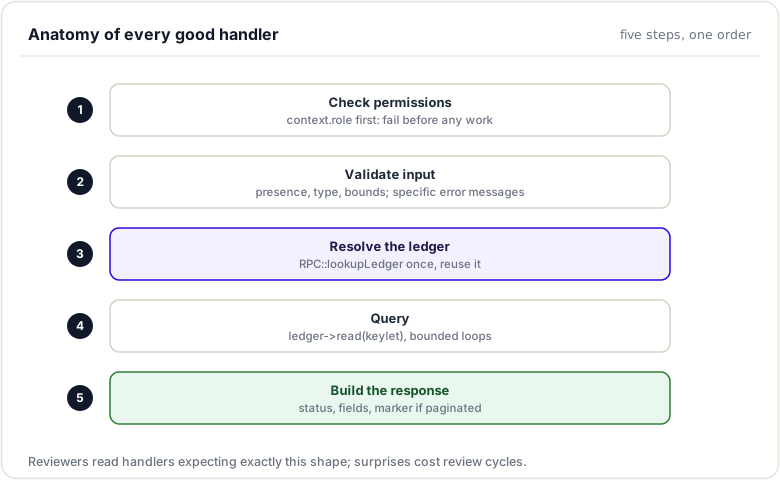
Step 1: Create the Handler File
Create a new file in the handlers directory:
File: src/xrpld/rpc/handlers/MyCustomHandler.cpp
//------------------------------------------------------------------------------
/*
    This file is part of rippled: https://github.com/ripple/rippled
    Copyright (c) 2024 Ripple Labs Inc.

    Permission to use, copy, modify, and/or distribute this software for any
    purpose  with  or without fee is hereby granted, provided that the above
    copyright notice and this permission notice appear in all copies.
*/
//==============================================================================

#include <xrpld/app/main/Application.h>
#include <xrpld/rpc/Context.h>
#include <xrpld/rpc/detail/RPCHelpers.h>
#include <xrpl/protocol/ErrorCodes.h>
#include <xrpl/protocol/jss.h>

namespace xrpl {

// Forward declaration
Json::Value doMyCustomCommand(RPC::JsonContext& context);

} // namespace xrpl
Key idea. A command only becomes reachable once it is registered in the handler table with its role and condition. Writing the function is not enough.
Step 2: Define the Handler Function
Implement the handler with the standard signature:
Json::Value doMyCustomCommand(RPC::JsonContext& context)
{
    // Create the result object
    Json::Value result;

    // Step 1: Validate input parameters
    if (!context.params.isMember(jss::account)) {
        return rpcError(RpcInvalidParams, "Missing 'account' field");
    }

    // Step 2: Parse and validate account
    std::string const accountStr = context.params[jss::account].asString();

    auto const account = parseBase58<AccountID>(accountStr);
    if (!account) {
        return rpcError(RpcActMalformed, "Invalid account format");
    }

    // Step 3: Get ledger to query
    std::shared_ptr<ReadView const> ledger;
    auto const ledgerResult = RPC::lookupLedger(ledger, context);

    if (!ledger) {
        return ledgerResult;
    }

    // Step 4: Query the ledger
    auto const sleAccount = ledger->read(keylet::account(*account));

    if (!sleAccount) {
        return rpcError(RpcActNotFound, "Account not found");
    }

    // Step 5: Build the response
    result[jss::account] = accountStr;
    result[jss::ledger_index] = ledger->info().seq;
    result[jss::validated] = ledger->isImmutable();

    // Add custom data
    result["balance"] = to_string(sleAccount->getFieldAmount(sfBalance));
    result["sequence"] = sleAccount->getFieldU32(sfSequence);

    return result;
}
Step 3: Register the Handler
Add your handler to the central table:
File: src/xrpld/rpc/detail/Handler.cpp
{.name = "my_custom_command",
 .valueMethod = byRef(&doMyCustomCommand),
 .role = Role::USER,
 .condition = Condition::NeedsCurrentLedger}
Step 4: Declare in Header (Optional)
For better code organization:
File: src/xrpld/rpc/handlers/Handlers.h
Json::Value doMyCustomCommand(RPC::JsonContext&);
Understanding the JsonContext
In brief: the object that carries the request, services, and ledger access into your handler.
The JsonContext object is your gateway to Rippled's internals:
Essential Fields
struct JsonContext {
    // Request parameters from the client
    Json::Value params;

    // Application instance (access to all services)
    Application& app;

    // Resource consumption tracking
    Resource::Consumer& consumer;

    // Caller's permission level
    Role role;

    // Current or requested ledger view
    std::shared_ptr<ReadView const> ledger;

    // Network operations interface
    NetworkOPs& netOps;

    // Ledger management interface
    LedgerMaster& ledgerMaster;

    // API version (for backward compatibility)
    unsigned int apiVersion;
};
Accessing Services
// Get the current ledger
auto currentLedger = context.ledgerMaster.getCurrentLedger();

// Get network info
auto serverState = context.netOps.getOperatingMode();

// Access configuration
auto const& config = context.app.config();

// Get transaction pool
auto& txPool = context.app.openLedger();
Input Validation Patterns
In brief: validate every field the caller sends before you use it.
Proper input validation is critical for security and reliability:
Validate Required Fields
if (!context.params.isMember(jss::account)) {
    return rpcError(RpcInvalidParams, "Missing 'account' field");
}

if (!context.params[jss::account].isString()) {
    return rpcError(RpcInvalidParams, "'account' must be a string");
}
Parse Account Addresses
auto const account = parseBase58<AccountID>(
    context.params[jss::account].asString()
);

if (!account) {
    return rpcError(RpcActMalformed, "Invalid account address");
}
Validate Numeric Parameters
if (context.params.isMember("limit")) {
    if (!context.params["limit"].isUInt()) {
        return rpcError(RpcInvalidParams, "'limit' must be a positive integer");
    }

    unsigned int limit = context.params["limit"].asUInt();

    if (limit == 0 || limit > 1000) {
        return rpcError(RpcInvalidParams, "'limit' must be between 1 and 1000");
    }
}
Validate Currency Codes
if (context.params.isMember("currency")) {
    std::string const currencyStr = context.params["currency"].asString();

    if (!to_currency(currencyStr)) {
        return rpcError(RpcInvalidParams, "Invalid currency code");
    }
}
Ledger Access Patterns
Most handlers need to access ledger data:
Using RPC::lookupLedger
The standard way to get a ledger:
std::shared_ptr<ReadView const> ledger;
auto const result = RPC::lookupLedger(ledger, context);

if (!ledger) {
    return result;  // Return the error response
}

// Now you can safely use 'ledger'
This helper function:
- Parses
ledger_indexorledger_hashfrom params - Handles special values like
"validated","current","closed" - Returns appropriate error if ledger not found
- Populates the
ledgershared pointer
Manual Ledger Selection
For advanced use cases:
std::shared_ptr<ReadView const> ledger;

if (context.params.isMember(jss::ledger_index)) {
    auto const ledgerIndex = context.params[jss::ledger_index].asUInt();
    ledger = context.ledgerMaster.getLedgerBySeq(ledgerIndex);
} else {
    // Default to current ledger
    ledger = context.ledgerMaster.getCurrentLedger();
}

if (!ledger) {
    return rpcError(RpcLgrNotFound, "Ledger not found");
}
Reading Ledger Objects
Once you have a ledger, you can query its state:
Read an Account
auto const sleAccount = ledger->read(keylet::account(accountID));

if (!sleAccount) {
    return rpcError(RpcActNotFound, "Account not found");
}

// Access account fields
STAmount balance = sleAccount->getFieldAmount(sfBalance);
std::uint32_t sequence = sleAccount->getFieldU32(sfSequence);
AccountID account = sleAccount->getAccountID(sfAccount);
Read Trust Lines
auto const sleRippleState = ledger->read(
    keylet::trustLine(accountID, issuerID, currency)
);

if (sleRippleState) {
    STAmount balance = sleRippleState->getFieldAmount(sfBalance);
    STAmount limit = sleRippleState->getFieldAmount(sfHighLimit);
}
Read Offers
auto const sleOffer = ledger->read(keylet::offer(accountID, sequence));

if (sleOffer) {
    STAmount takerPays = sleOffer->getFieldAmount(sfTakerPays);
    STAmount takerGets = sleOffer->getFieldAmount(sfTakerGets);
}
Iterate Directory
auto const dir = ledger->read(keylet::ownerDir(accountID));

if (dir) {
    for (auto const& index : dir->getFieldV256(sfIndexes)) {
        auto const sle = ledger->read(keylet::child(index));
        // Process each owned object
    }
}
Response Construction
Build well-structured JSON responses:
Basic Response
Json::Value result;
result[jss::account] = to_string(accountID);
result[jss::ledger_index] = ledger->info().seq;
result[jss::validated] = ledger->isImmutable();

return result;
Nested Objects
Json::Value accountData;
accountData[jss::Account] = to_string(accountID);
accountData[jss::Balance] = to_string(balance);
accountData[jss::Sequence] = sequence;

result[jss::account_data] = accountData;
Arrays
Json::Value lines(Json::arrayValue);

for (auto const& line : trustLines) {
    Json::Value lineJson;
    lineJson["account"] = to_string(line.account);
    lineJson["balance"] = to_string(line.balance);
    lineJson["currency"] = to_string(line.currency);

    lines.append(lineJson);
}

result["lines"] = lines;
Common Helper Functions
Rippled provides many utility functions to simplify handler implementation:
Account Parsing
// From RPC::detail::RPCHelpers.h
auto account = RPC::accountFromString(accountStr);
if (!account) {
    return rpcError(RpcActMalformed);
}
Amount Parsing
STAmount amount;
if (!amountFromJsonNoThrow(amount, params["amount"])) {
    return rpcError(RpcInvalidParams, "Invalid amount");
}
Currency/Issuer Extraction
Currency currency;
if (!to_currency(currency, params["currency"].asString())) {
    return rpcError(RpcInvalidParams, "Invalid currency");
}
Ledger Range Validation
auto [minLedger, maxLedger] = RPC::getLedgerRange(context, params);
Real-World Example: Custom Balance Checker
Let's implement a handler that returns XRP balance with reserve calculations:
Json::Value doGetAccountBalance(RPC::JsonContext& context)
{
    // Validate account parameter
    if (!context.params.isMember(jss::account)) {
        return rpcError(RpcInvalidParams, "Missing 'account' field");
    }

    auto const account = parseBase58<AccountID>(
        context.params[jss::account].asString()
    );

    if (!account) {
        return rpcError(RpcActMalformed, "Invalid account address");
    }

    // Get ledger
    std::shared_ptr<ReadView const> ledger;
    auto const ledgerResult = RPC::lookupLedger(ledger, context);

    if (!ledger) {
        return ledgerResult;
    }

    // Read account state
    auto const sleAccount = ledger->read(keylet::account(*account));

    if (!sleAccount) {
        return rpcError(RpcActNotFound, "Account not found");
    }

    // Get balance
    STAmount balance = sleAccount->getFieldAmount(sfBalance);

    // Calculate reserves
    auto const& fees = ledger->fees();
    std::uint32_t ownerCount = sleAccount->getFieldU32(sfOwnerCount);

    XRPAmount baseReserve = fees.accountReserve(0);
    XRPAmount ownerReserve = fees.accountReserve(ownerCount);
    XRPAmount totalReserve = baseReserve + ownerReserve;

    // Build response
    Json::Value result;
    result[jss::account] = to_string(*account);
    result[jss::ledger_index] = ledger->info().seq;
    result[jss::validated] = ledger->isImmutable();
    result["balance"] = to_string(balance);
    result["available_balance"] = to_string(balance - totalReserve);
    result["base_reserve"] = to_string(baseReserve);
    result["owner_reserve"] = to_string(ownerReserve);
    result["owner_count"] = ownerCount;

    return result;
}
Registration:
{.name = "get_account_balance",
 .valueMethod = byRef(&doGetAccountBalance),
 .role = Role::USER,
 .condition = Condition::NeedsCurrentLedger}
Example Request:
{
    "method": "get_account_balance",
    "params": [{
        "account": "rN7n7otQDd6FczFgLdlqtyMVrn3NnrcVXs",
        "ledger_index": "validated"
    }]
}
Example Response:
{
    "result": {
        "account": "rN7n7otQDd6FczFgLdlqtyMVrn3NnrcVXs",
        "ledger_index": 12345,
        "validated": true,
        "balance": "1000000000",
        "available_balance": "990000000",
        "base_reserve": "10000000",
        "owner_reserve": "0",
        "owner_count": 0
    }
}
Conclusion
Implementing custom RPC handlers transforms your understanding of Rippled's architecture into practical skills. By following the standard function signature, validating inputs thoroughly, leveraging helper functions, and building structured responses, you create handlers that integrate seamlessly with the existing codebase. The step-by-step process, from file creation through registration to testing, provides a repeatable pattern for extending Rippled's API capabilities with your own functionality.
Reference Guide to Production RPC Handlers
This reference guide walks through three actual RPC handlers from the rippled codebase. These handlers are battle-tested, production-ready implementations that demonstrate best practices and patterns you should follow in your own custom handlers.
Each example includes:
- Complete code walkthrough
- Key implementation patterns
- How it integrates with the broader system
- Performance and security considerations
1. AccountInfo Handler
Overview
The AccountInfo handler queries account state and returns detailed information about an account on the ledger. It's one of the most commonly used RPC commands and demonstrates fundamental patterns.
Source: src/xrpld/rpc/handlers/account/AccountInfo.cpp
Complete Implementation
Json::Value doAccountInfo(RPC::JsonContext& context)
{
    // STEP 1: Validate request has required parameters
    if (!context.params.isMember(jss::account)) {
        return rpcError(RpcInvalidParams);
    }

    // STEP 2: Parse and validate the account identifier
    std::string const strAccountID = context.params[jss::account].asString();

    auto const account = parseBase58<AccountID>(strAccountID);
    if (!account) {
        return rpcError(RpcActMalformed, "Account is malformed");
    }

    // STEP 3: Get the ledger to query against
    std::shared_ptr<ReadView const> ledger;
    auto const jvResult = RPC::lookupLedger(ledger, context);

    if (!ledger) {
        return jvResult;  // Return error from ledger lookup
    }

    // STEP 4: Query the account state from the ledger
    auto const sleAccount = ledger->read(keylet::account(*account));

    if (!sleAccount) {
        return rpcError(RpcActNotFound, "Account not found");
    }

    // STEP 5: Build the result object
    Json::Value result;
    result[jss::account_data] = sleAccount->getJson(0);
    result[jss::account_flags] = sleAccount->getFieldU32(sfFlags);

    // STEP 6: Include ledger information context
    if (ledger) {
        result[jss::ledger_current_index] =
            ledger->info().seq;
        result[jss::validated] =
            context.ledgerMaster.getValidLedgerIndex() >= ledger->info().seq;
    }

    return result;
}
Key Patterns Demonstrated
1. Parameter Validation
if (!context.params.isMember(jss::account)) {
    return rpcError(RpcInvalidParams);
}
- Always check for required parameters before accessing
- Use predefined JSON string constants (jss::*) for consistency
- Return early with error if validation fails
2. Account Parsing
auto const account = parseBase58<AccountID>(strAccountID);
if (!account) {
    return rpcError(RpcActMalformed, "Account is malformed");
}
- Use template function
parseBase58<>()for Base58Check decoding - Check optional return value before using
- Return specific error with descriptive message
3. Ledger Lookup
std::shared_ptr<ReadView const> ledger;
auto const jvResult = RPC::lookupLedger(ledger, context);
if (!ledger) {
    return jvResult;  // Forward the error response
}
- Use
RPC::lookupLedger()to get appropriate ledger - Helper function returns error if ledger unavailable
- Forward error response to client
4. Data Query
auto const sleAccount = ledger->read(keylet::account(*account));
if (!sleAccount) {
    return rpcError(RpcActNotFound, "Account not found");
}
- Use keylet functions to locate ledger objects
- Check for null before dereferencing
- Return appropriate "not found" error
5. Response Construction
Json::Value result;
result[jss::account_data] = sleAccount->getJson(0);
result[jss::ledger_current_index] = ledger->info().seq;
result[jss::validated] = ...;
return result;
- Build response as Json::Value object
- Include both requested data and contextual information
- Always return ledger context for validation
Error Handling
| Error Condition | Error Code | Message |
|---|---|---|
| Missing account parameter | RpcInvalidParams | "Missing 'account' field" |
| Malformed account address | RpcActMalformed | "Account is malformed" |
| No ledger available | RpcNoCurrent | "No current ledger" |
| Account doesn't exist | RpcActNotFound | "Account not found" |
2. Submit Handler
Overview
The Submit handler processes transaction submission. It demonstrates more complex patterns including transaction validation, fee calculation, and async processing.
Source: src/xrpld/rpc/handlers/transaction/Submit.cpp
Implementation Highlights
Json::Value doSubmit(RPC::JsonContext& context)
{
    // STEP 1: Require IDENTIFIED or ADMIN role
    if (!isUnlimited(context.role)) {   // Role.h: ADMIN or IDENTIFIED
        return rpcError(RpcForbidden);
    }

    // STEP 2: Check for required tx_json parameter
    if (!context.params.isMember(jss::tx_json)) {
        return rpcError(RpcInvalidParams, "Missing tx_json");
    }

    // STEP 3: Parse the transaction JSON
    Json::Value const& tx_json = context.params[jss::tx_json];

    auto const txn = Transaction::makeTransaction(tx_json);
    if (!txn) {
        return rpcError(RpcInvalidParams, "Invalid transaction");
    }

    // STEP 4: Get the current ledger for fee calculation
    auto const ledger = context.ledgerMaster.getClosedLedger();
    if (!ledger) {
        return rpcError(RpcNoClosed, "No closed ledger");
    }

    // STEP 5: Calculate base fee and check minimum
    XRPAmount const base_fee = ledger->baseFeeDrops();
    XRPAmount const tx_fee = txn->getFee();

    if (tx_fee < base_fee) {
        return rpcError(RpcInvalidParams,
            "Fee too low: " + to_string(tx_fee) +
            " < " + to_string(base_fee));
    }

    // STEP 6: Submit to mempool
    TER const result = context.app.getJobQueue()
        .postTransaction(txn);

    if (result != tesSUCCESS) {
        return rpcError(RpcInternal,
            transResultString(result));
    }

    // STEP 7: Build result with transaction details
    Json::Value jvResult;
    jvResult[jss::engine_result] = transResultString(result);
    jvResult[jss::engine_result_code] = result;
    jvResult[jss::tx_blob] = txn->getSigningHash().toString();
    jvResult[jss::tx_json] = txn->getJson(0);

    return jvResult;
}
Key Patterns Demonstrated
1. Permission Checking
if (!isUnlimited(context.role)) {   // Role.h: ADMIN or IDENTIFIED
    return rpcError(RpcForbidden);
}
- Check role permissions early, before processing
- Deny access immediately for unauthorized clients
- Refer to the RPC authentication & error handling module
2. Complex Validation
auto const txn = Transaction::makeTransaction(tx_json);
if (!txn) {
    return rpcError(RpcInvalidParams, "Invalid transaction");
}
- Use specialized parsing functions when available
- Provide specific error messages for validation failures
- Validate all inputs before state-changing operations
3. Context-Dependent Logic
XRPAmount const base_fee = ledger->baseFeeDrops();
XRPAmount const tx_fee = txn->getFee();

if (tx_fee < base_fee) {
    return rpcError(RpcInvalidParams, "Fee too low");
}
- Factor validation against current ledger state
- Provide helpful error messages with actual values
- Calculate derived values only when needed
4. Async Operation Handling
TER const result = context.app.getJobQueue()
    .postTransaction(txn);

if (result != tesSUCCESS) {
    return rpcError(RpcInternal, transResultString(result));
}
- Use job queue for async operations
- Map internal result codes to RPC errors
- Return human-readable error explanations
Error Scenarios
| Scenario | Code | Response |
|---|---|---|
| Unauthorized client | RpcForbidden | 200 OK, error object in the body |
| Missing tx_json | RpcInvalidParams | 200 OK, error object in the body |
| Unparseable transaction | RpcInvalidParams | 200 OK, error object in the body |
| Fee below minimum | RpcInvalidParams | 200 OK, error object with fee info |
Note: JSON-RPC over HTTP in rippled returns HTTP 200 with the error inside the JSON body for handler-level failures; non-200 statuses are reserved for transport-level problems (malformed HTTP, unauthorized port, server overload). | Submission failed | RpcInternal | 500 with result code |
3. ServerInfo Handler
Overview
The ServerInfo handler returns comprehensive information about the running node. It demonstrates accessing application state and formatting complex hierarchical data.
Source: src/xrpld/rpc/handlers/server_info/ServerInfo.cpp
Implementation Highlights
Json::Value doServerInfo(RPC::JsonContext& context)
{
    // STEP 1: Create the result object
    Json::Value jvResult;

    // STEP 2: Add server information
    jvResult[jss::info][jss::server_state] =
        to_string(context.app.getOPs().getNetworkState());

    // STEP 3: Add ledger information
    auto const ledger =
        context.ledgerMaster.getValidatedLedger();

    if (ledger) {
        jvResult[jss::info][jss::validated_ledger]
            [jss::sequence] = ledger->info().seq;
        jvResult[jss::info][jss::validated_ledger]
            [jss::hash] = to_string(ledger->info().hash);
        jvResult[jss::info][jss::validated_ledger]
            [jss::close_time] = ledger->info().closeTime;
    }

    // STEP 4: Add network information
    const auto& validations =
        context.validators.getValidations();
    jvResult[jss::info][jss::validated_ledgers] =
        context.ledgerMaster.getCompleteLedgers();
    jvResult[jss::info][jss::peers] =
        static_cast<Json::UInt>(context.peers.size());

    // STEP 5: Add configuration details (with permission check)
    if (context.role == Role::ADMIN) {
        jvResult[jss::config] = context.app.getConfig()
            .getAdminServerJSON();
    }

    // STEP 6: Add resource usage
    jvResult[jss::load_factor] =
        context.app.getOPs().getLoadFactor();

    return jvResult;
}
Key Patterns Demonstrated
1. Hierarchical JSON Construction
jvResult[jss::info][jss::server_state] = to_string(...);
jvResult[jss::info][jss::validated_ledger][jss::sequence] = ...;
- Build nested JSON structures by chaining subscript operators
- Use jss:: constants for all key names
- JSON library auto-creates intermediate objects
2. Optional Data Handling
auto const ledger = context.ledgerMaster.getValidatedLedger();

if (ledger) {
    jvResult[jss::info][jss::validated_ledger]
        [jss::sequence] = ledger->info().seq;
}
- Check for optional data before including
- Leave out fields if data isn't available
- Client code should handle missing optional fields
3. Role-Based Response Modification
if (context.role == Role::ADMIN) {
    jvResult[jss::config] = context.app.getConfig()
        .getAdminServerJSON();
}
- Tailor response content based on caller's role
- Include sensitive information only for authorized clients
- Refer to the RPC authentication & error handling module
4. Accessing Application State
context.app.getOPs().getNetworkState()
context.ledgerMaster.getValidatedLedger()
context.validators.getValidations()
context.app.getConfig()
- Use context object to access application components
- Through context.app, access the main Application singleton
- Cache results when making multiple queries
No Error Handling?
Notably, ServerInfo returns early without extensive error checking because:
- Server state is always available
- Missing data is handled by omitting fields
- No user input to validate
- No permission that would cause rejection
This demonstrates that not all handlers need error-heavy validation. Only validate what the client provides.
Common Implementation Patterns
Pattern 1: Parameter Extraction and Validation
// Safe extraction with validation
if (!context.params.isMember(jss::account)) {
    return rpcError(RpcInvalidParams);
}

std::string const strAccount =
    context.params[jss::account].asString();

auto const account = parseBase58<AccountID>(strAccount);
if (!account) {
    return rpcError(RpcActMalformed);
}
Pattern 2: Ledger Access
// Get appropriate ledger
std::shared_ptr<ReadView const> ledger;
auto const result = RPC::lookupLedger(ledger, context);

if (!ledger) {
    return result;  // Propagate error
}

// Use ledger safely
auto const sle = ledger->read(keylet);
if (!sle) {
    return rpcError(RpcActNotFound);
}
Pattern 3: Permission Checking
// Check permission early
if (context.role != Role::ADMIN) {
    return rpcError(RpcNoPermission);
}

// Now proceed with privileged operations
Pattern 4: Complex Result Building
Json::Value result;

// Add required fields
result[jss::field1] = value1;

// Add optional fields conditionally
if (condition) {
    result[jss::optional_field] = optionalValue;
}

// Always include ledger context
result[jss::ledger_current_index] = ledger->info().seq;
result[jss::validated] = isValidated;

return result;
Performance Considerations
1. Minimize Ledger Queries
// BAD: Multiple reads from ledger
auto sle1 = ledger->read(keylet1);
auto sle2 = ledger->read(keylet2);

// GOOD: Batch when possible, cache results
2. Avoid Synchronous Blocking
// BAD: Synchronous wait in handler
context.app.getJobQueue().waitFor(job);

// GOOD: Post async, return immediately
context.app.getJobQueue().post(job);
3. Check Permissions Early
// Check before expensive operations
if (!isUnlimited(context.role)) {
    return rpcError(RpcNoPermission);  // Fast fail
}

// Now do expensive work
Testing These Handlers
See Testing RPC Handlers for comprehensive testing strategies.
Quick test template:
TEST(AccountInfoTest, ValidAccount) {
    RPC::JsonContext context = setupTestContext();
    context.params[jss::account] = "rN7n7otQDd6FczFgLdlqtyMVrn...";

    auto result = doAccountInfo(context);

    ASSERT_TRUE(result.isMember(jss::account_data));
    ASSERT_EQ(result[jss::validated].asBool(), true);
}
Navigation
Related Module Sections:
- Implementing Custom Handlers
- the RPC authentication & error handling module
- Testing RPC Handlers
Summary
This module had you build an RPC command end to end. You wrote a handler with the standard signature, registered it in the handler table with a role and condition, validated the incoming parameters, looked up the ledger, and built a clean JSON response using jss field names. A command only becomes reachable once it is registered; writing the function alone is not enough.
To remember:
- Three steps: write
doMyCommand(RPC::JsonContext&), register it in the handler table (role + condition), declare it in the header - A handler that is not registered is unreachable: "unknown command" means missing table entry
- Validate every parameter: presence, type, format (
parseBase58<AccountID>for accounts) - Use
RPC::lookupLedgerto resolveledger_index/ledger_hasharguments safely - Read entries with a keylet +
view->read(...) - Build responses with
jss::field constants; setvalidatedwhen it applies - Reference implementations to copy from:
ServerInfo.cpp,AccountInfo.cppinsrc/xrpld/rpc/handlers - Watch out: return errors with
rpcError(...)codes, never ad-hoc strings; clients dispatch on the code
Next up. It works! Now make it something a reviewer would sign off. Next: the best practices that separate working handlers from production handlers.
Resources
Assignments
0 of 2 complete