
Transactor architecture
The `Transactor` base class and framework — contexts, phases, and how every transaction type extends a shared base.
What you'll learn
- Describe the Transactor base class and its members (`accountID_`, `preFeeBalance_`…).
- Distinguish PreflightContext / PreclaimContext / ApplyContext.
- Understand the ConsequencesFactory and the transactor hierarchy.
Introduction
≈90 min · Advanced · builds on Caching & resource management
Watch this short video by XRPL Commons first, then dive into the details below.
You've seen a transaction's journey from the outside, now let's meet the code that carries it out. In this module you'll learn the Transactor base class that every transaction type extends, the contexts that back each phase (PreflightContext, PreclaimContext, ApplyContext), and the shape of the transactor hierarchy. It's the framework you'll be building inside when you write your own transaction type later.
The Transactor Base Class
In brief: the shared base that every transaction type extends, holding common state and helpers.
Architecture Overview
Every transaction type in Rippled inherits from the Transactor base class, which provides the fundamental framework for transaction processing. This inheritance model ensures consistent behavior across all transaction types while allowing each type to implement its specific business logic.
The base Transactor class is defined in include/xrpl/tx/Transactor.h and provides:
- Common validation logic - Signature verification, fee checks, sequence number validation
- Helper methods - Account balance queries, ledger state access, fee calculation
- Per-phase hooks - Static
preflightandpreclaim(dispatched by name hiding), and the virtualdoApply - Transaction context - Access to the ledger, transaction data, and application services
Base Class Structure
A condensed extract (see Transactor.h for the full class):
class Transactor
{
protected:
    // Member variables
    ApplyContext& ctx_;
    beast::WrappedSink sink_;
    beast::Journal const j_;

    AccountID const accountID_;
    XRPAmount preFeeBalance_{};  // Balance before fees.

public:
    enum class ConsequencesFactoryType { Normal, Blocker, Custom };

    /** Process the transaction. (The main entry point.) */
    ApplyResult
    operator()();

    // The preflight and preclaim phases are STATIC functions, dispatched
    // by name hiding, not virtual: a derived class shadows them with its
    // own versions, and the framework instantiates the dispatch per type.
    template <class T>
    static NotTEC
    invokePreflight(PreflightContext const& ctx);

    static TER
    preclaim(PreclaimContext const& ctx);  // default: returns tesSUCCESS

    // Generic checks run by the preclaim pipeline
    static NotTEC
    checkSeqProxy(ReadView const& view, STTx const& tx, beast::Journal j);
    static NotTEC
    checkPriorTxAndLastLedger(PreclaimContext const& ctx);
    static TER
    checkFee(PreclaimContext const& ctx, XRPAmount baseFee);
    static NotTEC
    checkSign(PreclaimContext const& ctx);

protected:
    TER
    apply();  // charges the fee, consumes the sequence, then calls doApply()

    // Constructor - available to derived classes
    explicit Transactor(ApplyContext& ctx);

    virtual TER
    doApply() = 0;  // the only virtual phase
};
Note that payFee() is private: the base class charges the fee itself inside apply(); a derived transactor never calls it.
Key Concepts
ApplyContext: Provides access to the transaction being processed, the ledger view, and application services. This context object is passed through all stages of transaction processing.
Transaction Engine Result (TER): Every validation step returns a TER code: success (tes), retry (ter codes), malformed transaction (tem codes), failure against the current ledger state (tef codes), local errors that are never forwarded (tel codes), or failure that still claims the fee (tec codes). The class of the code determines whether a transaction can be retried, is rejected outright, or is applied to the ledger with only its fee charged.
Ledger Views: Transactors work with "views" of the ledger state, allowing tentative modifications that can be committed or rolled back. This ensures atomic transaction processing.
Key idea. Every transaction type inherits from
Transactor. Learn the base once and you understand the skeleton of every transaction on the ledger.
Three-Phase Validation Process
In brief: preflight, preclaim and doApply, each with its own context object.
The transactor framework implements a rigorous three-phase validation process. Each phase has a specific purpose and access to different levels of information, creating a defense-in-depth approach to transaction validation.
Phase 1: Preflight
Purpose: Static validation that doesn't require ledger state
Access: Only the raw transaction data and protocol rules
When It Runs: Before any ledger state is accessed, can run in parallel
What It Checks:
- Transaction format is valid
- Required fields are present
- Field values are within valid ranges
- Amounts are positive and properly formatted
- No malformed or contradictory data
Key Characteristic: Preflight checks are deterministic and stateless, they depend only on the transaction itself, not on current ledger state.
Preflight Example: Payment Transaction
A trimmed extract of the real Payment::preflight (Payment.cpp). Notice what is not here: no amendment gate and no calls to preflight1/preflight2. Transactor::invokePreflight applies the gating amendment from the amendments column of transactions.macro (Payment's is empty — it predates amendments) and runs preflight1, preflightUniversal, this function, preflight2, and preflightSigValidated around it. Extra amendment gates belong in checkExtraFeatures; flag checks belong in getFlagsMask.
NotTEC
Payment::preflight(PreflightContext const& ctx)
{
    auto& tx = ctx.tx;
    auto& j = ctx.j;

    STAmount const dstAmount(tx.getFieldAmount(sfAmount));
    bool const hasPaths = tx.isFieldPresent(sfPaths);
    bool const hasMax = tx.isFieldPresent(sfSendMax);

    auto const account = tx.getAccountID(sfAccount);
    STAmount const maxSourceAmount =
        getMaxSourceAmount(account, dstAmount, tx[~sfSendMax]);
    auto const& srcAsset = maxSourceAmount.asset();
    auto const& dstAsset = dstAmount.asset();

    if (!isLegalNet(dstAmount) || !isLegalNet(maxSourceAmount))
        return temBAD_AMOUNT;

    auto const dstAccountID = tx.getAccountID(sfDestination);
    if (!dstAccountID)
    {
        JLOG(j.trace()) << "Malformed transaction: "
                        << "Payment destination account not specified.";
        return temDST_NEEDED;
    }
    if (hasMax && maxSourceAmount <= beast::kZero)
    {
        JLOG(j.trace()) << "Malformed transaction: bad max amount: "
                        << maxSourceAmount.getFullText();
        return temBAD_AMOUNT;
    }
    if (dstAmount <= beast::kZero)
    {
        JLOG(j.trace()) << "Malformed transaction: bad dst amount: "
                        << dstAmount.getFullText();
        return temBAD_AMOUNT;
    }
    auto bad = [&](auto const& asset) {
        if (ctx.rules.enabled(featureMPTokensV2))
            return badAsset() == asset;
        return badCurrency() == asset;
    };
    if (bad(srcAsset) || bad(dstAsset))
    {
        JLOG(j.trace()) << "Malformed transaction: Bad currency.";
        return temBAD_CURRENCY;
    }
    if (account == dstAccountID && equalTokens(srcAsset, dstAsset) && !hasPaths)
    {
        // You're signing yourself a payment.
        // If hasPaths is true, you might be trying some arbitrage.
        return temREDUNDANT;
    }

    // ... (SendMax, DeliverMin, path, and MPT consistency checks elided)

    return tesSUCCESS;
}
Why Preflight Matters: By catching format errors early, preflight prevents wasting resources on obviously invalid transactions. It also provides fast feedback to clients about transaction formatting issues.
Phase 2: Preclaim
Purpose: Validation requiring read-only access to ledger state
Access: Current ledger state (read-only), transaction data, protocol rules
When It Runs: After preflight passes, but before any state modifications
What It Checks:
- Source account exists (the generic
checkSeqProxy/checkFeesteps returnterNO_ACCOUNTif not) - Destination account exists (or can be created)
- Required authorizations are in place
- Account flags and settings permit the transaction
- Sequence numbers are correct (
checkSeqProxy) - The fee can be paid (
checkFee)
What it does NOT check: whether the source account can fund the payment amount itself — that is decided in doApply, against preFeeBalance_ and the reserve. Trust-line balances and limits along issued-currency paths are likewise discovered during path evaluation inside doApply, not in preclaim.
Key Characteristic: Preclaim can read ledger state but cannot modify it. This allows for safe concurrent execution and caching of preclaim results.
Preclaim Example: Payment Transaction
A trimmed extract of the real Payment::preclaim (Payment.cpp). By the time this runs, the generic preclaim steps — checkSeqProxy, checkPriorTxAndLastLedger, checkPermission, checkSign, and checkFee (see invokePreclaim in applySteps.cpp) — have already run, so a missing source account or an unpayable fee never reaches this function. And the source-equals-destination redundancy check is a preflight check (temREDUNDANT, shown above), because a malformed transaction is a tem, not a state failure.
TER
Payment::preclaim(PreclaimContext const& ctx)
{
    bool const partialPaymentAllowed = ctx.tx.isFlag(tfPartialPayment);

    AccountID const dstAccountID(ctx.tx[sfDestination]);
    STAmount const dstAmount(ctx.tx[sfAmount]);

    auto const k = keylet::account(dstAccountID);
    auto const sleDst = ctx.view.read(k);

    if (!sleDst)
    {
        // Destination account does not exist.
        if (!dstAmount.native())
        {
            // Only XRP can create an account. Another transaction could
            // create the account and then this transaction would succeed.
            return tecNO_DST;
        }
        if (ctx.view.open() && partialPaymentAllowed)
        {
            // You cannot fund an account with a partial payment.
            return telNO_DST_PARTIAL;
        }
        if (dstAmount < STAmount(ctx.view.fees().reserve))
        {
            // The XRP delivered must be at least the base reserve,
            // or the new account cannot exist.
            return tecNO_DST_INSUF_XRP;
        }
    }
    else if (sleDst->isFlag(lsfRequireDestTag) && !ctx.tx.isFieldPresent(sfDestinationTag))
    {
        // The tag is basically account-specific information we don't
        // understand, but we can require someone to fill it in.
        return tecDST_TAG_NEEDED;
    }

    // ... (path-count, credential, and permissioned-domain checks elided)

    return tesSUCCESS;
}
(Note that lsfDisallowXRP never appears: the payment engine does not enforce that flag. It is advisory — clients are expected to honor it, but the ledger accepts XRP payments to accounts that set it.)
Why Preclaim Matters: Preclaim catches state-dependent errors before attempting state modifications. This prevents partially-applied transactions and provides clear error messages about why a transaction cannot succeed.
Phase 3: DoApply
Purpose: Actual ledger state modification
Access: Full read/write access to ledger state
When It Runs: After both preflight and preclaim succeed
What It Does:
- Debits source account
- Credits destination account
- Creates or modifies ledger objects
- Applies transaction-specific business logic
- Records transaction metadata
- Checks funding against
preFeeBalance_and the reserve
Key Characteristic: DoApply modifies ledger state. On tesSUCCESS all of the transaction's changes are applied. On a tec result the transaction-specific changes are rolled back, but the transaction is still applied to the ledger: the fee is charged, the sequence number is consumed, and the transaction — with its tec result — is recorded in the ledger. Those fee and sequence side effects are exactly why the tec class exists.
DoApply Example: Payment Transaction
The fee is not paid here: Transactor::apply() already called payFee() before invoking your doApply (see src/libxrpl/tx/Transactor.cpp). A derived transactor never touches the fee. What doApply does check is whether the payment is funded — against preFeeBalance_, the source balance captured before the fee was charged, with the reserve accounted for. A trimmed extract of the direct-XRP path of the real Payment::doApply:
TER
Payment::doApply()
{
    AccountID const dstAccountID(ctx_.tx.getAccountID(sfDestination));
    STAmount const dstAmount(ctx_.tx.getFieldAmount(sfAmount));

    auto const k = keylet::account(dstAccountID);
    SLE::pointer sleDst = view().peek(k);

    if (!sleDst)
    {
        // Create the account.
        sleDst = std::make_shared<SLE>(k);
        sleDst->setAccountID(sfAccount, dstAccountID);
        sleDst->setFieldU32(sfSequence, view().seq());
        sleDst->setFieldAmount(sfBalance, XRPAmount(beast::kZero));
        view().insert(sleDst);
    }
    else
    {
        view().update(sleDst);
    }

    // ... (issued-currency and path payments run RippleCalc here; direct
    //      MPT payments have their own branch. What follows is the direct
    //      XRP payment.)

    auto const sleSrc = view().peek(keylet::account(accountID_));
    if (!sleSrc)
        return tefINTERNAL;

    // ownerCount is the number of entries in this ledger for this
    // account that require a reserve.
    auto const ownerCount = sleSrc->getFieldU32(sfOwnerCount);

    // This is the total reserve in drops.
    auto const reserve = view().fees().accountReserve(ownerCount);

    // In a delegated payment, the fee payer is the delegated account,
    // not the source account (accountID_).
    bool const accountIsPayer = (ctx_.tx.getFeePayer() == accountID_);

    // preFeeBalance_ is the balance on the source account (accountID_)
    // BEFORE the fees were charged. If source account is the fee payer, it
    // must also cover the fee. The final spend may use the reserve to
    // cover fees.
    auto const minRequiredFunds =
        accountIsPayer ? std::max(reserve, ctx_.tx.getFieldAmount(sfFee).xrp()) : reserve;

    if (preFeeBalance_ < dstAmount.xrp() + minRequiredFunds)
    {
        // Vote no. However the transaction might succeed, if applied in
        // a different order.
        return tecUNFUNDED_PAYMENT;
    }

    // ... (deposit-authorization checks elided)

    // Do the arithmetic for the transfer and make the ledger change.
    sleSrc->setFieldAmount(sfBalance, sleSrc->getFieldAmount(sfBalance) - dstAmount);
    sleDst->setFieldAmount(sfBalance, sleDst->getFieldAmount(sfBalance) + dstAmount);

    return tesSUCCESS;
}
Why DoApply Matters: This is where the actual ledger state changes happen. DoApply ensures that only transactions that have passed all validation steps can modify the ledger, maintaining data integrity.
Transaction Types in Detail
In brief: how concrete transactors (Payment, OfferCreate, Escrow, and more) specialize the base.
The XRP Ledger supports numerous transaction types, each implemented as a specific transactor. Understanding the most common types helps you navigate the codebase and understand protocol capabilities.
Payment
File: src/libxrpl/tx/transactors/payment/Payment.cpp
Purpose: Transfer XRP or issued currencies between accounts
Key Features:
- Direct XRP transfers
- Issued currency transfers via trust lines
- Path-based payments (automatic currency conversion)
- Partial payments (deliver less than requested if full amount unavailable)
Common Fields:
Account- Source accountDestination- Recipient accountAmount- Amount to deliverSendMax(optional) - Maximum amount to sendPaths(optional) - Payment paths for currency conversionDestinationTag(optional) - Identifier for the recipient
Use Cases:
- Simple XRP transfers
- Issued currency payments
- Cross-currency payments
- Payment channel settlements
OfferCreate
File: src/libxrpl/tx/transactors/dex/OfferCreate.cpp
Purpose: Place an offer on the decentralized exchange (DEX)
Key Features:
- Buy or sell any currency pair
- Immediate-or-cancel orders
- Fill-or-kill orders
- Passive offers (don't consume existing offers)
- Auto-bridging via XRP
Common Fields:
TakerPays- Asset the taker (matcher) paysTakerGets- Asset the taker receivesExpiration(optional) - When offer expiresOfferSequence(optional) - Sequence of offer to replace
Use Cases:
- Currency exchange
- Market making
- Arbitrage
- Limit orders
OfferCancel
File: src/libxrpl/tx/transactors/dex/OfferCancel.cpp
Purpose: Remove an offer from the order book
Key Features:
- Cancel by offer sequence number
- Only offer owner can cancel
Common Fields:
OfferSequence- Sequence number of offer to cancel
TrustSet
File: src/libxrpl/tx/transactors/token/TrustSet.cpp
Purpose: Create or modify a trust line for issued currencies
Key Features:
- Set trust limit for a currency
- Authorize/deauthorize trust lines
- Configure trust line flags
Common Fields:
LimitAmount- Trust line limit and currencyQualityIn(optional) - Exchange rate for incoming transfersQualityOut(optional) - Exchange rate for outgoing transfers
Use Cases:
- Accept issued currencies
- Set credit limits
- Freeze trust lines
EscrowCreate
File: src/libxrpl/tx/transactors/escrow/EscrowCreate.cpp
Purpose: Lock XRP until conditions are met
Key Features:
- Time-based release (
FinishAfter/CancelAfter) - Conditional release (PREIMAGE-SHA-256 crypto-conditions via
Condition/Fulfillment) - Guaranteed delivery or return
Common Fields:
Destination- Who can claim the escrowAmount- Amount of XRP to escrowFinishAfter(optional) - Earliest finish timeCancelAfter(optional) - When escrow can be cancelledCondition(optional) - Cryptographic condition for release
EscrowFinish
File: src/libxrpl/tx/transactors/escrow/EscrowFinish.cpp
Purpose: Complete an escrow and deliver XRP
Key Features:
- Must meet time and/or condition requirements
- Can be executed by anyone (typically destination)
Common Fields:
Owner- Account that created the escrowOfferSequence- Sequence of EscrowCreate transactionFulfillment(optional) - Fulfillment of cryptographic condition
EscrowCancel
File: src/libxrpl/tx/transactors/escrow/EscrowCancel.cpp
Purpose: Return escrowed XRP to owner
Key Features:
- Only after CancelAfter time passes
- Can be executed by anyone
AccountSet
File: src/libxrpl/tx/transactors/account/AccountSet.cpp
Purpose: Modify account settings and flags
Key Features:
- Set account flags
- Configure transfer rate
- Set domain and message key
- Configure email hash
Common Fields:
SetFlag/ClearFlag- Flags to modifyTransferRate(optional) - Fee for transferring issued currenciesDomain(optional) - Domain associated with accountMessageKey(optional) - Public key for encrypted messaging
Important Flags:
asfRequireDest- Require destination tagasfRequireAuth- Require authorization for trust linesasfDisallowXRP- Disallow XRP payments (advisory: clients are expected to honor it, the payment engine does not enforce it)asfDefaultRipple- Enable rippling by default
SignerListSet
File: src/libxrpl/tx/transactors/account/SignerListSet.cpp
Purpose: Create or modify multi-signature configuration
Key Features:
- Define list of authorized signers
- Set signing quorum
- Enable complex authorization schemes
Common Fields:
SignerQuorum- Required signature weightSignerEntries- List of authorized signers with weights
PaymentChannelCreate
File: src/libxrpl/tx/transactors/payment_channel/PaymentChannelCreate.cpp
Purpose: Open a unidirectional payment channel
Key Features:
- Lock XRP for fast, off-ledger payments
- Asynchronous payments with cryptographic claims
- Efficient micropayments
Creating Custom Transactors
In brief: the steps to add a brand-new transaction type to the protocol.
When implementing new features through amendments, you'll often need to create custom transactors. Here's the complete process:
Step 1: Define the Transaction in transactions.macro
There is exactly one place where a transaction type is defined: include/xrpl/protocol/detail/transactions.macro. One TRANSACTION(tag, value, name, delegable, amendments, privileges, fields) entry — plus the guarded header include right above it — gives you the TxType enum value, the transaction format, the JSON name binding, the amendment gate, and the dispatch registration. Everything else is generated from it.
/** This transaction type performs my custom operation. */
#if TRANSACTION_INCLUDE
#   include <xrpl/tx/transactors/MyCustomTx.h>
#endif
TRANSACTION(ttMY_CUSTOM_TX, 100, MyCustomTx,   // 100 = next unused value
    Delegation::Delegable,
    featureMyCustomTx,
    NoPriv,
    ({
    {sfDestination, SoeRequired},
    {sfCustomField, SoeRequired},
    {sfOptionalField, SoeOptional},
}))
The amendments column (featureMyCustomTx) is the gate: the framework returns temDISABLED for this transaction type until that amendment is enabled — you never write that check yourself.
Prerequisites the entry relies on, each in its own single-source-of-truth file:
featureMyCustomTxdeclared ininclude/xrpl/protocol/detail/features.macrosfCustomField/sfOptionalFielddeclared ininclude/xrpl/protocol/detail/sfields.macro(here as UINT32 fields)JSS(MyCustomTx)added toinclude/xrpl/protocol/jss.h(the format bindsjss::MyCustomTxas the JSON name)
Step 2: Create Transactor Class
Create include/xrpl/tx/transactors/MyCustomTx.h. Note the exact member name kConsequencesFactory — the dispatch templates in applySteps.cpp require it — and that visitInvariantEntry / finalizeInvariants are pure virtual in Transactor, so every transactor must override them (most do so trivially):
#pragma once

#include <xrpl/tx/Transactor.h>

namespace xrpl {

class MyCustomTx : public Transactor
{
public:
    static constexpr auto kConsequencesFactory = ConsequencesFactoryType::Normal;

    explicit MyCustomTx(ApplyContext& ctx) : Transactor(ctx)
    {
    }

    static NotTEC
    preflight(PreflightContext const& ctx);

    static TER
    preclaim(PreclaimContext const& ctx);

    TER
    doApply() override;

    void
    visitInvariantEntry(
        bool isDelete,
        std::shared_ptr<SLE const> const& before,
        std::shared_ptr<SLE const> const& after) override;

    [[nodiscard]] bool
    finalizeInvariants(
        STTx const& tx,
        TER result,
        XRPAmount fee,
        ReadView const& view,
        beast::Journal const& j) override;
};

}  // namespace xrpl
Step 3: Implement Preflight
Create src/libxrpl/tx/transactors/MyCustomTx.cpp:
#include <xrpl/tx/transactors/MyCustomTx.h>

#include <xrpl/basics/Log.h>
#include <xrpl/protocol/Feature.h>
#include <xrpl/protocol/Indexes.h>

namespace xrpl {

NotTEC
MyCustomTx::preflight(PreflightContext const& ctx)
{
    // No amendment gate here: invokePreflight already returned temDISABLED
    // if featureMyCustomTx (the amendments column of the TRANSACTION entry)
    // is not enabled. Extra gates go in checkExtraFeatures; flag checks go
    // in getFlagsMask. preflight1/preflight2 are private to Transactor and
    // run around this function automatically.

    // sfCustomField is SoeRequired, so its presence is already enforced by
    // the transaction format. Validate its value:
    auto const customValue = ctx.tx[sfCustomField];
    if (customValue > 1000000)
        return temBAD_AMOUNT;

    // Additional stateless validation...

    return tesSUCCESS;
}
Step 4: Implement Preclaim
TER
MyCustomTx::preclaim(PreclaimContext const& ctx)
{
    // The generic preclaim steps -- checkSeqProxy, checkPriorTxAndLastLedger,
    // checkPermission, checkSign, and checkFee -- have already run. A missing
    // source account (terNO_ACCOUNT) or an unpayable fee never reaches this
    // function, so don't re-check them here.

    // Verify destination account exists
    if (!ctx.view.exists(keylet::account(ctx.tx[sfDestination])))
        return tecNO_DST;

    // Additional state-based validation...

    return tesSUCCESS;
}
Step 5: Implement DoApply
TER
MyCustomTx::doApply()
{
    // (fee already charged by Transactor::apply() before we get here)

    // Get transaction fields
    auto const dst = ctx_.tx[sfDestination];
    auto const customValue = ctx_.tx[sfCustomField];

    // Perform custom logic
    // Example: Create a new ledger object. NOTE: keylet::custom is a
    // placeholder, not a real API -- a real transactor defines its keylet
    // in Indexes.h / Indexes.cpp.
    auto const sleNew = std::make_shared<SLE>(
        keylet::custom(accountID_, ctx_.tx.getSeqProxy().value()));

    sleNew->setAccountID(sfAccount, accountID_);
    sleNew->setAccountID(sfDestination, dst);
    sleNew->setFieldU32(sfCustomField, customValue);

    // Insert into ledger
    view().insert(sleNew);

    // Log the operation
    JLOG(j_.trace()) << "MyCustomTx applied successfully";

    return tesSUCCESS;
}

void
MyCustomTx::visitInvariantEntry(
    bool,
    std::shared_ptr<SLE const> const&,
    std::shared_ptr<SLE const> const&)
{
    // No transaction-specific invariants.
}

bool
MyCustomTx::finalizeInvariants(STTx const&, TER, XRPAmount, ReadView const&, beast::Journal const&)
{
    // No transaction-specific invariants.
    return true;
}

}  // namespace xrpl
Step 6: Registration Is Generated — Don't Hand-Edit the Consumers
There is no registration file to edit. The TRANSACTION entry you wrote in Step 1 is expanded everywhere it is needed:
src/libxrpl/protocol/TxFormats.cppexpands it intoadd(jss::name, tag, fields, getCommonFields())— the transaction formatsrc/libxrpl/tx/applySteps.cppexpands it into thecase tag:dispatch insidewithTxnType— preflight, preclaim, base-fee calculation, and doApply all route through itinclude/xrpl/protocol/TxFormats.hexpands it into theTxTypeenum (ttMY_CUSTOM_TX = 100)
applySteps.cpp even carries the warning:
// DO NOT INCLUDE TRANSACTOR HEADER FILES HERE.
// See the instructions at the top of transactions.macro instead.
The #if TRANSACTION_INCLUDE block in transactions.macro is how your header reaches applySteps.cpp. If your transactor needs custom transaction-queue consequences, set kConsequencesFactory = ConsequencesFactoryType::Custom and define static TxConsequences makeTxConsequences(PreflightContext const& ctx) — the consequencesHelper templates in applySteps.cpp select it by the kConsequencesFactory value.
Step 7: Write Tests
Create src/test/app/MyCustomTx_test.cpp:
#include <test/jtx.h>

#include <xrpl/protocol/Feature.h>
#include <xrpl/protocol/jss.h>

namespace xrpl {
namespace test {

class MyCustomTx_test : public beast::unit_test::suite
{
public:
    void
    testBasicOperation()
    {
        using namespace jtx;
        Env env(*this, testableAmendments() | featureMyCustomTx);

        // Create test accounts
        Account const alice{"alice"};
        Account const bob{"bob"};
        env.fund(XRP(10000), alice, bob);

        // Submit custom transaction
        Json::Value jv;
        jv[jss::TransactionType] = jss::MyCustomTx;  // the JSS token from Step 1
        jv[jss::Account] = alice.human();
        jv[jss::Destination] = bob.human();
        jv["CustomField"] = 12345;
        jv[jss::Fee] = "10";

        env(jv);
        env.close();

        // Verify results
        // Add assertions...
    }

    void
    run() override
    {
        testBasicOperation();
        // More tests...
    }
};

BEAST_DEFINE_TESTSUITE(MyCustomTx, app, xrpl);

}  // namespace test
}  // namespace xrpl
Transaction Lifecycle Within Framework
Understanding how a transaction flows through the transactor framework helps debug issues and optimize performance.
Complete Flow Diagram
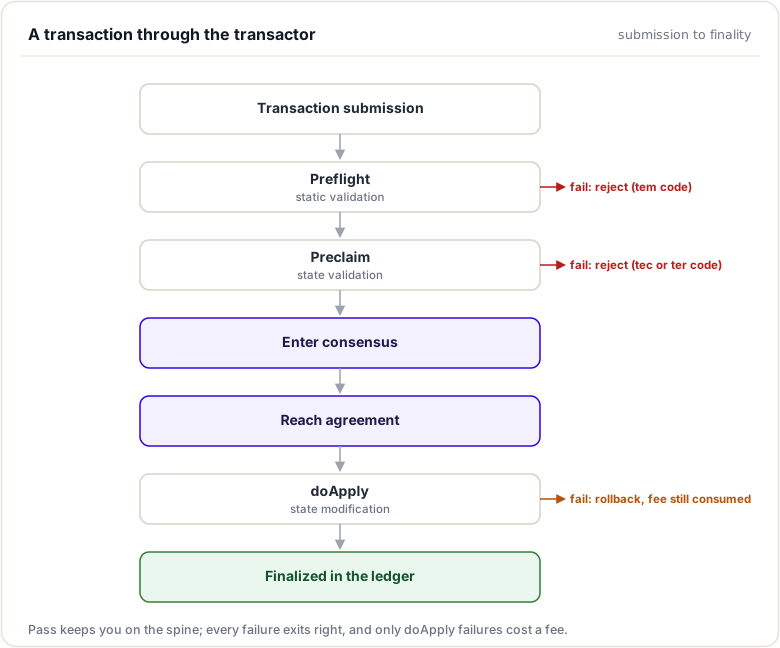
Error Code Categories
tel (Local Error): Transaction failed local, non-consensus checks (fee inadequate under current load, exceeds a local limit)
- Example:
telINSUF_FEE_P,telBAD_PATH_COUNT,telCAN_NOT_QUEUE - Action: Not forwarded to peers; may succeed if resubmitted (e.g. when load drops)
tem (Malformed): Transaction is permanently invalid due to format issues
- Example:
temMALFORMED,temBAD_AMOUNT,temDISABLED - Action: Reject immediately, never retry
tef (Failure): Transaction cannot succeed given the current ledger state (e.g. a sequence number that was already used)
- Example:
tefPAST_SEQ,tefMASTER_DISABLED - Action: Not applied, not forwarded; could only succeed against a different ledger state
ter (Retry): Transaction failed but might succeed later
- Example:
terQUEUED,terPRE_SEQ - Action: Can be retried after conditions change
tec (Claimed Fee): Transaction failed, but is still applied to the ledger
- Example:
tecUNFUNDED,tecNO_DST,tecNO_PERMISSION - Action: Fee charged, sequence number consumed, transaction recorded in the ledger with its
tecresult
tes (Success): Transaction succeeded
- Example:
tesSUCCESS - Action: Changes committed to ledger
Set requireDestTag flag on destination account
xrpld submit '{ "TransactionType": "AccountSet", "Account": "<address2>", "SetFlag": 1, "Fee": "12" }'
**Step 4**: Try payment without destination tag

```bash
# This should fail with tecDST_TAG_NEEDED
xrpld submit '{
  "TransactionType": "Payment",
  "Account": "<address1>",
  "Destination": "<address2>",
  "Amount": "1000000",
  "Fee": "12"
}'
Step 5: Try payment with destination tag
# This should succeed
xrpld submit '{
  "TransactionType": "Payment",
  "Account": "<address1>",
  "Destination": "<address2>",
  "Amount": "1000000",
  "DestinationTag": 12345,
  "Fee": "12"
}'
Part 3: Modify the Transactor (Advanced)
Step 1: Add custom logging
Edit Payment.cpp and add logging to doApply():
TER Payment::doApply()
{
    JLOG(j_.info()) << "Payment doApply started";
    JLOG(j_.info()) << "Source: " << accountID_;
    JLOG(j_.info()) << "Destination: " << ctx_.tx[sfDestination];
    JLOG(j_.info()) << "Amount: " << ctx_.tx[sfAmount];

    // ... existing code ...
}
Step 2: Recompile rippled
cd rippled/build
cmake --build . --target xrpld
Step 3: Run with your modified code
./xrpld --conf=xrpld.cfg --standalone
Step 4: Submit a payment and observe your logs
Analysis Questions
Answer these based on your exploration:
- What happens in each validation phase?
- List the checks performed in preflight
- List the checks performed in preclaim
- What state modifications occur in doApply?
- How are transaction fees handled?
- Where is
payFee()called? - What happens if an account can't pay the fee?
- How does the code handle XRP vs issued currencies?
- Find the code that distinguishes between them
- How do payment paths work for issued currencies?
- What's the role of the
accountSend()helper?
- Where is it implemented?
- What does it do internally?
Additional Resources
Official Documentation
- XRP Ledger Dev Portal: xrpl.org/docs
- Transaction Types: xrpl.org/transaction-types
- Create Custom Transactors: xrpl.org/create-custom-transactors
Codebase References
src/libxrpl/tx/transactors- All transactor implementationsinclude/xrpl/tx/Transactor.h- Base transactor classinclude/xrpl/protocol/detail/transactions.macro- The single source of truth for transaction typessrc/libxrpl/protocol/TxFormats.cpp- Transaction formats (generated from the macro)include/xrpl/protocol/TER.h- Transaction result codes
Related Topics
- Protocols - How transactions are propagated across the network
- Transaction Lifecycle - Complete journey from submission to ledger
- Application Layer - How transactors integrate with the overall system
Transactor Architecture
Introduction
Every transaction that modifies the XRP Ledger, whether it's a payment, an offer, a trust line, or any other operation, is processed by a Transactor. The transactor architecture provides a consistent, safe, and extensible framework for implementing transaction types while ensuring that the ledger remains in a valid state.
Understanding this architecture is essential for anyone who wants to implement new transaction types, debug validation failures, or contribute to the rippled codebase. This section explores the layered design of the transaction engine and how each component contributes to the safety and correctness of ledger modifications.
The Transactor Base Class
The Transactor class, defined in include/xrpl/tx/Transactor.h, is the foundation of all transaction processing in rippled. Every transaction type inherits from this base class, which provides:
- Common validation logic: Signature verification, fee checks, sequence number validation
- Helper methods: Account balance queries, ledger state access, fee calculation
- Per-phase hooks: Static
preflightandpreclaim(dispatched by name hiding), and the virtualdoApply - Transaction context: Access to the ledger view, transaction data, and application services
Core Class Structure
class Transactor
{
protected:
    ApplyContext& ctx_;
    beast::WrappedSink sink_;
    beast::Journal const j_;

    AccountID const accountID_;
    XRPAmount preFeeBalance_{};  // Balance before fees.

public:
    enum class ConsequencesFactoryType { Normal, Blocker, Custom };

    // Main entry point for transaction application
    ApplyResult operator()();

    ApplyView& view();
    ApplyView const& view() const;

    // Static methods for validation phases
    static NotTEC checkSeqProxy(ReadView const& view, STTx const& tx, beast::Journal j);
    static NotTEC checkPriorTxAndLastLedger(PreclaimContext const& ctx);
    static TER checkFee(PreclaimContext const& ctx, XRPAmount baseFee);
    static NotTEC checkSign(PreclaimContext const& ctx);
    static XRPAmount calculateBaseFee(ReadView const& view, STTx const& tx);

    // Default implementations that derived classes can override
    static TER preclaim(PreclaimContext const& ctx) { return tesSUCCESS; }

protected:
    TER apply();
    explicit Transactor(ApplyContext& ctx);

    virtual void preCompute();
    virtual TER doApply() = 0;  // Pure virtual - must be implemented

    // Transaction-specific invariant hooks - also pure virtual
    virtual void
    visitInvariantEntry(
        bool isDelete,
        std::shared_ptr<SLE const> const& before,
        std::shared_ptr<SLE const> const& after) = 0;

    [[nodiscard]] virtual bool
    finalizeInvariants(
        STTx const& tx,
        TER result,
        XRPAmount fee,
        ReadView const& view,
        beast::Journal const& j) = 0;
};
Key observations:
doApply()is pure virtual: Every transaction type must implement this methodpreclaim()has a default implementation: ReturnstesSUCCESS, can be overriddenvisitInvariantEntry()andfinalizeInvariants()are also pure virtual: Every transactor implements them, most triviallypreFeeBalance_: Tracks the account's XRP balance before fees are deductedctx_: TheApplyContextprovides access to the transaction, view, and application services
Context Objects
The transactor framework uses three context objects that provide different levels of access at each processing phase:
PreflightContext
Used during the preflight phase for stateless validation:
struct PreflightContext
{
public:
    std::reference_wrapper<ServiceRegistry> registry;
    STTx const& tx;
    Rules const rules;
    ApplyFlags flags;
    std::optional<uint256 const> parentBatchId;
    beast::Journal const j;
};
What it provides:
- Access to the raw transaction (
tx) - Protocol rules that are currently enabled (
rules) - Application flags (
flags) - Application services via the
ServiceRegistry(registry) - The outer Batch transaction's ID, when this is an inner transaction of a Batch (
parentBatchId) - Logging journal (
j)
What it does NOT provide:
- Any ledger state (no
view)
This limitation is intentional, preflight checks must be stateless and deterministic based solely on the transaction content.
PreclaimContext
Used during the preclaim phase for read-only ledger validation:
struct PreclaimContext
{
public:
    std::reference_wrapper<ServiceRegistry> registry;
    ReadView const& view;
    TER preflightResult;
    ApplyFlags flags;
    STTx const& tx;
    std::optional<uint256 const> const parentBatchId;
    beast::Journal const j;
};
What it provides:
- Read-only access to the ledger (
view) - The result from preflight (
preflightResult) - Transaction and application-services context
Key distinction: The view is ReadView const&, you can read ledger state but cannot modify it.
ApplyContext
Used during the doApply phase for ledger modification:
class ApplyContext
{
public:
    std::reference_wrapper<ServiceRegistry> registry;
    STTx const& tx;
    TER const preclaimResult;
    XRPAmount const baseFee;
    beast::Journal const journal;

    ApplyView& view();
    void deliver(STAmount const& amount);
    // ... additional methods
};
What it provides:
- Full read/write access to the ledger via
view() - Transaction data and application services
- Methods for delivering amounts, tracking metadata
Transaction Type Registration
New transaction types are registered with the transaction engine from a single source of truth:
- One
TRANSACTION(...)entry ininclude/xrpl/protocol/detail/transactions.macro, with the transactor header in the guarded#if TRANSACTION_INCLUDEblock above it - Transactor class implementation in
src/libxrpl/tx/transactors - Generated consumers:
TxFormats.cppexpands the macro into the format table, andapplySteps.cppexpands it into the type-dispatch switch — neither file is edited by hand
Example: CheckCreate Registration
In transactions.macro:
/** This transaction type creates a new check. */
#if TRANSACTION_INCLUDE
#   include <xrpl/tx/transactors/check/CheckCreate.h>
#endif
TRANSACTION(ttCHECK_CREATE, 16, CheckCreate,
    Delegation::Delegable,
    uint256{},
    NoPriv,
    ({
    {sfDestination, SoeRequired},
    {sfSendMax, SoeRequired, SoeMptSupported},
    {sfExpiration, SoeOptional},
    {sfDestinationTag, SoeOptional},
    {sfInvoiceID, SoeOptional},
}))
This single entry defines:
- The transaction type enum (
ttCHECK_CREATE = 16) - The transactor class and JSON name (
CheckCreate/jss::CheckCreate) - Whether the transaction can be delegated (
Delegation::Delegable) - The gating amendment (
uint256{}here — CheckCreate's gate predates the column; a new type puts its feature here) - The invariant privileges (
NoPriv) - Required and optional fields (common fields are appended by
TxFormats)
The Transactor Hierarchy
All specific transaction types inherit from Transactor and implement their own validation logic:
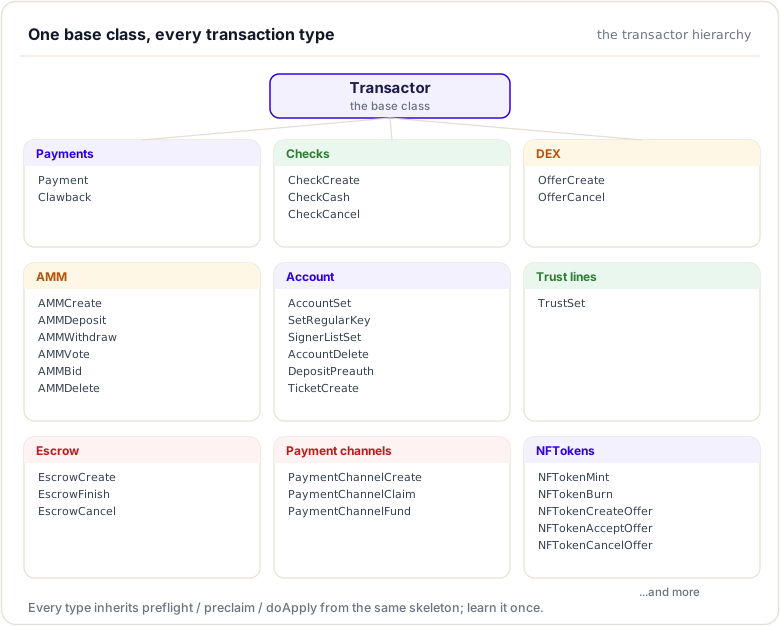
Each derived class typically implements:
preflight(): Static method for stateless validationpreclaim(): Static method for ledger-state validationdoApply(): Instance method for applying changes
plus the invariant hooks visitInvariantEntry() and finalizeInvariants().
The invokePreflight Template
The base class provides a template method that orchestrates the preflight phase:
template <class T>
NotTEC
Transactor::invokePreflight(PreflightContext const& ctx)
{
    // 1. Check the transaction type's gating amendment
    //    (the `amendments` column of transactions.macro)
    auto const feature =
        Permission::getInstance().getTxFeature(ctx.tx.getTxnType());
    if (feature && !ctx.rules.enabled(*feature))
        return temDISABLED;

    // 2. Check any extra features the transaction requires
    if (!T::checkExtraFeatures(ctx))
        return temDISABLED;

    // 3. Run preflight1 (account, fee, flags validation)
    if (auto const ret = preflight1(ctx, T::getFlagsMask(ctx)))
        return ret;

    // 4. Run universal validations (valid MPTAmount and XRPAmount)
    if (auto const ret = preflightUniversal(ctx))
        return ret;

    // 5. Run the transaction-specific preflight
    if (auto const ret = T::preflight(ctx))
        return ret;

    // 6. Run preflight2 (signature validation)
    if (auto const ret = preflight2(ctx))
        return ret;

    // 7. Run any post-signature validation
    return T::preflightSigValidated(ctx);
}
This template ensures consistent ordering of validation steps across all transaction types. preflight1, preflightUniversal, and preflight2 are private to Transactor — a derived preflight must never call them, gate amendments, or check flags itself; those jobs belong to the template and to the checkExtraFeatures / getFlagsMask hooks.
Key Member Variables
accountID_
The AccountID of the transaction sender, extracted from the sfAccount field:
AccountID const accountID_;
This is set during construction and used throughout transaction processing.
preFeeBalance_
XRPAmount preFeeBalance_{}; // Balance before fees
This records the sender's XRP balance at the start of transaction processing, before the
fee is deducted. It is used for reserve calculations, the reserve is checked against
preFeeBalance_ to allow accounts to dip into their reserve to pay the transaction fee. The
fee is charged, and the post-fee balance written to the ledger, by the base class itself.
ctx_
ApplyContext& ctx_;
The ApplyContext provides access to:
ctx_.tx: The transaction being processedctx_.view(): The ledger view for reading/writingctx_.registry: TheServiceRegistry(application services)ctx_.journal: Logging
Helper Methods
The base class provides several helper methods used by derived transactors:
view()
ApplyView& view() { return ctx_.view(); }
Returns the ledger view for reading and modifying ledger state.
calculateBaseFee()
static XRPAmount calculateBaseFee(ReadView const& view, STTx const& tx);
Calculates the base transaction fee based on the transaction type and current fee settings.
minimumFee()
static XRPAmount minimumFee(
    ServiceRegistry& registry,
    XRPAmount baseFee,
    Fees const& fees,
    ApplyFlags flags);
Calculates the minimum fee required considering current load and fee escalation.
Codebase References
| File | Description |
|---|---|
include/xrpl/tx/Transactor.h |
Base Transactor class definition |
src/libxrpl/tx/Transactor.cpp |
Base class implementation |
include/xrpl/tx/ApplyContext.h |
ApplyContext definition |
include/xrpl/protocol/detail/transactions.macro |
Transaction type definitions (single source of truth) |
src/libxrpl/tx/applySteps.cpp |
Transaction type dispatch (generated from the macro) |
src/libxrpl/protocol/TxFormats.cpp |
Transaction formats (generated from the macro) |
Summary
This module introduced the transactor framework. Every transaction type derives from the shared Transactor base class and runs the same three phases, each with its own context: PreflightContext, PreclaimContext, and ApplyContext. You saw how concrete transactors (Payment, OfferCreate, Escrow, and others) specialise the base, the role of members like preFeeBalance_, and the steps to add a brand-new transaction type.
To remember:
- Every transaction type extends
Transactor(include/xrpl/tx/Transactor.h) - Static phases
preflight(PreflightContext)andpreclaim(PreclaimContext); memberdoApply()withApplyContext ctx_ - Members you will use:
accountID_,preFeeBalance_(reserve checks),view() kConsequencesFactory(ConsequencesFactoryType { Normal, Blocker, Custom }) declares how the tx behaves in the queue- Concrete transactors live in
src/libxrpl/tx/transactors/<family>/ - Adding a type: one
TRANSACTIONentry intransactions.macro(fields, gating amendment, privileges, header include) plus the transactor class —TxFormatsand theapplyStepsdispatch are generated from it - The CheckCreate case study (two modules ahead) is the working template
- Watch out: preflight and preclaim are static, so no member state; only
doApplymay write. On atecthe tx changes roll back, but the fee is charged, the sequence consumed, and the transaction recorded in the ledger
Next up. You met the family; now watch one member run the gauntlet. Next: the processing pipeline, preflight to doApply, and why each gate exists.
Resources
Assignments
0 of 2 complete