
TER result codes
The Transaction Engine Result taxonomy — tes / tec / ter / tef / tem / tel — and how to choose the right code.
What you'll learn
- Read the six TER categories and their ranges.
- Know when a fee is claimed vs not.
- Choose appropriate result codes and understand `NotTEC`.
Introduction
≈30 min · Intermediate · builds on State modification, fees & sequences
You've watched a transaction move through preflight, preclaim and doApply, but how does the engine actually tell you what happened? That's the job of the TER (Transaction Engine Result) code. In this module you'll learn to read the six code families (tes, tec, ter, tef, tem and tel) tell at a glance whether a fee was charged, and choose the right code when you write your own transactor. You'll be reading these codes for the rest of the bootcamp, so it's worth getting comfortable with them now.
TER Code Categories
In brief: six families of result code, organized by numeric range, that report a transaction's fate.
TER codes are organized into distinct ranges, each indicating a different category of outcome:
| Range | Prefix | Name | Meaning | Fee Charged? |
|---|---|---|---|---|
| -399 to -300 | tel |
Local | Local processing error | No |
| -299 to -200 | tem |
Malformed | Transaction is malformed | No |
| -199 to -100 | tef |
Failure | Transaction failed | No |
| -99 to -1 | ter |
Retry | Transaction may succeed later | No |
| 0 | tes |
Success | Transaction succeeded | Yes |
| 100+ | tec |
Claim | Transaction failed but fee claimed | Yes |
Key idea. Only
tes(success) andtec(claimed cost) charge a fee. Everything else (tem,tef,ter,tel) leaves the account untouched. That single distinction explains most of the taxonomy.
tesSUCCESS (0)
The only success code. The transaction was applied successfully and achieved its intended effect.
enum TEScodes : TERUnderlyingType {
    tesSUCCESS = 0
};
Characteristics:
- Transaction is included in a validated ledger
- All intended state changes were applied
- Transaction fee was charged
- Sequence number was consumed
tem* Codes: Malformed Transactions
Range: -299 to -200
Malformed transactions have structural or format problems that make them permanently invalid. These transactions can never succeed, regardless of ledger state.
enum TEMcodes : TERUnderlyingType {
    temMALFORMED = -299,
    temBAD_AMOUNT,
    temBAD_CURRENCY,
    temBAD_EXPIRATION,
    temBAD_FEE,
    temBAD_ISSUER,
    temBAD_LIMIT,
    temBAD_OFFER,
    temBAD_PATH,
    temBAD_PATH_LOOP,
    temBAD_REGKEY,
    temBAD_SEQUENCE,
    temBAD_SIGNATURE,
    temBAD_SRC_ACCOUNT,
    temBAD_TRANSFER_RATE,
    temDST_IS_SRC,
    temDST_NEEDED,
    temINVALID,
    temINVALID_FLAG,
    temREDUNDANT,
    temRIPPLE_EMPTY,
    temDISABLED,
    // ... and more
};
Common tem Codes:
| Code | Meaning | Typical Cause |
|---|---|---|
temMALFORMED |
Generic malformed | Invalid transaction structure |
temBAD_AMOUNT |
Invalid amount | Negative, zero, or overflow |
temBAD_CURRENCY |
Invalid currency | Bad currency code format |
temBAD_EXPIRATION |
Invalid expiration | Zero or negative expiration |
temINVALID_FLAG |
Invalid flag | Unknown or conflicting flags |
temREDUNDANT |
Redundant operation | Self-send, self-trust, etc. |
temDISABLED |
Feature disabled | Amendment not enabled |
Example Usage in Code:
// From CheckCreate::preflight
if (ctx.tx[sfAccount] == ctx.tx[sfDestination])
{
    JLOG(ctx.j.warn()) << "Malformed transaction: Check to self.";
    return temREDUNDANT;
}

STAmount const sendMax{ctx.tx.getFieldAmount(sfSendMax)};
if (!isLegalNet(sendMax) || sendMax.signum() <= 0)
{
    JLOG(ctx.j.warn()) << "Malformed transaction: bad sendMax amount";
    return temBAD_AMOUNT;
}
Client Handling: Never retry tem* transactions, they are permanently invalid.
tef* Codes: Failure
Range: -199 to -100
Failure codes indicate that the transaction cannot succeed due to the current ledger state, but the failure is not permanent.
enum TEFcodes : TERUnderlyingType {
    tefFAILURE = -199,
    tefALREADY,
    tefBAD_ADD_AUTH,
    tefBAD_AUTH,
    tefBAD_LEDGER,
    tefCREATED,
    tefEXCEPTION,
    tefINTERNAL,
    tefNO_AUTH_REQUIRED,
    tefPAST_SEQ,
    tefWRONG_PRIOR,
    tefMASTER_DISABLED,
    tefMAX_LEDGER,
    tefBAD_SIGNATURE,
    tefBAD_QUORUM,
    tefNOT_MULTI_SIGNING,
    tefBAD_AUTH_MASTER,
    tefINVARIANT_FAILED,
    tefTOO_BIG,
    tefNO_TICKET,
    // ...
};
Common tef Codes:
| Code | Meaning | Typical Cause |
|---|---|---|
tefPAST_SEQ |
Sequence already used | Transaction already applied or sequence too low |
tefMAX_LEDGER |
LastLedgerSequence passed | Transaction expired |
tefBAD_SIGNATURE |
Invalid signature | Wrong key or corrupted signature |
tefBAD_AUTH |
Authorization failed | Signer not authorized |
tefINTERNAL |
Internal error | Unexpected state (bug) |
tefINVARIANT_FAILED |
Invariant check failed | Transaction would violate ledger invariants |
Example:
// In doApply, checking for internal consistency
auto const sle = view().peek(keylet::account(accountID_));
if (!sle)
    return tefINTERNAL;  // Account should exist at this point
Client Handling: Generally don't retry, the transaction has a fundamental problem.
ter* Codes: Retry
Range: -99 to -1
Retry codes indicate that the transaction could not be applied now but might succeed later if ledger state changes.
enum TERcodes : TERUnderlyingType {
    terRETRY = -99,
    terFUNDS_SPENT,    // DEPRECATED
    terINSUF_FEE_B,    // Insufficient fee at current load
    terNO_ACCOUNT,     // Source account doesn't exist
    terNO_AUTH,        // Not authorized to hold IOUs
    terNO_LINE,        // No trust line
    terOWNERS,         // Non-zero owner count
    terPRE_SEQ,        // Sequence too high
    terLAST,           // DEPRECATED
    terNO_RIPPLE,      // Rippling not allowed
    terQUEUED,         // Held in transaction queue
    terPRE_TICKET,     // Ticket not yet in ledger
    terNO_AMM,         // AMM doesn't exist
};
Common ter Codes:
| Code | Meaning | What to Do |
|---|---|---|
terPRE_SEQ |
Sequence too high | Wait for earlier transaction |
terQUEUED |
In queue | Wait for queue processing |
terINSUF_FEE_B |
Fee too low | Increase fee and resubmit |
terNO_ACCOUNT |
Account doesn't exist | Fund the account first |
Client Handling: May retry after conditions change (e.g., earlier transaction applies, fee drops).
tec* Codes: Claimed Cost
Range: 100+
These codes indicate that the transaction was included in a ledger and the fee was charged, but the intended operation did not succeed. The transaction "claims" its cost (fee + sequence) but doesn't achieve its goal.
enum TECcodes : TERUnderlyingType {
    tecCLAIM = 100,
    tecPATH_PARTIAL = 101,
    tecUNFUNDED_ADD = 102,    // Unused
    tecUNFUNDED_OFFER = 103,
    tecUNFUNDED_PAYMENT = 104,
    tecFAILED_PROCESSING = 105,
    tecDIR_FULL = 121,
    tecINSUF_RESERVE_LINE = 122,
    tecINSUF_RESERVE_OFFER = 123,
    tecNO_DST = 124,
    tecNO_DST_INSUF_XRP = 125,
    tecNO_LINE_INSUF_RESERVE = 126,
    tecNO_LINE_REDUNDANT = 127,
    tecPATH_DRY = 128,
    tecUNFUNDED = 129,
    tecNO_ALTERNATIVE_KEY = 130,
    tecNO_REGULAR_KEY = 131,
    tecOWNERS = 132,
    tecNO_ISSUER = 133,
    tecNO_AUTH = 134,
    tecNO_LINE = 135,
    tecINSUFF_FEE = 136,
    tecFROZEN = 137,
    tecNO_TARGET = 138,
    tecNO_PERMISSION = 139,
    tecNO_ENTRY = 140,
    tecINSUFFICIENT_RESERVE = 141,
    tecDST_TAG_NEEDED = 143,
    tecEXPIRED = 148,
    tecDUPLICATE = 149,
    tecKILLED = 150,
    // ... many more
};
Common tec Codes:
| Code | Meaning | Typical Cause |
|---|---|---|
tecNO_DST |
No destination | Destination account doesn't exist |
tecUNFUNDED_PAYMENT |
Insufficient funds | Not enough balance for payment |
tecINSUFFICIENT_RESERVE |
Reserve not met | Can't afford new object |
tecFROZEN |
Asset frozen | Trust line or global freeze |
tecNO_PERMISSION |
Not permitted | Account flags prevent operation |
tecDST_TAG_NEEDED |
Tag required | Destination requires tag |
tecEXPIRED |
Expired | Object or transaction expired |
tecDIR_FULL |
Directory full | Too many objects |
Example Usage:
// From CheckCreate::preclaim
if (!sleDst)
{
    JLOG(ctx.j.warn()) << "Destination account does not exist.";
    return tecNO_DST;
}

if (ctx.view.rules().enabled(featureDisallowIncoming) &&
    (flags & lsfDisallowIncomingCheck))
    return tecNO_PERMISSION;

if (hasExpired(ctx.view, ctx.tx[~sfExpiration]))
{
    JLOG(ctx.j.warn()) << "Creating a check that has already expired.";
    return tecEXPIRED;
}
Client Handling: Transaction is final, fee was charged, but operation failed. Fix the issue and submit a new transaction.
tel* Codes: Local Errors
Range: -399 to -300
Local errors occur during local processing and are not related to consensus. The transaction is not forwarded to the network.
enum TELcodes : TERUnderlyingType {
    telLOCAL_ERROR = -399,
    telBAD_DOMAIN,
    telBAD_PATH_COUNT,
    telBAD_PUBLIC_KEY,
    telFAILED_PROCESSING,
    telINSUF_FEE_P,
    telNO_DST_PARTIAL,
    telCAN_NOT_QUEUE,
    telCAN_NOT_QUEUE_BALANCE,
    telCAN_NOT_QUEUE_BLOCKS,
    telCAN_NOT_QUEUE_BLOCKED,
    telCAN_NOT_QUEUE_FEE,
    telCAN_NOT_QUEUE_FULL,
    telWRONG_NETWORK,
    telREQUIRES_NETWORK_ID,
    // ...
};
Client Handling: Address the local issue (fee, network, etc.) and resubmit.
The NotTEC Type
In brief: a result type that excludes tec codes, which is exactly what preflight is allowed to return.
The codebase uses a special type NotTEC for functions that cannot return tec codes:
// NotTEC can hold: tel*, tem*, tef*, ter*, tes
// NotTEC CANNOT hold: tec*
using NotTEC = TERSubset<CanCvtToNotTEC>;
Why NotTEC exists:
Preflight runs before signature verification. If preflight could return tec codes (which claim fees), an attacker could:
- Submit a malformed transaction with a valid account but invalid signature
- Have the fee claimed from that account
- Drain accounts without proper authorization
By returning NotTEC, preflight ensures no fees can be claimed for unsigned transactions.
// Preflight returns NotTEC, not TER
static NotTEC preflight(PreflightContext const& ctx);

// Preclaim and doApply return TER
static TER preclaim(PreclaimContext const& ctx);
virtual TER doApply() = 0;
Helper Functions
The TER header provides utility functions for checking result categories:
// Check result categories
inline bool isTelLocal(TER x) noexcept;      // Is it a tel* code?
inline bool isTemMalformed(TER x) noexcept;  // Is it a tem* code?
inline bool isTefFailure(TER x) noexcept;    // Is it a tef* code?
inline bool isTerRetry(TER x) noexcept;      // Is it a ter* code?
inline bool isTesSuccess(TER x) noexcept;    // Is it tesSUCCESS?
inline bool isTecClaim(TER x) noexcept;      // Is it a tec* code?

// Convert to string
std::string transToken(TER code);  // e.g., "tesSUCCESS"
std::string transHuman(TER code);  // e.g., "The transaction was applied."
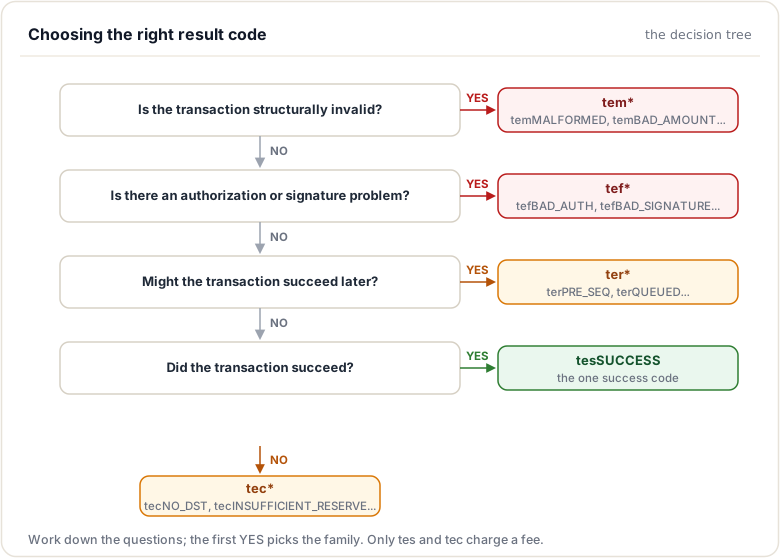
Decision Tree for Choosing Result Codes
In brief: a practical guide to picking the right code for a given failure.
Best Practices
- Choose the right code: Match the error category to the situation
- Use specific codes: Prefer
tecNO_DSTover generictecFAILED_PROCESSING - Log with context: Include helpful debug information in logs
- Return early: Check cheapest conditions first, return on failure
- NotTEC in preflight: Never return
teccodes from preflight
Codebase References
| File | Description |
|---|---|
include/xrpl/protocol/TER.h |
TER code definitions and helper functions |
src/libxrpl/protocol/TER.cpp |
TER string conversion implementation |
Summary
This module explained the TER result-code taxonomy: the six families (tes, tec, ter, tef, tem, tel), organised by numeric range, that report a transaction's fate. The load-bearing distinction is which codes charge a fee: only tes (success) and tec (claimed cost) do, while everything else leaves the account untouched. You also met NotTEC, the type that excludes tec codes and is exactly what preflight is allowed to return.
To remember:
- Six families by numeric range:
tel(-399..-300),tem(-299..-200),tef(-199..-100),ter(-99..-1),tes(0),tec(100+) - A fee is charged ONLY for
tesandtec tem= malformed (never valid);tef= failed for good;ter= retry, may succeed later;tel= local errortecexists to charge failed-but-well-formed attempts (anti-spam)NotTEC= every family excepttec: it is preflight's return type- Defined in
include/xrpl/protocol/TER.h - The authoritative code is what
tx <hash>reports from a validated ledger - Watch out:
tercodes get retried by the network; treatingterQUEUEDorterPRE_SEQas permanent failure is a client bug
Next up. You have all the theory of transaction processing. Time to watch every piece work at once, line by line, in a real transactor: the CheckCreate case study.
Assignments
0 of 2 complete