
Case study — the CheckCreate transactor
A code-level walkthrough of a real transactor (`CheckCreate`) across preflight, preclaim and doApply.
What you'll learn
- Follow CheckCreate through all three phases.
- See real validation, freeze checks and reserve logic.
- Use it as a template for a new transaction type.
Introduction
≈45 min · Advanced · builds on TER result codes
Theory meets a real transactor here. In this module you'll follow CheckCreate line by line through preflight, preclaim and doApply, seeing genuine format checks, freeze and permission logic, and reserve handling in context. By the end you'll have a concrete template you could adapt to build a transaction type of your own.
What CheckCreate Does
In brief: creates a deferred payment (a Check) the recipient can cash later.
A CheckCreate transaction:
- Creates a new Check ledger object
- Links the Check to both sender's and recipient's owner directories
- Increments the sender's owner count
- Specifies a maximum amount that can be cashed
Transaction Fields:
| Field | Required | Description |
|---|---|---|
Account |
Yes | The sender creating the check |
Destination |
Yes | The recipient who can cash the check |
SendMax |
Yes | Maximum amount that can be cashed |
Expiration |
No | When the check expires |
DestinationTag |
No | Tag for the destination |
SourceTag |
No | Tag for the source |
InvoiceID |
No | Arbitrary reference ID |
Source Files
- Header:
include/xrpl/tx/transactors/check/CheckCreate.h - Implementation:
src/libxrpl/tx/transactors/check/CheckCreate.cpp
Phase 1: Preflight
In brief: stateless checks: no self-send, a valid SendMax, a sane currency and expiration.
Preflight performs stateless validation on the transaction content.
Every check here reads only the transaction, never the ledger:
NotTEC
CheckCreate::preflight(PreflightContext const& ctx)
{
Check 1: Self-Send Prevention
A check to yourself is redundant, you can just keep the money:
    if (ctx.tx[sfAccount] == ctx.tx[sfDestination])
    {
        JLOG(ctx.j.warn()) << "Malformed transaction: Check to self.";
        return temREDUNDANT;
    }
Why temREDUNDANT? This is a permanent format error. The transaction can never be valid with these field values.
Check 2: SendMax Validation
The amount must be positive and well-formed:
    {
        STAmount const sendMax{ctx.tx.getFieldAmount(sfSendMax)};
        if (!isLegalNet(sendMax) || sendMax.signum() <= 0)
        {
            JLOG(ctx.j.warn()) << "Malformed transaction: bad sendMax amount: "
                               << sendMax.getFullText();
            return temBAD_AMOUNT;
        }
isLegalNet() checks that:
- The amount isn't negative
- The amount doesn't overflow
- The precision is valid
signum() <= 0 ensures the amount is positive (not zero).
Check 3: Currency Validation
The currency code must be valid:
        if (badCurrency() == sendMax.getCurrency())
        {
            JLOG(ctx.j.warn()) << "Malformed transaction: Bad currency.";
            return temBAD_CURRENCY;
        }
    }
badCurrency() returns a special invalid currency code. This catches malformed currency specifications.
Check 4: Expiration Validation
If an expiration is provided, it must not be zero:
    if (auto const optExpiry = ctx.tx[~sfExpiration])
    {
        if (*optExpiry == 0)
        {
            JLOG(ctx.j.warn()) << "Malformed transaction: bad expiration";
            return temBAD_EXPIRATION;
        }
    }

    return tesSUCCESS;
}
Note: The ~ operator returns std::optional<T>, allowing us to check if the field is present.
Phase 2: Preclaim
In brief: ledger checks: destination exists, permissions and tags, freeze status, not expired.
Preclaim validates against the current ledger state.
TER
CheckCreate::preclaim(PreclaimContext const& ctx)
{
Check 1: Destination Account Existence
    AccountID const dstId{ctx.tx[sfDestination]};
    auto const sleDst = ctx.view.read(keylet::account(dstId));
    if (!sleDst)
    {
        JLOG(ctx.j.warn()) << "Destination account does not exist.";
        return tecNO_DST;
    }
Why tecNO_DST? The destination doesn't exist now, but it could be created before this transaction is applied. However, the transaction will fail if applied without the destination.
Check 2: DisallowIncoming Permission
Accounts can opt out of receiving certain objects:
    auto const flags = sleDst->getFlags();

    if (ctx.view.rules().enabled(featureDisallowIncoming) &&
        (flags & lsfDisallowIncomingCheck))
        return tecNO_PERMISSION;
This is amendment-gated (featureDisallowIncoming), so we only check if the amendment is enabled.
Check 3: Pseudo-Account Prevention
Pseudo-accounts (like AMM pools) cannot cash checks:
    if (isPseudoAccount(sleDst))
        return tecNO_PERMISSION;
Check 4: Destination Tag Requirement
Some accounts require a destination tag:
    if ((flags & lsfRequireDestTag) && !ctx.tx.isFieldPresent(sfDestinationTag))
    {
        JLOG(ctx.j.warn()) << "Malformed transaction: DestinationTag required.";
        return tecDST_TAG_NEEDED;
    }
Check 5: Freeze Status
For non-XRP amounts, check that the asset isn't frozen:
    {
        STAmount const sendMax{ctx.tx[sfSendMax]};
        if (!sendMax.native())
        {
            // Check global freeze
            AccountID const& issuerId{sendMax.getIssuer()};
            if (isGlobalFrozen(ctx.view, issuerId))
            {
                JLOG(ctx.j.warn()) << "Creating a check for frozen asset";
                return tecFROZEN;
            }
Global Freeze: The issuer has frozen all holdings of this currency.
            // Check source trust line freeze
            AccountID const srcId{ctx.tx.getAccountID(sfAccount)};
            if (issuerId != srcId)
            {
                auto const sleTrust = ctx.view.read(
                    keylet::trustLine(srcId, issuerId, sendMax.getCurrency()));
                if (sleTrust &&
                    sleTrust->isFlag(
                        (issuerId > srcId) ? lsfHighFreeze : lsfLowFreeze))
                {
                    JLOG(ctx.j.warn())
                        << "Creating a check for frozen trustline.";
                    return tecFROZEN;
                }
            }
Trust Line Freeze: The issuer has frozen the source's specific trust line.
The (issuerId > srcId) ? lsfHighFreeze: lsfLowFreeze pattern is due to how trust lines store flags, the "high" account's flags use different bits than the "low" account's flags.
            // Check destination trust line freeze
            if (issuerId != dstId)
            {
                auto const sleTrust = ctx.view.read(
                    keylet::trustLine(issuerId, dstId, sendMax.getCurrency()));
                if (sleTrust &&
                    sleTrust->isFlag(
                        (dstId > issuerId) ? lsfHighFreeze : lsfLowFreeze))
                {
                    JLOG(ctx.j.warn())
                        << "Creating a check for destination frozen trustline.";
                    return tecFROZEN;
                }
            }
        }
    }
Check 6: Expiration
Don't create a check that's already expired:
    if (hasExpired(ctx.view, ctx.tx[~sfExpiration]))
    {
        JLOG(ctx.j.warn()) << "Creating a check that has already expired.";
        return tecEXPIRED;
    }
    return tesSUCCESS;
}
hasExpired() compares the expiration against the parent ledger's close time.
Phase 3: doApply
In brief: reserve check, then create the Check entry and wire it into both owner directories.
doApply modifies the ledger state.
Reserve first, then create the entry and update the directories:
TER
CheckCreate::doApply()
{
Step 1: Verify Account Exists
    auto const sle = view().peek(keylet::account(accountID_));
    if (!sle)
        return tefINTERNAL;
This should never fail, if we got this far, the account exists. tefINTERNAL indicates a bug.
Step 2: Check Reserve
    {
        STAmount const reserve{
            view().fees().accountReserve(sle->getFieldU32(sfOwnerCount) + 1)};

        if (preFeeBalance_ < reserve)
            return tecINSUFFICIENT_RESERVE;
    }
Calculate what the reserve will be with one more owned object. Use preFeeBalance_ (before fee) to allow dipping into reserve for fees.
Step 3: Create the Check SLE
    std::uint32_t const seq = ctx_.tx.getSeqValue();
    Keylet const checkKeylet = keylet::check(accountID_, seq);
    auto sleCheck = std::make_shared<SLE>(checkKeylet);
The check's key is derived from the creator's account and the transaction sequence (or ticket number).
Step 4: Set Required Fields
    sleCheck->setAccountID(sfAccount, accountID_);
    AccountID const dstAccountId = ctx_.tx[sfDestination];
    sleCheck->setAccountID(sfDestination, dstAccountId);
    sleCheck->setFieldU32(sfSequence, seq);
    sleCheck->setFieldAmount(sfSendMax, ctx_.tx[sfSendMax]);
Step 5: Set Optional Fields
    if (auto const srcTag = ctx_.tx[~sfSourceTag])
        sleCheck->setFieldU32(sfSourceTag, *srcTag);
    if (auto const dstTag = ctx_.tx[~sfDestinationTag])
        sleCheck->setFieldU32(sfDestinationTag, *dstTag);
    if (auto const invoiceId = ctx_.tx[~sfInvoiceID])
        sleCheck->setFieldH256(sfInvoiceID, *invoiceId);
    if (auto const expiry = ctx_.tx[~sfExpiration])
        sleCheck->setFieldU32(sfExpiration, *expiry);
The [~sfField] pattern returns std::optional, allowing conditional field setting.
Step 6: Insert into Ledger
view().insert(sleCheck);
This adds the new SLE to the view's modified set.
Step 7: Add to Destination Directory
    auto viewJ = ctx_.app.journal("View");

    if (dstAccountId != accountID_)
    {
        auto const page = view().dirInsert(
            keylet::ownerDir(dstAccountId),
            checkKeylet,
            describeOwnerDir(dstAccountId));

        JLOG(j_.trace()) << "Adding Check to destination directory "
                         << to_string(checkKeylet.key) << ": "
                         << (page ? "success" : "failure");

        if (!page)
            return tecDIR_FULL;

        sleCheck->setFieldU64(sfDestinationNode, *page);
    }
The check is added to the destination's owner directory so they can find checks payable to them. The page number is stored in the Check for later removal.
Step 8: Add to Source Directory
    {
        auto const page = view().dirInsert(
            keylet::ownerDir(accountID_),
            checkKeylet,
            describeOwnerDir(accountID_));

        JLOG(j_.trace()) << "Adding Check to owner directory "
                         << to_string(checkKeylet.key) << ": "
                         << (page ? "success" : "failure");

        if (!page)
            return tecDIR_FULL;

        sleCheck->setFieldU64(sfOwnerNode, *page);
    }
The check is also added to the source's directory, they need to track checks they've created.
Step 9: Update Owner Count
    adjustOwnerCount(view(), sle, 1, viewJ);
    return tesSUCCESS;
}
Increment the source's owner count. This affects their reserve requirement.
Key idea. doApply is the only phase that writes. Notice the order: check the reserve, create the entry, add it to the owner directories, then adjust the owner count. Miss a step and the ledger's accounting drifts.
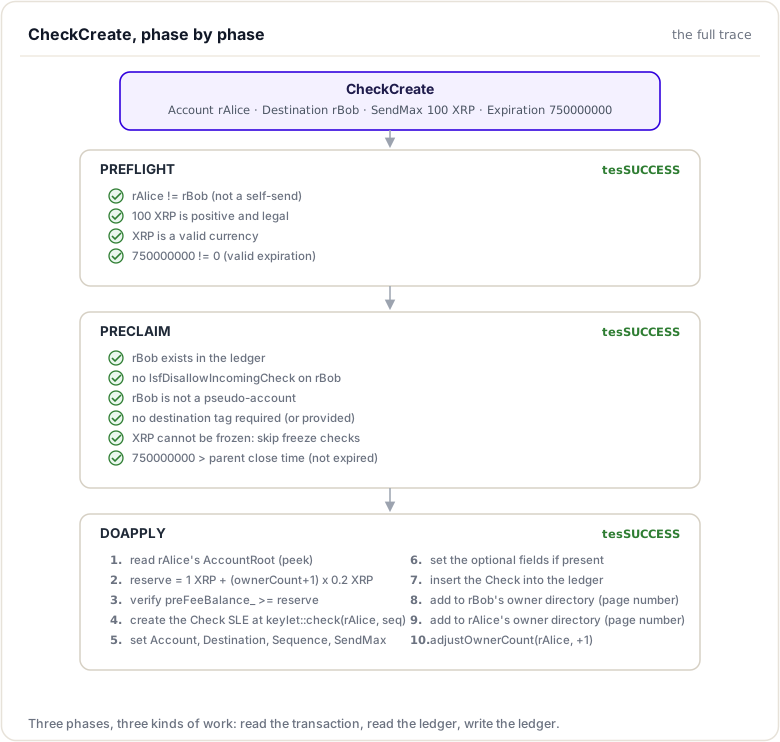
Complete Transaction Flow Diagram
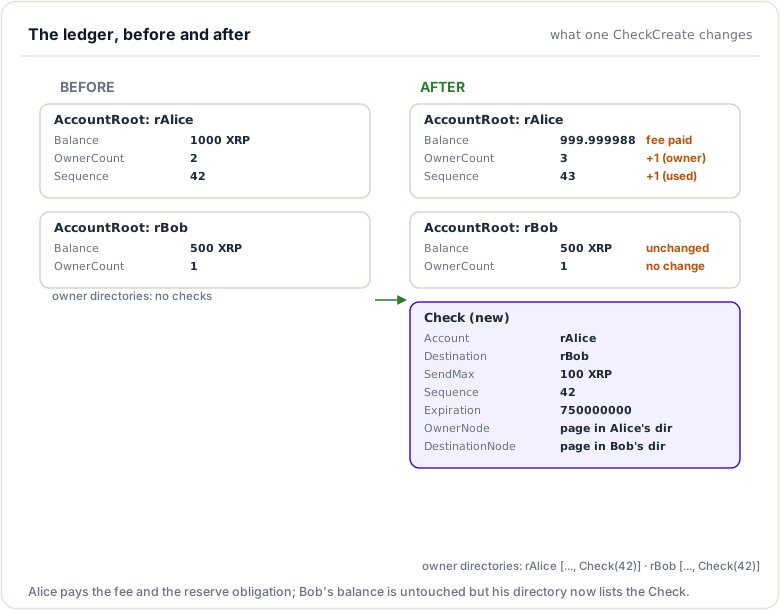
Ledger State Changes
One CheckCreate transaction transforms the ledger like this:
Key Patterns Demonstrated
In brief: the reusable patterns you would copy to build a transactor of your own.
- Stateless validation in preflight: No ledger access
- Amendment checking: Using
ctx.view.rules().enabled() - Freeze checking: Both global and trust line freezes
- Reserve management: Check before creating objects
- Directory management: Add to both source and destination
- Owner count management: Increment when creating objects
- Optional field handling: Using
[~sfField]pattern - Appropriate error codes:
tem*for format,tec*for state
Related Transactors
Understanding CheckCreate helps with these related transactions:
- CheckCash: Cashing a check (balance transfer + check deletion)
- CheckCancel: Canceling a check (check deletion only)
- EscrowCreate: Similar pattern for creating escrow objects
- OfferCreate: Similar pattern for creating offer objects
Exercises
- Trace a failed CheckCreate: Walk through what happens when:
- Destination doesn't exist
- Trust line is frozen
- Insufficient reserve
- Compare with CheckCancel: How does deletion differ from creation?
- Implement logging: Add detailed trace logs to follow execution
Codebase References
| File | Description |
|---|---|
src/libxrpl/tx/transactors/check/CheckCreate.cpp |
CheckCreate implementation |
include/xrpl/tx/transactors/check/CheckCreate.h |
CheckCreate class definition |
src/libxrpl/tx/transactors/check/CheckCash.cpp |
CashCheck for comparison |
src/libxrpl/tx/transactors/check/CheckCancel.cpp |
CancelCheck for comparison |
include/xrpl/protocol/Indexes.h |
Keylet definitions including keylet::check |
Summary
This module traced a real transactor, CheckCreate, through preflight, preclaim, and doApply. You saw genuine format checks (self-send, SendMax, currency, expiration), ledger-state checks (destination existence, permissions, freeze status), and the doApply logic that verifies the reserve, creates the Check entry, wires it into the owner directories, and adjusts the owner count. It is a concrete template you could adapt to build a transaction type of your own.
To remember:
- Files:
src/libxrpl/tx/transactors/check/CheckCreate.cpp(with CheckCash and CheckCancel beside it) - preflight: self-send (
temREDUNDANT), SendMax positive and legal, currency valid, expiration not zero - preclaim: destination exists (
tecNO_DST),lsfDisallowIncomingCheck/ pseudo-account (tecNO_PERMISSION), destination tag required (tecDST_TAG_NEEDED), frozen (tecFROZEN), expired (tecEXPIRED) - doApply order: reserve check (
tecINSUFFICIENT_RESERVE), create the SLE atkeylet::check(account, seq), dirInsert into BOTH owner directories,adjustOwnerCount(+1) - That doApply order (reserve, create, wire, count) is the reusable pattern
- Copy this family's structure when you build your own transactor
- Watch out: forgetting one of the two directory inserts is the classic copy-paste bug when adapting the template
Next up. That closes the tour of the machine. New phase: everything you just saw is held together by mathematics. Welcome to cryptography, starting with the security model.
Resources
Assignments
0 of 4 complete