
Storage backends & database operations
The NodeStore backends (NuDB, RocksDB…) and the fetch / store / batch / async lifecycle above them.
What you'll learn
- Compare the NuDB and RocksDB backends.
- Trace fetch, store, batch and async operations.
- Understand online deletion / database rotation.
Introduction
≈60 min · Advanced · builds on NodeStore architecture
Watch this short video by XRPL Commons first, then dive into the details below.
Now that you know what the NodeStore stores, let's look at where and how. In this module you'll compare the real backends (NuDB and RocksDB) and trace the fetch, store, batch and async operations that move data in and out, plus online deletion, the mechanism that keeps a node's disk from growing forever. This is where architecture meets the realities of running a node.
Choosing a Backend at a Glance
In brief: NuDB versus RocksDB at a glance, and when to pick each.
NuDB (Recommended)
When to use:
- Most deployments (this is the default in the shipped example config)
- Solid-state storage (which any production node should have anyway)
- High-transaction-volume networks and archive nodes
Configuration:
[node_db]
type = NuDB
path = /var/lib/xrpld/db/nudb
nudb_block_size = 4096
online_delete = 512
advisory_delete = 0
Performance:
- Write throughput: 50,000-200,000 objects/sec
- Optimized for: xrpld and solid-state drives
- Maintains its speed regardless of how much history is stored
- Good for: Most deployments, including validators and archive nodes
RocksDB (Alternative for Spinning Disks)
When to use:
- Systems that don't use solid-state drives
- (Caution: the example config also warns that spinning disks are barely fast enough to run a node at all)
Configuration:
[node_db]
type = RocksDB
path = /var/lib/xrpld/db/rocksdb
online_delete = 512
advisory_delete = 0
Performance:
- Write throughput: 10,000-50,000 objects/sec
- Compression: built in (the backend hardcodes Snappy)
- Performance degrades as it stores more data, so keeping full history is not advised and
online_deleteis recommended
Testing Backends
- Memory: In-memory, non-persistent (testing only)
- none: No-op backend (unit tests). The factory class is
NullFactory, but thetype=string it registers isnone—type = Nullwould fail with a missing-backend error.
Encoding Format Reference
The standardized encoding format enables backend independence:
Structure (from the NodeStore architecture module):
Bytes 0-7:   Reserved (written as zero)
Byte 8:      Type (NodeObjectType enumeration)
Bytes 9+:    Serialized data payload
One caveat when reading: current code writes the 8 prefix bytes as zero, but EncodedBlob.h warns not to assume that when decoding — earlier versions of the code used these bytes to store the ledger index, either once or twice. If you're diagnosing old data, a non-zero prefix is not necessarily corruption.
This format is handled transparently by the Database layer, but understanding it is important for:
- Backend implementation
- Data corruption diagnosis
- Migration between backends
Configuration Tuning
In brief: the knobs that matter for a backend's memory and throughput.
Two keys apply to both backends and configure the Database-layer TaggedCache, not the backend itself:
[node_db]
# Database-layer record cache (NuDB and RocksDB alike)
cache_size = 16384      # Number of records to cache (not MB). Default 16384.
cache_age = 5           # Minutes to keep records cached. Default 5.
Note: this cache is not created at all when online_delete is set — the rotating NodeStore does not use it (the example config says so explicitly).
RocksDB Options
These are the keys RocksDBFactory.cpp actually parses (values shown are examples):
[node_db]
type = RocksDB
path = /var/lib/xrpld/db/rocksdb

# RocksDB tuning
open_files = 2000            # rocksdb max_open_files
filter_bits = 12             # bloom filter bits per key
cache_mb = 256               # block cache size in MB
file_size_mb = 8             # target file size in MB
file_size_mult = 2           # target file size multiplier per level
bg_threads = 4               # low-priority (compaction) thread pool
high_threads = 4             # high-priority (flush) thread pool
block_size = 4096            # table block size in bytes
Advanced escape hatches: universal_compaction switches the compaction style, and bbt_options / options pass option strings directly to RocksDB.
There is no compression key in [node_db]: the RocksDB backend hardcodes Snappy compression. (The top-level [compression] section that does exist in the config controls peer link compression — unrelated to storage.)
NuDB Options
[node_db]
type = NuDB
path = /var/lib/xrpld/db/nudb

# NuDB specific
nudb_block_size = 4096  # Block size in bytes. Power of 2 between
                        # 4096 and 32768. Default is 4096.
nudb_block_size is the only NuDB-specific key. The key size is not configurable — it's the compile-time constant NodeObject::kKeyBytes = 32 (the SHA-512Half hash width).
Migration Between Backends
In brief: how to move an existing node's data from one engine to another.
There is no export file. The server copies NodeObjects directly from one database to another: you configure the old database as an [import_db] section, the new one as [node_db], and run once with the --import flag. Internally this calls Database::importDatabase during startup (Application::initNodeStore).
# 1. Stop the server
systemctl stop xrpld

# 2. Edit xrpld.cfg:
#    - Rename your existing [node_db] section to [import_db]
#    - Add a new [node_db] section with the new type and a NEW path,
#      for example:
#
#      [import_db]
#      type = RocksDB
#      path = /var/lib/xrpld/db/rocksdb
#
#      [node_db]
#      type = NuDB
#      path = /var/lib/xrpld/db/nudb

# 3. Start once with --import; the server copies the node database
#    from [import_db] into [node_db] before it begins serving
xrpld --conf /etc/opt/xrpld/xrpld.cfg --import

# 4. After the import completes, remove the [import_db] section
#    (and the old database directory once you're satisfied)

# 5. Restart normally
systemctl restart xrpld
The alternative is simpler but slower: change type= and point path= at a fresh directory, then let the node resync from the network.
For Detailed Reference
See these sections of the NodeStore architecture module:
- "Backend Abstraction" - Interface design
- "Supported Backends" - Feature comparison
- "Data Encoding Format" - Serialization details
For implementation details, consult:
rippled/include/xrpl/nodestore/Backend.hrippled/include/xrpl/nodestore/Database.hrippled/src/libxrpl/nodestore/backend/*Factory.cpp
Database Operations and Lifecycle Management
In brief: fetch, store, batch and async operations, plus online deletion.
Key idea. Online deletion (database rotation) is what keeps a node's disk bounded: it drops ledger history the node no longer needs to keep.
Introduction
Beyond the cache layer, the Database class orchestrates the complete lifecycle of NodeStore operations:
- Initialization on startup
- Runtime fetch/store operations
- Asynchronous background operations
- Graceful shutdown
- Database rotation and archival
This chapter covers these operational aspects that are critical for production XRPL nodes.
Core Database Interface
The Database class provides higher-level operations above Backend. Abridged from include/xrpl/nodestore/Database.h:
Key Responsibilities:
class Database {
public:
    // Store: takes the pieces, not a NodeObject — the object is
    // created inside the implementation
    virtual void store(
        NodeObjectType type,
        Blob&& data,
        uint256 const& hash,
        std::uint32_t ledgerSeq) = 0;

    // Synchronous fetch
    std::shared_ptr<NodeObject> fetchNodeObject(
        uint256 const& hash,
        std::uint32_t ledgerSeq = 0,
        FetchType fetchType = FetchType::Synchronous,
        bool duplicate = false);

    // Asynchronous fetch (ledgerSeq is required; callback taken by rvalue)
    virtual void asyncFetch(
        uint256 const& hash,
        std::uint32_t ledgerSeq,
        std::function<void(std::shared_ptr<NodeObject> const&)>&& callback);

    // Import from another database (the --import / [import_db] flow)
    virtual void importDatabase(Database& source) = 0;

    // Shutdown; there is no open()/close() — backends are opened by
    // their factories at construction (Manager::makeDatabase)
    virtual void stop();

    // Metrics and diagnostics: fills a caller-supplied JSON object
    void getCountsJson(json::Value& obj);
};
Note that batch writing is not on Database at all — it's a Backend operation, Backend::storeBatch(Batch const&), fed by the BatchWriter helper (more below).
DatabaseNodeImp: Single Backend Implementation
The standard implementation for most XRPL validators:
Architecture:
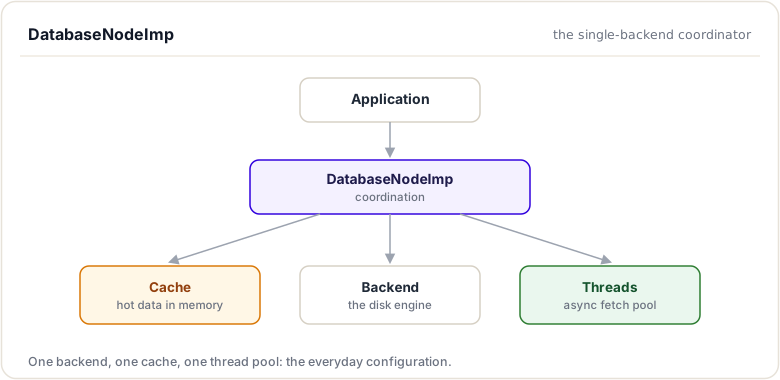
Storage Flow:
Simplified from src/libxrpl/nodestore/DatabaseNodeImp.cpp:
void DatabaseNodeImp::store(
    NodeObjectType type, Blob&& data,
    uint256 const& hash, std::uint32_t)
{
    // Step 1: Update counters
    storeStats(1, data.size());

    // Step 2: Create the NodeObject and hand it to the backend.
    // The wire encoding (EncodedBlob) happens INSIDE the backend,
    // not in the Database layer.
    auto obj = NodeObject::createObject(type, std::move(data), hash);
    backend_->store(obj);

    // Step 3: Update the cache, if one is configured. The TaggedCache
    // exists only when cache_size / cache_age are set, and is never
    // created when online_delete is on. It replaces a negative
    // (Dummy) entry if a previous fetch cached "not found".
    if (cache_)
        cache_->canonicalize(hash, obj, [](auto const& n) {
            return n->getType() == NodeObjectType::Dummy;
        });
}
Note what this flow does not promise: the cache is optional and in-memory only, so it is not a durability net. If a backend store fails, that data does not survive a restart.
Fetch Flow:
Simplified from the same file:
std::shared_ptr<NodeObject> DatabaseNodeImp::fetchNodeObject(
    uint256 const& hash,
    std::uint32_t,
    FetchReport& fetchReport,
    bool duplicate)
{
    // Step 1: Check the cache, if one is configured
    std::shared_ptr<NodeObject> nodeObject =
        cache_ ? cache_->fetch(hash) : nullptr;

    if (!nodeObject) {
        // Step 2: Query backend (potentially slow)
        Status status = backend_->fetch(hash, &nodeObject);

        switch (status) {
            case Status::Ok:
                if (cache_) {
                    if (nodeObject) {
                        cache_->canonicalizeReplaceClient(hash, nodeObject);
                    } else {
                        // Not found - cache a Dummy entry to prevent
                        // asking the backend again
                        auto notFound = NodeObject::createObject(
                            NodeObjectType::Dummy, {}, hash);
                        cache_->canonicalizeReplaceClient(hash, notFound);
                    }
                }
                break;
            case Status::NotFound:
                break;
            case Status::DataCorrupt:
                // logged as fatal
                break;
            default:
                // unknown backend status, logged as warning
                break;
        }
    } else if (nodeObject->getType() == NodeObjectType::Dummy) {
        // Cached negative entry
        nodeObject.reset();
    }

    if (nodeObject)
        fetchReport.wasFound = true;

    return nodeObject;
}
(Hit/miss counters — fetchTotalCount_, fetchHitCount_ — are maintained by the Database base class around this call.)
Batch Operations
Batch operations improve efficiency. Batch writing lives at the Backend level: Backend::storeBatch(Batch const&) takes a Batch (a std::vector<std::shared_ptr<NodeObject>>), and the BatchWriter helper accumulates individual stores into batches for backends that use it:
Batch Store:
// include/xrpl/nodestore/Backend.h
virtual void storeBatch(Batch const& batch) = 0;

// BatchWriter accumulates objects and hands full batches
// to the backend on its writer thread.
Benefits:
Without batch:
  Write 1000 objects → 1000 backend transactions
  1000 disk I/O operations

With batch:
  Write 1000 objects → 1 backend transaction
  1 disk I/O operation

Throughput improvement: 10-50x depending on backend
Batch Size Limits:
From include/xrpl/nodestore/Types.h:
static constexpr auto kBatchWritePreallocationSize = 256;
static constexpr auto kBatchWriteLimitSize = 65536;

// kBatchWriteLimitSize caps the number of writes in one batch.
// Note from the header: actual usage can be TWICE this, because
// a new batch grows while the old one is being written.
//
// Prevents:
// 1. Memory exhaustion (unbounded batches)
// 2. Backend transactions growing too large
// 3. Excessive latency (batching too much)
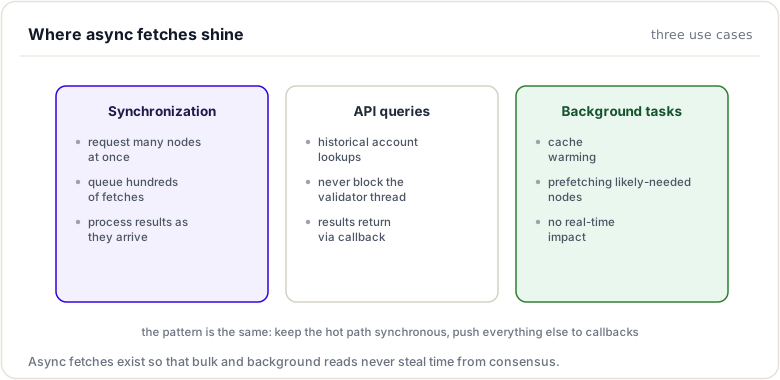
Asynchronous Operations
Background threads handle expensive operations without blocking. The read threads are owned by the Database base class itself:
Asynchronous Fetch:
// Simplified from Database::asyncFetch / Database::threadEntry
void Database::asyncFetch(
    uint256 const& hash,
    std::uint32_t ledgerSeq,
    std::function<void(std::shared_ptr<NodeObject> const&)>&& callback)
{
    // Step 1: Record the request in the read_ map and wake a
    // read thread. The caller continues without blocking.
}

// Each read thread (Database::threadEntry):
//   - dequeues up to requestBundle_ requests at a time
//     (a small bundle, to amortize mutex acquisition; default 4)
//   - calls fetchNodeObject() for each hash
//   - invokes the callbacks with the results
//
// There is no batched backend read: Backend's read API is the
// single-object fetch(uint256 const&, std::shared_ptr<NodeObject>*).
The number of read threads comes from the prefetch_workers config value, defaulting to 4 (Application.cpp passes config_->prefetchWorkers > 0 ? config_->prefetchWorkers : 4 to SHAMapStoreImp::makeNodeStore).
Use Cases:
Initialization and Shutdown
Startup Sequence:
There is no Database::open(). The wiring happens once, at construction:
1. SHAMapStoreImp::makeNodeStore builds the node store
   (src/xrpld/app/misc/SHAMapStoreImp.cpp):
     - with online_delete: a DatabaseRotatingImp over two backends
       (writable + archive)
     - otherwise: Manager::makeDatabase reads [node_db], looks up
       the factory registered for type=, and the factory's
       createInstance() constructs the backend already open

2. The Database-layer TaggedCache is created only if cache_size /
   cache_age are configured (and never in online_delete mode)

3. The read threads are started (prefetch_workers, default 4)

4. If --import was passed on the command line,
   Application::initNodeStore opens the [import_db] source and
   calls nodeStore_->importDatabase(*source) before the server
   starts serving
Shutdown Sequence:
1. Database::stop() stops the read threads and drains pending
   asynchronous requests

2. Backends flush and close in their destructors; a rotated-out
   archive backend marked with setDeletePath() deletes its files
   when the last reference to it drops
DatabaseRotatingImp: Advanced Rotation
For production systems needing online deletion:
Problem Solved:
Without deletion, database grows unbounded:
Each ledger adds new nodes
Over time: thousands of gigabytes
Eventually: disk full
Options:
  1. Stop validator (unacceptable)
  2. Manual pruning (requires downtime)
  3. Rotation (online deletion)
Rotation Architecture:
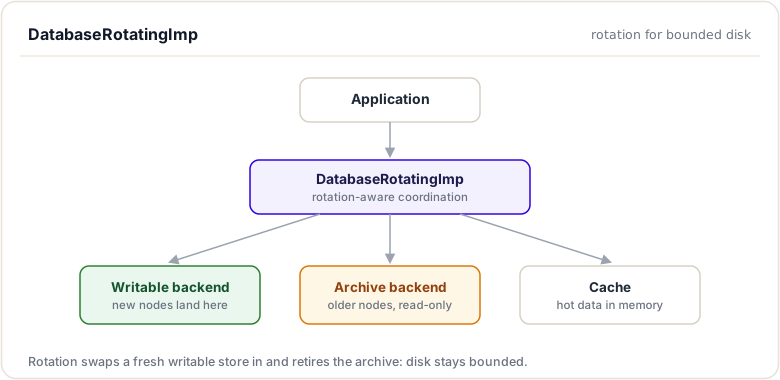
Rotation Process:
Rotation is driven by SHAMapStoreImp's thread (configured by online_delete), not by the database itself. Simplified from SHAMapStoreImp::run() and DatabaseRotatingImp::rotate():
// In SHAMapStoreImp's thread, once
// validatedSeq >= lastRotated + deleteInterval_:

// Step 1: Delete old SQL data (ledger headers, transaction maps)
clearPrior(lastRotated);

// Step 2: Copy the validated ledger's state tree into the
// writable backend, so everything the node still needs
// survives the rotation. This happens BEFORE anything
// is deleted.
validatedLedger->stateMap().snapShot(false)->visitNodes(
    /* SHAMapStoreImp::copyNode for each node */);

// Step 3: Create the new, empty backend — the caller creates it
// and passes it in; rotate() does not create backends
auto newBackend = makeBackendRotating();

// Step 4: Swap the backends
dbRotating_->rotate(
    std::move(newBackend),
    [&](std::string const& writableName,
        std::string const& archiveName) {
        // Step 5: Persist which directory is which, so a restart
        // picks up the right files
        stateDb_.setState(savedState);
        clearCaches(validatedSeq);
    });

// Inside DatabaseRotatingImp::rotate, under lock:
//   archiveBackend_->setDeletePath();     // old archive: files are
//                                         // deleted when the last
//                                         // reference drops, AFTER
//                                         // the callback finishes
//   archiveBackend_ = writableBackend_;   // writable becomes archive
//   writableBackend_ = newBackend;        // new backend takes writes
The ordering is the whole point: the validated ledger is copied into the writable backend before the rotation, and the old archive is only deleted after the swap and callback complete. Nothing the node still needs is ever in a deleted backend.
Dual Fetch Logic:
Simplified from DatabaseRotatingImp::fetchNodeObject. Note there is no cache here — the rotating database does not create the Database-layer TaggedCache (the example config: "the cache will not be created if online_delete is specified, because the rotating NodeStore does not use this cache"):
std::shared_ptr<NodeObject> DatabaseRotatingImp::fetchNodeObject(
    uint256 const& hash,
    std::uint32_t,
    FetchReport& fetchReport,
    bool duplicate)
{
    // Snapshot both backend pointers under lock
    auto [writable, archive] = /* writableBackend_, archiveBackend_ */;

    // Try writable (current ledgers)
    auto nodeObject = fetch(writable);
    if (!nodeObject) {
        // Try archive (older ledgers)
        nodeObject = fetch(archive);
        if (nodeObject && duplicate) {
            // Copy forward to writable so the object survives
            // the next rotation
            writable->store(nodeObject);
        }
    }

    if (nodeObject)
        fetchReport.wasFound = true;

    return nodeObject;
}
Benefits:
With rotation:
  Ledger 1000000: stored in Writable
  Ledger 1000001-1100000: stored in Writable
  Ledger 900000-999999: stored in Archive

  Ledger 900000: Delete ledger → Keep recent 100k only
  Old archive deleted → Disk space reclaimed

  No downtime, no backups needed, bounded growth
Metrics and Monitoring
The instrumentation is a handful of atomic counters on the Database base class (storeCount_, storeSz_, fetchTotalCount_, fetchHitCount_, fetchSz_, fetchDurationUs_), published by Database::getCountsJson:
node_writes             objects written        (storeCount_)
node_reads_total        fetch attempts         (fetchTotalCount_)
node_reads_hit          fetches satisfied      (fetchHitCount_)
node_written_bytes      bytes written          (storeSz_)
node_read_bytes         bytes read             (fetchSz_)
node_reads_duration_us  cumulative fetch time  (fetchDurationUs_)

read_threads_total      async read threads (prefetch_workers)
read_threads_running    read threads currently busy
read_request_bundle     requests dequeued per bundle
These reach you two ways: the admin RPC get_counts (which calls getCountsJson on the node store), and server_info — but only when counters are requested, under counters.nodestore.
Monitoring Typical Values:
Hit rate (node_reads_hit / node_reads_total):
  92-96% on well-configured systems WITHOUT online_delete
  (with online_delete there is no Database-layer cache, so the
  "hit" rate only reflects reads satisfied without error)

Average read time (node_reads_duration_us / node_reads_total):
  tens to hundreds of microseconds, mostly cache hits

Cache: cache_size records (default 16384),
       kept cache_age minutes (default 5)
Alert Thresholds:
All the values are cumulative since startup, so alert on the rate of change between samples, not the raw totals:
Hit rate < 80%:
  Cache too small (raise cache_size / cache_age) — or online_delete
  is set and there is no cache, in which case this is expected

node_reads_duration_us / node_reads_total climbing between samples:
  Backend I/O struggling

read_threads_running pinned at read_threads_total:
  Async reads are queueing faster than the threads drain them —
  consider raising prefetch_workers
Note there are no per-write latency or queue-depth counters — if you need those, they have to come from outside rippled (e.g. iostat).
Appendix: Debugging and Development Tools
Introduction
This appendix provides techniques and tools for investigating SHAMap and NodeStore behavior.
Logging and Diagnostics
Enable Verbose Logging
Edit xrpld.cfg:
[rpc_startup]
{ "command": "log_level", "severity": "debug" }
Then restart rippled and check logs:
tail -f /var/log/rippled/rippled.log | grep -i nodestore
Key Log Messages
TRACE Ledger:        Ledger opened/closed
DEBUG SHAMap:        Tree operations
DEBUG NodeStore:     Database operations
INFO  Consensus:     Validation and agreement
WARN  Performance:   Slow operations detected
Metrics Inspection
JSON-RPC Inspection
The NodeStore counters come from the admin RPC get_counts (values are strings, cumulative since startup):
# Get storage metrics
xrpld get_counts | jq '.result | {node_writes, node_reads_total,
  node_reads_hit, node_written_bytes, node_read_bytes,
  node_reads_duration_us}'

# Example output:
{
  "node_writes": "1000000",
  "node_reads_total": "50000000",
  "node_reads_hit": "46150000",
  "node_written_bytes": "1000000000",
  "node_read_bytes": "5000000000",
  "node_reads_duration_us": "750000000"
}
The same block appears in server_info under counters.nodestore, but only when counters are requested — a plain server_info does not include it. There is no node_db object in server_info, and the backend type/path are not reported over RPC; read those from the config file.
File System Inspection
# Check database size
du -sh /var/lib/rippled/db/*

# Monitor growth
watch -n 1 'du -sh /var/lib/rippled/db/*'

# Check free space
df -h /var/lib/rippled/

# Monitor I/O
iostat -x 1 /dev/sda
Debugging Specific Issues
Issue: Cache Hit Rate Too Low
Symptoms:
- Database queries slow
- Ledger close times increasing
- Hit rate < 80%
Investigation:
# Compute the hit rate from get_counts
xrpld get_counts | jq -r '.result |
  (.node_reads_hit | tonumber) / (.node_reads_total | tonumber)'

# Check cache configuration
# (cache_size is a RECORD COUNT, default 16384;
#  cache_age is in MINUTES, default 5)
grep -E "cache_size|cache_age|online_delete" xrpld.cfg

# Monitor cache evictions
tail -f /var/log/rippled/rippled.log | \
  grep -i "evict\|cache"
Solutions:
- Increase
cache_size(number of records) if memory is available - Increase
cache_age(minutes) so hot records stay cached longer - If
online_deleteis set, the Database-layer cache is not created at all — a low hit rate is expected there, and these two keys have no effect - Check if system is memory-constrained (use
free)
Issue: Write Performance Degradation
Symptoms:
- Ledger closes slow (>10 seconds)
- Database write errors in logs
- Validator falling behind network
Investigation:
# Track write volume between two samples
xrpld get_counts | \
  jq '.result | {node_writes, node_written_bytes}'

# Monitor disk I/O (rippled has no per-write latency counter;
# measure at the OS level)
iotop -o -b -n 1
iostat -x 1

# Check disk space
df -h
Solutions:
- Ensure SSD (not HDD) for database
- Check disk I/O isn't saturated
- On RocksDB: raise
bg_threads/high_threadsif compaction or flushing is the bottleneck - Switch to NuDB (on SSDs it sustains higher write throughput and doesn't degrade with stored history)
Issue: Synchronization Slow
Symptoms:
- New nodes take hours to sync
- Falling behind network
- High database query count
Investigation:
# Monitor sync progress
xrpld server_info | jq '.result.info.validated_ledger.seq'

# Track fetch operations
tail -f /var/log/rippled/rippled.log | \
  grep -i "fetch\|sync"

# Monitor thread pool
ps -p $(pidof rippled) -L

# Check read-thread utilization
xrpld get_counts | jq '.result |
  {read_threads_total, read_threads_running, read_request_bundle}'
Solutions:
- Increase cache size for better hit rate during sync
- Increase
prefetch_workers(the async read threads; default 4) - Use faster SSD
- Check network bandwidth (might be bottleneck)
- Switch to NuDB for higher throughput
Code Debugging
Building with Debug Symbols
cd rippled
mkdir build
cd build
cmake -DCMAKE_BUILD_TYPE=Debug ..
make -j4
GDB Debugging
# Run under GDB
gdb --args xrpld --conf /path/to/xrpld.cfg

# Inside GDB:
(gdb) run
(gdb) break SHAMap::addKnownNode
(gdb) continue

# When breakpoint hit:
(gdb) print node->getHash()
(gdb) print nodeID
(gdb) step
(gdb) quit
Common Breakpoints
// Node addition
break SHAMap::addKnownNode
break Database::store

// Cache operations (TaggedCache has no get(); its read APIs are
// fetch/retrieve and the canonicalize family)
break TaggedCache::fetch
break TaggedCache::insert

// Synchronization
break SHAMap::getMissingNodes
break xrpl::NodeStore::Database::fetchNodeObject
Print Useful Data
(gdb) print node->getHash().hex()
(gdb) print nodeID.mDepth
(gdb) print nodeID.mNodeID.hex()
// The counters are atomics on the Database object:
(gdb) print db->fetchHitCount_
(gdb) print db->fetchTotalCount_
Performance Profiling
CPU Profiling with Perf
# Record 60 seconds of system behavior
perf record -F 99 -p $(pidof rippled) -- sleep 60

# Analyze results
perf report

# Show flame graph
perf record -F 99 -p $(pidof rippled) -- sleep 60
perf script | stackcollapse-perf.pl | flamegraph.pl > profile.svg
Memory Profiling with Valgrind
# Run under memcheck (very slow)
valgrind --leak-check=full xrpld --conf xrpld.cfg

# Run the nodestore test suites
valgrind --leak-check=full xrpld --unittest=nodestore
Custom Instrumentation
Add to rippled source:
// In Database::fetchNodeObject
auto startTime = std::chrono::steady_clock::now();

auto obj = backend_->fetch(hash, &nodeObject);

auto elapsed = std::chrono::steady_clock::now() - startTime;
auto ms = std::chrono::duration_cast<std::chrono::milliseconds>(elapsed);

if (ms.count() > 100) {
    JLOG(j_.warn()) << "Slow fetch: " << hash
                    << " took " << ms.count() << "ms";
}
Test-Driven Debugging
Running Unit Tests
Suite identifiers follow <library>.<module>.<Name> with xrpl as the library: BEAST_DEFINE_TESTSUITE(SHAMap, shamap, xrpl) registers xrpl.shamap.SHAMap. The --unittest selector matches an exact suite name, a full name, a module, a library, or a name prefix.
# Build with tests enabled
cd rippled/build
cmake -Dtests=ON ..

# Run all beast unit tests
./xrpld --unittest

# Run everything in a module
./xrpld --unittest=nodestore
./xrpld --unittest=shamap

# Run a single suite (exact name or full name)
./xrpld --unittest=SHAMap
./xrpld --unittest=xrpl.shamap.SHAMap
Note on ctest: it only discovers the gtest binary built from src/tests/libxrpl (gtest_discover_tests(xrpl_tests)). The beast suites under src/test/ — including all of src/test/nodestore/ and src/test/shamap/ — are not registered with ctest, so select them with --unittest as above.
Writing Debug Tests
// Shape of the suites in src/test/nodestore/ (beast::unit_test)
class MyDebug_test : public beast::unit_test::Suite
{
public:
    void
    run() override
    {
        testcase("Debug specific case");

        auto shamap = std::make_shared<SHAMap>(/* ... */);
        shamap->addRootNode(/* ... */);

        auto const node = shamap->getNode(hash);
        BEAST_EXPECT(node != nullptr);
        BEAST_EXPECT(node->getHash() == expectedHash);
    }
};

BEAST_DEFINE_TESTSUITE(MyDebug, nodestore, xrpl);
Useful Commands
Check Configuration
grep -E "^[a-z]|^\[" xrpld.cfg | head -30
Monitor in Real Time
# CPU/Memory
top -p $(pidof rippled)

# Disk I/O
iotop -p $(pidof rippled)

# Network traffic
netstat -an | grep ripple

# File descriptors
lsof -p $(pidof rippled) | wc -l
Database Inspection
For RocksDB:
# Use RocksDB tools
rocksdb_ldb --db=/var/lib/rippled/db/rocksdb scan

# List files
ls -lah /var/lib/rippled/db/rocksdb/
Log Analysis
# Count errors
grep ERROR /var/log/rippled/rippled.log | wc -l

# Find slow operations
grep "took.*ms" /var/log/rippled/rippled.log

# Timeline of events
tail -f /var/log/rippled/rippled.log | \
  awk '{print $1" "$2" "$3" "$4" ..."}'
Performance Regression Testing
Benchmark Before/After
# Get baseline
xrpld --unittest=SHAMap > baseline.txt 2>&1

# Modify code...

# Test after change
xrpld --unittest=SHAMap > modified.txt 2>&1

# Compare
diff baseline.txt modified.txt
Load Testing
# Submit transactions and measure
./load_test.sh --transactions 1000 --duration 60

# Monitor metrics
watch -n 1 'xrpld get_counts | jq ".result |
  {node_writes, node_reads_total, node_reads_hit}"'
Common Issues and Solutions
| Issue | Investigation | Solution |
|---|---|---|
| High cache miss rate | get_counts hit rate | Increase cache_size |
| Slow sync | Fetch counters | Increase prefetch_workers |
| Disk full | df -h | Enable online_delete |
| Memory leak | Valgrind | Fix code (likely nodes not freed) |
| Hang on startup | strace | Check database corruption |
| Consensus failing | Logs for validation errors | Check NodeStore consistency |
See the Codebase navigation module to find the files mentioned here.
Summary
This module looked at where and how the NodeStore actually stores data. You compared the real backends, NuDB and RocksDB, and traced the fetch, store, batch, and asynchronous operations that move data in and out. You also saw online deletion (database rotation), the mechanism that bounds a node's disk by dropping ledger history it no longer needs.
To remember:
- Two production backends: NuDB (append-only, constant-time fetch, SSD-friendly, the shipped default) and RocksDB (LSM tree, the alternative for spinning disks)
- Operations: fetch / store / async, implemented by
DatabaseNodeImp; batch writes live onBackend(storeBatch, fed byBatchWriter) - Online deletion (rotation):
online_delete+advisory_deletekeep disk usage bounded - Backend files live under the
[node_db]path= - Switching engines = configure the old database as
[import_db], the new one as[node_db], and run once with--import(or changetype=with a fresh path and resync); data does not convert in place - Batch writes amortize I/O; async fetches keep sync fast
- Tests to study:
src/test/nodestore - Watch out: changing
type=while keeping the oldpath=leaves the old data stranded and the node starts empty
Next up. Disks are slow and consensus will not wait. Next: the caching layers that keep a 3-second ledger cycle fed from microsecond memory.
Resources
Assignments
0 of 2 complete