
NodeStore architecture
The pluggable, hash-indexed key-value store that persists SHAMap nodes, and its `NodeObjectType` model.
What you'll learn
- Explain the NodeStore Database/Backend abstraction.
- Understand NodeObject and NodeObjectType.
- See how SHAMap nodes are persisted and fetched by hash.
Introduction
≈60 min · Advanced · builds on SHAMap synchronization & proofs
Watch this short video by XRPL Commons first, then dive into the details below.
The SHAMap lives in memory, but it has to survive restarts, that's where the NodeStore comes in. In this module you'll learn the pluggable, hash-indexed key-value store that persists every tree node: what a NodeObject is, how it's keyed by its own hash, and how the Database/Backend abstraction keeps the storage engine swappable. It's the quiet layer everything else stands on.
NodeStore's Role in XRPL Architecture
In brief: the persistent, hash-indexed store that lets SHAMap nodes survive restarts.
NodeStore sits at a critical junction in XRPL's architecture:
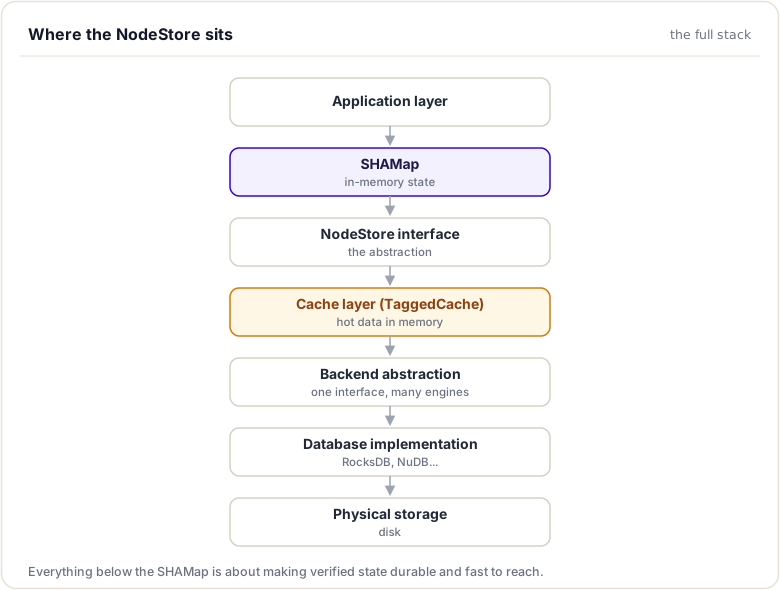
SHAMap's Dependency:
SHAMap needs to retrieve historical nodes:
// During synchronization or historical queries:
std::shared_ptr<SHAMapTreeNode> node = nodestore.fetch(nodeHash);
But SHAMap doesn't know or care about:
- How data is stored
- Which database backend is used
- Where the data is physically located
- How caching is implemented
All that complexity is hidden behind NodeStore's interface.
Core Purpose
In brief: one job: persist hash-addressed blobs fast enough for consensus.
NodeStore provides four critical services:
1. Persistence
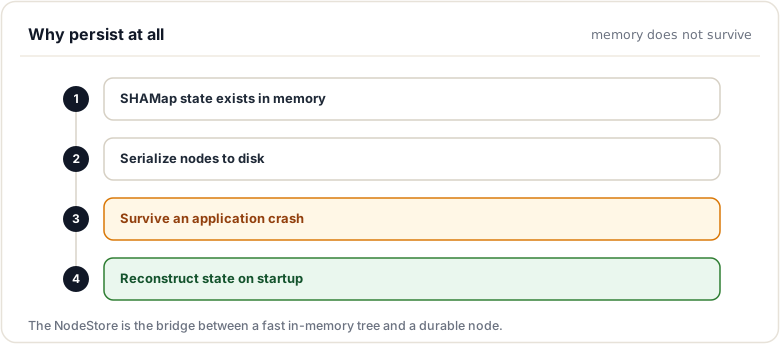
2. Consistent Interface
// Application code doesn't change regardless of backend
nodestore.store(node);   // Works with RocksDB, NuDB, SQLite...
auto node = nodestore.fetch(hash);
3. Performance Optimization
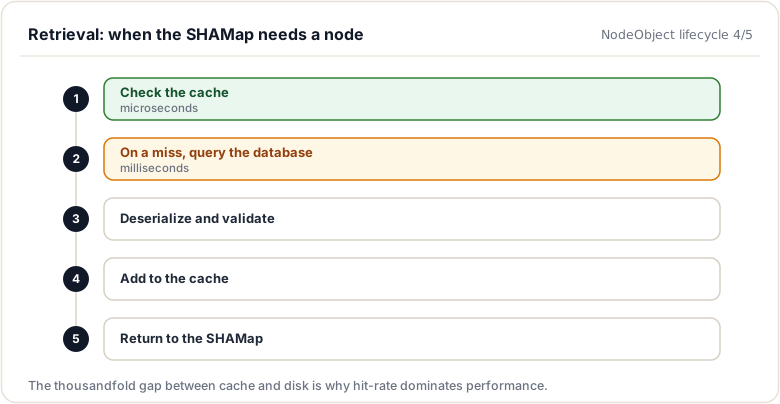
Database queries: 1-10 milliseconds
Memory access: 1-10 microseconds
1000x difference!

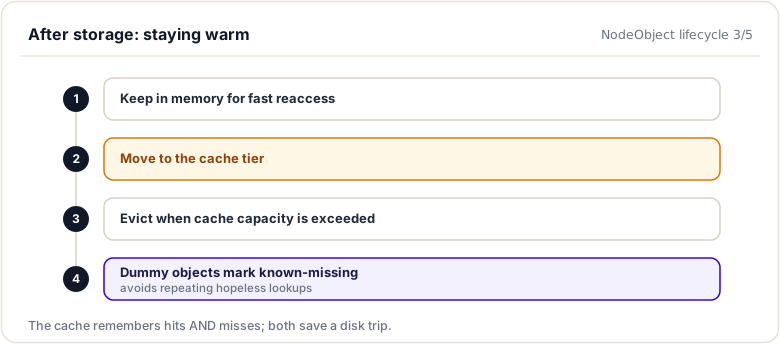
NodeStore uses caching to keep hot data in memory
Typical hit rate: 90-95%
Result: Average latency near memory speed
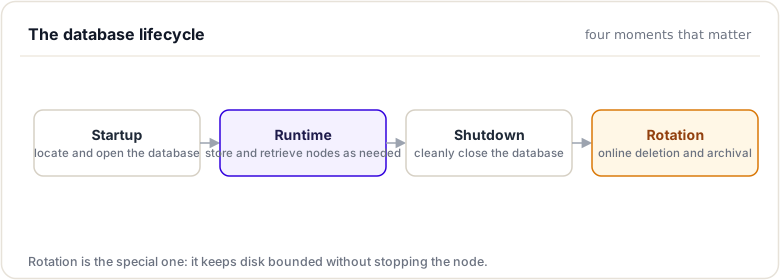
4. Lifecycle Management
NodeObject: The Fundamental Storage Unit
In brief: one stored blob, addressed by its own hash and tagged with its type.
The atomic unit of storage in XRPL is the NodeObject:
Structure:
class NodeObject {
    // Type of object (LEDGER_HEADER, ACCOUNT_NODE, TRANSACTION_NODE)
    NodeObjectType mType;

    // 256-bit unique identifier
    uint256 mHash;

    // Serialized content (variable length)
    Blob mData;

public:
    // Factory: create NodeObject from components
    static std::shared_ptr<NodeObject> createObject(
        NodeObjectType type,
        Blob const& data,
        uint256 const& hash);

    // Access methods
    NodeObjectType getType() const { return mType; }
    uint256 const& getHash() const { return mHash; }
    Blob const& getData() const { return mData; }
};
Key Characteristics:
- Immutable Once Created: Cannot modify data after creation
- Hash as Key: Hash uniquely identifies the object
- Type Distinguishing: Type prevents hash collisions between different data types
- Serialized Format: Data is already in wire format
NodeObject Types:
The NodeObjectType enum (include/xrpl/nodestore/NodeObject.h) is a scoped enum class:
| Type | Purpose | Numeric Value |
|---|---|---|
NodeObjectType::Ledger |
Ledger headers and metadata | 1 |
NodeObjectType::AccountNode |
Account state tree nodes | 3 |
NodeObjectType::TransactionNode |
Transaction tree nodes | 4 |
NodeObjectType::Unknown |
Unknown/unrecognized types | 0 |
NodeObjectType::Dummy |
Cache marker for missing entries | 512 |
Type Prefix in Hashing:
Type fields prevent collisions:
// Two different types of data, might have same structure
// Type prefix ensures different hashes

uint256 hash_account = SHA512Half(
    ACCOUNT_TYPE_BYTE || accountData);

uint256 hash_transaction = SHA512Half(
    TRANSACTION_TYPE_BYTE || accountData);

// hash_account != hash_transaction
NodeObject Lifecycle
In brief: from in-memory tree node to stored blob and back.
Creation
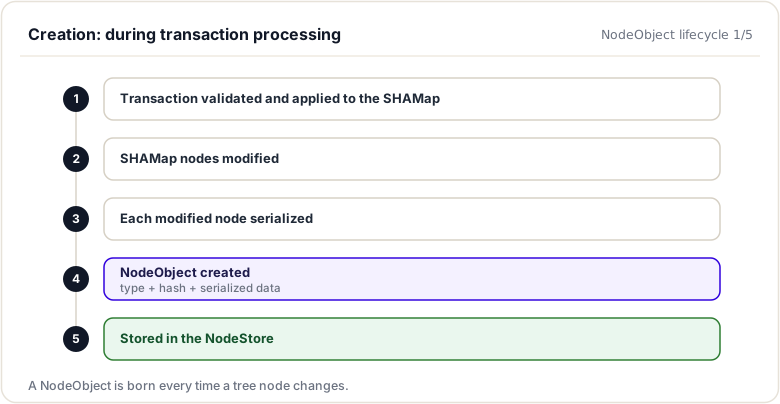
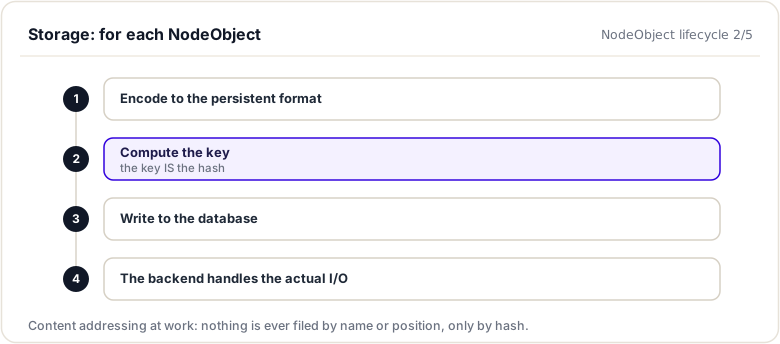
Storage
Caching
Retrieval
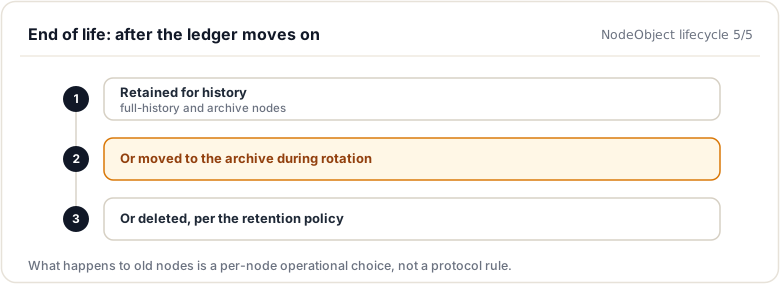
Archival
Backend Abstraction
In brief: the Database/Backend split that keeps the storage engine swappable.
The Backend class defines the minimal interface for any storage system:
Core Operations:
class Backend {
    // Store single object
    virtual Status store(NodeObject const& object) = 0;

    // Retrieve single object by hash
    virtual Status fetch(uint256 const& hash,
                        std::shared_ptr<NodeObject>& object) = 0;

    // Persist multiple objects atomically
    virtual Status storeBatch(std::vector<NodeObject> const& batch) = 0;

    // Retrieve multiple objects efficiently
    virtual Status fetchBatch(std::vector<uint256> const& hashes,
                             std::vector<NodeObject>& objects) = 0;

    // Lifecycle
    virtual Status open(std::string const& path) = 0;
    virtual Status close() = 0;
    virtual int fdRequired() const = 0;  // File descriptors needed
};
Status Codes:
enum class Status {
    ok,                 // Operation succeeded
    notFound,          // Key doesn't exist
    dataCorrupt,       // Data integrity check failed (fatal)
    backendError       // Backend error
};
Backend Independence:
NodeStore sits above backends, application logic unchanged:
// Same code works with any backend

struct DatabaseConfig {
    std::string type;  // "rocksdb", "nudb", "sqlite", etc.
    std::string path;
    // ... backend-specific options
};

auto backend = createBackend(config);
NodeStore store(backend);

// Application uses NodeStore
store.fetch(hash);  // Works regardless of backend
store.store(node);
Supported Backends
In brief: the real engines you can plug in, chiefly NuDB and RocksDB.
RocksDB (Recommended for Most Cases)
Backend* createRocksDBBackend(std::string const& path) {
    return new RocksDBBackend(path);
}
- Modern key-value store developed by Facebook
- LSM tree (Log-Structured Merge tree) design
- Excellent performance for XRPL workloads
- Built-in compression support
- Active maintenance
Characteristics:
- Write throughput: ~10,000-50,000 objects/second
- Read throughput: ~100,000+ objects/second
- Compression: Reduces disk space by 50-70%
NuDB (High-Throughput Alternative)
Backend* createNuDBBackend(std::string const& path) {
    return new NuDBBackend(path);
}
- Purpose-built for XRPL by Ripple
- Append-only design optimized for SSD
- Higher write throughput than RocksDB
- Efficient space utilization
Characteristics:
- Write throughput: ~50,000-200,000 objects/second
- Read throughput: ~100,000+ objects/second
- Better for high-volume systems
Testing Backends
Backend* createMemoryBackend() {
    return new MemoryBackend();  // In-memory, non-persistent
}

Backend* createNullBackend() {
    return new NullBackend();     // No-op backend
}
Data Encoding Format
In brief: the 9-byte header plus payload every backend stores.
To enable backend independence, NodeStore uses a standardized encoding:
Encoded Blob Structure:
Byte Offset | Field | Description
0-7         | Reserved | Set to zero, reserved for future use
8           | Type | NodeObjectType enumeration value
9+          | Data | Serialized object payload (variable length)
Encoding Process:
void encodeNodeObject(NodeObject const& obj, Blob& blob) {
    // Add 8 reserved bytes
    blob.resize(8, 0);

    // Add type byte
    blob.push_back(obj.getType());

    // Add data payload
    blob.append(obj.getData());
}
Decoding Process:
std::shared_ptr<NodeObject> decodeNodeObject(
    uint256 const& hash,
    Blob const& blob)
{
    if (blob.size() < 9) {
        return nullptr;  // Corrupted
    }

    NodeObjectType type = static_cast<NodeObjectType>(blob[8]);

    Blob data(blob.begin() + 9, blob.end());

    return NodeObject::createObject(type, data, hash);
}
Benefits:
- Backend Agnostic: Any backend can store/retrieve encoded blobs
- Self-Describing: Type embedded, forward-compatible with unknown types
- Efficient: Minimal overhead (8 bytes) per object
- Validated: Type byte catches most corruption
Database Key as Hash
In brief: every object is looked up by its content hash, never by a position or name.
The database key is the object's hash (not a sequential ID):
Status Backend::store(NodeObject const& obj) {
    uint256 key = obj.getHash();      // 256-bit hash as key
    Blob value = encode(obj);          // Encoded blob as value

    return database.put(key, value);   // Key-value store
}
Implications:
- Direct Retrieval: Any node retrievable by hash
- Deduplication: Identical content produces identical hash → same key
- Immutability: Hash never changes for given data
- Verification: Can verify data by recomputing hash
Key idea. Content addressing means the key IS the hash of the value. That is what ties the on-disk store directly to the SHAMap's integrity guarantees.
Integration Architecture
In brief: who calls the NodeStore, and what sits between.
NodeStore integrates with SHAMap through the Family pattern:
// Family provides NodeStore access to SHAMap
class Family {
    virtual std::shared_ptr<NodeStore> getNodeStore() = 0;
    virtual std::shared_ptr<TreeNodeCache> getTreeNodeCache() = 0;
    virtual std::shared_ptr<FullBelowCache> getFullBelowCache() = 0;
};

class NodeFamily : public Family {
    std::shared_ptr<NodeStore> mNodeStore;
    std::shared_ptr<TreeNodeCache> mTreeCache;
    std::shared_ptr<FullBelowCache> mFullBelow;

    // ... implement Family interface
};

// SHAMap uses Family for storage access
class SHAMap {
    std::shared_ptr<Family> mFamily;

    std::shared_ptr<SHAMapTreeNode> getNode(uint256 const& hash) {
        // Try cache first
        auto cached = mFamily->getTreeNodeCache()->get(hash);
        if (cached) return cached;

        // Fetch from NodeStore
        auto obj = mFamily->getNodeStore()->fetch(hash);
        if (obj) {
            auto node = deserializeNode(obj);
            // Cache for future access
            mFamily->getTreeNodeCache()->insert(hash, node);
            return node;
        }

        return nullptr;
    }
};
Appendix: Configuration Reference
In brief: every [node_db] knob, with defaults and trade-offs.
Introduction
Complete reference for NodeStore and SHAMap configuration options in xrpld.cfg.
NodeStore Configuration
[node_db] Section
Core database configuration:
[node_db]
type = RocksDB              # Type: RocksDB, NuDB, SQLite, Memory
path = /var/lib/rippled/db  # Database location
cache_size = 256            # Cache size in MB (32-4096 typical)
cache_age = 60              # Cache entry age limit in seconds
Backend Selection
RocksDB (Recommended)
[node_db]
type = RocksDB
path = /var/lib/rippled/db/rocksdb

# RocksDB specific options
compression = true          # Enable compression (reduces disk ~50%)
block_cache_size = 256      # Block cache in MB
write_buffer_size = 64      # Write buffer in MB
max_open_files = 100        # Max concurrent file handles
NuDB (High-Throughput)
[node_db]
type = NuDB
path = /var/lib/rippled/db/nudb

# NuDB specific options
key_size = 32               # SHA256 key size (always 32)
block_size = 4096           # Block size for writes
SQLite (Legacy)
[node_db]
type = SQLite
path = /var/lib/rippled/db/rippled.db
In-Memory (Testing)
[node_db]
type = Memory
# No path needed
Cache Configuration
[node_db]
cache_size = 256            # Size in MB

# Tuning guide:
# Small (32MB):     Minimal memory, slower
# Standard (256MB): Good for most validators
# Large (1GB):      Better sync performance
# Very Large (4GB): Archive nodes
Cache Age:
cache_age = 60              # Seconds before eviction

# Tuning guide:
# Short (30s):      Low memory, frequent eviction
# Standard (60s):   Good balance
# Long (300s):      More memory, longer lifespan
Threading Configuration
[node_db]
async_threads = 4           # Background fetch threads

# Tuning guide:
# Few (2-4):     Lower CPU, simpler
# Standard (4-8): Balance CPU and throughput
# Many (16-32):   High-throughput systems
Batch Operation Configuration
[node_db]
batch_write_size = 256      # Objects per batch

# Note: Most systems don't need to adjust this
# Default of 256 is well-optimized
Online Deletion (Database Rotation)
In brief: keeping disk bounded by rotating two databases.
Enable automatic deletion of old ledgers:
# add to the [node_db] section:
online_delete = 512         # Keep at least this many ledgers (raw count; minimum 256)

# online_delete is a raw ledger count (minimum 256). At ~1 ledger/4s:
# 256    ≈ 17 minutes of history (the minimum)
# 20000  ≈ 1 day
# 150000 ≈ ~1 week (common for validators)
Without Rotation:
# Don't set online_delete section
# Database grows unbounded (~1-2 GB per day)
# Eventually disk fills
# Requires manual pruning
Import/Export Configuration
Import from another database:
[node_db]
type = RocksDB
path = /var/lib/rippled/db/new_rocksdb
import_db = /path/to/old/database  # Source database

# During startup, rippled will:
# 1. Open source database
# 2. Read all objects
# 3. Write to destination
# 4. Verify counts match
# 5. Continue with destination as primary
Historical Database Configuration
Keep complete history without deletion:
[node_db]
type = RocksDB
path = /var/lib/rippled/db/rocksdb

# Don't enable online_delete
# Don't set import_db

# Result: Complete ledger history preserved
# Disk grows ~1GB per day initially
# ~500GB - 1TB for ~2 years mainnet
Tuning by Deployment Type
Small Validator
[node_db]
type = RocksDB
path = /var/lib/rippled/db/rocksdb
cache_size = 128            # Limited memory
cache_age = 30              # Short lifespan
async_threads = 2           # Few threads

# add to the [node_db] section:
online_delete = 172800      # Keep ~8 days (~1 ledger/4s)
Expected:
- Memory: ~300MB
- Disk: ~50GB
- CPU: 20-40%
Standard Validator
[node_db]
type = RocksDB
path = /var/lib/rippled/db/rocksdb
cache_size = 256            # Standard size
cache_age = 60              # Standard lifespan
async_threads = 4           # Normal concurrency
compression = true          # Enable compression

# add to the [node_db] section:
online_delete = 172800      # Keep ~8 days (~1 ledger/4s)
Expected:
- Memory: ~500-700MB
- Disk: ~50GB (with rotation)
- CPU: 30-50%
High-Performance Validator
[node_db]
type = NuDB                 # Higher throughput
path = /var/lib/rippled/db/nudb
cache_size = 1024           # Large cache
cache_age = 120             # Longer lifespan
async_threads = 8           # More parallelism
batch_write_size = 512      # Larger batches

# add to the [node_db] section:
online_delete = 324000      # Keep ~15 days
Expected:
- Memory: ~1.5GB
- Disk: ~80GB (with rotation)
- CPU: 40-60%
Archive Node
[node_db]
type = RocksDB
path = /var/lib/rippled/db/rocksdb
cache_size = 512            # Medium cache
cache_age = 300             # Long lifespan
async_threads = 16          # Many threads
compression = true          # Important for space

# No online_delete section - keep all history
Expected:
- Memory: ~1GB
- Disk: ~500GB - 1TB
- CPU: 50-70%
Monitoring Configuration
Logging Levels
There is no [logging] section. Set the startup log level via [rpc_startup] (or the -q/--verbose command-line flags), and the log file via [debug_logfile]:
[rpc_startup]
{ "command": "log_level", "severity": "warning" }   # or "debug", "info", "error"

[debug_logfile]
/var/log/rippled/debug.log
RPC Configuration for Monitoring
[rpc_startup]
{ "command": "log_level", "severity": "debug" }

# Get metrics via RPC
# xrpld server_info | jq '.result.node_db'
Performance Impact Summary
| Parameter | Lower Value | Higher Value |
|---|---|---|
| cache_size | Less memory, slower | More memory, faster |
| cache_age | Quick eviction, less memory | Slow eviction, more memory |
| async_threads | Less CPU, slower I/O | More CPU, faster I/O |
| compression | Faster disk I/O | Slower disk I/O, less disk space |
| online_delete | More disk space needed | Smaller database, bounded growth |
Configuration Validation
Check configuration syntax:
# Validate config file
xrpld --validate-cfg

# Expected output:
# Config appears to be valid
Changing Configuration
Changing Cache Size
# Edit xrpld.cfg
nano xrpld.cfg
# Change cache_size value

# Restart rippled
systemctl stop rippled
systemctl start rippled

# Cache takes effect immediately
Changing Backend
# This requires data migration

# 1. Stop rippled
systemctl stop rippled

# 2. Export current database
xrpld --export current_db export.json

# 3. Update config with new backend
nano xrpld.cfg  # Change type = XXX

# 4. Import to new backend
mkdir -p /var/lib/rippled/db/new_backend
xrpld --import export.json --ledger-db new_backend

# 5. Backup old database
mv /var/lib/rippled/db/old_backend \
   /var/lib/rippled/db/old_backend.backup

# 6. Restart with new database
systemctl start rippled

# 7. Verify it works
xrpld server_info | jq '.result.node_db.type'
Enabling Online Deletion
# Add to xrpld.cfg
# add to the [node_db] section:
online_delete = 256

# Restart rippled
systemctl restart rippled

# Monitor deletion (may take time)
tail -f /var/log/rippled/rippled.log | grep -i delete
Troubleshooting Configuration Issues
Issue: Cache hits too low
Possible causes:
cache_sizetoo smallcache_agetoo short- High variance in access patterns
Check:
xrpld server_info | jq '.result.node_db.cache_hit_rate'
Fix:
- Increase
cache_sizeby 50% - Increase
cache_ageto 120 - Verify available memory
Issue: Database corrupted
Possible causes:
- Unclean shutdown
- Disk failure
- Backend corruption
Recovery:
# Stop rippled
systemctl stop rippled

# Backup corrupted database
mv /var/lib/rippled/db /var/lib/rippled/db.corrupt

# Restart (will resync from network)
systemctl start rippled

# Check progress
xrpld server_info | jq '.result.ledger.ledger_index'
Issue: Disk space filling
Check:
df -h /var/lib/rippled/

# If near full:
du -sh /var/lib/rippled/db/*
Solution:
- If rotation enabled: wait for deletion to complete
- If rotation disabled: enable it with
online_delete = 256 - Monitor with
watch -n 1 'du -sh /var/lib/rippled/db'
Issue: Poor write performance
Check:
iostat -x 1 /dev/sda  # Check I/O wait
iotop -o              # Check top I/O processes
Solutions:
- Use SSD (not HDD)
- Enable compression:
compression = true - Switch to NuDB:
type = NuDB - Increase
async_threads
Quick Configuration Checklist
[node_db]
type = RocksDB                    # ✓ Choose backend
path = /var/lib/rippled/db        # ✓ Choose location
cache_size = 256                  # ✓ Tune for hardware
cache_age = 60                    # ✓ Default is good
async_threads = 4                 # ✓ Default is good
compression = true                # ✓ Enable (if RocksDB)

# add to the [node_db] section:
online_delete = 256               # ✓ Prevent unbounded growth
This configuration is production-ready for most validators.
Performance Monitoring Script
#!/bin/bash
# Monitor NodeStore health

while true; do
    clear
    echo "=== NodeStore Health Check ==="

    xrpld server_info | jq '{
        "cache_hit_rate": .result.node_db.cache_hit_rate,
        "cache_size_mb": .result.node_db.cache_size,
        "write_latency_us": .result.node_db.write_latency_us,
        "read_latency_us": .result.node_db.read_latency_us,
        "async_queue_depth": .result.node_db.async_queue_depth
    }'

    echo ""
    echo "=== Disk Usage ==="
    du -sh /var/lib/rippled/db/*

    sleep 5
done
For more details, see the Storage backends & operations, Caching & resource management, and Development & debugging techniques modules.
Summary
This module covered the NodeStore, the persistent layer beneath the SHAMap. It is a pluggable, hash-indexed key-value store: every SHAMap node becomes a NodeObject addressed by its own hash and tagged with a type, and a Database/Backend abstraction keeps the storage engine swappable. Content addressing, where the key is the hash of the value, is what ties on-disk storage directly to the SHAMap's integrity guarantees.
To remember:
- NodeStore = the persistent, hash-keyed key-value store beneath the SHAMap
- Unit of storage:
NodeObject= type + hash + blob - Content-addressed: the database key IS the hash of the value
NodeObjectTypetags what the blob is (ledger header, transaction, account node...)- The Database / Backend split keeps storage engines swappable (
include/xrpl/nodestore) - Configured in the
[node_db]stanza:type=,path=, cache tuning - Read path: cache first, then NodeStore, then ask peers for what is missing
- Watch out: deleting the node_db folder forces a full resync and destroys local history;
online_deleteis the sane way to bound disk
Next up. You know the NodeStore's shape; now choose its engine. RocksDB or NuDB, rotation, imports, online deletion: next is storage backends and operations.
Resources
Assignments
0 of 2 completeUnlocks
Finishing this module opens up: