
RPC architecture & request flow
How rippled's RPC layer dispatches JSON-RPC / WebSocket / gRPC requests to handlers.
What you'll learn
- Describe the handler table and the dispatch flow.
- Understand `JsonContext` and the handler signature.
- Trace a request from transport to response.
Understanding the Foundation of Rippled's RPC System
Introduction
≈45 min · Advanced · builds on Handshake & message relaying
This phase is about how the outside world talks to a node. In this module you'll learn how rippled's RPC layer dispatches JSON-RPC and WebSocket requests to the right handler: the central handler table, the JsonContext a handler receives, and the path a request takes from transport to response. gRPC is a separate, much smaller surface with its own handlers, and we'll cover exactly where it diverges. It's the groundwork for building your own command a couple of modules from now.
Core Architecture Components
In brief: the pieces that make RPC work: the handler table, the handler signature, and the JsonContext.
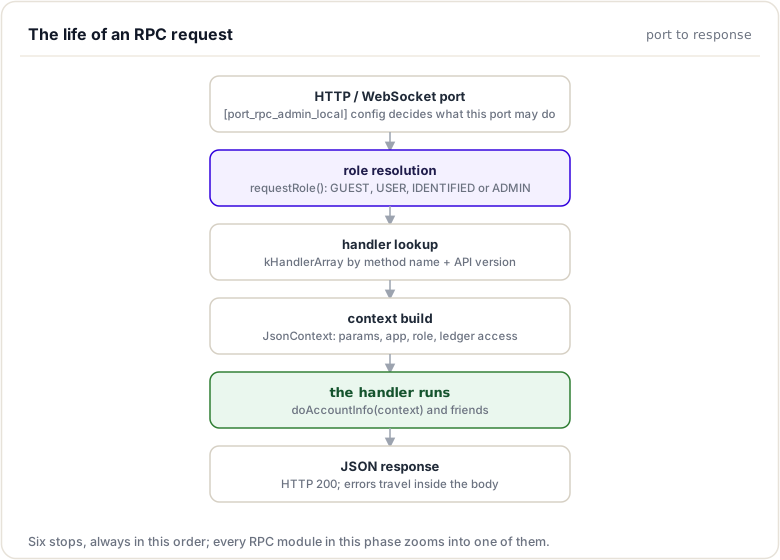
The RPC system consists of several key components that work together to process requests:
1. Central Handler Table
The handler table is a centralized registry that maps RPC command names to their corresponding handler functions.
Location: src/xrpld/rpc/detail/Handler.cpp
The table starts as a static array, kHandlerArray, in Handler.cpp. Here are two real entries:
Handler const kHandlerArray[]{
    // Some handlers not specified here are added to the table via addHandler()
    // Request-response methods
    {.name = "account_info",
     .valueMethod = byRef(&doAccountInfo),
     .role = Role::USER,
     .condition = Condition::NoCondition},
    // ...
    {.name = "submit",
     .valueMethod = byRef(&doSubmit),
     .role = Role::USER,
     .condition = Condition::NeedsCurrentLedger},
    // ... roughly 70 entries in total
};
The array is copied into a searchable std::multimap<std::string, Handler> the first time HandlerTable::instance() is called (a function-local static), and a couple of new-style handlers — LedgerHandler (the ledger command) and VersionHandler — are added on top via addHandler<T>() rather than appearing in the array.
Key characteristics:
- Command Name: Case-sensitive string identifier (e.g.,
"account_info") - Handler Function:
valueMethod, astd::functionwrapping the implementation - Role: In practice a binary admin/non-admin marker — entries with
Role::ADMINare refused to non-admin callers; every other role value places no restriction on who may call the command - Condition: A readiness requirement (
NoConditionor one of three "needs a usable ledger/network" values) checked before the handler runs
2. Handler Information Structure
Each table entry is a Handler structure containing metadata:
// src/xrpld/rpc/detail/Handler.h
struct Handler
{
    template <class JsonValue>
    using Method = std::function<Status(JsonContext&, JsonValue&)>;

    char const* name;
    Method<json::Value> valueMethod;
    Role role;
    RPC::Condition condition;

    unsigned minApiVer = kApiMinimumSupportedVersion;
    unsigned maxApiVer = kApiMaximumValidVersion;
};
Purpose:
- Enables versioning for backward compatibility —
minApiVerdefaults tokApiMinimumSupportedVersion(1) andmaxApiVertokApiMaximumValidVersion(3, the beta version — notUINT_MAX) - Specifies permission requirements before execution (the
Role::ADMINgate) - Defines runtime conditions (e.g., the node must be synced and hold a recent validated ledger)
3. Handler Function Signature
Legacy-style RPC handlers (the vast majority) follow a standardized function signature:
json::Value handlerName(RPC::JsonContext& context);
Components:
- Return Type:
json::Value, The JSON response object - Parameter:
RPC::JsonContext&, Contains request data, the caller's role, and application services
The table entry wraps this function with byRef(...), which adapts it to the Method<json::Value> shape (Status(JsonContext&, json::Value&)) the dispatcher invokes. This consistency allows the dispatcher to invoke any handler uniformly.
4. JsonContext Object
The JsonContext provides handlers with everything needed to process a request:
// src/xrpld/rpc/Context.h
struct Context
{
    beast::Journal const j;
    Application& app;
    Resource::Charge& loadType;
    NetworkOPs& netOps;
    LedgerMaster& ledgerMaster;
    Resource::Consumer& consumer;
    Role role;
    std::shared_ptr<JobQueue::Coro> coro;
    InfoSub::pointer infoSub;
    unsigned int apiVersion;
};

struct JsonContext : public Context
{
    struct Headers
    {
        std::string_view user;
        std::string_view forwardedFor;
    };

    json::Value params;

    Headers headers{};
};
Key capabilities:
- Request parameters:
paramscarries the client's JSON request - Application services:
app,netOps,ledgerMasterreach the rest of the node - Resource Management:
consumertracks API usage;loadTypeis the charge the handler may raise - Authentication:
roleis the caller's permission level
Note what is not here: there is no ledger view member. The dispatcher does not select a ledger for the handler — each handler resolves the ledger itself (typically via RPC::lookupLedger, honoring the request's ledger_index/ledger_hash parameters) using ledgerMaster.
Handler Registration Process
In brief: how a command is added to the central handler table.
Handlers are listed in a static array; the searchable multimap is built from it once, on first use, inside HandlerTable::instance():
Step 1: Define the Handler Function
// src/xrpld/rpc/handlers/MyCustomHandler.cpp
namespace xrpl {

json::Value doMyCustomCommand(RPC::JsonContext& context)
{
    json::Value result;
    // Implementation here
    return result;
}

} // namespace xrpl
Step 2: Declare in Header
// src/xrpld/rpc/handlers/Handlers.h
json::Value doMyCustomCommand(RPC::JsonContext&);
This step is mandatory, not optional: Handler.cpp includes xrpld/rpc/handlers/Handlers.h, and the table entry in Step 3 takes the address of the function — without a visible declaration the file does not compile.
Step 3: Add to Handler Table
// src/xrpld/rpc/detail/Handler.cpp — add an entry to kHandlerArray[]
{.name = "my_custom_command",
 .valueMethod = byRef(&doMyCustomCommand),  // wrap the handler function
 .role = Role::USER,                        // ADMIN would gate the command
 .condition = Condition::NeedsCurrentLedger}
Handler Discovery and Dispatch
In brief: how an incoming request is matched to its handler and run.
When a client sends an RPC request, the system follows this flow:
1. Request Reception
The server receives a JSON-RPC request via HTTP or WebSocket (gRPC requests take a separate path covered below):
{
    "method": "account_info",
    "params": [{
        "account": "rN7n7otQDd6FczFgLdlqtyMVrn3NnrcVXs"
    }]
}
2. Command Lookup
Inside RPC::doCommand, fillHandler looks the command up, keyed by name and API version:
auto handler = getHandler(context.apiVersion, context.app.config().betaRpcApi, strCommand);

if (handler == nullptr)
    return RpcUnknownCommand;
3. Permission Check
Before invoking the handler, the system applies a single binary gate (RPCHandler.cpp):
if (handler->role == Role::ADMIN && context.role != Role::ADMIN)
    return RpcNoPermission;
There is no ordered role comparison. Only commands registered with Role::ADMIN are permission-gated here; a Role::GUEST caller can run any non-admin command, including submit.
4. Condition Validation
The system ensures the node is in shape to answer:
ErrorCodeI const res = conditionMet(handler->condition, context);
if (res != RpcSuccess)
{
    return res;
}
conditionMet (in Handler.h) does not test the individual flags — any condition other than NoCondition triggers the same full battery of readiness checks (amendment-blocked, UNL-blocked, operating mode, validated-ledger age, closed ledger).
5. Handler Invocation
Finally, the handler is executed through the stored valueMethod:
auto method = handler->valueMethod;
auto ret = method(context, result);
6. Response Serialization
The result is wrapped in a JSON-RPC response envelope and returned to the client.
Key idea. Dispatch always runs the same gauntlet: look up the command (per API version), apply the ADMIN gate, validate conditions, then invoke the handler. Every command goes through it.
Handler Capability Flags
In brief: the conditions a handler declares before it may run.
Handlers declare one condition from a small enum class:
// src/xrpld/rpc/detail/Handler.h
enum class Condition {
    NoCondition = 0,
    NeedsNetworkConnection = 1,
    NeedsCurrentLedger = 1 << 1,
    NeedsClosedLedger = 1 << 2,
};
| Value | Declared by | Example Use Case |
|---|---|---|
NoCondition |
Most read-only queries (account_info, ledger_data, server_info, sign, ...) |
Queries a specific ledger the handler resolves itself |
NeedsCurrentLedger |
fee, ledger_accept, ledger_current, owner_info, path_find, simulate, submit, submit_multisigned |
Transaction submission |
NeedsNetworkConnection |
tx, ledger_cleaner |
Transaction lookup |
NeedsClosedLedger |
ledger_closed |
Last closed ledger info |
How it's enforced: despite the flag-style values, Condition is an enum class and the table never combines flags with |. RPC::conditionMet runs one shared battery for any value other than NoCondition:
if ((conditionRequired != Condition::NoCondition) &&
    (context.netOps.getOperatingMode() < OperatingMode::SYNCING))
plus amendment-blocked and UNL-blocked checks, a validated-ledger age check against Tuning::kMaxValidatedLedgerAge, a current-vs-validated ledger index gap check, and finally !context.ledgerMaster.getClosedLedger(). Under API version 1 the failures map to RpcNoNetwork/RpcNoCurrent/RpcNoClosed; under API version 2 and up they all collapse to RpcNotSynced.
Example:
{.name = "submit",
 .valueMethod = byRef(&doSubmit),
 .role = Role::USER,
 .condition = Condition::NeedsCurrentLedger},
This ensures the handler cannot execute unless the node is synced and holds a usable, recent ledger.
Multi-Transport Support
In brief: the same handlers serve JSON-RPC and WebSocket; gRPC is a separate, four-method surface.
Rippled's RPC system abstracts away the two JSON transports, allowing handlers to work across:
HTTP (JSON-RPC)
curl -X POST http://localhost:5005/ \
  -H "Content-Type: application/json" \
  -d '{
    "method": "account_info",
    "params": [{"account": "rN7n7otQDd6FczFgLdlqtyMVrn3NnrcVXs"}]
  }'
WebSocket (JSON-RPC)
const ws = new WebSocket('ws://localhost:6006');
ws.send(JSON.stringify({
    command: 'account_info',
    account: 'rN7n7otQDd6FczFgLdlqtyMVrn3NnrcVXs'
}));
gRPC (Protocol Buffers)
gRPC is not a third front-end to the same handlers. The service (include/xrpl/proto/org/xrpl/rpc/v1/xrp_ledger.proto) exposes exactly four methods, aimed at bulk ledger extraction (clio is the main consumer):
service XRPLedgerAPIService {
  // Get a specific ledger, optionally including transactions and any modified,
  // added or deleted ledger objects
  rpc GetLedger(GetLedgerRequest) returns (GetLedgerResponse);

  // Get a specific ledger object from a specific ledger
  rpc GetLedgerEntry(GetLedgerEntryRequest) returns (GetLedgerEntryResponse);

  // Iterate through all ledger objects in a specific ledger
  rpc GetLedgerData(GetLedgerDataRequest) returns (GetLedgerDataResponse);

  // Get all ledger objects that are different between the two specified
  // ledgers. Note, this method has no JSON equivalent.
  rpc GetLedgerDiff(GetLedgerDiffRequest) returns (GetLedgerDiffResponse);
}
There is no account_info (or submit, or anything else from the JSON table) over gRPC. Each method has a dedicated handler — doLedgerGrpc, doLedgerEntryGrpc, doLedgerDataGrpc, doLedgerDiffGrpc in src/xrpld/rpc/GRPCHandlers.h — that takes an RPC::GRPCContext<ProtobufRequest> and returns a protobuf response paired with a grpc::Status. These handlers never pass through the handler table, doCommand, or any JSON conversion. The proto file itself says it: "They do not directly mimic the JSON equivalent methods."
Handler Transparency: The same handler function serves HTTP and WebSocket — the dispatcher handles the protocol-specific envelope details for those two.
Versioning and Compatibility
In brief: how one command name serves several API versions.
Rippled supports API versioning to maintain backward compatibility. The multimap can hold multiple entries for the same name with non-overlapping version ranges. A real example — ledger_header only exists in API version 1:
{.name = "ledger_header",
 .valueMethod = byRef(&doLedgerHeader),
 .role = Role::USER,
 .condition = Condition::NoCondition,
 .minApiVer = 1,
 .maxApiVer = 1},
Clients can specify the API version in their requests:
{
    "method": "account_info",
    "api_version": 2,
    "params": [...]
}
If no version is specified, the system uses kApiVersionIfUnspecified — version 1. The supported range is 1 to kApiMaximumSupportedVersion (2), extendable to kApiBetaVersion (3) when [beta_rpc_api] is enabled in the config.
Two distinct failure modes are worth keeping apart: an api_version value outside the supported range is rejected at the transport layer as invalid_API_version (HTTP 400, or JSON-RPC error code kWrongVersion in a batch), before dispatch. A valid version for which the command has no covering table entry makes getHandler return nullptr, and fillHandler reports that as RpcUnknownCommand — the command simply doesn't exist at that version.
Real-World Example: AccountInfo Handler
In brief: the theory applied to one real handler.
Let's examine the registration of the widely-used account_info handler:
Registration (Handler.cpp):
{.name = "account_info",
 .valueMethod = byRef(&doAccountInfo),
 .role = Role::USER,
 .condition = Condition::NoCondition},
Analysis:
- Command:
"account_info" - Function:
doAccountInfo(defined insrc/xrpld/rpc/handlers/account/AccountInfo.cpp) - Role:
USER, meaning not admin-gated — any caller, including an unauthenticatedGUEST, may run it - Condition:
NoCondition, soconditionMetreturns immediately; the handler resolves whichever ledger the request names (viaRPC::lookupLedger) and reports its own error if that ledger is unavailable
This registration tells Rippled:
- Accept requests with
method: "account_info" - Skip the ADMIN permission gate (the role is not
Role::ADMIN) - Skip the node-readiness battery (the condition is
NoCondition) - Invoke
doAccountInfo()with the request context
Conclusion
The RPC handler architecture provides a clean, extensible foundation for Rippled's API layer. Through centralized registration in a handler table, uniform function signatures, and a simple ADMIN permission gate, the system ensures consistency across roughly seventy commands while remaining easy to extend. The separation between the two JSON transports and handler logic means the same implementation serves HTTP and WebSocket clients transparently, while gRPC remains a deliberately small, separate surface with its own protobuf handlers. Understanding this architecture is essential for navigating the codebase, debugging RPC issues, and preparing to implement custom handlers.
Request and Response Flow
In brief: the twelve stages every request passes, at a glance.
Tracing a Request Through Rippled's RPC Pipeline
Introduction
Understanding the complete lifecycle of an RPC request, from the moment it arrives at the server to when the response is sent back to the client, is essential for building robust custom handlers. This knowledge helps you anticipate edge cases, implement proper error handling, and optimize performance.
In this section, we'll trace the journey of a request through Rippled's RPC system, examining each stage of processing and the components involved.
The Complete Request Journey
In brief: the same twelve stages, one by one.
Client → Transport Layer → Parser → Role Determination → JsonContext → Dispatcher (lookup → ADMIN gate → conditions) → Handler → Response Builder → Client
Note the order: the transport (ServerHandler) builds the complete JsonContext before handing off to the dispatcher (RPC::doCommand) — lookup, the permission gate, and condition checks all happen inside dispatch, with the context already in hand.
Let's break down each stage in detail.
Stage 1: Request Reception
HTTP Entry Point
For HTTP requests, the entry point is the HTTP server configured in xrpld.cfg:
[port_rpc_admin_local]
port = 5005   # local example; public servers conventionally expose 51234 (JSON-RPC) / 51233 (WebSocket)
ip = 127.0.0.1
admin = 127.0.0.1
protocol = http
Source Location: src/xrpld/rpc/detail/ServerHandler.cpp — ServerHandler::onRequest posts a coroutine that runs processSession, which calls processRequest. (Don't confuse this with RPCCall.cpp, which is the command-line client: it converts xrpld <command> argv into a JSON-RPC request and sends it to a server.)
The HTTP server receives the raw request:
POST / HTTP/1.1
Host: localhost:5005
Content-Type: application/json

{
    "method": "account_info",
    "params": [{
        "account": "rN7n7otQDd6FczFgLdlqtyMVrn3NnrcVXs",
        "ledger_index": "validated"
    }]
}
WebSocket Entry Point
For WebSocket connections, clients establish a persistent connection:
[port_ws_admin_local]
port = 6006
ip = 127.0.0.1
admin = 127.0.0.1
protocol = ws
Source Location: also src/xrpld/rpc/detail/ServerHandler.cpp — ServerHandler::onWSMessage parses the frame and posts a coroutine running the WebSocket overload of processSession. Both transports converge on RPC::doCommand in RPCHandler.cpp, the transport-agnostic dispatcher.
WebSocket messages use a slightly different format:
{
    "id": 1,
    "command": "account_info",
    "account": "rN7n7otQDd6FczFgLdlqtyMVrn3NnrcVXs",
    "ledger_index": "validated"
}
gRPC Entry Point
For gRPC, requests arrive as Protocol Buffer messages and stay on their own path end to end:
Source Location: src/xrpld/app/main/GRPCServer.cpp — GRPCServerImpl::setupListeners wires the four service methods to their dedicated handlers.
message GetLedgerRequest {
  LedgerSpecifier ledger = 1;

  // If true, include transactions contained in this ledger
  bool transactions = 2;
  ...
}
Stage 2: Request Parsing
The raw request is parsed into a structured format.
JSON Parsing
// Parse the JSON body (ServerHandler::processRequest, simplified)
json::Value jsonOrig;
json::Reader reader;

if ((request.size() > RPC::Tuning::kMaxRequestSize) ||
    !reader.parse(request, jsonOrig) || !jsonOrig || !jsonOrig.isObject())
{
    // HTTP 400: "Unable to parse request: ..."
}
Field Extraction
The parser extracts key fields — the command name (from method or command) and the API version via RPC::getAPIVersionNumber, defaulting to kApiVersionIfUnspecified (1) when the request names none.
Protocol Normalization
The two JSON transports use different formats, which are normalized:
HTTP/WebSocket:
methodorcommandfieldparamsarray or direct parameters
gRPC:
- Protobuf message fields, consumed directly by the dedicated protobuf handlers — never converted to JSON
Stage 3: Role Determination
Before dispatching the request, the system determines the caller's role based on the connection:
IP-Based Role Assignment
Source Location: src/xrpld/rpc/detail/Role.cpp
Role
requestRole(
    Role const& required,
    Port const& port,
    json::Value const& params,
    beast::IP::Endpoint const& remoteIp,
    std::string_view user)
{
    if (isAdmin(port, params, remoteIp.address()))
        return Role::ADMIN;

    if (required == Role::ADMIN)
        return Role::FORBID;

    if (ipAllowed(remoteIp.address(), port.secureGatewayNetsV4, port.secureGatewayNetsV6))
    {
        if (!user.empty())
            return Role::IDENTIFIED;
        return Role::PROXY;
    }

    return Role::GUEST;
}
The Role Enum
// src/xrpld/rpc/Role.h
enum class Role { GUEST, USER, IDENTIFIED, ADMIN, PROXY, FORBID };
This is not an ordered hierarchy — note that PROXY and FORBID sit numerically above ADMIN, so no < comparison over these values would make sense. requestRole only ever returns one of ADMIN, FORBID, IDENTIFIED, PROXY, or GUEST:
- ADMIN: The connection matches the port's
adminnetworks (and any configured admin credentials) — full access, unlimited resources - FORBID: Returned when a command whose table entry requires
Role::ADMINis requested from a non-admin connection; the transport answers withrpcError(RpcForbidden). It is not a blacklist - IDENTIFIED: A
secure_gatewayconnection that forwarded a username header — its practical effect is unlimited resources (isUnlimited), not extra command access - PROXY: A
secure_gatewayconnection with no username header - GUEST: Everyone else — a plain unauthenticated caller. GUEST callers can run every non-admin command, including
submit - USER: Never assigned to a caller. It exists purely as a requirement level in the handler table, marking "not admin-gated"
Configuration Example
admin and secure_gateway are keys inside a [port_*] stanza, not standalone sections (cfg/xrpld-example.cfg):
[port_rpc_admin_local]
port = 5005
ip = 127.0.0.1
admin = 127.0.0.1
protocol = http

[port_grpc]
port = 50051
ip = 127.0.0.1
secure_gateway = 127.0.0.1
Stage 4: Context Construction
A JsonContext object is built by the transport — before any handler lookup — with all necessary information. This is the real WebSocket construction site (ServerHandler::processSession):
RPC::JsonContext context{
    {.j = app_.getJournal("RPCHandler"),
     .app = app_,
     .loadType = loadType,
     .netOps = app_.getOPs(),
     .ledgerMaster = app_.getLedgerMaster(),
     .consumer = is->getConsumer(),
     .role = role,
     .coro = coro,
     .infoSub = is,
     .apiVersion = apiVersion},
    jv,
    {.user = is->user(), .forwardedFor = is->forwardedFor()}};
Context provides:
- Request parameters (
params— the second aggregate member,jvhere) - Application services (
app,netOps,ledgerMaster) - Resource tracking (
consumer, plusloadType, the charge the handler may raise) - Permission level (
role) - Header data (
headers.user,headers.forwardedFor)
There is no ledger member: the handler picks its own ledger from the request parameters.
Stage 5: Handler Lookup
Inside RPC::doCommand, fillHandler extracts the command name and searches the handler table, keyed by name and API version:
auto handler = getHandler(context.apiVersion, context.app.config().betaRpcApi, strCommand);

if (handler == nullptr)
    return RpcUnknownCommand;
Version Matching
HandlerTable::getHandler walks the multimap entries for the name and picks the one whose [minApiVer, maxApiVer] range covers the requested version:
auto const range = table_.equal_range(name);
auto const i = std::find_if(range.first, range.second, [version](auto const& entry) {
    return entry.second.minApiVer <= version && version <= entry.second.maxApiVer;
});

return i == range.second ? nullptr : &i->second;
No covering entry means nullptr — reported as RpcUnknownCommand, not an invalid-params error. (An api_version outside the supported range never gets this far; the transport already rejected it as invalid_API_version.)
Stage 6: Permission Verification
The system applies the single binary permission gate (RPCHandler.cpp):
if (handler->role == Role::ADMIN && context.role != Role::ADMIN)
    return RpcNoPermission;
Example: a GUEST client calling stop (registered with Role::ADMIN) is rejected here. A GUEST client calling submit (registered with Role::USER) passes — non-admin commands are open to everyone. Separately, when requestRole already returned Role::FORBID (an admin-required command from a non-admin connection), the transport answers rpcError(RpcForbidden) without dispatching at all.
Stage 7: Condition Validation
Handlers may require the node to be in a usable state. RPC::conditionMet runs the same battery for any condition other than NoCondition:
Blocked-Node Checks
if (context.app.getOPs().isAmendmentBlocked() && (conditionRequired != Condition::NoCondition))
{
    return RpcAmendmentBlocked;
}

if (context.app.getOPs().isUNLBlocked() && (conditionRequired != Condition::NoCondition))
{
    return RpcExpiredValidatorList;
}
Operating-Mode Check
if ((conditionRequired != Condition::NoCondition) &&
    (context.netOps.getOperatingMode() < OperatingMode::SYNCING))
Failure yields RpcNoNetwork under API version 1, RpcNotSynced under version 2 and up.
Ledger-Freshness and Closed-Ledger Checks
Outside standalone mode, the validated-ledger age is compared against Tuning::kMaxValidatedLedgerAge, and the current ledger index must not lag the validated index by more than 10 (RpcNoCurrent / RpcNotSynced). Finally:
if ((conditionRequired != Condition::NoCondition) && !context.ledgerMaster.getClosedLedger())
which yields RpcNoClosed (v1) or RpcNotSynced (v2+). Note it is getClosedLedger() — there is no argument-less haveLedger(); the real LedgerMaster::haveLedger(std::uint32_t seq) takes a sequence number and plays no part here.
Stage 8: Resource Accounting
Resource control brackets the dispatch rather than sitting at one point inside it:
On arrival, the overload check runs: if Consumer::disconnect() reports the endpoint over threshold, WebSocket closes the session ("threshold exceeded") and HTTP replies 503 Server is overloaded — before any dispatch.
Before lookup, fillHandler also refuses non-unlimited callers when the job queue is saturated:
if (!isUnlimited(context.role))
{
    // Count all jobs at jtCLIENT priority or higher.
    int const jobCount = context.app.getJobQueue().getJobCountGE(JtClient);
    if (jobCount > Tuning::kMaxJobQueueClients)
        return RpcTooBusy;
}
After the handler runs, the actual charge is applied:
is->getConsumer().charge(loadType);
loadType starts as Resource::kFeeReferenceRpc and the handler may raise it through context.loadType. ADMIN and IDENTIFIED roles are unlimited and skip the limits entirely.
Stage 9: Handler Invocation
The handler function is called with the constructed context (callMethod in RPCHandler.cpp):
try
{
    auto ret = method(context, result);
    // ...
}
catch (std::exception& e)
{
    if (context.loadType == Resource::kFeeReferenceRpc)
        context.loadType = Resource::kFeeExceptionRpc;

    injectError(RpcInternal, result);
    return RpcInternal;
}
Error handling: Any uncaught exceptions are converted to RpcInternal errors — and the resource charge is bumped to kFeeExceptionRpc.
Stage 10: Response Construction
Success Response
For successful requests:
{
    "result": {
        "status": "success",
        "account_data": {
            "Account": "rN7n7otQDd6FczFgLdlqtyMVrn3NnrcVXs",
            "Balance": "1000000000",
            ...
        },
        "ledger_index": 12345
    }
}
Error Response
For failed requests:
{
    "result": {
        "error": "actNotFound",
        "error_code": 19,
        "error_message": "Account not found.",
        "status": "error",
        "request": {
            "command": "account_info",
            "account": "rInvalidAccount"
        }
    }
}
Stage 11: Response Serialization
The JSON response is serialized back to the client's format:
HTTP Response
HTTP/1.1 200 OK
Content-Type: application/json

{
    "result": { ... }
}
WebSocket Response
{
    "id": 1,
    "status": "success",
    "type": "response",
    "result": { ... }
}
gRPC Response
GetLedgerResponse {
    ledger_header: ...
}
Stage 12: Response Delivery
The response is sent back to the client over the same transport:
- HTTP: Single request-response cycle completes
- WebSocket: Response is pushed to the persistent connection
- gRPC: Unary protobuf response returned by the dedicated handler
Timing and Performance
In brief: where the milliseconds actually go.
Each stage has associated latency:
| Stage | Typical Time | Notes |
|---|---|---|
| Reception | < 1 ms | Network overhead |
| Parsing | < 1 ms | JSON parsing |
| Lookup | < 0.1 ms | Ordered multimap lookup |
| Permission Check | < 0.1 ms | Simple comparison |
| Condition Check | < 1 ms | Ledger availability |
| Handler Execution | 1-100 ms | Varies by handler |
| Serialization | < 1 ms | JSON encoding |
| Delivery | < 1 ms | Network overhead |
Total typical latency: 5-105 ms
Error Handling at Each Stage
In brief: which stage produces which class of error.
Different errors can occur at each stage:
Parsing Errors
// HTTP 400 "Unable to parse request"  — malformed JSON
// WS  "jsonInvalid"                   — malformed or oversized frame
// invalid_API_version                 — api_version outside the supported range
Lookup Errors
RpcUnknownCommand // Command not found, or no entry covers the requested api_version
RpcCommandMissing // Neither "command" nor "method" present
Permission Errors
RpcNoPermission   // ADMIN-required command, non-admin caller (dispatch gate)
RpcForbidden      // Role::FORBID from requestRole (rejected at the transport)
Condition Errors
RpcNoCurrent             // Stale or lagging ledger (API v1)
RpcNoNetwork             // Operating mode below SYNCING (API v1)
RpcNoClosed              // No closed ledger (API v1)
RpcNotSynced             // Any of the above under API v2+
RpcAmendmentBlocked      // Node is amendment blocked
RpcExpiredValidatorList  // Node is UNL blocked
Handler Errors
RpcActNotFound   // Account not found
RpcLgrNotFound   // Ledger not found
RpcInternal      // Unexpected error
Real-World Example: Tracing an account_info Request
In brief: one concrete request walked through all twelve stages.
Let's trace a complete request:
1. Client Request
{
    "method": "account_info",
    "params": [{
        "account": "rN7n7otQDd6FczFgLdlqtyMVrn3NnrcVXs",
        "ledger_index": "validated"
    }]
}
2. Reception (HTTP)
POST / HTTP/1.1
Host: localhost:5005
3. Role Determination
remoteIP = 127.0.0.1, matches the port's admin nets → Role::ADMIN
4. Context Construction
context.params = params
context.role = Role::ADMIN
context.apiVersion = 1
// no ledger member — the handler resolves "validated" itself
5. Handler Lookup
handler->valueMethod wraps doAccountInfo
handler->role = Role::USER
handler->condition = Condition::NoCondition
6. Permission Check
handler->role != Role::ADMIN → gate does not apply → PASS
7. Condition Check
conditionRequired == Condition::NoCondition → RpcSuccess (battery skipped)
8. Handler Invocation
doAccountInfo(context) // resolves the validated ledger via RPC::lookupLedger
9. Response
{
    "result": {
        "status": "success",
        "account_data": {
            "Account": "rN7n7otQDd6FczFgLdlqtyMVrn3NnrcVXs",
            "Balance": "1000000000"
        }
    }
}
10. Resource Charge
usage.charge(loadType); // kFeeReferenceRpc; ADMIN is unlimited anyway
Conclusion
The RPC request-response flow demonstrates Rippled's carefully orchestrated pipeline for handling API calls. From initial reception on the JSON transports, through parsing, role determination, context construction, and then dispatch — lookup, the ADMIN gate, and condition validation — to handler invocation and response formatting, each stage serves a specific purpose. This design enables early rejection of invalid requests, consistent error handling, and proper resource management, with HTTP and WebSocket sharing one dispatcher while gRPC runs its own small pipeline. Mastering this flow is crucial for debugging RPC issues and understanding how custom handlers integrate into the system.
Summary
This module explained how the outside world talks to a node. rippled routes HTTP and WebSocket JSON requests through a central handler table; each handler receives a JsonContext built by the transport, and every request runs the same gauntlet inside dispatch: command lookup, the ADMIN permission gate, condition validation, then handler invocation. gRPC is a separate four-method surface with its own protobuf handlers. It is the groundwork for building your own command.
To remember:
- One central handler table maps command name (per API version) to handler + role + condition; only
Role::ADMINentries are permission-gated - Handler signature:
json::Value doX(RPC::JsonContext&), wrapped bybyRefinto the table'svalueMethod - Pipeline: transport builds the JsonContext, then dispatch does lookup, ADMIN gate,
conditionMet, invoke, serialize - The same handlers serve JSON-RPC (HTTP) and WebSocket; gRPC exposes only GetLedger/GetLedgerData/GetLedgerDiff/GetLedgerEntry through dedicated handlers
JsonContextcarries params, the caller's role, app services, and LedgerMaster — handlers resolve the ledger themselves- Client ports: 51234 JSON-RPC / 51233 WebSocket by convention; peers use 51235: different worlds
- Code:
src/xrpld/rpcandsrc/xrpld/rpc/handlers - Watch out: HTTP wraps the payload in
resultwhile WebSocket returns it at top level; parse the envelope per transport
Next up. You can follow a request; now decide who is allowed to make it. Next: RPC authentication and error handling, roles and the error contract.
Resources
Assignments
0 of 2 complete