
Navigating the rippled codebase
Find your way around the modern rippled source tree (`include/xrpl`, `src/libxrpl`, `src/xrpld`) and the naming conventions used throughout.
What you'll learn
- Navigate the three source roots: public headers, libxrpl and the xrpld daemon.
- Locate transactors, RPC handlers, consensus and overlay code quickly.
- Decode common prefixes (ST*, SLE, tt*, sf*, keylet, TER…).
- Use grep patterns to trace functionality across the tree.
Introduction
≈60 min · Intermediate · builds on The Application layer
A million lines of C++ can feel intimidating, until you know the map. In this module you'll learn to find your way around the modern rippled tree (include/xrpl, src/libxrpl, src/xrpld), decode the naming conventions that are everywhere in the code (ST*, SLE, sf*, keylet, TER…), and use a few grep strategies to trace any feature end to end. Get comfortable here and the rest of the bootcamp becomes reading, not searching.
Directory Structure Overview
In brief: the three source roots and what lives in each (include/xrpl, src/libxrpl, src/xrpld).
Top-Level Organization
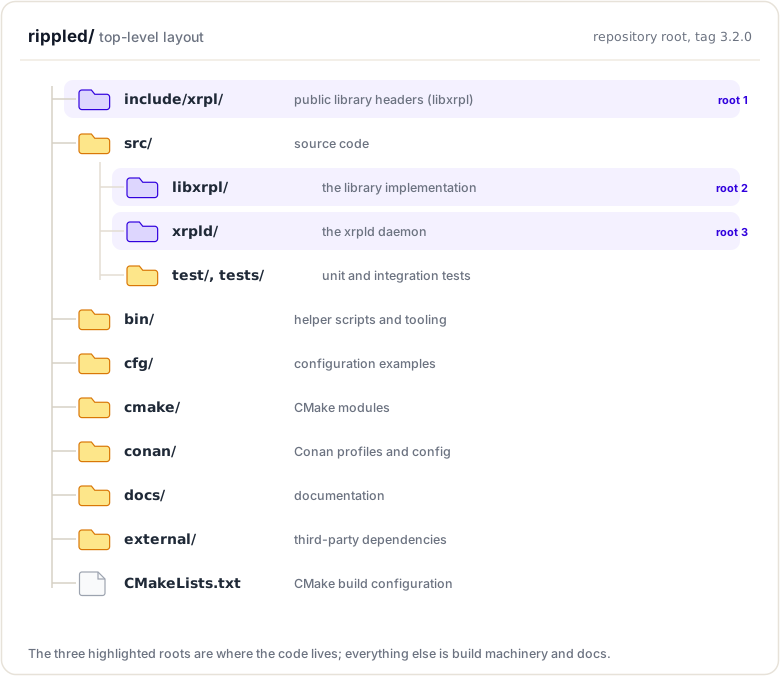
The source tree: three roots
Modern rippled no longer keeps everything under a single src/ tree. The code is now split across three roots:
include/xrpl, public headers of the reusable libxrpl library (protocol, ledger data structures, crypto, basics, JobQueue interface, etc.).src/libxrpl, the implementation (.cpp) of that library, plus the transaction processing engine (src/libxrpl/tx).src/xrpld, the daemon: everything specific to running a node (application layer, overlay/P2P, consensus glue, RPC handlers, node storage daemon side).
Private implementation files that used to sit in an impl/ subfolder now live in a detail/ subfolder.
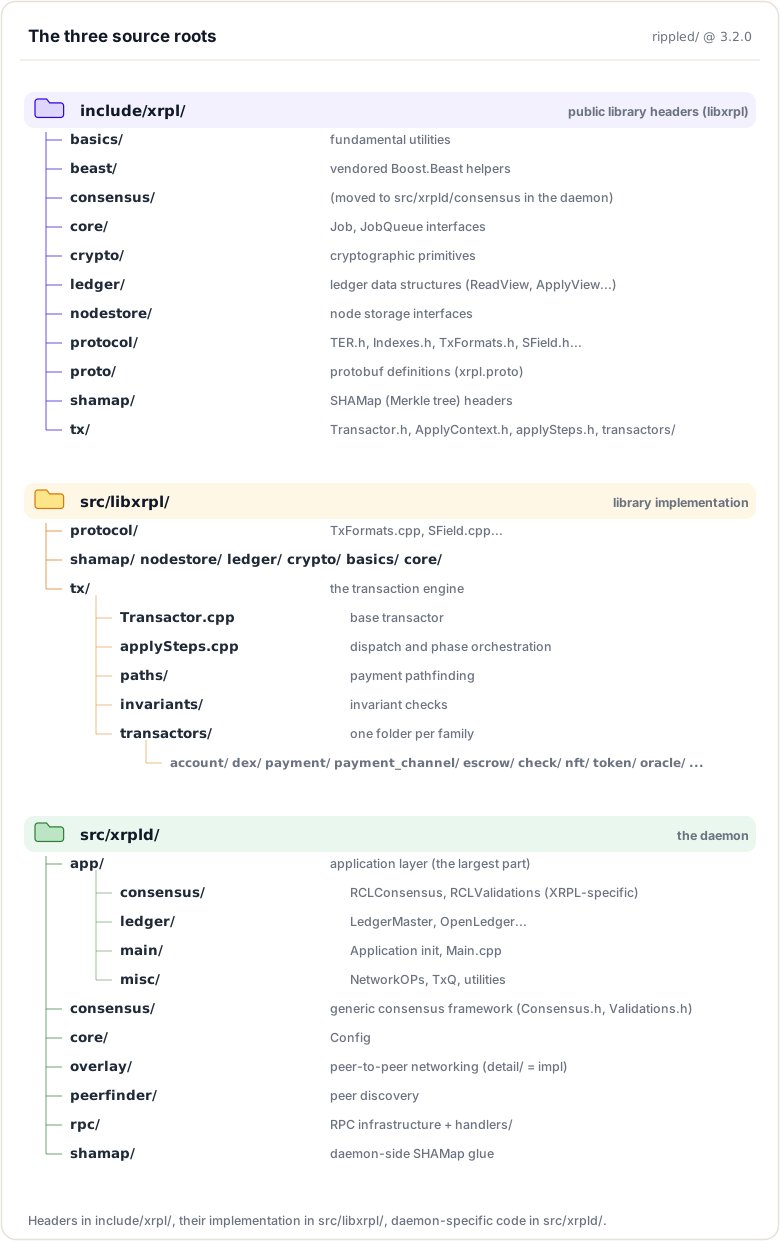
Key Directories by Function
Transaction Processing:
src/libxrpl/tx/transactors- All transactor implementations (grouped by family)include/xrpl/tx/Transactor.h+src/libxrpl/tx/Transactor.cpp- Base transactorsrc/libxrpl/protocol/TxFormats.cpp- Transaction format tables (the type definitions themselves live in a.macrofile, see below)
One thing to know before you grep for protocol definitions: TxFormats.h/TxFormats.cpp just #include <xrpl/protocol/detail/transactions.macro>. The actual definitions of transaction types, SFields, ledger entries, amendments and permissions live in the .macro files under include/xrpl/protocol/detail (transactions.macro, sfields.macro, ledger_entries.macro, features.macro, permissions.macro), and generated per-type classes land in include/xrpl/protocol_autogen. When you ask "where is transaction type / SField / ledger entry X defined", grep the .macro files first. Also, which module may include which is enforced by the levelization check in .github/scripts/levelization/.
Consensus:
src/xrpld/consensus- Generic consensus frameworksrc/xrpld/app/consensus- XRPL-specific consensus (RCLConsensus, RCLValidations)
Networking:
src/xrpld/overlay- P2P overlay network (detail/holds the implementation)include/xrpl/server+src/libxrpl/server- The HTTP/WebSocket server (the protocol machinery itself comes from the external Boost.Beast dependency)include/xrpl/beast+src/libxrpl/beast- Utility code (asio helpers, clocks, containers, hashing, insight metrics, unit_test)
Ledger Management:
src/xrpld/app/ledger- Ledger operationsinclude/xrpl/ledger- Ledger data structures (ReadView, ApplyView…)include/xrpl/shamap+src/libxrpl/shamap- Merkle tree implementation
Storage:
include/xrpl/nodestore+src/libxrpl/nodestore- Key-value storage backend
RPC:
src/xrpld/rpc/handlers- RPC command implementations, grouped by area (account/,admin/,ledger/,orderbook/,server_info/,subscribe/,transaction/,utility/)src/xrpld/rpc- RPC infrastructure
Application Core:
src/xrpld/app/main- Application initializationsrc/xrpld/core/Config.h- Configuration;include/xrpl/core/JobQueue.h- JobQueue
Naming Conventions
In brief: decode the prefixes you will see everywhere (ST, SLE, sf, tt, keylet, TER).
Common Prefixes and Abbreviations
Understanding naming conventions is essential for quickly identifying what a class or type represents:
ST* Classes (Serialized Types)
Classes representing serializable protocol objects:
STTx - Serialized Transaction
// Represents a transaction
class STTx : public STObject
{
    TxType getTxnType() const;
    AccountID getAccountID(SField const& field) const;
    STAmount getFieldAmount(SField const& field) const;
};
STObject - Serialized Object (base class)
// Base for all serialized objects
class STObject
{
    void add(Serializer& s) const;
    Json::Value getJson(JsonOptions options) const;
};
STAmount - Serialized Amount
// Represents XRP or issued currency amount
class STAmount
{
    bool native() const;
    Asset const& asset() const;
    std::uint64_t mantissa() const;
};
// Note: isXRP(amount) is a free function, not a member
STValidation - Serialized Validation
// Validator signature on a ledger
class STValidation
{
    uint256 getLedgerHash() const;
    NetClock::time_point getSignTime() const;
};
STArray - Serialized Array
// Array of STObjects
class STArray : public STBase
{
    std::size_t size() const;
    STObject const& operator[](std::size_t i) const;
};
SLE - Serialized Ledger Entry
Represents an object stored in the ledger. SLE is a type alias — the class is STLedgerEntry (using SLE = STLedgerEntry; in include/xrpl/protocol/STLedgerEntry.h), so grep for class STLedgerEntry, not class SLE:
// An entry in the ledger state
class STLedgerEntry : public STObject
{
    LedgerEntryType getType() const;
    uint256 const& key() const;

    // Field accessors (inherited from STObject)
    STAmount const& getFieldAmount(SField const& field) const;
    AccountID getAccountID(SField const& field) const;
};
using SLE = STLedgerEntry;
Common SLE Types:
- Account (AccountRoot)
- Offer
- RippleState (Trust Line)
- SignerList
- PayChannel
- Escrow
- NFTokenPage / NFTokenOffer (individual NFTokens are objects stored inside a page, not their own ledger entry)
TER - Transaction Engine Result
Result codes from transaction processing:
// Simplified from include/xrpl/protocol/TER.h — each category owns a
// numeric range, and enumerators after the range anchor just increment.
// The exact numbers are mirrored in ripple-binary-codec's definitions.json,
// so use the tokens, not the numbers.
enum TER : int
{
    // Local error (tel): -399 .. -300
    telLOCAL_ERROR = -399,

    // Malformed (tem): -299 .. -200
    temMALFORMED = -299,
    // ... temBAD_AMOUNT, temBAD_FEE, temBAD_SIGNATURE, etc.

    // Failure (tef): -199 .. -100
    tefFAILURE = -199,
    // ... tefALREADY, tefPAST_SEQ, etc.

    // Retry (ter): -99 .. -1
    terRETRY = -99,
    // ... terQUEUED, terPRE_SEQ, etc.

    // Success
    tesSUCCESS = 0,

    // Claimed fee (tec) — note: tec codes are positive (>= 100)
    tecCLAIM = 100,
    tecUNFUNDED_PAYMENT = 104,
    tecNO_TARGET = 138,
};
Categories:
tel*- Local error (not forwarded; only valid during non-consensus processing)tem*- Malformed (cannot succeed in any imagined ledger)tef*- Failure (not applied, not forwarded; could succeed in an imagined ledger)ter*- Retry (not applied; could succeed in a later ledger)tes*- Successtec*- Claimed fee (failed but fee charged)
SF* - Serialized Field
Field identifiers for serialized data:
// Field definitions
extern SField const sfAccount;
extern SField const sfDestination;
extern SField const sfAmount;
extern SField const sfFee;
extern SField const sfSequence;
extern SField const sfSigningPubKey;
extern SField const sfTxnSignature;
Naming Pattern: sf + CamelCase field name
Other Common Prefixes
LedgerEntryType - Types of ledger objects
The enum is not hand-written: each entry is defined in include/xrpl/protocol/detail/ledger_entries.macro and expanded into the LedgerEntryType enum in include/xrpl/protocol/LedgerFormats.h:
// In include/xrpl/protocol/detail/ledger_entries.macro
LEDGER_ENTRY(ltACCOUNT_ROOT, 0x0061, AccountRoot, account, ...)
LEDGER_ENTRY(ltOFFER, 0x006f, Offer, offer, ...)
LEDGER_ENTRY(ltRIPPLE_STATE, 0x0072, RippleState, state, ...)
LEDGER_ENTRY(ltESCROW, 0x0075, Escrow, escrow, ...)
LEDGER_ENTRY(ltPAYCHAN, 0x0078, PayChannel, payment_channel, ...)
Keylet - Keys for accessing ledger objects
// Factory functions for creating keylets
Keylet account(AccountID const& id);
Keylet offer(AccountID const& id, std::uint32_t seq);
Keylet escrow(AccountID const& src, std::uint32_t seq);
RPC - RPC dispatch and context
There is no RPCHandler class. Dispatch goes through a free function, and requests carry a context struct:
// Declared in src/xrpld/rpc/RPCHandler.h
Status
doCommand(RPC::JsonContext&, json::Value&);

// The context types live in src/xrpld/rpc/Context.h
struct RPC::Context;                       // app, netOps, ledgerMaster, role…
struct RPC::JsonContext : RPC::Context;    // JSON-RPC / WebSocket requests
struct RPC::GRPCContext : RPC::Context;    // gRPC requests
Key idea. The prefixes are your map. Once
sf(serialized field),SLE(serialized ledger entry) andkeylet(an entry's key) are second nature, most of the code reads itself.
Code Patterns and Idioms
In brief: the recurring C++ patterns (keylets, views, optional fields, RAII) that show up in every file.
Pattern 1: Keylet Access
Keylets are the standard way to access ledger objects:
// Create keylet for account
AccountID const accountID = ...;
Keylet const k = keylet::account(accountID);

// Read from ledger (immutable)
auto const sle = view.read(k);
if (!sle)
    return terNO_ACCOUNT;

// Access fields
auto const balance = (*sle)[sfBalance];
auto const sequence = (*sle)[sfSequence];
Common Keylet Functions:
// In include/xrpl/protocol/Indexes.h
namespace keylet {
    Keylet account(AccountID const& id);
    Keylet offer(AccountID const& id, std::uint32_t seq);
    Keylet line(AccountID const& id0, AccountID const& id1, Currency const& currency);
    Keylet escrow(AccountID const& src, std::uint32_t seq);
    Keylet payChan(AccountID const& src, AccountID const& dst, std::uint32_t seq);
}
These match 3.2.0. On develop, keylet::line and keylet::payChan were renamed to keylet::trustLine and keylet::payChannel (#7059); the others are unchanged.
Pattern 2: View Abstraction
Views provide read/write access to ledger state:
Read-Only View:
void analyzeAccount(ReadView const& view, AccountID const& id)
{
    // Can only read, cannot modify
    auto const sle = view.read(keylet::account(id));

    // Safe for concurrent access
    auto balance = (*sle)[sfBalance];
}
Modifiable View:
TER modifyAccount(ApplyView& view, AccountID const& id)
{
    // Can read and modify
    auto sle = view.peek(keylet::account(id));
    if (!sle)
        return terNO_ACCOUNT;

    // Modify
    (*sle)[sfBalance] = newBalance;
    (*sle)[sfSequence] = (*sle)[sfSequence] + 1;

    // Commit changes
    view.update(sle);

    return tesSUCCESS;
}
View Types:
ReadView- Read-only accessApplyView- Read/write for transaction applicationOpenView- Open ledger viewPaymentSandbox- Sandboxed view for payments
Pattern 3: Field Access with Optional
Many fields are optional, use ~ operator:
// Required field (asserts if missing)
auto const account = tx[sfAccount];

// Optional field (returns std::optional)
auto const destTag = tx[~sfDestinationTag];

if (destTag)
    useDestinationTag(*destTag);

// Optional with default
auto const flags = tx[~sfFlags].value_or(0);
Pattern 4: RAII and Smart Pointers
Extensive use of RAII and smart pointers:
// Unique ownership
std::unique_ptr<LedgerMaster> ledgerMaster_;

// Shared ownership
std::shared_ptr<Ledger const> ledger = getLedger();

// Weak references
std::weak_ptr<Peer> weakPeer_;
Pattern 5: Application Reference Pattern
Most components hold an Application reference:
class SomeComponent
{
public:
    SomeComponent(Application& app)
        : app_(app)
        , j_(app.journal("SomeComponent"))
    {
    }

    void doWork()
    {
        // Access other components via app_
        auto& ledgerMaster = app_.getLedgerMaster();
        auto& overlay = app_.overlay();
    }

private:
    Application& app_;
    beast::Journal j_;
};
Finding Functionality
In brief: practical strategies to trace any feature: grep, follow the types, start from entry points.
Strategy 1: Grep and Search
Command-line searching is often the fastest way:
Find where a function is defined:
# Find a function — the codebase puts the return type on its own line,
# so grep the bare name, not "void functionName"
grep -rn "processTransaction" src/xrpld/

# Find a class definition — search both roots; libxrpl declarations
# live under include/, only the daemon's live under src/
grep -r "class NetworkOPs" src/ include/
Find where a variable is used:
# Find all uses of a variable
grep -r "ledgerMaster_" src/xrpld/app/

# Case-insensitive search
grep -ri "transaction" src/libxrpl/tx/
Find specific transaction type:
# Find the Payment transactor (class declarations are headers under include/)
grep -rn "class Payment" include/xrpl/tx/transactors/

# Find all transactor implementations (they sit in family subfolders)
ls src/libxrpl/tx/transactors/*/*.cpp
Find RPC command handler:
# Find account_info handler
grep -r "doAccountInfo" src/xrpld/rpc/handlers/
Strategy 2: Follow the Types
Use type information to navigate:
Example: Finding where STTx is used
# Find STTx usage
grep -r "STTx" src/ | grep -v ".h:" | head -20

# Find function taking STTx parameter
grep -r "STTx const&" src/
Example: Finding transaction submission
# Find where transactions are submitted
grep -r "submitTransaction" src/ include/

# Follow to NetworkOPs
cat include/xrpl/server/NetworkOPs.h | grep submitTransaction
Strategy 3: Start from Entry Points
Entry Points:
- main() -
src/xrpld/app/main/Main.cpp - RPC handlers -
src/xrpld/rpc/handlers/*/*.cpp - Transaction types -
src/libxrpl/tx/transactors/*/*.cpp - Protocol messages -
src/xrpld/overlay/detail/ProtocolMessage.h
Example: Tracing RPC Call
1. Client calls "account_info" RPC
2. Find handler: src/xrpld/rpc/handlers/account/AccountInfo.cpp
3. Handler function: doAccountInfo()
4. Calls: view.read(keylet::account(accountID))
5. View implementation: include/xrpl/ledger/ReadView.h
Strategy 4: Use IDE Features
Modern IDEs provide powerful navigation:
Visual Studio Code:
Ctrl/Cmd + Click- Go to definitionF12- Go to definitionShift + F12- Find all referencesCtrl/Cmd + T- Go to symbolCtrl/Cmd + P- Quick file open
CLion:
Ctrl + B- Go to declarationCtrl + Alt + B- Go to implementationAlt + F7- Find usagesCtrl + N- Go to classCtrl + Shift + N- Go to file
XCode:
Cmd + Click- Go to definitionCtrl + 1- Show related itemsCmd + Shift + O- Open quicklyCmd + Shift + F- Find in project
Understanding File Organization
Transaction Files
Format: src/libxrpl/tx/transactors/<family>/<TransactionType>.cpp. Since 3.x the file names match the TransactionType exactly and are grouped by family:
payment/Payment.cpp        - Payment transactions
dex/OfferCreate.cpp        - Offer creation
dex/OfferCancel.cpp        - Offer cancellation
token/TrustSet.cpp         - Trust line creation/modification
account/AccountSet.cpp     - Account settings
escrow/EscrowCreate.cpp    - Escrow operations (Finish/Cancel alongside)
payment_channel/           - Payment channels
account/SignerListSet.cpp  - Multi-signature configuration
Finding Transaction Implementation:
# If you know the transaction type, find its family folder…
ls src/libxrpl/tx/transactors/ | grep -i payment   # → payment, payment_channel

# …then list the folder
ls src/libxrpl/tx/transactors/payment/

# List all transaction implementations
ls src/libxrpl/tx/transactors/*/*.cpp
RPC Handler Files
Format: src/xrpld/rpc/handlers/<area>/<CommandName>.cpp — handlers are grouped in subfolders by area (account/, admin/, ledger/, orderbook/, server_info/, subscribe/, transaction/, utility/):
account/AccountInfo.cpp        - account_info command
account/AccountLines.cpp       - account_lines command
account/AccountTx.cpp          - account_tx command
transaction/Tx.cpp             - tx command
transaction/Submit.cpp         - submit command
ledger/LedgerCurrent.cpp       - ledger_current command
server_info/ServerInfo.cpp     - server_info command
Finding RPC Handler:
# List the account-related handlers
ls src/xrpld/rpc/handlers/account/

# Find handler function
grep -r "doAccountInfo" src/xrpld/rpc/handlers/
Header vs Implementation
Header Files (.h):
- Class declarations
- Function prototypes
- Template definitions
- Inline functions
Implementation Files (.cpp):
- Function implementations
- Static variables
- Template specializations
Finding Pattern:
# Find header — search include/ too: libxrpl public headers live there,
# not under src/ (this one is include/xrpl/server/NetworkOPs.h)
find src/ include/ -name "NetworkOPs.h"

# Find implementation
find src/ -name "NetworkOPs.cpp"
Reading and Understanding Code
Step 1: Start with the Interface
Always read the header file first:
// In LedgerMaster.h
class LedgerMaster
{
public:
    // Public interface - what can be called
    std::shared_ptr<Ledger const> getValidatedLedger();
    std::shared_ptr<Ledger const> getClosedLedger();

    void addValidatedLedger(std::shared_ptr<Ledger const> const& ledger);

    // ...

private:
    // Implementation details - how it works
    std::shared_ptr<Ledger> mCurrentLedger;
    std::shared_ptr<Ledger> mClosedLedger;

    // ...
};
What to Look For:
- Public methods (API)
- Constructor parameters (dependencies)
- Member variables (state)
- Comments and documentation
Step 2: Trace Data Flow
Follow how data flows through functions:
// Example: Following a payment (simplified — the real declaration in
// include/xrpl/server/NetworkOPs.h takes std::shared_ptr<STTx const> const&)
void NetworkOPs::submitTransaction(std::shared_ptr<STTx const> const& tx)
{
    // 1. Initial validation
    auto const result = checkTransaction(tx);
    if (!isTesSuccess(result))
        return;

    // 2. Apply to open ledger
    app_.openLedger().modify([&](OpenView& view)
    {
        return Transactor::apply(app_, view, tx);  // → Go here
    });

    // 3. Broadcast
    app_.overlay().relay(tx);  // → And here
}
Step 3: Understand Control Flow
Identify key decision points:
TER Payment::doApply()
{
    // Key decision: XRP or issued currency?
    if (isXRP(amount_))
    {
        // XRP path
        return payXRP();
    }
    else
    {
        // Issued currency path
        return payIssued();
    }
}
Step 4: Read Tests
Tests show how code is meant to be used. The legacy suites are beast::unit_test classes under src/test/; newer library tests are gtest under src/tests/:
// jtx pattern, as used throughout src/test/ (see src/test/jtx/Env_test.cpp)
void testPayment()
{
    // Setup
    Env env(*this);
    Account alice{"alice"};
    Account bob{"bob"};

    env.fund(XRP(10000), alice, bob);

    // Execute
    env(pay(alice, bob, XRP(100)));

    // Verify — alice also paid the transaction fee
    auto const baseFee = env.current()->fees().base;
    BEAST_EXPECT(env.balance(alice) == XRP(10000) - XRP(100) - baseFee);
    BEAST_EXPECT(env.balance(bob) == XRP(10100));
}
IDE Setup and Configuration
Visual Studio Code Setup
Extensions:
- C/C++ (Microsoft)
- C/C++ Extension Pack
- CMake Tools
- GitLens
Configuration (.vscode/settings.json):
{
  "C_Cpp.default.configurationProvider": "ms-vscode.cmake-tools",
  "C_Cpp.default.compileCommands": "${workspaceFolder}/build/compile_commands.json",
  "files.associations": {
    "*.h": "cpp",
    "*.cpp": "cpp"
  },
  "search.exclude": {
    "**/build": true,
    "**/external": true
  }
}
CLion Setup
CMake Configuration:
- Open rippled directory
- CLion auto-detects CMakeLists.txt
- Configure build profiles (Debug, Release)
- Let CLion index the project
Tips:
- Use "Find in Path" (Ctrl+Shift+F) for project-wide search
- Use "Go to Symbol" (Ctrl+Alt+Shift+N) to find classes/functions
- Enable "Compact Middle Packages" in Project view
Compile Commands Database
Generate for better IDE support. Configuring rippled requires the Conan-generated toolchain first (see BUILD.md at the repo root for the full flow):
cd rippled
mkdir .build && cd .build
conan install .. --output-folder . --build missing --settings build_type=Release
cmake -DCMAKE_TOOLCHAIN_FILE:FILEPATH=build/generators/conan_toolchain.cmake \
      -DCMAKE_BUILD_TYPE=Release -DCMAKE_EXPORT_COMPILE_COMMANDS=ON ..
This creates compile_commands.json in the build directory that IDEs use for accurate code intelligence.
Documentation and Comments
Code Documentation
Rippled uses various documentation styles:
Doxygen-Style Comments:
/**
 * @brief Apply a transaction to a view
 *
 * @param app Application instance
 * @param view Ledger view to apply to
 * @param tx Transaction to apply
 * @return Pair of result code and success flag
 */
std::pair<TER, bool>
applyTransaction(
    Application& app,
    OpenView& view,
    STTx const& tx);
Inline Comments:
// Check if destination requires a tag
if (sleDest->getFlags() & lsfRequireDestTag)
{
    if (!ctx.tx.isFieldPresent(sfDestinationTag))
        return tecDST_TAG_NEEDED;
}
In-Source Documentation
README Files:
src/xrpld/README.md
src/xrpld/consensus/README.md
Design Documents:
docs/consensus.md
docs/CodingStyle.md
docs/CheatSheet.md
Build instructions are BUILD.md at the repo root (there is no docs/build-unix.md).
External Documentation
Dev Null Productions Source Code Guide:
- Comprehensive walkthrough of rippled codebase
- Available online
- Covers architecture and key components
- Written in 2018 against the old
src/ripple/tree — translate its paths to the three-root layout
XRP Ledger Dev Portal:
- https://xrpl.org/docs
- Protocol documentation
- API reference
Quick Reference
Grep Commands
# Find class definition (search both roots — libxrpl declarations live under include/)
grep -r "class ClassName" src/ include/

# Find function implementation (return types sit on their own line,
# so grep the bare name)
grep -rn "functionName(" src/

# Find where something is used
grep -r "variableName" src/

# Case-insensitive search
grep -ri "searchterm" src/

# Search in specific file types
grep -r --include="*.cpp" "searchterm" src/

# Exclude directories
grep -r --exclude-dir="test" "searchterm" src/
IDE Shortcuts
VS Code:
Go to Definition:        F12 or Ctrl+Click
Find References:         Shift+F12
Go to Symbol:            Ctrl+T
Search in Files:         Ctrl+Shift+F
CLion:
Go to Declaration:       Ctrl+B
Go to Implementation:    Ctrl+Alt+B
Find Usages:            Alt+F7
Search Everywhere:       Double Shift
Additional Resources
Official Documentation
- XRP Ledger Dev Portal: xrpl.org/docs
- Rippled Repository: github.com/XRPLF/rippled
- Build Instructions: github.com/XRPLF/rippled/BUILD.md
Codebase Guides
- Dev Null Productions Source Code Guide: Comprehensive rippled walkthrough (2018 — it predates the reorganization, so translate its
src/ripple/paths to the three-root layout) - In-Source Documentation:
src/xrpld/README.mdanddocs/directory - Code Comments: Doxygen-style documentation throughout
Tools
- Visual Studio Code: Free, excellent C++ support
- CLion: Powerful C++ IDE (commercial)
- grep/ag/ripgrep: Command-line search tools
- ctags/cscope: Code indexing tools
Related Topics
- Application Layer - Understanding the overall architecture
- Transactors - How to read transaction implementations
- Debugging Tools - Tools for exploring code at runtime
Summary
This module gave you a map of the rippled source. You learned the three roots (include/xrpl for public headers, src/libxrpl for the library implementation, src/xrpld for the daemon), the naming conventions that appear everywhere (ST, SLE, sf, tt, keylet, TER), and the recurring C++ patterns (keylets, views, the Application reference). With those in hand you can trace any feature by grepping, following the types, or starting from an entry point.
To remember:
- Three roots:
include/xrpl(public headers),src/libxrpl(library impl),src/xrpld(the daemon) - Prefixes:
ST*serialized types,SLEledger entry,sf*fields,tt*tx types,lsf*state flags,tes/tec/ter/tef/tem/telresults keylet::account(...),keylet::check(...)compute the key that locates a ledger entry- Transactors:
src/libxrpl/tx/transactors/<family>/; RPC handlers:src/xrpld/rpc/handlers, grouped by area (account/,transaction/,ledger/, …) - Protocol definitions (tx types, SFields, ledger entries, amendments) live in the
.macrofiles underinclude/xrpl/protocol/detail/ - Consensus:
src/xrpld/consensus(generic engine) +src/xrpld/app/consensus(RCL glue); overlay:src/xrpld/overlay - Private implementation files sit in
detail/subfolders - To trace a feature: grep the symbol, follow the types, or start from an entry point (
main(), a handler, a transactor) - Watch out: older docs cite
src/ripple/...paths; the tree was reorganized, translate to the three-root layout
Next up. You can find any file; can you follow a transaction through all of them? Next you trace the complete transaction lifecycle, from submission to finality.
Resources
Assignments
0 of 2 complete