
Amendment impact & monitoring
How an amendment changes transaction processing and the ledger, and how to monitor amendment status.
What you'll learn
- Explain how an amendment changes preflight / preclaim / doApply and ledger entries.
- Use the `feature` RPC to monitor amendment status.
- Understand consensus impact and amendment-blocked nodes.
Introduction
≈75 min · Intermediate · builds on Voting & network coordination
You've reached the end, so let's close the loop on what an amendment actually changes and how to keep an eye on it. In this module you'll learn how an amendment can alter transaction processing and ledger entries, how to read amendment status with the feature RPC, and how to monitor activation across the network. From here, you're equipped to follow (and help shape) how the protocol grows.
RPC feature Command
In brief: the command that reports every amendment's status.
Basic Usage
The feature command is the primary tool for querying amendment status on a rippled node.
Syntax:
# List all amendments
xrpld feature

# Query a specific amendment
xrpld feature <amendment_hash>

# Enable voting (admin only)
xrpld feature <amendment_hash> accept

# Disable voting (admin only)
xrpld feature <amendment_hash> reject
Note. "Subscriptions" (with its
SubscriptionSettransactor andsfFrequency/sfNextPaymentTimefields shown later in this module) is a hypothetical example amendment, used to illustrate how an amendment changes transaction processing. It is not a real XRPL feature; the C++ is illustrative, not copied from rippled.
Example for Subscriptions:
xrpld feature 7B73B9E8D8E6E8E8A8B8C8D8E8F8A8B8C8D8E8F8A8B8C8D8E8F8A8B8C8D8E8F8
Response Format
Complete response:
{
  "result": {
    "features": {
      "7B73B9E8D8E6E8E8A8B8C8D8E8F8A8B8C8D8E8F8A8B8C8D8E8F8A8B8C8D8E8F8": {
        "count": 28,
        "enabled": false,
        "majority": 806021535,
        "name": "Subscriptions",
        "supported": true,
        "threshold": 28,
        "validations": 35
      }
    },
    "status": "success"
  }
}
Field Interpretation
count
Type: number
Meaning: Number of UNL validators currently voting for the amendment.
Example: "count": 28 means 28 validators have included this amendment in their recent validations.
Usage: Compare with threshold to know if the 80% threshold is exceeded (count > threshold).
enabled
Type: boolean
Meaning: Is the amendment activated on the network?
true: The amendment is activated and its rules are appliedfalse: The amendment is not yet activated
Example: "enabled": false means Subscriptions is not yet active.
Usage: Determines if new features are available.
majority
Type: number (XRPL Time) or null
Meaning: Timestamp (in seconds since 2000-01-01 00:00:00 UTC) when the amendment first exceeded the 80% threshold (count > threshold).
- Present: The amendment exceeded the threshold and is in stability period
null: The amendment has not exceeded the threshold
Example: "majority": 806021535
Human date conversion:
// XRPL Time -> Unix Time
const xrplTime = 806021535;
const unixTime = xrplTime + 946684800;  // Ripple Epoch (2000-01-01)
const date = new Date(unixTime * 1000);
console.log(date.toISOString());
// Output: 2025-07-20T14:32:15.000Z
Usage: Calculate when the amendment will be activated (majority + 2 weeks).
name
Type: string
Meaning: Human-readable name of the amendment.
Example: "name": "Subscriptions"
Usage: Human identification of the amendment (the hash is hard to memorize).
supported
Type: boolean
Meaning: Does this node support the amendment (does it have the implementation code)?
true: The node can apply the amendment rulesfalse: The node does not recognize or does not support the amendment
Example: "supported": true
Usage: Know if the node is up to date. If supported: false and the amendment has a majority, urgent upgrade is needed.
threshold
Type: number
Meaning: Absolute number calculated as floor(validations * 0.8). To reach majority, count > threshold (strictly greater) is required.
Calculation: threshold = floor(validations * 0.8)
Example: "threshold": 28 with 35 validations
- To exceed 80%: count > 28, so minimum 29 votes required
- Actual percentage: 29/35 = 82.9% > 80%
Usage: Know how many additional votes are needed to reach majority (count must be > threshold).
validations
Type: number
Meaning: Total number of trusted validators (UNL) for the node.
Example: "validations": 35
Usage: Calculate current support percentage: (count / validations) * 100
Key idea.
featureis your window on governance: it shows each amendment's status, whether it is enabled, and how close it is to the threshold.
Activation ETA Calculation
In brief: estimating when an amendment in majority will go live.
Formula
When an amendment has a majority, you can calculate when it will be activated:
activation_time = majority_time + 2_weeks
In seconds:
activation_time = majority + (2 * 7 * 24 * 60 * 60)
                = majority + 1209600
Calculation Script
JavaScript:
function calculateActivationETA(majority) {
  if (!majority) return null;

  // Convert XRPL Time to Unix Time
  const majorityUnix = majority + 946684800;

  // Add 2 weeks
  const activationUnix = majorityUnix + (14 * 24 * 60 * 60);

  // Calculate time remaining
  const now = Math.floor(Date.now() / 1000);
  const timeUntil = activationUnix - now;

  return {
    activationDate: new Date(activationUnix * 1000),
    timeUntil: timeUntil,
    days: Math.floor(timeUntil / 86400),
    hours: Math.floor((timeUntil % 86400) / 3600),
    minutes: Math.floor((timeUntil % 3600) / 60)
  };
}

// Example
const eta = calculateActivationETA(806021535);
console.log(`Activation: ${eta.activationDate.toISOString()}`);
console.log(`Time until: ${eta.days}d ${eta.hours}h ${eta.minutes}m`);
Python:
from datetime import datetime, timedelta

def calculate_activation_eta(majority):
    if not majority:
        return None

    # XRPL Epoch: 2000-01-01 00:00:00 UTC
    ripple_epoch = datetime(2000, 1, 1)

    # Convert majority to datetime
    majority_dt = ripple_epoch + timedelta(seconds=majority)

    # Add 2 weeks
    activation_dt = majority_dt + timedelta(weeks=2)

    # Time remaining
    time_until = activation_dt - datetime.utcnow()

    return {
        'activation_date': activation_dt.isoformat(),
        'time_until': str(time_until),
        'days': time_until.days,
        'seconds': time_until.seconds
    }

# Example
eta = calculate_activation_eta(806021535)
print(f"Activation: {eta['activation_date']}")
print(f"Time until: {eta['days']}d {eta['seconds']//3600}h")
Automated Monitoring
Continuous monitoring script:
#!/bin/bash
# monitor_amendment.sh

AMENDMENT_HASH="7B73B9E8D8E6E8E8A8B8C8D8E8F8A8B8C8D8E8F8A8B8C8D8E8F8A8B8C8D8E8F8"

while true; do
  RESULT=$(xrpld feature $AMENDMENT_HASH)

  ENABLED=$(echo $RESULT | jq -r '.result.features."'$AMENDMENT_HASH'".enabled')
  MAJORITY=$(echo $RESULT | jq -r '.result.features."'$AMENDMENT_HASH'".majority')
  COUNT=$(echo $RESULT | jq -r '.result.features."'$AMENDMENT_HASH'".count')
  THRESHOLD=$(echo $RESULT | jq -r '.result.features."'$AMENDMENT_HASH'".threshold')

  echo "$(date '+%Y-%m-%d %H:%M:%S') - Status: enabled=$ENABLED, count=$COUNT/$THRESHOLD, majority=$MAJORITY"

  if [ "$ENABLED" = "true" ]; then
    echo "Amendment is ACTIVATED!"
    exit 0
  fi

  if [ "$MAJORITY" != "null" ]; then
    # Calculate ETA (simplified)
    ACTIVATION_TIME=$((MAJORITY + 1209600))
    NOW=$(date +%s)
    TIME_UNTIL=$((ACTIVATION_TIME - NOW + 946684800))
    DAYS=$((TIME_UNTIL / 86400))
    echo "  -> Activation ETA: ${DAYS} days"
  fi

  sleep 300  # Check every 5 minutes
done
Ledger Explorers
XRPL Explorers
Several web explorers allow visualizing amendment status:
1. Bithomp Explorer
URL: https://bithomp.com/amendments
Features:
- List of all known amendments
- Real-time status (enabled, majority, voting)
- Vote progression graphs
- Historical timeline
Example display:
Subscriptions
Hash: 7B73B9E8...E8F8
Status: MAJORITY REACHED
Votes: 29/35 (82.9%)
Majority Since: 2025-04-20 14:32:15 UTC
Activation ETA: 2025-05-04 14:32:15 UTC
2. XRPL.org Amendment Tracker
URL: https://livenet.xrpl.org/amendments
Features:
- Overview of all amendments
- Filters by status (enabled, voting, obsolete)
- Links to XLS documentation
- Activation history
3. XRPScan
URL: https://xrpscan.com/amendments
Features:
- Graphical visualization of support
- Email notifications for status changes
- API for dashboard integration
Pseudo-transaction Visualization
EnableAmendment pseudo-transactions can be visualized in explorers:
Example of tfGotMajority transaction:
Transaction Hash: ABC123...
Ledger: 86245789
Type: EnableAmendment
Account: rrrrrrrrrrrrrrrrrrrrrhoLvTp
Amendment: 7B73B9E8D8E6E8E8A8B8C8D8E8F8A8B8C8D8E8F8A8B8C8D8E8F8A8B8C8D8E8F8
Flags: tfGotMajority
Result: tesSUCCESS
Search in Bithomp:
https://bithomp.com/ledger/86245789
Allows viewing all pseudo-transactions in the ledger.
API and Integration
WebSocket Streaming
Monitor amendment changes in real-time via WebSocket:
Subscribe to validations:
const WebSocket = require('ws');
const ws = new WebSocket('wss://xrplcluster.com/');

ws.on('open', () => {
  // Subscribe to validations
  ws.send(JSON.stringify({
    command: 'subscribe',
    streams: ['validations']
  }));
});

ws.on('message', (data) => {
  const msg = JSON.parse(data);

  if (msg.type === 'validationReceived') {
    const validation = msg.validation;

    // Extract voted amendments
    if (validation.amendments) {
      console.log(`Validator ${validation.validation_public_key} votes for:`,
                  validation.amendments);

      // Check Subscriptions
      if (validation.amendments.includes('7B73B9E8...')) {
        console.log('-> Subscriptions included!');
      }
    }
  }
});
HTTP Polling
Periodically query status:
const axios = require('axios');

async function checkAmendmentStatus(hash) {
  const response = await axios.post('https://xrplcluster.com/', {
    method: 'feature',
    params: [{
      feature: hash
    }]
  });

  return response.data.result;
}

// Poll every 5 minutes
setInterval(async () => {
  const status = await checkAmendmentStatus('7B73B9E8...');
  console.log('Amendment status:', status);

  if (status.features[hash].enabled) {
    console.log('ACTIVATED!');
    process.exit(0);
  }
}, 5 * 60 * 1000);
Command Line Tools
Scripting with jq
Extract specific information with jq:
Get vote count:
xrpld feature 7B73B9E8... | jq '.result.features | .[].count'
Check if enabled:
ENABLED=$(xrpld feature 7B73B9E8... | jq -r '.result.features | .[].enabled')
if [ "$ENABLED" = "true" ]; then
  echo "Amendment is active"
else
  echo "Amendment not yet active"
fi
List all enabled amendments:
xrpld feature | jq -r '.result.features | to_entries[] | select(.value.enabled == true) | .value.name'
List amendments in majority:
xrpld feature | jq -r '.result.features | to_entries[] | select(.value.majority != null) | "\(.value.name): \(.value.majority)"'
Wrapper Scripts
check_amendments.sh: Complete verification script
#!/bin/bash

echo "=== XRPL Amendment Status ==="
echo

# Get complete list
FEATURES=$(xrpld feature)

# Enabled amendments
echo "ACTIVATED:"
echo "$FEATURES" | jq -r '.result.features | to_entries[] | select(.value.enabled == true) | "  - \(.value.name)"'
echo

# Amendments in majority
echo "IN MAJORITY (waiting for activation):"
echo "$FEATURES" | jq -r '.result.features | to_entries[] | select(.value.majority != null and .value.enabled == false) | "  - \(.value.name) (ETA: \(.value.majority + 1209600 - 946684800))"'
echo

# Amendments voting
echo "VOTING (not yet majority):"
echo "$FEATURES" | jq -r '.result.features | to_entries[] | select(.value.enabled == false and .value.majority == null and .value.count > 0) | "  - \(.value.name): \(.value.count)/\(.value.threshold) votes"'
echo

# Unsupported amendments
echo "UNSUPPORTED (require upgrade):"
echo "$FEATURES" | jq -r '.result.features | to_entries[] | select(.value.supported == false) | "  - \(.value.name)"'
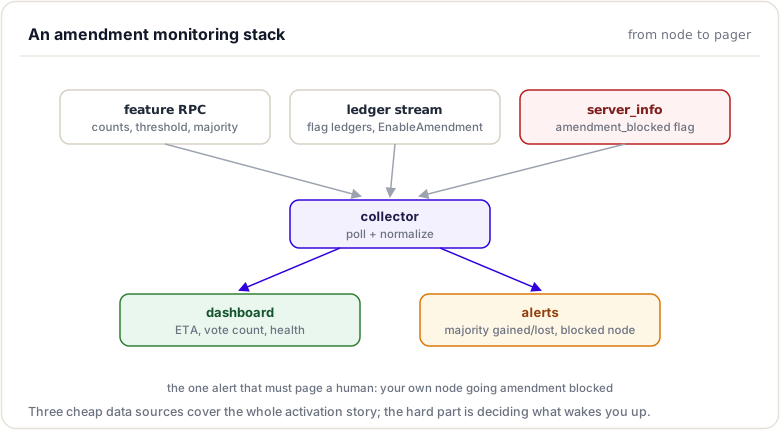
Alerting and Notifications
Alert Configuration
Prometheus + Grafana:
# prometheus.yml
scrape_configs:
  - job_name: 'rippled'
    static_configs:
      - targets: ['localhost:5005']
    metrics_path: '/metrics'
Example exported metric:
# HELP rippled_amendment_votes Number of votes for an amendment
# TYPE rippled_amendment_votes gauge
rippled_amendment_votes{name="Subscriptions",hash="7B73B9E8..."} 28

# HELP rippled_amendment_threshold Vote threshold for majority
# TYPE rippled_amendment_threshold gauge
rippled_amendment_threshold{name="Subscriptions"} 28

# HELP rippled_amendment_enabled Whether amendment is enabled
# TYPE rippled_amendment_enabled gauge
rippled_amendment_enabled{name="Subscriptions"} 0
Grafana Alert:
Alert: Amendment Majority Reached
Condition: rippled_amendment_votes >= rippled_amendment_threshold
Duration: 5m
Severity: WARNING
Notification: #xrpl-alerts
Email Notifications
Script with sendmail:
#!/bin/bash

PREVIOUS_STATUS=""

while true; do
  RESULT=$(xrpld feature 3B95AC15...)
  MAJORITY=$(echo $RESULT | jq -r '.result.features | .[].majority')

  if [ "$MAJORITY" != "null" ] && [ "$PREVIOUS_STATUS" != "majority" ]; then
    # Send email
    echo "Amendment Subscriptions has reached majority!" | \
      mail -s "XRPL Alert: Amendment Majority" [email protected]
    PREVIOUS_STATUS="majority"
  fi

  sleep 300
done
Custom Dashboard
Web Interface Example
HTML + JavaScript:
<!DOCTYPE html>
<html>
<head>
  <title>XRPL Amendment Monitor</title>
  <style>
    .amendment { border: 1px solid #ccc; margin: 10px; padding: 10px; }
    .enabled { background-color: #d4edda; }
    .majority { background-color: #fff3cd; }
    .voting { background-color: #d1ecf1; }
  </style>
</head>
<body>
  <h1>XRPL Amendment Status</h1>
  <div id="amendments"></div>

  <script>
    async function loadAmendments() {
      const response = await fetch('https://xrplcluster.com/', {
        method: 'POST',
        headers: { 'Content-Type': 'application/json' },
        body: JSON.stringify({ method: 'feature', params: [{}] })
      });

      const data = await response.json();
      const features = data.result.features;
      const container = document.getElementById('amendments');

      for (const [hash, info] of Object.entries(features)) {
        const div = document.createElement('div');
        div.className = 'amendment';

        if (info.enabled) {
          div.classList.add('enabled');
          div.innerHTML = `
            <h3>${info.name}</h3>
            <p>Status: ACTIVATED</p>
          `;
        } else if (info.majority) {
          div.classList.add('majority');
          const eta = new Date((info.majority + 1209600 + 946684800) * 1000);
          div.innerHTML = `
            <h3>${info.name}</h3>
            <p>Status: ⏳ MAJORITY</p>
            <p>Votes: ${info.count}/${info.validations} (${Math.round(info.count/info.validations*100)}%)</p>
            <p>Activation ETA: ${eta.toLocaleString()}</p>
          `;
        } else if (info.count > 0) {
          div.classList.add('voting');
          div.innerHTML = `
            <h3>${info.name}</h3>
            <p>Status: VOTING</p>
            <p>Votes: ${info.count}/${info.threshold} (${Math.round(info.count/info.validations*100)}%)</p>
          `;
        } else {
          continue;  // Ignore amendments with no activity
        }

        container.appendChild(div);
      }
    }

    loadAmendments();
    setInterval(loadAmendments, 60000);  // Refresh every minute
  </script>
</body>
</html>
Third-Party Tools
XRPL Amendment Notifier
Hypothetical email/SMS notification service:
# Subscribe to notifications
curl -X POST https://xrpl-notifier.com/api/subscribe \
  -d [email protected] \
  -d amendment=7B73B9E8...
Discord/Slack Bots
Bot posting to a channel:
XRPL Bot [12:34:56]
Amendment Update: Subscriptions
Votes: 29/35 (82.9%)
Status: MAJORITY REACHED
Activation ETA: 2025-05-04 14:32:15 UTC

@channel Please prepare for activation in 14 days!
Core Protocol Impact
In brief: how an active amendment changes transaction processing and ledger entries.
Introduction
The activation of an amendment has profound consequences on the XRPL protocol. Unlike simple software updates, an amendment modifies the fundamental rules that govern consensus, transaction validation, and ledger structure. These changes are irreversible and must be applied uniformly by all nodes on the network.
In this section, we will analyze the impact that an amendment like Subscriptions (XLS-0078) has on the core protocol: modifications to consensus rules, changes in transaction validation, compatibility considerations, and management of nodes that do not support an enabled amendment.
Understanding this impact is crucial for assessing the risks associated with an amendment and for planning deployment and migration strategies.
Modification of Consensus Rules
The Rules Object
The XRPL protocol encapsulates the set of active rules in a Rules object that is constructed for each ledger based on enabled amendments.
Conceptual structure:
class Rules {
private:
    // Set of all enabled amendments
    std::set<uint256> enabledAmendments_;

    // Pre-calculation of commonly used rules
    bool fixQualityUpperBound_;
    bool fixTrustLinesToSelf_;
    bool flowCross_;
    bool ownerPaysFee_;
    // ... etc for each impacting amendment

public:
    // Check if an amendment is enabled
    bool enabled(uint256 const& amendment) const {
        return enabledAmendments_.count(amendment) > 0;
    }

    // Quick accessors for specific rules
    bool fixQualityUpperBound() const { return fixQualityUpperBound_; }
    bool flowCross() const { return flowCross_; }
    // ... etc
};
Construction: The Rules object is constructed from the sfAmendments field of the ledger:
Rules makeRules(std::shared_ptr<ReadView const> const& ledger) {
    // Read amendments from ledger
    auto const amendments = ledger->read(keylet::amendments());

    std::set<uint256> enabled;
    if (amendments && amendments->isFieldPresent(sfAmendments)) {
        auto const& vec = amendments->getFieldV256(sfAmendments);
        enabled.insert(vec.begin(), vec.end());
    }

    return Rules(enabled);
}
Impact of Subscriptions on Rules
When Subscriptions is enabled, several aspects of the protocol change:
1. New transaction types:
// In Transactor::preflight()
NotTEC checkTransactionType(TxType type, Rules const& rules) {
    if (type == ttSUBSCRIPTION_SET ||
        type == ttSUBSCRIPTION_CLAIM ||
        type == ttSUBSCRIPTION_CANCEL)
    {
        if (!rules.enabled(featureSubscriptions))
            return temDISABLED;
    }
    return tesSUCCESS;
}
2. New ledger entry types:
// In View::read()
if (entry->getType() == ltSUBSCRIPTION) {
    if (!rules.enabled(featureSubscriptions))
        return nullptr;  // Ignore if amendment not enabled
}
3. New validation logic:
// In SubscriptionClaim::doApply()
TER SubscriptionClaim::doApply() {
    // This function can only be called if
    // featureSubscriptions is enabled
    assert(ctx_.view().rules().enabled(featureSubscriptions));

    // Logic specific to recurring subscriptions
    // ...
}
Changes in Transaction Validation
In brief: how preflight, preclaim, and doApply can shift under an amendment.
Validation Phases
Every XRPL transaction goes through several validation phases. Amendments can affect each of these phases.
1. Preflight: Basic syntactic validation (before applying to ledger)
NotTEC SubscriptionSet::preflight(PreflightContext const& ctx) {
    // Check that the amendment is enabled
    if (!ctx.rules.enabled(featureSubscriptions))
        return temDISABLED;

    // Syntactic validation
    if (!ctx.tx.isFieldPresent(sfDestination))
        return temMALFORMED;

    if (!ctx.tx.isFieldPresent(sfAmount))
        return temMALFORMED;

    if (!ctx.tx.isFieldPresent(sfFrequency))
        return temMALFORMED;

    // Basic preflight validation
    auto const ret = preflight1(ctx);
    if (!isTesSuccess(ret))
        return ret;

    return preflight2(ctx);
}
2. Preclaim: Contextual validation (with ledger access but without modifying it)
TER SubscriptionSet::preclaim(PreclaimContext const& ctx) {
    // Check that source account exists
    auto const account = ctx.view.read(keylet::account(ctx.tx[sfAccount]));
    if (!account)
        return terNO_ACCOUNT;

    // Check that destination account exists
    auto const dest = ctx.view.read(keylet::account(ctx.tx[sfDestination]));
    if (!dest)
        return tecNO_DST;

    // Check sufficient funds (approximate)
    auto const balance = (*account)[sfBalance];
    auto const amount = ctx.tx[sfAmount].xrp();

    if (balance < amount)
        return tecUNFUNDED;

    return tesSUCCESS;
}
3. DoApply: Actual application to ledger
TER SubscriptionSet::doApply() {
    // Create subscription entry
    auto const subKey = keylet::subscription(
        ctx_.tx[sfAccount],
        ctx_.tx[sfSubscriptionID]);

    auto sub = std::make_shared<SLE>(subKey);
    sub->setAccountID(sfAccount, ctx_.tx[sfAccount]);
    sub->setAccountID(sfDestination, ctx_.tx[sfDestination]);
    sub->setFieldAmount(sfAmount, ctx_.tx[sfAmount]);
    sub->setFieldU32(sfFrequency, ctx_.tx[sfFrequency]);
    sub->setFieldU32(sfNextPaymentTime, view().info().closeTime + frequency);

    // Add to ledger
    view().insert(sub);

    return tesSUCCESS;
}
Backward Compatibility
Before activation: ttSUBSCRIPTION_SET transactions submitted before Subscriptions activation are rejected with temDISABLED.
After activation: These transactions become valid and can be processed.
No backward compatibility for ledgers: A ledger built after activation potentially contains ltSUBSCRIPTION objects that would not exist in a pre-activation ledger. A node that does not support Subscriptions cannot correctly validate such a ledger.
Impact on Consensus
LedgerHash Calculation
The hash of a ledger is calculated from all its components, including:
- The root hash of the accounts SHAMap
- The root hash of the transactions SHAMap
- The ledger index, close time, parent hash
- The
sfAmendmentsandsfMajoritiesfields
Importance: If two nodes apply different rules (one with Subscriptions, the other without), they will build different ledgers with different hashes, which will prevent consensus.
Consensus on Rules
XRPL consensus is not only about which transactions to include, but also about the rules to apply. All nodes must:
- Agree on the parent ledger
- Agree on transactions to include
- Agree on enabled amendments (rules to apply)
Protection mechanism: If a node does not support an enabled amendment, it enters "amendment blocked" mode and ceases to participate in consensus, thus avoiding building an invalid ledger.
Management of Unsupported Amendments
Detection of Unsupported Amendment
When an amendment is enabled, the system immediately checks if the node supports it:
// In Change::applyAmendment()
if (!ctx.app.getAmendmentTable().isSupported(amendment)) {
    JLOG(ctx.journal.fatal())
        << "Unsupported amendment " << amendment
        << " (" << amendmentName << ") activated!";

    // Block the server
    ctx.app.getOPs().setAmendmentBlocked();

    // Record expected moment
    ctx.app.getAmendmentTable().recordFirstUnsupported(
        ctx.view().info().closeTime);
}
Amendment Blocked Mode
When a node enters "amendment blocked" mode:
Consensus stopped: The node ceases to propose and validate ledgers
void NetworkOPsImp::setAmendmentBlocked() {
    amendmentBlocked_ = true;

    // Stop participating in consensus
    setMode(OperatingMode::DISCONNECTED);

    JLOG(j_.fatal())
        << "Server is amendment blocked. "
        << "Please upgrade to a newer version.";
}
API still functional: The node can still:
- Respond to RPC queries
- Synchronize ledgers from peers
- Provide historical data
But it cannot:
- Propose new ledgers
- Validate peer proposals
- Submit new transactions to the network
Signaling via server_info:
{
  "result": {
    "info": {
      "amendment_blocked": true,
      "build_version": "1.11.0",
      "server_state": "amendment_blocked",
      "validated_ledger": {
        "seq": 86652345
      }
    },
    "status": "success"
  }
}
Prior Warnings
The system warns operators before an unsupported amendment is activated:
firstUnsupportedExpected: If an unsupported amendment has reached majority, the system calculates when it will be activated and emits warnings.
auto const expected = app.getAmendmentTable().firstUnsupportedExpected();

if (expected) {
    auto const timeUntil = *expected - now();

    if (timeUntil < 24h) {
        JLOG(j_.fatal())
            << "Unsupported amendment will activate in "
            << std::chrono::duration_cast<std::chrono::hours>(timeUntil).count()
            << " hours. Please upgrade immediately!";
    }
    else if (timeUntil < 7days) {
        JLOG(j_.error())
            << "Unsupported amendment will activate in "
            << std::chrono::duration_cast<std::chrono::days>(timeUntil).count()
            << " days. Please upgrade soon.";
    }
}
Forward Compatibility: Anticipating Changes
Unsupported vs Obsolete
Unsupported: An amendment that this node does not recognize or for which it does not have implementation code.
Obsolete: A historical amendment that is no longer relevant but must remain in the code in case it was activated on a historical ledger.
XRPL_FEATURE(Tickets, Supported::yes, VoteBehavior::Obsolete)
Design for Forward Compatibility
rippled developers design code to anticipate future changes:
1. Tolerant parsing: Data structures ignore unknown fields rather than rejecting
// If a new field is added by a future amendment
STObject obj = parseTransaction(data);

// Unknown fields are ignored, no error
// Allows old nodes to read new data
2. Structure versioning: Some structures include version fields
if (obj.isFieldPresent(sfVersion)) {
    auto version = obj.getFieldU32(sfVersion);
    if (version > SUPPORTED_VERSION) {
        // Handle with caution or reject
    }
}
3. Feature flags everywhere: Each new code explicitly checks amendments
if (rules.enabled(featureNewFeature)) {
    // New logic
} else {
    // Old logic
}
Backward Compatibility: Supporting Old Ledgers
Historical Rules
Even after an amendment is enabled, nodes must be able to validate historical ledgers that date from before activation.
Reconstruction of historical Rules:
// To validate ledger 86000000 (before Subscriptions)
Rules historicalRules = makeRules(ledger86000000);

// Subscriptions is not enabled in these rules
assert(!historicalRules.enabled(featureSubscriptions));

// Apply transactions with old rules
for (auto const& tx : ledger86000000->txs()) {
    applyTransaction(tx, historicalRules);
}
Retired Amendments
After an amendment has been active for at least 2 years, the pre-amendment code can be removed:
// Before retirement
if (rules.enabled(featureMultiSign)) {
    // New multi-signature logic
} else {
    // Old logic (can be removed after 2 years)
}

// After retirement
// Always assume MultiSign is enabled
// No more conditional branch
Marking in features.macro:
XRPL_RETIRE_FEATURE(MultiSign)
This indicates that:
- Pre-amendment code has been removed
- The identifier is deprecated
- New ledgers always assume the amendment is active
Special Cases and Edge Cases
Simultaneous Activation of Multiple Amendments
It is possible that multiple amendments reach their activation period at the same flag ledger.
Application order: Pseudo-transactions are ordered deterministically by amendment hash:
std::map<uint256, std::uint32_t> actions;  // Map sorted by key

for (auto const& [hash, action] : actions) {
    // Amendments are activated in hash order
    applyAmendmentTransaction(hash, action);
}
Dependencies between amendments: Some amendments may depend on others. Code must manage these dependencies:
// featureB depends on featureA
if (rules.enabled(featureB)) {
    assert(rules.enabled(featureA));  // Must be true
}
Conflicting Amendments
It is theoretically possible to create two amendments that modify the same logic in incompatible ways.
Prevention strategy:
- Rigorous code review before release
- Integration tests with all amendments enabled
- Coordination between development teams
Management if conflict detected:
- Validators must withdraw their vote for one of the conflicting amendments
- Or a third corrective amendment must be developed
Network Partition During Activation
If the network partitions at the moment of amendment activation, two scenarios are possible:
1. Both partitions activate the amendment: No problem, they will converge when the partition is resolved.
2. One partition activates, the other doesn't: Partitions will build incompatible ledgers. When the partition is resolved, the minority partition must abandon its chain and adopt the majority partition's chain (normal consensus).
Migration Strategies
Progressive Deployment
Node operators can update their software before an amendment is activated:
Phase 1: Code release with the new amendment (e.g., rippled 1.12.0 with Subscriptions)
- Nodes update but the amendment is not yet voted on
Phase 2: Validators begin voting
- Amendment is supported but not yet enabled
- Nodes not updated can still function
Phase 3: Amendment exceeds 80% and enters majority
- 2 weeks notice for the last nodes not updated
Phase 4: Amendment activation
- Nodes not updated are blocked
Read-Only Mode Nodes
Nodes that are not validators (simple fullhistory or API nodes) can choose to:
1. Update quickly: To continue following the network in real-time
2. Stay in historical mode: Serve only data up to the ledger preceding activation, and synchronize from other nodes for following ledgers without applying the rules themselves
3. Depend on other nodes: Relay requests to updated nodes
Impact on Third-Party Applications
Wallets and Exchanges
Applications that interact with XRPL must adapt their code when an amendment is activated:
New transactions: Support for ttSUBSCRIPTION_SET, ttSUBSCRIPTION_CLAIM, and ttSUBSCRIPTION_CANCEL in the UI
New fields: Parsing of fields sfAccount, sfDestination, sfDestinationTag, sfAmount, sfFrequency, sfNextPaymentTime, sfExpiration, etc.
New business logic: Management of recurring subscriptions (display, cancellation, claim, monitoring)
APIs and Libraries
Libraries like xrpl.js, xrpl-py must be updated to support new features:
// xrpl.js after Subscriptions
const tx = {
  TransactionType: 'SubscriptionSet',
  Account: 'rN7n7otQDd6FczFgLdlqtyMVrn3M1tXB7V',
  Destination: 'rLHzPsX6oXkzU9rFYvT1EZUcqPFiSv5xdJ',
  Amount: '100000000',  // 100 XRP max per period
  Frequency: 2592000,  // 30 days in seconds
  StartTime: 711232800  // Optional
};

await client.submit(tx);
Summary
This module closed the loop on what an amendment actually changes and how to keep an eye on it. You learned to read amendment status with the feature RPC (enabled, supported, majority, threshold, validations), to estimate an amendment's activation time, and to understand how an active amendment can change transaction processing (preflight, preclaim, doApply) and ledger-entry formats across the network.
To remember:
featureRPC fields:enabled,supported,count,threshold,validations,majority- Activation ETA = the majority timestamp + 14 days (earliest possible)
- An active amendment can change preflight/preclaim/doApply behaviour AND ledger-entry formats
- Code branches on the Rules object:
view().rules().enabled(featureX) amendment_blocked: trueinserver_infomeans your node fell behind: upgrade- Explorers (XRPScan, Bithomp) track amendment status graphically
- Monitoring pattern: poll
featureor watch flag ledgers (every 256) - Watch out: testing only with an amendment enabled hides disabled-path regressions; always test both sides of the gate
Next up. That is the whole machine: build, storage, crypto, network, RPC, consensus, amendments. One thing left: do it yourself, end to end. The capstone awaits.
Resources
Assignments
0 of 2 complete