
The Application layer
How the `Application` class wires rippled together — the central orchestrator that owns and coordinates every subsystem, plus the job queue and configuration.
What you'll learn
- Explain how the Application acts as a dependency-injection container / service locator.
- Trace rippled's startup, run and shutdown sequence.
- Identify the major subsystems (LedgerMaster, NetworkOPs, Overlay, NodeStore…) and how to reach them.
- Understand the job queue and how work is scheduled.
Introduction
≈60 min · Advanced · builds on Build & run your own xrpld node
Now that your node runs, let's see what actually holds it together. At the center of rippled sits one object (the Application class) that owns and wires up every subsystem, from the ledger to the network to storage. In this module you'll trace how the node starts up, runs and shuts down, meet the major subsystems and the job queue that schedules their work, and learn how any component reaches another. It's the map you'll keep coming back to as the codebase gets deeper.
The Application Class Architecture
In brief: the single object that owns every subsystem and hands them out on request (a service locator).
Design Philosophy
The Application class follows several key design principles that make Rippled maintainable and extensible:
Single Point of Coordination: Instead of components directly creating and managing their dependencies, everything flows through the Application. This centralization makes it easy to understand system initialization and component relationships.
Dependencies through the Application: rippled predominantly uses the service locator style: subsystems receive Application& and ask it for what they need (app.getLedgerMaster()), rather than receiving each dependency in their constructor. A few components do take explicit constructor dependencies, but Application& is the norm; it trades some testability for one obvious place to find everything.
Interface-Based Design: The Application class implements the Application interface, allowing for different implementations (production, test, mock) without changing dependent code. The subsystem accessors themselves live on a separate ServiceRegistry interface that Application inherits, so components that only need service access (not lifecycle control) can hold a ServiceRegistry& instead.
Lifetime Management: The Application controls the creation, initialization, and destruction of all major subsystems, ensuring proper startup/shutdown sequences.
Application Interface
The Application interface is defined in src/xrpld/app/main/Application.h. It inherits the subsystem accessors from ServiceRegistry (include/xrpl/core/ServiceRegistry.h) and adds lifecycle control plus a few utilities:
class Application : public ServiceRegistry, public beast::PropertyStream::Source
{
public:
    using MutexType = std::recursive_mutex;
    virtual MutexType&
    getMasterMutex() = 0;

public:
    Application();

    virtual bool
    setup(boost::program_options::variables_map const& options) = 0;

    virtual void
    start(bool withTimers) = 0;
    virtual void
    run() = 0;
    virtual void
    signalStop(std::string msg) = 0;

    // ...

    virtual Config&
    config() = 0;

    // ...

    /** Ensure that a newly-started validator does not sign proposals older
     * than the last ledger it persisted. */
    virtual LedgerIndex
    getMaxDisallowedLedger() = 0;

    // ...
};
The interface every subsystem is reached through is ServiceRegistry (trimmed to the accessors you'll use most):
class ServiceRegistry
{
public:
    // ...
    virtual JobQueue&
    getJobQueue() = 0;

    // ...

    virtual RCLValidations&
    getValidations() = 0;

    // ...

    virtual ManifestCache&
    getValidatorManifests() = 0;

    virtual ManifestCache&
    getPublisherManifests() = 0;

    // Network services
    virtual Overlay&
    getOverlay() = 0;

    // ...

    // Storage services
    virtual NodeStore::Database&
    getNodeStore() = 0;

    // ...

    virtual RelationalDatabase&
    getRelationalDatabase() = 0;

    // Ledger services
    virtual InboundLedgers&
    getInboundLedgers() = 0;

    // ...

    virtual LedgerMaster&
    getLedgerMaster() = 0;

    // ...

    virtual OpenLedger&
    getOpenLedger() = 0;

    // ...

    // Transaction and operation services
    virtual NetworkOPs&
    getOPs() = 0;

    // ...

    virtual TxQ&
    getTxQ() = 0;

    // ...

    // Server services
    virtual ServerHandler&
    getServerHandler() = 0;

    // ...

    // Configuration and state
    [[nodiscard]] virtual bool
    isStopping() const = 0;

    // ...

    virtual Logs&
    getLogs() = 0;

    // ...
};
Note there is no RPCHandler class: RPC commands are dispatched through free functions in src/xrpld/rpc/RPCHandler.h (RPC::doCommand), and the RPC/WebSocket servers are managed by ServerHandler, reached via getServerHandler().
ApplicationImp Implementation
The concrete implementation ApplicationImp is in src/xrpld/app/main/Application.cpp. This class:
- Implements all interface methods
- Owns all major subsystem objects
- Manages initialization order
- Coordinates shutdown
- Provides cross-cutting services
Key Member Variables (trimmed; note they are public, under a NOLINT block, and several are held by value or std::optional rather than unique_ptr):
class ApplicationImp : public Application, public BasicApp
{
public:
    // NOLINTBEGIN(readability-identifier-naming)
    std::unique_ptr<Config> config_;
    std::unique_ptr<Logs> logs_;
    std::unique_ptr<TimeKeeper> timeKeeper_;

    // ...

    beast::Journal journal_;
    std::unique_ptr<perf::PerfLog> perfLog_;

    // ...

    std::unique_ptr<JobQueue> jobQueue_;

    // ...

    std::unique_ptr<SHAMapStore> shaMapStore_;

    // ...

    std::optional<OpenLedger> openLedger_;

    // ...

    std::unique_ptr<NodeStore::Database> nodeStore_;

    // ...

    std::unique_ptr<LedgerMaster> ledgerMaster_;
    std::unique_ptr<LedgerCleaner> ledgerCleaner_;
    std::unique_ptr<InboundLedgers> inboundLedgers_;
    std::unique_ptr<InboundTransactions> inboundTransactions_;

    // ...

    std::unique_ptr<NetworkOPs> networkOPs_;

    // ...

    std::unique_ptr<ServerHandler> serverHandler_;
    std::unique_ptr<AmendmentTable> amendmentTable_;

    // ...

    RCLValidations validations_;
    std::unique_ptr<LoadManager> loadManager_;
    std::unique_ptr<TxQ> txQ_;

    // ...

    std::optional<SQLiteDatabase> relationalDatabase_;
    std::unique_ptr<DatabaseCon> walletDB_;
    std::unique_ptr<Overlay> overlay_;

    // ...

    std::atomic_flag isTimeToStop;

    // ...

    std::unique_ptr<GRPCServer> grpcServer_;
    // NOLINTEND(readability-identifier-naming)
};
Key idea. Almost nothing in rippled constructs its own dependencies; it asks the
Applicationfor them. Find theApplicationand you can reach the whole node.
Initialization and Lifecycle
In brief: how the node starts up, runs, and shuts down, in order.
Startup Sequence
Understanding the startup sequence is crucial for debugging initialization issues and understanding component dependencies. The real call chain in src/xrpld/app/main/Main.cpp is: load Config → makeApplication(...) → app->setup(vm) → app->start(true) → app->run().
Phase 1: Configuration Loading
// In Main.cpp
auto config = std::make_unique<Config>();

auto configFile = vm.contains("conf") ? vm["conf"].as<std::string>() : std::string();

// config file, quiet flag.
config->setup(
    configFile, vm.contains("quiet"), vm.contains("silent"), vm.contains("standalone"));
What Happens:
- Parse
xrpld.cfgconfiguration file - Load validator list configuration
- Set up logging configuration
- Validate configuration parameters
- Apply defaults for unspecified options
Configuration Sections:
[server]- Server ports and interfaces[node_db]- NodeStore database configuration[node_size]- Performance tuning parameters[validation_seed]- Validator key configuration[ips_fixed]- Fixed peer connections[features]- Amendments to treat as enabled locally (this is not voting)[amendments]/[veto_amendments]- Amendment voting (up-vote / down-vote)
Phase 2: Application Construction
// Create the application instance
auto app =
    makeApplication(std::move(config), std::move(logs), std::make_unique<TimeKeeper>());
Constructor Sequence (ApplicationImp::ApplicationImp()): the subsystems are constructed in the member-initializer list, in member declaration order — not assigned in the constructor body. Trimmed:
ApplicationImp(
    std::unique_ptr<Config> config,
    std::unique_ptr<Logs> logs,
    std::unique_ptr<TimeKeeper> timeKeeper)
    : BasicApp(numberOfThreads(*config))
    , config_(std::move(config))
    , logs_(std::move(logs))
    , timeKeeper_(std::move(timeKeeper))
    // ...
    , journal_(logs_->journal("Application"))
    // PerfLog must be started before any other threads are launched.
    , perfLog_(
          perf::makePerfLog(
              perf::setupPerfLog(config_->section("perf"), config_->configDir),
              *this,
              logs_->journal("PerfLog"),
              [this] { signalStop("PerfLog"); }))
    , txMaster_(*this)
    // ...
    , jobQueue_(std::make_unique<JobQueue>(/* thread count, collector, journals... */))
    , nodeStoreScheduler_(*jobQueue_)
    , shaMapStore_(makeSHAMapStore(*this, nodeStoreScheduler_, logs_->journal("SHAMapStore")))
    // ...
    , nodeStore_(shaMapStore_->makeNodeStore(
          config_->prefetchWorkers > 0 ? config_->prefetchWorkers : 4))
    // ...
    , ledgerMaster_(
          std::make_unique<LedgerMaster>(
              *this,
              stopwatch(),
              collectorManager_->collector(),
              logs_->journal("LedgerMaster")))
    // ...
    , networkOPs_(makeNetworkOPs(/* ... */))
    // ...
    , validations_(ValidationParms(), stopwatch(), *this, logs_->journal("Validations"))
    , loadManager_(makeLoadManager(*this, logs_->journal("LoadManager")))
    , txQ_(std::make_unique<TxQ>(setupTxQ(*config_), logs_->journal("TxQ")))
    // ...
{
    // ...
    //  Do not start threads, open sockets, or do any sort of "real work"
    //  inside the constructor. Put it in start instead. Or if you must,
    //  put it in setup (but everything in setup should be moved to start
    //  anyway.
    // ...
}
Notes on the real order:
- The first subsystem is
PerfLog, with the comment "PerfLog must be started before any other threads are launched." - The NodeStore is created through
shaMapStore_->makeNodeStore(...), not directly. - The
Overlayis not created here — it stays a nullunique_ptruntilsetup(). - The relational database is also opened later, in
setup(), viainitRelationalDatabase(). - Order matters! Components may depend on earlier ones.
Phase 3: Setup
if (!app->setup(vm))
    return -1;
What Happens (ApplicationImp::setup() returns bool; trimmed):
bool
ApplicationImp::setup(boost::program_options::variables_map const& cmdline)
{
    // ...

    if (!initRelationalDatabase() || !initNodeStore())
        return false;

    // ...

    // Configure the amendments the server supports
    {
        // ...
        Section const& downVoted = config_->section(SECTION_VETO_AMENDMENTS);

        Section const& upVoted = config_->section(SECTION_AMENDMENTS);

        amendmentTable_ = makeAmendmentTable(
            *this,
            config().amendmentMajorityTime,
            supported,
            upVoted,
            downVoted,
            logs_->journal("Amendments"));
    }

    // ...

    overlay_ = makeOverlay(
        *this,
        setupOverlay(*config_, journal_),
        *serverHandler_,
        *resourceManager_,
        *resolver_,
        getIoContext(),
        *config_,
        collectorManager_->collector());
    add(*overlay_);  // add to PropertyStream

    // start first consensus round
    if (!networkOPs_->beginConsensus(ledgerMaster_->getClosedLedger()->header().hash, {}))
    {
        JLOG(journal_.fatal()) << "Unable to start consensus";
        return false;
    }

    // ...
}
Setup also loads the last ledger state (or creates a genesis ledger in standalone mode), loads peer reservations, manifests and validator lists, and configures the ServerHandler ports. Note that amendment voting comes from the [amendments] and [veto_amendments] config sections here.
Phase 4: Start
// Start the server
app->start(true /*start timers*/);
What Happens (ApplicationImp::start(bool withTimers)):
void
ApplicationImp::start(bool withTimers)
{
    JLOG(journal_.info()) << "Application starting. Version is " << BuildInfo::getVersionString();

    if (withTimers)
    {
        setSweepTimer();
        setEntropyTimer();
    }

    io_latency_sampler_.start();
    resolver_->start();
    loadManager_->start();
    shaMapStore_->start();
    if (overlay_)
        overlay_->start();

    if (grpcServer_->start())
        fixConfigPorts(*config_, {{SECTION_PORT_GRPC, grpcServer_->getEndpoint()}});

    ledgerCleaner_->start();
    perfLog_->start();
}
This is where threads, sockets, and timers actually come alive — exactly the "real work" the constructor comment forbids.
Phase 5: Run
// Block until we get a stop RPC.
app->run();
Main Event Loop (ApplicationImp::run(), trimmed):
void
ApplicationImp::run()
{
    if (!config_->standalone())
    {
        // ...
        getLoadManager().activateStallDetector();
    }

    isTimeToStop.wait(false, std::memory_order_relaxed);

    JLOG(journal_.debug()) << "Application stopping";

    // ... (the io latency sampler, resolver, and the sweep/entropy
    //      timers are cancelled; manifests are saved to wallet.db) ...

    // The order of these stop calls is delicate.
    // Re-ordering them risks undefined behavior.
    loadManager_->stop();
    shaMapStore_->stop();
    jobQueue_->stop();
    if (overlay_)
        overlay_->stop();
    grpcServer_->stop();
    networkOPs_->stop();
    serverHandler_->stop();
    ledgerReplayer_->stop();
    inboundTransactions_->stop();
    inboundLedgers_->stop();
    ledgerCleaner_->stop();
    nodeStore_->stop();
    perfLog_->stop();

    JLOG(journal_.info()) << "Done.";
}
What Runs:
- Job queue processes queued work
- Overlay network handles peer connections
- Consensus engine processes rounds
- NetworkOPs coordinates operations
- RPC handlers process client requests
All work happens in background threads managed by various subsystems. The main thread simply blocks in run() on the isTimeToStop atomic flag until a shutdown is signalled — and then run() itself performs the teardown shown above.
Phase 6: Shutdown
// e.g. in the "stop" RPC handler
// (src/xrpld/rpc/handlers/admin/server_control/Stop.cpp)
context.app.signalStop("RPC");
signalStop() does not perform the shutdown. Its entire job is to set the stop flag and wake the main thread (ApplicationImp::signalStop()):
void
ApplicationImp::signalStop(std::string msg)
{
    if (!isTimeToStop.test_and_set(std::memory_order_acquire))
    {
        if (msg.empty())
        {
            JLOG(journal_.warn()) << "Server stopping";
        }
        else
            JLOG(journal_.warn()) << "Server stopping: " << msg;

        isTimeToStop.notify_all();
    }
}
It is called from the stop admin RPC, from the POSIX signal handler (signalStop("Signal: " + to_string(signum))), and even from subsystems themselves (for example when the transaction database runs out of space). The actual teardown then runs at the end of run().
Shutdown Order: The stop calls at the end of run() are not simply the reverse of construction order — jobQueue_ is among the first members constructed yet stops third, while overlay_ is created last (in setup()) yet stops fourth. The code's own comment says it best: "The order of these stop calls is delicate. Re-ordering them risks undefined behavior."
Complete Lifecycle Diagram
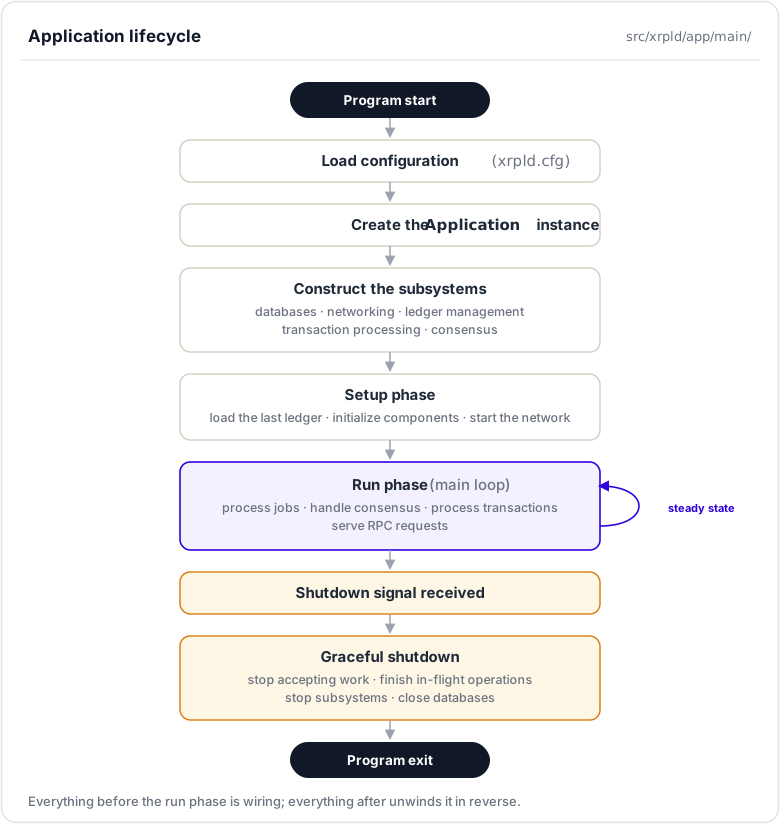
Subsystem Coordination
In brief: how components find and call each other through the Application.
The Service Locator Pattern
The Application acts as a service locator, allowing any component to access any other component through the app reference:
class SomeComponent
{
public:
    SomeComponent(Application& app)
        : app_(app)
    {
        // Components store app reference
    }

    void doWork()
    {
        // Access other components through app
        auto& ledgerMaster = app_.getLedgerMaster();
        auto& overlay = app_.getOverlay();
        auto& jobs = app_.getJobQueue();

        // Use the components...
    }

private:
    Application& app_;
};
Major Subsystems
LedgerMaster
Purpose: Manages the chain of validated ledgers and coordinates ledger progression.
Key Responsibilities:
- Track current validated ledger
- Build candidate ledgers for consensus
- Synchronize ledger history
- Maintain ledger cache
- Coordinate with consensus engine
Access: app.getLedgerMaster()
Important Methods (from src/xrpld/app/ledger/LedgerMaster.h):
// The finalized ledger is the last closed/accepted ledger
std::shared_ptr<Ledger const>
getClosedLedger()
{
    return closedLedger_.get();
}

// The validated ledger is the last fully validated ledger.
std::shared_ptr<Ledger const>
getValidatedLedger();

void
tryAdvance();
tryAdvance() is the entry point for advancing the validated ledger (it schedules a JtAdvance job). Fetching missing ledgers is not LedgerMaster's job: that belongs to InboundLedgers, reached via app.getInboundLedgers().
NetworkOPs
Purpose: Coordinates network operations and transaction processing.
Key Responsibilities:
- Process submitted transactions
- Manage transaction queue
- Coordinate consensus participation
- Track network state
- Publish ledger close events
Access: app.getOPs()
Important Methods (from include/xrpl/server/NetworkOPs.h):
// must complete immediately
virtual void
submitTransaction(std::shared_ptr<STTx const> const&) = 0;

/**
 * Process transactions as they arrive from the network or which are
 * submitted by clients. Process local transactions synchronously
 *
 * @param transaction Transaction object
 * @param bUnlimited Whether a privileged client connection submitted it.
 * @param bLocal Client submission.
 * @param failType fail_hard setting from transaction submission.
 */
virtual void
processTransaction(
    std::shared_ptr<Transaction>& transaction,
    bool bUnlimited,
    bool bLocal,
    FailHard failType) = 0;

[[nodiscard]] virtual OperatingMode
getOperatingMode() const = 0;
Overlay
Purpose: Manages peer-to-peer networking layer.
Key Responsibilities:
- Peer discovery and connection
- Message routing
- Network topology maintenance
- Bandwidth management
Access: app.getOverlay()
Important Methods (from src/xrpld/overlay/Overlay.h):
/** Establish a peer connection to the specified endpoint.
    The call returns immediately, the connection attempt is
    performed asynchronously.
*/
virtual void
connect(beast::IP::Endpoint const& address) = 0;

/** Returns the number of active peers.
    Active peers are only those peers that have completed the
    handshake and are using the peer protocol.
*/
[[nodiscard]] virtual std::size_t
size() const = 0;

/** Broadcast a proposal. */
virtual void
broadcast(protocol::TMProposeSet& m) = 0;

/** Broadcast a validation. */
virtual void
broadcast(protocol::TMValidation& m) = 0;
Note there is no generic broadcast(Message): only proposals and validations are broadcast to every peer; other traffic goes through relay/send paths.
TxQ (Transaction Queue)
Purpose: Manages transaction queuing when network is busy.
Key Responsibilities:
- Queue transactions during high load
- Fee-based prioritization
- Account-based queuing limits
- Transaction expiration
Access: app.getTxQ()
Important Methods (from src/xrpld/app/misc/TxQ.h):
/**
    Add a new transaction to the open ledger, hold it in the queue,
    or reject it.

    @return A pair with the `TER` and a `bool` indicating
            whether or not the transaction was applied to
            the open ledger. If the transaction is queued,
            will return `{ terQUEUED, false }`.
*/
ApplyResult
apply(
    Application& app,
    OpenView& view,
    std::shared_ptr<STTx const> const& tx,
    ApplyFlags flags,
    beast::Journal j);
NodeStore
Purpose: Persistent storage for ledger data.
Key Responsibilities:
- Store ledger state nodes
- Provide efficient retrieval
- Cache frequently accessed data
- Support different backend databases (RocksDB, NuDB)
Access: app.getNodeStore()
Important Methods (from include/xrpl/nodestore/Database.h):
/** Store the object.

    The caller's Blob parameter is overwritten.

    @param type The type of object.
    @param data The payload of the object. The caller's
                variable is overwritten.
    @param hash The 256-bit hash of the payload data.
    @param ledgerSeq The sequence of the ledger the object belongs to.

    @return `true` if the object was stored?
*/
virtual void
store(NodeObjectType type, Blob&& data, uint256 const& hash, std::uint32_t ledgerSeq) = 0;

/** Fetch a node object.
    If the object is known to be not in the database, isn't found in the
    database during the fetch, or failed to load correctly during the fetch,
    `nullptr` is returned.

    @note This can be called concurrently.
    @param hash The key of the object to retrieve.
    @param ledgerSeq The sequence of the ledger where the object is stored.
    @param fetchType the type of fetch, synchronous or asynchronous.
    @return The object, or nullptr if it couldn't be retrieved.
*/
std::shared_ptr<NodeObject>
fetchNodeObject(
    uint256 const& hash,
    std::uint32_t ledgerSeq = 0,
    FetchType fetchType = FetchType::Synchronous,
    bool duplicate = false);
RelationalDatabase
Purpose: SQL database for indexed data and historical queries.
Key Responsibilities:
- Store transaction metadata
- Maintain account transaction history
- Support RPC queries (account_tx, tx)
- Ledger header storage
Access: app.getRelationalDatabase()
Database Types:
- SQLite (embedded) — the only relational backend.
ApplicationImpholds astd::optional<SQLiteDatabase>directly; the PostgreSQL backend was removed together with reporting mode.
Validations
Purpose: Manages validator signatures on ledger closes.
Key Responsibilities:
- Collect validations from validators
- Track which validations are current, trusted, and full
- Count trusted validations for a ledger (the raw input to validation decisions)
- Publish validation stream
Access: app.getValidations() — returns RCLValidations&, an alias for Validations<RCLValidationsAdaptor> (the generic engine in src/xrpld/consensus/Validations.h with an RCL-specific adaptor).
Important Methods (from src/xrpld/consensus/Validations.h, trimmed to declarations):
/** Add a new validation

    Attempt to add a new validation.

    @param nodeID The identity of the node issuing this validation
    @param val The validation to store
    @return The outcome
*/
ValStatus
add(NodeID const& nodeID, Validation const& val);

/** Get the currently trusted full validations

    @return Vector of validations from currently trusted validators
*/
std::vector<WrappedValidationType>
currentTrusted();

/** Count the number of trusted full validations for the given ledger

    @param ledgerID The identifier of ledger of interest
    @return The number of trusted validations
*/
std::size_t
numTrustedForLedger(ID const& ledgerID);

/**  Get trusted full validations for a specific ledger

     @param ledgerID The identifier of ledger of interest
     @param seq The sequence number of ledger of interest
     @return Trusted validations associated with ledger
*/
std::vector<WrappedValidationType>
getTrustedForLedger(ID const& ledgerID, Seq const& seq);
Incoming validations from the network enter through the free function handleNewValidation (src/xrpld/app/consensus/RCLValidations.h):
void
handleNewValidation(
    Application& app,
    std::shared_ptr<STValidation> const& val,
    std::string const& source,
    BypassAccept const bypassAccept = BypassAccept::No,
    std::optional<beast::Journal> j = std::nullopt);
Two related responsibilities live elsewhere: validator key rotations (manifests) are tracked by ManifestCache, reached via app.getValidatorManifests() and app.getPublisherManifests(), and the quorum policy (how many trusted validators are needed) lives in ValidatorList, reached via app.getValidators().
Job Queue System
In brief: how background work is queued, prioritized, and run across worker threads.
Purpose and Design
The job queue is Rippled's work scheduling system. Instead of each subsystem creating its own threads, work is submitted as jobs to a centralized queue processed by a thread pool. This provides:
- Centralized thread management: Easier to control thread count and CPU usage
- Priority-based scheduling: Critical jobs processed before low-priority ones
- Visibility: Easy to monitor what work is queued
- Deadlock prevention: Structured concurrency patterns
Job Types
Jobs are categorized by type, which determines priority. From include/xrpl/core/Job.h (trimmed) — read the comment carefully: earlier entries have LOWER priority, so the highest-priority job types sit at the bottom of the enum:
// NOLINTNEXTLINE(cppcoreguidelines-use-enum-class)
enum JobType {
    // Special type indicating an invalid job - will go away soon.
    JtInvalid = -1,

    // Job types - the position in this enum indicates the job priority with
    // earlier jobs having lower priority than later jobs. If you wish to
    // insert a job at a specific priority, simply add it at the right location.

    JtPack,             // Make a fetch pack for a peer
    JtPuboldledger,     // An old ledger has been accepted
    JtClient,           // A placeholder for the priority of all jtCLIENT jobs
    JtClientSubscribe,  // A websocket subscription by a client
    // ... (more client job types) ...
    JtRpc,              // A websocket command from the client
    JtSweep,            // Sweep for stale structures
    JtValidationUt,     // A validation from an untrusted source
    JtManifest,         // A validator's manifest
    JtUpdatePf,         // Update pathfinding requests
    JtTransactionL,     // A local transaction
    // ...
    JtProposalUt,       // A proposal from an untrusted source
    // ...
    JtTransaction,      // A transaction received from the network
    // ...
    JtBatch,            // Apply batched transactions
    JtLedgerData,       // Received data for a ledger we're acquiring
    JtAdvance,          // Advance validated/acquired ledgers
    JtPubledger,        // Publish a fully-accepted ledger
    JtTxnData,          // Fetch a proposed set
    JtWal,              // Write-ahead logging
    JtValidationT,      // A validation from a trusted source
    JtWrite,            // Write out hashed objects
    JtAccept,           // Accept a consensus ledger
    JtProposalT,        // A proposal from a trusted source
    JtNetopCluster,     // NetworkOPs cluster peer report
    JtNetopTimer,       // NetworkOPs net timer processing
    JtAdmin,            // An administrative operation

    // Special job types which are not dispatched by the job pool
    JtPeer,
    JtDisk,
    // ...
};
So the consensus-critical types — JtValidationT (trusted validations), JtAccept (accept a consensus ledger), and JtProposalT (trusted proposals) — are near the bottom, i.e. among the highest priorities, with JtAdmin the highest-priority dispatched type. JtPack and JtPuboldledger at the top are the two lowest. JtPeer and JtDisk are never queued at all; they exist only for load measurement.
Submitting Jobs
Components submit work to the job queue via addJob. The handler is a lambda taking no arguments — the addJob template (include/xrpl/core/JobQueue.h) enforces this at compile time:
template <
    typename JobHandler,
    typename = std::enable_if_t<std::is_same_v<decltype(std::declval<JobHandler&&>()()), void>>>
bool
addJob(JobType type, std::string const& name, JobHandler&& jobHandler)
A real call, from NetworkOPsImp::submitTransaction (src/xrpld/app/misc/NetworkOPs.cpp):
jobQueue_.addJob(JtTransaction, "SubmitTxn", [this, tx]() {
    auto t = tx;
    processTransaction(t, false, false, FailHard::No);
});
(Outside NetworkOPs, get the queue with app.getJobQueue() first.)
Job Priority and Scheduling
Priority Levels (from the real enum order — higher in this list = processed first):
- Highest:
JtAdmin(administrative operations), then the NetworkOPs timer/cluster jobs - Consensus-critical:
JtProposalT,JtAccept,JtValidationT(trusted proposals, ledger accept, trusted validations) - Ledger progression:
JtPubledger,JtAdvance,JtLedgerData,JtTransaction - Lower: untrusted validations/proposals, pathfinding updates, sweeps
- Lowest dispatched: client and RPC jobs (
JtClient*,JtRpc),JtPuboldledger,JtPack
Scheduling Algorithm:
- Worker threads pick the highest-priority waiting job
- Each job type also has a per-type queue limit (
include/xrpl/core/JobTypes.h) — this, not priority alone, is what protects the node under load - Each type carries target average/peak latencies used for load measurement
A slice of the real table (JobTypes.h):
//                                                           avg     peak
//  JobType               name                    limit    latency  latency
add(JtPack,              "makeFetchPack",               1,     0ms,     0ms);
add(JtPuboldledger,      "publishAcqLedger",            2, 10000ms, 15000ms);
add(JtValidationUt,     "untrustedValidation",  maxLimit,  2000ms,  5000ms);
add(JtLedgerData,       "ledgerData",                  3,     0ms,     0ms);
add(JtUpdatePf,         "updatePaths",                 1,     0ms,     0ms);
add(JtTransaction,       "transaction",          maxLimit,   250ms,  1000ms);
add(JtAdvance,           "advanceLedger",        maxLimit,     0ms,     0ms);
add(JtPubledger,         "publishNewLedger",     maxLimit,  3000ms,  4500ms);
add(JtValidationT,      "trustedValidation",    maxLimit,   500ms,  1500ms);
add(JtAccept,            "acceptLedger",         maxLimit,     0ms,     0ms);
add(JtProposalT,        "trustedProposal",      maxLimit,   100ms,   500ms);
add(JtAdmin,             "administration",       maxLimit,     0ms,     0ms);
The name column is what you'll see in the logs (e.g. transaction, advanceLedger, publishNewLedger), not the enum constant.
Job Queue Configuration
In xrpld.cfg:
[node_size]
# Influences the worker thread count (and many cache sizes).
# The default is tiny.
medium

[workers]
# Optional: explicitly set the job queue thread count.
The real thread-count logic is the lambda that constructs the JobQueue in ApplicationImp's member-initializer list (src/xrpld/app/main/Application.cpp):
[](std::unique_ptr<Config> const& config) {
    if (config->standalone() && !config->forceMultiThread)
        return 1;

    if (config->workers)
        return config->workers;

    auto count = static_cast<int>(std::thread::hardware_concurrency());

    // Be more aggressive about the number of threads to use
    // for the job queue if the server is configured as
    // "large" or "huge" if there are enough cores.
    if (config->nodeSize >= 4 && count >= 16)
    {
        count = 6 + std::min(count, 8);
    }
    else if (config->nodeSize >= 3 && count >= 8)
    {
        count = 4 + std::min(count, 6);
    }
    else
    {
        count = 2 + std::min(count, 4);
    }

    return count;
}(config_)
So: 1 thread in standalone mode, the [workers] value if set, otherwise a core-count-derived number that only grows for large/huge node sizes on machines with enough cores.
Configuration Management
In brief: how the node reads its config and exposes it to every subsystem.
Configuration File Structure
The xrpld.cfg file controls all aspects of server behavior. The Application loads and provides access to this configuration.
Example Configuration
[server]
port_rpc_admin_local
port_peer
port_ws_admin_local

[port_rpc_admin_local]
port = 5005
ip = 127.0.0.1
admin = 127.0.0.1
protocol = http

[port_peer]
port = 51235
ip = 0.0.0.0
protocol = peer

[port_ws_admin_local]
port = 6006
ip = 127.0.0.1
admin = 127.0.0.1
protocol = ws

[node_size]
medium

[node_db]
type=RocksDB
path=/var/lib/rippled/db/rocksdb
open_files=512
cache_mb=256
filter_bits=12
compression=1

[database_path]
/var/lib/rippled/db

[debug_logfile]
/var/log/rippled/debug.log

[sntp_servers]
time.windows.com
time.apple.com
time.nist.gov
pool.ntp.org

[ips_fixed]
r.ripple.com 51235

[validators_file]
validators.txt

[rpc_startup]
{ "command": "log_level", "severity": "warning" }

[features]
# Amendments to treat as enabled on this server. This is NOT voting:
# to vote, list amendments under [amendments] (up-vote) or
# [veto_amendments] (down-vote).
# AmendmentName
Be careful with [features]: it force-enables the listed amendments locally regardless of the network's amendment state, which can put a server out of sync with the network. Amendment voting is configured with [amendments] and [veto_amendments], which ApplicationImp::setup() feeds into the AmendmentTable.
Accessing Configuration
Components access configuration through the Application:
void SomeComponent::configure()
{
    // Get config reference
    Config const& config = app_.config();

    // Access specific sections
    auto const& nodeDB = config.section("node_db");
    auto const type = get<std::string>(nodeDB, "type");
    auto const path = get<std::string>(nodeDB, "path");

    // Access node size
    auto nodeSize = config.nodeSize;

    // Standalone mode?
    bool const standalone = config.standalone();
}
Runtime Configuration
Some settings can be adjusted at runtime via RPC:
# Change log verbosity
xrpld log_level partition severity

# Connect to peer
xrpld connect ip:port

# Get server info
xrpld server_info
Component Interaction Patterns
Pattern 1: Direct Method Calls
Most common pattern, components call each other's methods. Here is the real NetworkOPsImp::submitTransaction (src/xrpld/app/misc/NetworkOPs.cpp, trimmed) — notice it makes direct calls into other subsystems (HashRouter, LedgerMaster) to validate, but deliberately does not apply or broadcast inline; it hands the actual processing to the job queue:
void
NetworkOPsImp::submitTransaction(std::shared_ptr<STTx const> const& iTrans)
{
    // ...

    // this is an asynchronous interface
    auto const trans = sterilize(*iTrans);

    auto const txid = trans->getTransactionID();
    auto const flags = registry_.get().getHashRouter().getFlags(txid);

    // ...

    auto const [validity, reason] = checkValidity(
        registry_.get().getHashRouter(), *trans, ledgerMaster_.getValidatedRules());

    // ...

    auto tx = std::make_shared<Transaction>(trans, reason, registry_.get().getApp());

    jobQueue_.addJob(JtTransaction, "SubmitTxn", [this, tx]() {
        auto t = tx;
        processTransaction(t, false, false, FailHard::No);
    });
}
Pattern 2: Job Queue for Asynchronous Work
For work that should not block the caller. The real LedgerMaster::tryAdvance (src/xrpld/app/ledger/detail/LedgerMaster.cpp, trimmed):
void
LedgerMaster::tryAdvance()
{
    std::scoped_lock const ml(mutex_);

    // Can't advance without at least one fully-valid ledger
    advanceWork_ = true;
    if (!advanceThread_ && !validLedger_.empty())
    {
        advanceThread_ = true;
        app_.getJobQueue().addJob(JtAdvance, "AdvanceLedger", [this]() {
            // ... acquire and publish ledgers ...
        });
    }
}
Pattern 3: Event Publication
Ledger and transaction events are published to subscribers through NetworkOPs, which implements InfoSub::Source (include/xrpl/server/InfoSub.h). Subscribers (WebSocket clients, internal consumers) register through the sub* methods; the publisher side pushes events with the pub* methods:
// Subscriber side (InfoSub::Source)
virtual bool
subLedger(ref ispListener, json::Value& jvResult) = 0;
virtual bool
unsubLedger(std::uint64_t uListener) = 0;

// Publisher side (NetworkOPs)
virtual void
pubLedger(std::shared_ptr<ReadView const> const& lpAccepted) = 0;
virtual void
pubProposedTransaction(
    std::shared_ptr<ReadView const> const& ledger,
    std::shared_ptr<STTx const> const& transaction,
    TER result) = 0;
virtual void
pubValidation(std::shared_ptr<STValidation> const& val) = 0;
Pattern 4: Callback Registration
Components register callbacks for specific events, usually at construction time. Two real examples from ApplicationImp's member-initializer list (src/xrpld/app/main/Application.cpp):
// PerfLog must be started before any other threads are launched.
, perfLog_(
      perf::makePerfLog(
          perf::setupPerfLog(config_->section("perf"), config_->configDir),
          *this,
          logs_->journal("PerfLog"),
          [this] { signalStop("PerfLog"); }))
, inboundTransactions_(makeInboundTransactions(
      *this,
      collectorManager_->collector(),
      [this](std::shared_ptr<SHAMap> const& set, bool fromAcquire) {
          gotTXSet(set, fromAcquire);
      }))
Codebase Deep Dive
Key Files and Directories
Application Core:
src/xrpld/app/main/Application.h- Application interfaceinclude/xrpl/core/ServiceRegistry.h- Subsystem accessors (Application inherits this)src/xrpld/app/main/Application.cpp- Implementation (theApplicationImpclass lives here)src/xrpld/app/main/Main.cpp- Entry point, creates Application
Job Queue:
include/xrpl/core/JobQueue.h- Job queue interfacesrc/libxrpl/core/detail/JobQueue.cpp- Implementationinclude/xrpl/core/Job.h- Job definition
Configuration:
src/xrpld/core/Config.h- Config classsrc/xrpld/core/detail/Config.cpp- Section name definitions
Subsystem Implementations:
src/xrpld/app/ledger/LedgerMaster.hinclude/xrpl/server/NetworkOPs.hsrc/xrpld/overlay/Overlay.hsrc/xrpld/app/misc/TxQ.h
Code Navigation Tips
Finding Application Creation
Start in Main.cpp (trimmed):
auto app =
    makeApplication(std::move(config), std::move(logs), std::make_unique<TimeKeeper>());

if (!app->setup(vm))
    return -1;

// ...

// Start the server
app->start(true /*start timers*/);

// Block until we get a stop RPC.
app->run();

return 0;
Tracing Component Access
Follow how components access each other:
// In any component
void MyComponent::work()
{
    // Access through app_
    auto& ledgerMaster = app_.getLedgerMaster();  // → ApplicationImp::getLedgerMaster()
                                                   // → return *ledgerMaster_;
}
Understanding Job Submission
Find job submissions:
# Search for addJob calls
grep -r "addJob" src/xrpld/app/
Example (from src/xrpld/app/ledger/detail/LedgerMaster.cpp):
app_.getJobQueue().addJob(JtAdvance, "AdvanceLedger", [this]() {
    // ...
});
# Submit a payment
xrpld submit '{
  "TransactionType": "Payment",
  "Account": "...",
  "Destination": "...",
  "Amount": "1000000"
}'
Watch the logs for:
JtTransactionjobs being queued (they appear in the logs under the nametransaction, fromJobTypes.h)- Job processing time
- Queue depth changes
Step 5: Manually close a ledger
xrpld ledger_accept
Observe jobs related to ledger close:
JtAdvance(logged asadvanceLedger) - Advance validated/acquired ledgersJtPubledger(logged aspublishNewLedger) - Publish a fully-accepted ledgerJtUpdatePf(logged asupdatePaths) - Update pathfinding requests
Part 3: Add Custom Logging
Step 1: Modify Application.cpp
The subsystems are constructed in ApplicationImp's member-initializer list, not in the constructor body, so you can't wrap each construction with log lines. Instead, add logging at the start of the lifecycle methods (the journal member is journal_):
bool
ApplicationImp::setup(boost::program_options::variables_map const& cmdline)
{
    JLOG(journal_.info()) << "Entering setup";
    // ... existing code ...
Add a similar line at the top of start(bool withTimers) and run().
Step 2: Recompile
cd rippled/build
cmake --build . --target xrpld
Step 3: Run and observe
./xrpld --conf=xrpld.cfg --standalone
You should see your custom log messages showing the order in which the lifecycle phases run, interleaved with the existing startup logs.
Analysis Questions
Answer these based on your exploration:
- What's the first subsystem created?
- Why does it need to be first?
- How does the job queue decide which job to process next?
- What factors influence priority?
- What happens if a job throws an exception?
- Find the exception handling code
- How many jobs are queued during a typical ledger close?
- Count from your logs
- What's the relationship between Application and ApplicationImp?
- Why use an interface?
- How would you add a new subsystem?
- What's the process?
- Where would you add it?
Additional Resources
Official Documentation
- XRP Ledger Dev Portal: xrpl.org/docs
- Rippled Setup: xrpl.org/install-rippled
- Configuration Reference: xrpl.org/rippled-server-configuration
Codebase References
src/xrpld/app/main- Application layer implementationinclude/xrpl/core/JobQueue.h- Job queue systemsrc/xrpld/core/Config.h- Configuration managementsrc/xrpld/app/main/Main.cpp- Program entry point
Related Topics
- Transactors - How transactions are processed
- Consensus Engine - How consensus integrates with Application
- Codebase Navigation - Finding your way around the code
Summary
This module explained how the Application class holds rippled together. It is the central orchestrator that constructs and owns every subsystem, from LedgerMaster and NetworkOPs to the Overlay and NodeStore, and hands them out on request (a service-locator pattern). You saw the node's startup, start, run, and shutdown sequence, how components reach one another through the Application, and how background work is scheduled on the job queue.
To remember:
Applicationis the service locator: components ask it for subsystems instead of constructing their own (the accessors live onServiceRegistry, whichApplicationinherits)- Interface and
ApplicationImplive insrc/xrpld/app/main - Major subsystems: LedgerMaster, NetworkOPs, Overlay, NodeStore, JobQueue
- Reach them through accessors:
app.getLedgerMaster(),app.getOverlay(),app.getNodeStore() - Background work goes through the JobQueue (
include/xrpl/core/JobQueue.h):app.getJobQueue().addJob(...)with a no-argument lambda, priority-scheduled (laterJobTypeenum entries = higher priority) - The lifecycle is
setup(vm)→start(true)→run();signalStop()only sets a flag, and the teardown runs at the end ofrun()in an explicit, delicate order — not simply the reverse of construction - All behaviour is configured from
xrpld.cfg, parsed intoConfig(src/xrpld/core);[features]enables amendments locally, while voting uses[amendments]/[veto_amendments] - Watch out: touching a subsystem before the Application finishes construction is the classic startup crash; respect the init order
Next up. You know who owns every subsystem; now you need to find them in over half a million lines of C++. Next: navigating the rippled codebase without getting lost.
Resources
Assignments
0 of 2 complete